@visx/point review
@visx/point 4.0.0 is a mutable two-coordinate value from Airbnb's visx monorepo. `Point` exposes writable `x` and `y` numbers, copies them into an object with `value()` or an array with `toArray()`, and works with `sumPoints` and `subtractPoints`, which return new points. The package contains no React component, DOM code, scale, path, or chart. Visx 4 moved the wider suite to React 18 or 19 and fixed ESM packaging, but this package itself declares no React peer and remains a small coordinate helper.
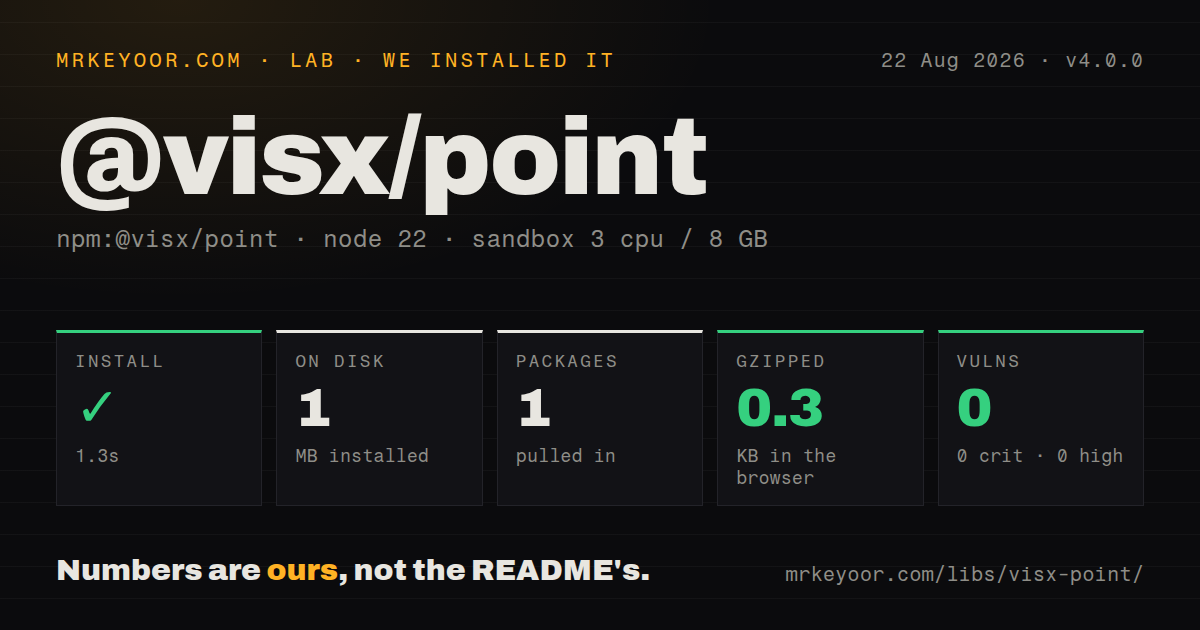
@visx/point 4.0.0 added 0.3 KB gzipped in our browser build and installed with no dependencies or audit findings, yet its API is only 2 mutable numbers plus add and subtract. Keep it when visx already supplies the data shape; otherwise a local type is usually clearer.
We installed it
| Install | ✓ · 1.3s | 1 package on disk · 1 MB |
| Import | ✓ | ESM import works · require() works · CommonJS package with exports map |
| Browser | 0.3 KB | gzipped (0.4 KB minified), bundled with esbuild |
| Types | ✓ | TypeScript types bundled |
| Known vulns | 0 | 0 critical · 0 high · 0 moderate · 0 low (npm audit) |
Answers from our run
Does @visx/point install cleanly?
Yes. In a fresh container with an empty cache, npm install @visx/point finished in 1 seconds, leaving 1 package and 1 MB on disk. npm audit reported no known vulnerabilities.
How much does @visx/point add to a browser bundle?
0.3 KB gzipped (0.4 KB minified) when the whole package is bundled for the browser with esbuild. Importing only part of it is usually smaller.
Does @visx/point work with both ESM and CommonJS?
Yes. Both import '@visx/point' and require('@visx/point') worked in Node 22 in our run. The package is published as CommonJS with an exports map.
Does @visx/point include TypeScript types?
Yes, type declarations ship inside the package, so no @types install is needed.
@visx/point or d3-array: which should you use?
d3-array: Choose it for numeric array summaries, grouping, binning, ticks, and ordering rather than a point class. @visx/point 4.0.0 added 0.3 KB gzipped in our browser build and installed with no dependencies or audit findings, yet its API is only 2 mutable numbers plus add and subtract.
When should you not use @visx/point?
Your own functions only need {x, y}. A local TypeScript interface and two arithmetic expressions are easier to own than this dependency.
Use it if
- Other visx code already exchanges `Point` instances and one shared coordinate type avoids adapters.
- You need a mutable x/y object with fresh object and array snapshots.
- Addition and subtraction are the only vector-like operations required.
- A utility must support CommonJS, ESM, and TypeScript consumers without runtime dependencies.
- Your own functions only need `{x, y}`. A local TypeScript interface and two arithmetic expressions are easier to own than this dependency.
- You need distance, length, dot products, normalization, rotation, scaling, interpolation, matrices, or bounds. None exists in @visx/point.
- Coordinates must be immutable. `point.x` and `point.y` are public writable properties.
- Input comes from a network or form. Runtime JavaScript accepts NaN, Infinity, strings, and other unchecked values despite numeric TypeScript declarations.
- You expect `new Point()` to create the origin. The constructor destructures its argument before x and y defaults apply, so plain JavaScript throws unless an object is passed.
Setup reality
We installed @visx/point 4.0.0 in a fresh, unprivileged Node 22 sandbox in 1.3 seconds. npm left one package and 1 MB on disk. The package has 0 direct dependencies, 0 peer dependencies, and 92 KB unpacked; npm audit found 0 vulnerabilities at every severity. Our measurement setup used 3 CPUs, 8 GB of RAM, and no cache. CommonJS require() and ESM import both worked, and TypeScript declarations are included.
There are no credentials, styles, native builds, React providers, or config files. Version 4.0.0 publishes CommonJS and ESM builds through an exports map. Import Point, sumPoints, and subtractPoints from the package root. Our esbuild browser check measured 0.4 KB minified and 0.3 KB gzipped. The wider visx 4 release requires React 18 or 19, but this package's own manifest has no React peer dependency.
Construction has one sharp edge: new Point({}) produces x=0 and y=0, while new Point() throws because the options object itself has no default. TypeScript catches the missing argument, plain JavaScript does not. The class accepts values without finite-number validation and attaches no unit or coordinate-system direction. Validate external values before creating a point.
The 2 fields are mutable. value() allocates a fresh {x, y} object and toArray() allocates a fresh two-item array, so editing either copy does not change the point. sumPoints and subtractPoints allocate new Point instances and leave their inputs untouched. If those operations do not cover the math you need, a local coordinate type or a full vector package is clearer than extending this class ad hoc.
Patterns
Create a point create-point
import { Point } from '@visx/point';

const point = new Point({x: 12, y: 8});
Pass an object even for the origin; `new Point()` throws in plain JavaScript.
Create the zero point create-origin
import { Point } from '@visx/point';

const origin = new Point({});
Missing x and y fields default to 0 after the constructor receives an object.
Copy coordinates into an object read-object
const point = new Point({x: 12, y: 8});
const coordinates = point.value();
`value()` allocates a new object. Mutating `coordinates` does not update the Point.
Copy coordinates into an array read-array
const [x, y] = new Point({x: 12, y: 8}).toArray();`toArray()` returns a fresh two-item array in x, y order.
Add two coordinates add-points
import { Point, sumPoints } from '@visx/point';

const total = sumPoints(
  new Point({x: 2, y: 3}),
  new Point({x: 4, y: 5}),
);
sumPoints returns a new Point with x=6 and y=8; neither input is modified.
Find a coordinate delta subtract-points
import { Point, subtractPoints } from '@visx/point';

const delta = subtractPoints(
  new Point({x: 10, y: 7}),
  new Point({x: 4, y: 2}),
);
subtractPoints computes the first point minus the second and returns a new Point.
Move a mutable point mutate-point
const cursor = new Point({x: 0, y: 0});
cursor.x += 5;
cursor.y += 2;
x and y are public writable fields. Copy the point first when callers expect immutable state.
Reject invalid external coordinates validate-input
function pointFromInput(input) {
  const x = Number(input.x);
  const y = Number(input.y);
  if (!Number.isFinite(x) || !Number.isFinite(y)) {
    throw new TypeError('finite x and y required');
  }
  return new Point({x, y});
}
The Point constructor performs no runtime number or finiteness checks.
Use coordinates in SVG render-svg-point
function Marker({point}) {
  return <circle cx={point.x} cy={point.y} r={4} />;
}
@visx/point has no React or SVG component; it only supplies the x and y values used here.
Adapt a plain coordinate convert-plain-object
const source = {x: 3, y: 9};
const point = new Point({x: source.x, y: source.y});
Constructing a Point creates a separate mutable object; later edits to `source` do not propagate.
Alternatives
| Package | Registry | Pick it when |
|---|---|---|
| d3-array | npm | Choose it for numeric array summaries, grouping, binning, ticks, and ordering rather than a point class. |
| victor | npm | Choose it for a mutable 2D vector API with length, angle, normalization, rotation, distance, and interpolation. |
| gl-matrix | npm | Choose it for allocation-conscious vec2, vec3, matrices, quaternions, and graphics transforms. |
More utils guides
lru-cache · type-fest · ajv · zod · p-limit · find-up · the whole shelf →
How this guide is made: grounded in the library's documentation, release notes, changelog, and issue history, on a fixed rubric — not a hands-on install of every release. The 50 most-downloaded entries are additionally install-verified in clean containers. Corrections: contact the desk.