universal-github-app-jwt review
universal-github-app-jwt 2.2.2 signs the app-level JSON Web Token used by GitHub Apps. One async call accepts an App ID or Client ID plus an RSA private key, then returns the token, the identifier, and an expiration timestamp. WebCrypto keeps the same signing path available in Node, Deno, and modern browser-style runtimes. The function does not exchange the JWT for an installation access token or manage refresh. Version 2.2.2 only corrects the README command for converting an OpenSSH key to PKCS#8; it does not change runtime signing behavior.
universal-github-app-jwt 2.2.2 installed as 1 package and 1 MB in 0.5 seconds in our sandbox, with a 0.9 KB gzipped browser build and no audit findings. Use it for the isolated GitHub App signing step; use @octokit/auth-app when the application actually needs installation tokens and refresh.
We installed it
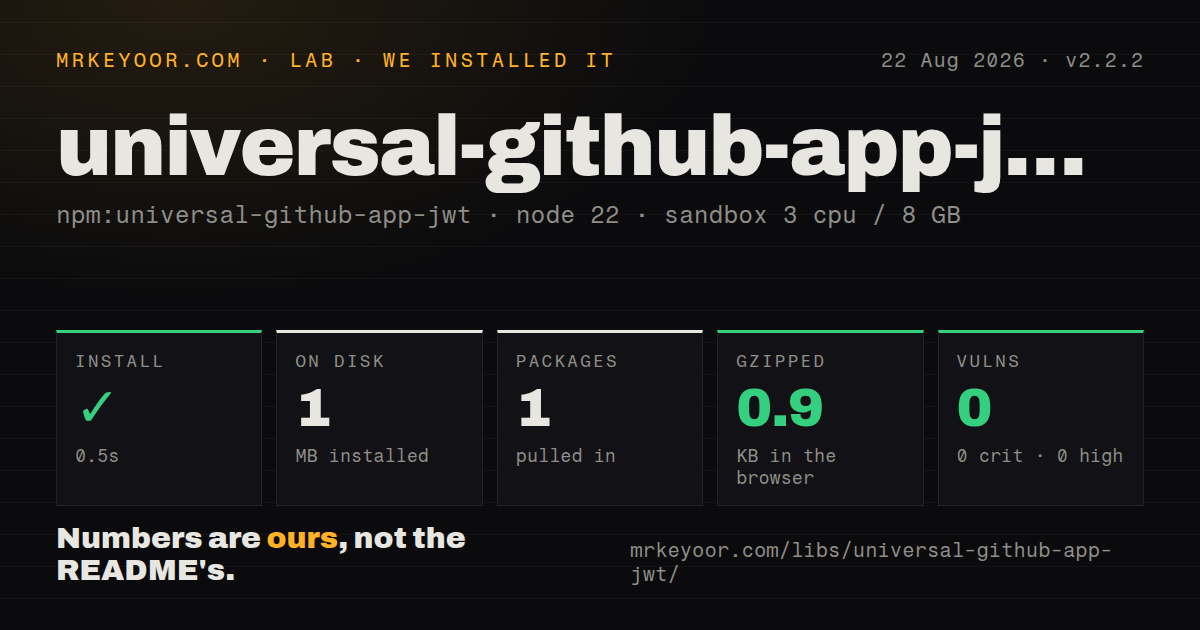
| Install | ✓ · 0.5s | 1 package on disk · 1 MB |
| Import | ✓ | ESM import works · require() works · ESM package with exports map |
| Browser | 0.9 KB | gzipped (1.6 KB minified), bundled with esbuild |
| Types | ✓ | TypeScript types bundled |
| Known vulns | 0 | 0 critical · 0 high · 0 moderate · 0 low (npm audit) |
Answers from our run
Does universal-github-app-jwt install cleanly?
Yes. In a fresh container with an empty cache, npm install universal-github-app-jwt finished in 0.5s, leaving 1 package and 1 MB on disk. npm audit reported no known vulnerabilities.
How much does universal-github-app-jwt add to a browser bundle?
0.9 KB gzipped (1.6 KB minified) when the whole package is bundled for the browser with esbuild. Importing only part of it is usually smaller.
Does universal-github-app-jwt work with both ESM and CommonJS?
Yes. Both import 'universal-github-app-jwt' and require('universal-github-app-jwt') worked in Node 22 in our run. The package is published as ESM with an exports map.
Does universal-github-app-jwt include TypeScript types?
Yes, type declarations ship inside the package, so no @types install is needed.
universal-github-app-jwt or @octokit/auth-app: which should you use?
@octokit/auth-app: Use it for installation and user tokens, caching, refresh, and the complete GitHub App auth strategy. universal-github-app-jwt 2.2.2 installed as 1 package and 1 MB in 0.5 seconds in our sandbox, with a 0.9 KB gzipped browser build and no audit findings.
When should you not use universal-github-app-jwt?
You need cached and refreshed installation access tokens; @octokit/auth-app implements the full GitHub App authentication flow
Use it if
- You only need a GitHub App JWT for app-level endpoints or a hand-written installation-token exchange
- The signer must run in Deno or a WebCrypto-based edge runtime without a general Node JWT stack
- A zero-dependency package and a 0.9 KB gzipped browser bundle matter to the deployment
- Tests need a fixed signing clock through the optional now value
- You need cached and refreshed installation access tokens; @octokit/auth-app implements the full GitHub App authentication flow
- You need arbitrary claims, algorithms, token verification, or non-GitHub JWTs; the function has one fixed GitHub App payload
- A browser would receive the production app private key; client-side signing exposes that key to every user and should not ship
- Your non-Node runtime only has GitHub's PKCS#1 key and cannot convert it before deployment; WebCrypto requires PKCS#8
- You want a broad authentication toolkit with several maintainers; this repository has 34 stars and a deliberately tiny surface
Setup reality
Our Node 22 sandbox installed universal-github-app-jwt 2.2.2 in 0.5 seconds. It left 1 package and 1 MB on disk, declared no direct or peer dependencies, bundled TypeScript declarations, and returned no findings from npm audit. Both require() and ESM import worked in our checks. A broad esbuild browser import measured 1.6 KB minified and 0.9 KB gzipped. Small code does not make browser deployment safe if a production private key goes with it.
GitHub downloads app keys as PKCS#1 PEM, whose first line says BEGIN RSA PRIVATE KEY. WebCrypto accepts PKCS#8, marked BEGIN PRIVATE KEY. Node can convert with createPrivateKey().export(), while edge and Deno deployments should receive a PKCS#8 secret prepared beforehand. A password manager may export an SSH key as BEGIN OPENSSH PRIVATE KEY; version 2.2.2 corrects the ssh-keygen flags documented for that conversion.
Pass the App ID or Client ID as id and preserve every PEM line break in privateKey. Literal backslash-n sequences from an environment variable are normalized by the package. Never log the key or generated token. The returned expiration is Unix time in seconds, so multiply by 1000 before passing it to Date. The optional now value also uses Unix seconds and exists for deterministic tests or clock-skew adjustment.
The result authenticates as the app. Repository and installation work usually needs a second POST to GitHub's installation access-token endpoint, followed by caching and refresh logic. That missing lifecycle is the line between this helper and @octokit/auth-app. Handle signing errors separately from GitHub HTTP 401 responses: a local key-format failure happens before the request, while a 401 after signing usually points to a mismatched app identifier, key, or endpoint authorization.
Patterns
Create a GitHub App bearer token sign-app-jwt
import githubAppJwt from 'universal-github-app-jwt';

const auth = await githubAppJwt({
  id: process.env.GITHUB_APP_CLIENT_ID,
  privateKey: process.env.GITHUB_APP_PRIVATE_KEY,
});
console.log(auth.appId, auth.expiration);
The package uses a default export. Keep the private key and returned token out of logs.
Authenticate an app-level request call-app-endpoint
const response = await fetch('https://api.github.com/app', {
  headers: {
    authorization: `Bearer ${auth.token}`,
    accept: 'application/vnd.github+json',
  },
});
if (!response.ok) throw new Error(`GitHub returned ${response.status}`);
An app JWT is accepted by app-level routes. Repository calls generally require an installation access token instead.
Exchange the JWT for installation credentials exchange-installation-token
const response = await fetch(
  `https://api.github.com/app/installations/${installationId}/access_tokens`,
  {
    method: 'POST',
    headers: {
      authorization: `Bearer ${auth.token}`,
      accept: 'application/vnd.github+json',
    },
  },
);
const installation = await response.json();
This package does not cache or refresh the returned installation token. @octokit/auth-app owns that lifecycle.
Convert GitHub's PEM with Node crypto convert-key-in-node
import crypto from 'node:crypto';

const privateKey = crypto
  .createPrivateKey(process.env.GITHUB_APP_PRIVATE_KEY)
  .export({ type: 'pkcs8', format: 'pem' });

const auth = await githubAppJwt({ id, privateKey });
Exporting PKCS#8 prepares the key for WebCrypto-style runtimes. Do not print or persist the converted value in build logs.
Prepare a PKCS#8 deployment secret convert-key-with-openssl
openssl pkcs8 -topk8 -inform PEM -outform PEM -nocrypt \
  -in private-key.pem -out private-key-pkcs8.pem
BEGIN RSA PRIVATE KEY identifies PKCS#1; the converted PKCS#8 file begins with BEGIN PRIVATE KEY.
Rewrite an OpenSSH export as PKCS#8 convert-openssh-key
cp private-key.pem private-key-pkcs8.pem
ssh-keygen -p -m PKCS8 -N '' -f private-key-pkcs8.pem
Version 2.2.2 specifically corrected these ssh-keygen options. Work on a copy so the source credential remains recoverable.
Pass a PEM stored with escaped newlines load-env-key
const auth = await githubAppJwt({
  id: process.env.GITHUB_APP_ID,
  privateKey: process.env.GITHUB_APP_PRIVATE_KEY,
});
The package replaces literal backslash-n sequences with newlines. Use the secret facility of the deployment platform, not a committed .env file.
Convert expiration seconds to a Date format-expiration
const { token, expiration } = await githubAppJwt({ id, privateKey });
const expiresAt = new Date(expiration * 1000);
console.log(expiresAt.toISOString());
expiration uses Unix seconds. JavaScript Date expects milliseconds.
Sign against a fixed test clock fix-clock-for-test
const fixedNow = 1_800_000_000;
const first = await githubAppJwt({ id, privateKey, now: fixedNow });
const second = await githubAppJwt({ id, privateKey, now: fixedNow });
expect(first.expiration).toBe(second.expiration);
now is expressed in Unix seconds. Use the override for deterministic tests rather than patching Date globally.
Reuse a token until its safety window cache-jwt
let cached;

async function getAppToken() {
  const now = Math.floor(Date.now() / 1000);
  if (cached && cached.expiration > now + 60) return cached.token;
  cached = await githubAppJwt({ id, privateKey });
  return cached.token;
}
Cache only in process memory and refresh before expiration. Do not persist the bearer token as application data.
Sign inside a WebCrypto worker edge-runtime
export default {
  async fetch(request, env) {
    const { token } = await githubAppJwt({
      id: env.GITHUB_APP_CLIENT_ID,
      privateKey: env.GITHUB_APP_PRIVATE_KEY,
    });
    return fetch('https://api.github.com/app', {
      headers: { authorization: `Bearer ${token}` },
    });
  },
};
The worker secret must already be PKCS#8. Never return the token in a response or expose the signing function to arbitrary callers.
Separate local signing from remote rejection classify-auth-error
let token;
try {
  ({ token } = await githubAppJwt({ id, privateKey }));
} catch (error) {
  reportKeyConfiguration(error);
  throw error;
}

const response = await callGitHub(token);
if (response.status === 401) reportAppCredentialMismatch();
PEM parsing and signing fail before any HTTP request. A later 401 comes from GitHub and needs separate diagnosis.
Alternatives
| Package | Registry | Pick it when |
|---|---|---|
| @octokit/auth-app | npm | Use it for installation and user tokens, caching, refresh, and the complete GitHub App auth strategy |
| jose | npm | Use it for cross-runtime JWT signing and verification with control over claims, algorithms, and key formats |
| jsonwebtoken | npm | Use it in a Node-only service that needs a general sign and verify API rather than GitHub's fixed payload |
More security guides
cryptography · jose · pyjwt · dompurify · jsonwebtoken · requests-oauthlib · the whole shelf →
How this guide is made: grounded in the library's documentation, release notes, changelog, and issue history, on a fixed rubric — not a hands-on install of every release. The 50 most-downloaded entries are additionally install-verified in clean containers. Corrections: contact the desk.