unidecode review
Unidecode 1.4.0 replaces Unicode characters with hand-maintained ASCII approximations. It is useful for legacy fields, machine identifiers, filenames, search keys, and stored URL slugs where Unicode cannot cross the boundary. Mappings operate one character at a time with no language or word context, so shared Japanese and Chinese characters may receive Chinese readings and quality drops outside Latin-derived scripts. Release 1.4.0 adds playing-card suits, chess pieces, response and versicle signs, Celsius and Fahrenheit symbols, corrects mathematical tau and ENG mappings, and drops Python versions before 3.7. Our install had 0 dependencies and imported in 0.07 seconds.
Unidecode 1.4.0 installed as 1 dependency-free package using 2 MB in our sandbox, imported in 0.07 seconds, and produced 0 audit findings. Use it for lossy machine-facing ASCII after accepting GPL terms; keep it away from user-visible names, language claims, and regenerated permanent IDs.
We installed it
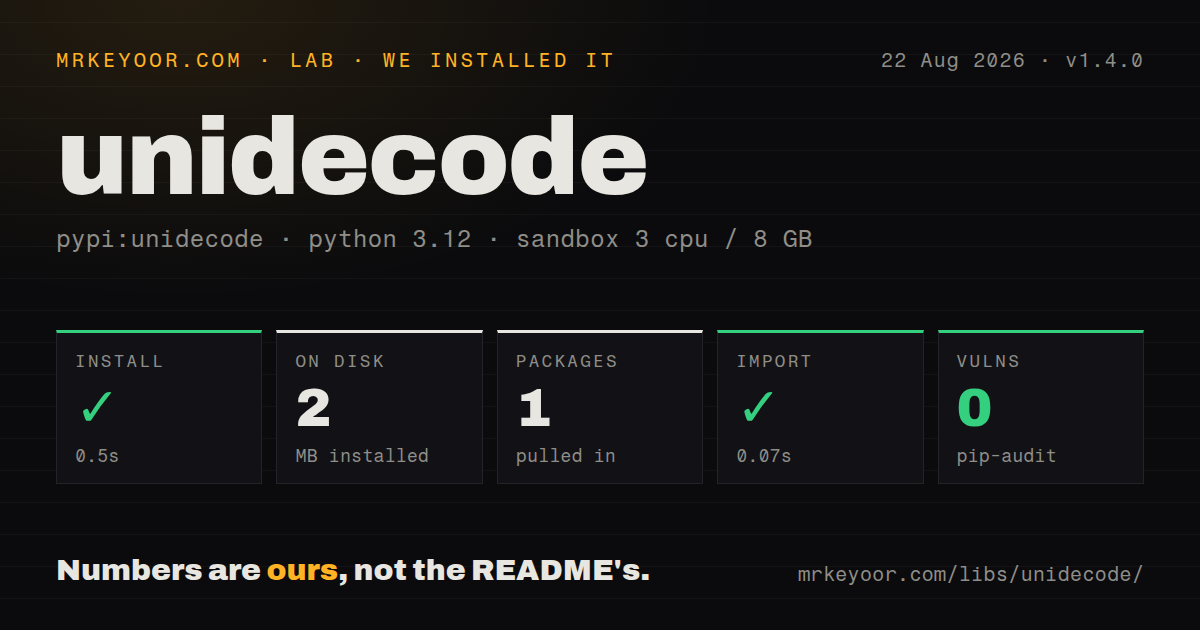
| Install | ✓ · 0.5s | 1 package on disk · 2 MB |
| Import | ✓ | import unidecode in 0.07s · pure Python · py.typed · requires Python >=3.7 |
| Known vulns | 0 | (pip-audit) |
Answers from our run
Does unidecode install cleanly?
Yes. In a fresh container with an empty cache, pip install unidecode finished in 0.5s, leaving 1 package and 2 MB on disk. pip-audit reported no known vulnerabilities.
What does unidecode need to run?
Python >=3.7, and nothing compiled: it is pure Python. In our run import unidecode succeeded in 0.07s, and the package ships py.typed for type checkers.
unidecode or text-unidecode: which should you use?
text-unidecode: Choose it for similar table-driven ASCII conversion when its Artistic License or GPL terms fit distribution better. Unidecode 1.4.0 installed as 1 dependency-free package using 2 MB in our sandbox, imported in 0.07 seconds, and produced 0 audit findings.
When should you not use unidecode?
People will see the converted value as their name or language. The maintainer warns that context-free results can be wrong or offensive.
Use it if
- An ASCII-only protocol, old database column, device, or machine identifier still needs a readable approximation of Unicode input.
- The application creates a URL slug once, stores it, and accepts lossy table-based output for that identifier.
- Mostly Latin-script text needs symbol and letter mappings beyond simply removing combining accents.
- Callers need a clear choice among ignore, strict, replace, and preserve behavior when no mapping exists.
- People will see the converted value as their name or language. The maintainer warns that context-free results can be wrong or offensive.
- Chinese, Japanese, Korean, or another context-sensitive script needs correct romanization. Unidecode cannot choose readings from language or surrounding text.
- Your software distribution cannot satisfy GPL-2.0-or-later terms. The README points license-sensitive users toward text-unidecode.
- Persistent URLs or external IDs will be regenerated after dependency upgrades. Mapping corrections can change output and break stored references.
- You only need accent removal while keeping other Unicode intact. Python's unicodedata normalization avoids inventing ASCII readings for unrelated scripts and symbols.
Setup reality
We installed Unidecode 1.4.0 in 0.5 seconds in a clean Python 3.12 Bookworm sandbox. It added 1 package, occupied 2 MB, and declared 0 direct dependencies. The code is pure Python, requires Python 3.7 or later, and ships py.typed. import unidecode worked in 0.07 seconds, while pip-audit reported 0 known vulnerabilities. The measured package license is GPL, and the README specifies GPL version 2 or later.
The default errors='ignore' silently deletes any character absent from the tables, including Private Use Area code points. strict raises UnidecodeError and exposes the source index. replace inserts ? or a chosen replacement marker. preserve keeps the original code point, which means the result may no longer encode as ASCII. Keep the original Unicode text because every transliteration loses information and cannot be reversed.
No locale or language detection runs. German umlauts become plain vowels unless application code maps them to ae, oe, and ue first. Some characters shared by Japanese and Chinese use Chinese-oriented output. The project explicitly declines language-aware behavior. Review representative strings with speakers before showing a conversion to users, and keep original Unicode visible whenever the destination supports it.
Version 1.4.0 changes mapping data, including chess, card, temperature, tau, and ENG characters. A slug rebuilt with this version may differ from one made by an older release. Store identifiers when first created and pin the package for reproducible batch output. Characters beyond the Basic Multilingual Plane need a wide-Unicode Python build. The CLI reads files using the system locale unless -e supplies an encoding, so automated jobs should pass it explicitly.
Patterns
Convert Unicode text to ASCII transliterate-text
from unidecode import unidecode

result = unidecode('kožušček')
print(result)  # kozuscek
The result is an irreversible approximation. Save the Unicode source for display, correction, and future conversion.
Create and store a URL slug once store-url-slug
import re
from unidecode import unidecode

def make_slug(title: str) -> str:
    value = unidecode(title).lower()
    return re.sub(r'[^a-z0-9]+', '-', value).strip('-')

article.slug = make_slug(article.title)
Persist the generated slug. A later mapping-table release can produce a different URL from the same title.
Fail on an unknown character reject-unmapped
from unidecode import UnidecodeError, unidecode

try:
    value = unidecode(input_text, errors='strict')
except UnidecodeError as exc:
    bad = input_text[exc.index]
    raise ValueError(f'Unsupported character: {bad!r}') from exc
Strict mode includes the original string index. The default ignore mode would remove that character with no warning.
Mark characters missing from the tables replace-unmapped
from unidecode import unidecode

clean = unidecode('name\ue000', errors='replace', replace_str='[?]')
A visible replacement records that data was lost, which helps during imports and later audit review.
Retain characters with no ASCII mapping preserve-unmapped
from unidecode import unidecode

result = unidecode('name\ue000', errors='preserve')
print(result.encode('utf-8'))
preserve can return non-ASCII output. Do not use it behind an API that promises ASCII-encodable text.
Apply German-specific rules before Unidecode apply-german-mapping
from unidecode import unidecode

def german_ascii(text: str) -> str:
    mapping = str.maketrans({'ä':'ae','ö':'oe','ü':'ue','Ä':'Ae','Ö':'Oe','Ü':'Ue','ß':'ss'})
    return unidecode(text.translate(mapping))
The library has no German locale and intentionally maps umlauts without the extra e. Preprocess rules you know from the source language.
Use the ASCII-oriented conversion path optimize-ascii-heavy
from unidecode import unidecode_expect_ascii

converted = [unidecode_expect_ascii(value) for value in incoming_values]
This function returns the same mappings as unidecode. Benchmark representative input before adding a specialized call.
Use the non-ASCII-oriented conversion path optimize-nonascii-heavy
from unidecode import unidecode_expect_nonascii

converted = [unidecode_expect_nonascii(value) for value in localized_values]
The specialized path can help when most strings contain non-ASCII characters. Output stays identical to the main function.
Convert a command-line string transliterate-argument
unidecode -c '30 𝗄𝗆/𝗁'The -c option reads its argument as text. Without it, the command treats an argument as a file path or reads standard input.
Set input encoding for a file conversion transliterate-file
unidecode -e utf-8 input.txt > output.txtWithout -e, decoding follows the host locale and may differ across a workstation, CI runner, and production container.
Check support for characters beyond the BMP check-wide-unicode
import sys

if sys.maxunicode <= 0xFFFF:
    raise RuntimeError('wide Unicode support required')
A narrow Unicode build cannot correctly process characters above the Basic Multilingual Plane. Current mainstream Python builds are usually wide.
Assert ASCII at the legacy boundary enforce-ascii-boundary
from unidecode import unidecode

def to_ascii_bytes(text: str) -> bytes:
    value = unidecode(text, errors='replace')
    return value.encode('ascii', errors='strict')
The final strict encode catches a switch to preserve mode or later code that reintroduces Unicode before the old system receives it.
Alternatives
| Package | Registry | Pick it when |
|---|---|---|
| text-unidecode | PyPI | Choose it for similar table-driven ASCII conversion when its Artistic License or GPL terms fit distribution better. |
| anyascii | PyPI | Choose it for broad Unicode-to-ASCII mappings under an ISC license. |
| transliterate | PyPI | Choose it when supported language packs and bidirectional transliteration are more useful than one global character table. |
More utils guides
lru-cache · type-fest · ajv · zod · p-limit · find-up · the whole shelf →
How this guide is made: grounded in the library's documentation, release notes, changelog, and issue history, on a fixed rubric — not a hands-on install of every release. The 50 most-downloaded entries are additionally install-verified in clean containers. Corrections: contact the desk.