ua-parser review
ua-parser 1.0.2 is the official Python implementation of the shared ua-parser ruleset. It turns one user-agent string into frozen dataclasses for browser, operating system, and device, or resolves only the domain you request. The regex data ships separately in `ua-parser-builtins`, while optional Rust and RE2 resolvers replace the slower Python matcher. Version 1.0.2 fixed non-ASCII JSON and YAML regex loading, added default caching to the Rust and RE2 resolvers, dropped Python 3.9, and added Python 3.13, 3.14, free-threaded 3.14, and GraalPy 25 support.
ua-parser 1.0.2 installed in 0.2 seconds, imported in 0.16 seconds, and left 2 packages using 1 MB with 0 audit findings in our sandbox. It is a sound log-classification dependency on Python 3.10+, especially with the recommended `regex` extra, but callers must keep `None`, string versions, and the 1.0 API break visible.
We installed it
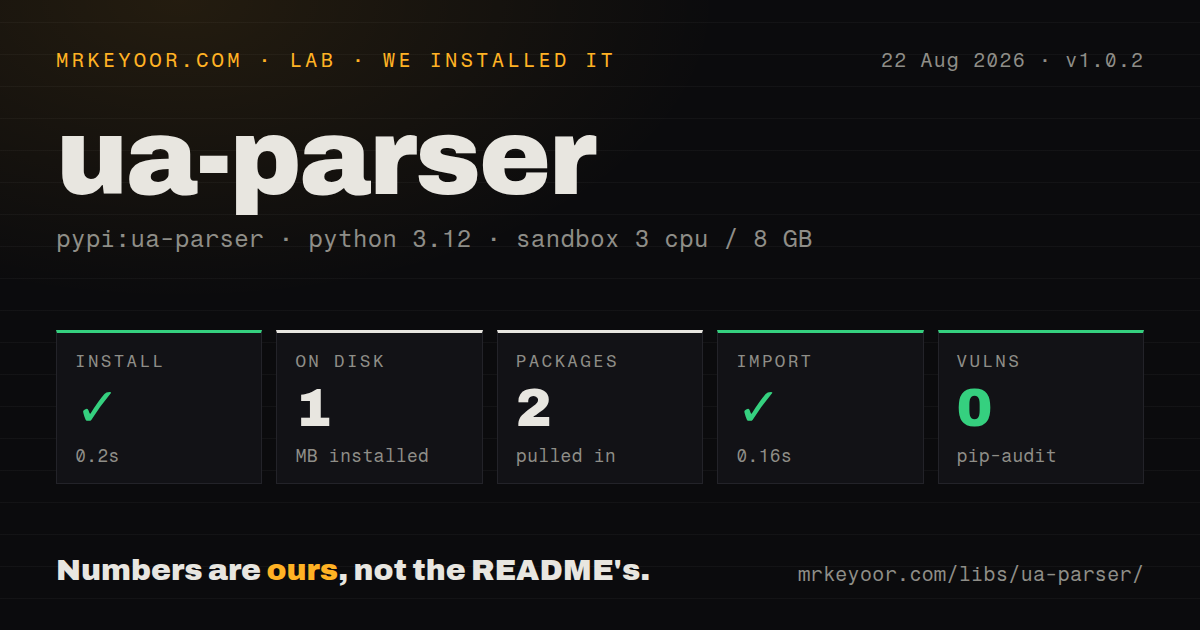
| Install | ✓ · 0.2s | 2 packages on disk · 1 MB |
| Import | ✓ | import ua_parser in 0.16s · pure Python · py.typed · requires Python >=3.10 |
| Known vulns | 0 | (pip-audit) |
Answers from our run
Does ua-parser install cleanly?
Yes. In a fresh container with an empty cache, pip install ua-parser finished in 0.2s, leaving 2 packages and 1 MB on disk. pip-audit reported no known vulnerabilities.
What does ua-parser need to run?
Python >=3.10, and nothing compiled: it is pure Python. In our run import ua_parser succeeded in 0.16s, and the package ships py.typed for type checkers.
ua-parser or user-agents: which should you use?
user-agents: Use it for mobile, tablet, PC, touch, and bot convenience properties layered over parsed user agents. ua-parser 1.0.2 installed in 0.2 seconds, imported in 0.16 seconds, and left 2 packages using 1 MB with 0 audit findings in our sandbox.
When should you not use ua-parser?
Choose user-agents when the output must include convenience flags such as mobile, tablet, PC, touch, or bot; ua-parser's result types only expose family, version, brand, and model fields
Use it if
- Server logs need browser, operating-system, or device labels based on the same ua-parser dataset used by other languages
- A high-volume parser can install the recommended `regex` extra and benefit from repeated user-agent strings in the cache
- The call site only needs one domain and can use `parse_user_agent`, `parse_os`, or `parse_device` instead of resolving all three
- Your application needs typed immutable results and can handle an unmatched domain as `None`
- Choose user-agents when the output must include convenience flags such as mobile, tablet, PC, touch, or bot; ua-parser's result types only expose family, version, brand, and model fields
- Choose device-detector for Matomo's broader device and bot classifications; this package follows the ua-parser ruleset and its 3 result domains
- Rewrite pre-1.0 integrations before upgrading because the current top-level functions return dataclasses and optional values instead of the legacy `user_agent_parser.Parse()` dictionaries
- Stay on another package when Python 3.9 support is mandatory; version 1.0.2 requires Python 3.10 or newer
- Avoid the plain install for latency-sensitive traffic because the project calls its pure Python resolver significantly slower and strongly recommends the Rust-backed `regex` extra
Setup reality
Our install of ua-parser 1.0.2 completed in 0.2 seconds and left 2 packages using 1 MB on disk. pip-audit reported 0 known vulnerabilities. The package has 4 direct dependencies, requires Python 3.10 or newer, contains only Python code, and ships py.typed; its installed license metadata was unknown. import ua_parser succeeded in 0.16 seconds in our Python 3.12 sandbox.
Install ua-parser[regex] for the Rust-backed resolver recommended by the project. The plain package falls back to a pure Python matcher described as significantly slower. ua-parser[re2] selects google-re2, and ua-parser[yaml] adds PyYAML for custom rules. Built-in regex data comes from the separate ua-parser-builtins distribution, so pinning that package also pins browser and device recognition independently of the 1.0.2 wrapper.
The module creates its global parser lazily and protects first initialization with a thread lock. Parser.from_matchers() wraps the selected resolver in an S3-FIFO cache sized for 2,000 strings. Version 1.0.2 also put caching in front of the regex and RE2 paths by default. Access ua_parser.parser during process startup if the first request must avoid matcher loading, or construct a Parser with your own resolver and cache policy.
Every parsed field can be missing. parse('') returns a Result whose 3 domains are None, and a single-domain helper also returns None on no match. Version components are optional strings, so guard before integer comparison. with_defaults() replaces unmatched domains with family Other, which is convenient for report grouping but removes the distinction between a failed lookup and a real label. Custom JSON and YAML loaders now open paths as binary files, fixing the 1.0.2 non-ASCII parsing bug.
Patterns
Parse browser, OS, and device parse-all-domains
from ua_parser import parse

result = parse(request.headers.get('User-Agent', ''))
print(result.user_agent)
print(result.os)
print(result.device)
`parse()` resolves all 3 domains and returns `None` for each unmatched domain; an empty string produces 3 `None` values.
Resolve only the browser parse-one-domain
from ua_parser import parse_user_agent

browser = parse_user_agent(user_agent_string)
if browser:
    print(browser.family, browser.major)
`parse_user_agent()` skips OS and device resolution, and its return value is `None` when no browser rule matches.
Compare an optional major version handle-version-parts
from ua_parser import parse_user_agent

browser = parse_user_agent(user_agent_string)
major = int(browser.major) if browser and browser.major else None
if browser and browser.family == 'Chrome' and major is not None:
    print(major)
All 4 browser version components are optional strings in ua-parser 1.0.2, so numeric comparisons need a missing-value check and conversion.
Group unmatched values under Other default-missing-domains
from ua_parser import parse

filled = parse(user_agent_string).with_defaults()
label = (
    filled.user_agent.family,
    filled.os.family,
    filled.device.family,
)
`with_defaults()` turns each failed domain into a dataclass whose family is `Other`; the original `None` signal is no longer present.
Install the recommended Rust resolver install-fast-backend
python -m pip install 'ua-parser[regex]'The `regex` extra installs ua-parser-rs; version 1.0.2 selects it ahead of RE2 and the pure Python resolver when available.
Initialize the global parser at startup warm-parser
import ua_parser

def warm_user_agent_parser() -> None:
    _ = ua_parser.parser
The global parser is created on first attribute access under a thread lock; warming moves that 1-time matcher setup before request handling.
Build a parser with a larger cache set-cache-size
from ua_parser import BasicResolver, Cache, CachingResolver, Parser, load_builtins

resolver = BasicResolver(load_builtins())
parser = Parser(CachingResolver(resolver, Cache(10_000)))
result = parser.parse(user_agent_string)
`Parser.from_matchers()` uses an S3-FIFO cache of 2,000 entries; explicit construction fixes the resolver and cache size for your workload.
Replace the module-wide parser replace-global-parser
import ua_parser
from ua_parser import BasicResolver, Cache, CachingResolver, Parser, load_builtins

ua_parser.parser = Parser(
    CachingResolver(BasicResolver(load_builtins()), Cache(5_000))
)
result = ua_parser.parse(user_agent_string)
Assigning `ua_parser.parser` changes the resolver used by all 4 top-level helpers in that Python process.
Resolve browser and OS together resolve-selected-domains
import ua_parser
from ua_parser import Domain

partial = ua_parser.parser(
    user_agent_string,
    Domain.USER_AGENT | Domain.OS,
)
print(partial.user_agent, partial.os)
The PartialResult domain flags record which of the 3 domains were attempted; device remains unresolved in this call.
Aggregate browser families in a log count-log-families
from collections import Counter
from ua_parser import parse_user_agent

counts = Counter()
for user_agent_string in user_agent_strings:
    browser = parse_user_agent(user_agent_string)
    counts[browser.family if browser else 'Unmatched'] += 1
Version 1.0.2 caches by complete user-agent string, so repeated log values can avoid another resolver pass.
Parse with a custom JSON ruleset load-json-rules
from ua_parser import Parser
from ua_parser.loaders import load_json

matchers = load_json('internal-regexes.json')
parser = Parser.from_matchers(matchers)
result = parser.parse(user_agent_string)
The JSON file must use the ua-parser `user_agent_parsers`, `os_parsers`, and `device_parsers` sections; version 1.0.2 fixed non-ASCII path loading.
Parse with a custom YAML ruleset load-yaml-rules
from ua_parser import Parser
from ua_parser.loaders import load_yaml

if load_yaml is None:
    raise RuntimeError('install ua-parser[yaml]')
parser = Parser.from_matchers(load_yaml('internal-regexes.yaml'))
result = parser.parse(user_agent_string)
The YAML loader requires the `yaml` extra, and 1.0.2 opens file paths in binary mode so non-ASCII regex data parses correctly on Windows.
Alternatives
| Package | Registry | Pick it when |
|---|---|---|
| user-agents | PyPI | Use it for mobile, tablet, PC, touch, and bot convenience properties layered over parsed user agents. |
| device-detector | PyPI | Use the Matomo dataset when richer device categories, brands, and bot recognition matter. |
| ua-parser-rs | PyPI | Use the native matcher directly when the Python wrapper, dataclasses, and resolver composition add no value. |
More utils guides
lru-cache · type-fest · ajv · zod · p-limit · find-up · the whole shelf →
Related reading
How this guide is made: grounded in the library's documentation, release notes, changelog, and issue history, on a fixed rubric — not a hands-on install of every release. The 50 most-downloaded entries are additionally install-verified in clean containers. Corrections: contact the desk.