twilio review
twilio 6.1.0 is Twilio's official Node.js server SDK. Its generated resource tree covers messaging, voice, Verify, Conversations, phone numbers, TaskRouter, account administration, and other Twilio services through create, fetch, update, remove, list, page, and each methods. The package also includes TwiML builders, webhook-signature validation, pagination, region and edge routing, and typed REST errors. Version 6.1.0 removes the Assistants API and the Connect Assistant TwiML noun, adds Dial passport passthrough, and changes several generated product endpoints. Our install used 29 MB, and browser bundling failed because this is Node-only code.
twilio 6.1.0 installed in 4.7 seconds as 52 packages using 29 MB, emitted 1 deprecation warning, and failed browser bundling in our sandbox. Use it on Node 20+ when Twilio is a committed backend dependency; wrap or avoid it when one endpoint or provider portability is the actual requirement.
We installed it
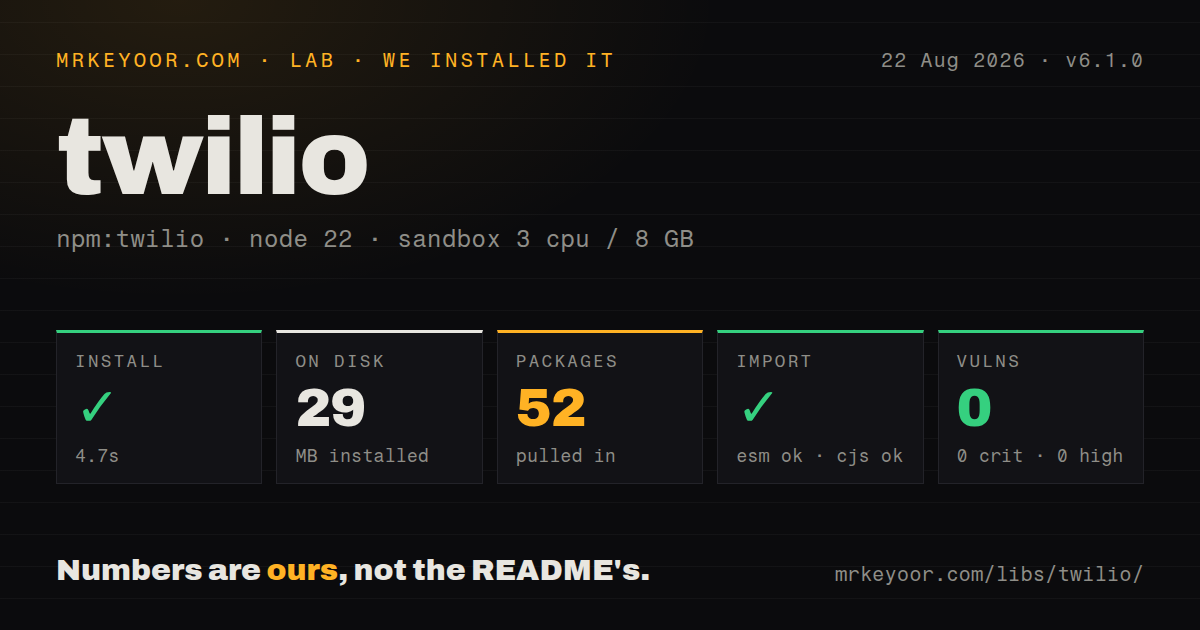

| Install | ✓ · 4.7s | 52 packages on disk · 29 MB · 1 deprecation warning |
| Import | ✓ | ESM import works · require() works · CommonJS package |
| Browser | n/a | could not be bundled for the browser (Node-only code, most likely) |
| Types | ✓ | TypeScript types bundled |
| Known vulns | 0 | 0 critical · 0 high · 0 moderate · 0 low (npm audit) |
Answers from our run
Does twilio install cleanly?
Yes. In a fresh container with an empty cache, npm install twilio finished in 5 seconds, leaving 52 packages and 29 MB on disk. npm audit reported no known vulnerabilities. The install printed 1 deprecation warning.
Can twilio run in a browser?
Not directly: esbuild could not bundle it for the browser in our run, which normally means it depends on Node built-ins. Use it on the server, or find a browser-targeted alternative.
Does twilio work with both ESM and CommonJS?
Yes. Both import 'twilio' and require('twilio') worked in Node 22 in our run. The package is published as CommonJS.
Does twilio include TypeScript types?
Yes, type declarations ship inside the package, so no @types install is needed.
twilio or @vonage/server-sdk: which should you use?
@vonage/server-sdk: Choose it when Vonage pricing, coverage, and communications products fit the deployment better. twilio 6.1.0 installed in 4.7 seconds as 52 packages using 29 MB, emitted 1 deprecation warning, and failed browser bundling in our sandbox.
When should you not use twilio?
Any code path ships to browsers. The README warns that frontend use exposes credentials, and our esbuild browser bundle failed.
Use it if
- A Node backend uses several Twilio products and benefits from one generated, typed client.
- Twilio webhook signatures or TwiML responses should use the vendor's own helpers.
- Pagination, regional routing, retry settings, and Twilio error objects would otherwise be reimplemented.
- The application already accepts Twilio SIDs, account structure, sender rules, and service-specific workflows.
- Any code path ships to browsers. The README warns that frontend use exposes credentials, and our esbuild browser bundle failed.
- Production runs below Node 20. Version 6.1.0 declares Node 20 or newer and documents Node 20, 22, and 24.
- Provider neutrality matters. TwiML, SIDs, Verify Services, webhook signatures, status codes, regions, and resource paths are Twilio-specific.
- Only 1 stable REST endpoint is needed. Our clean install left 52 packages and 29 MB for a client generated across many Twilio products.
- Strict semantic-versioning guarantees are required. The README says twilio-node uses modified SemVer, and 6.1.0 includes a breaking TwiML removal in a minor release.
Setup reality
We installed twilio 6.1.0 in a fresh Node 22 Bookworm sandbox. npm completed in 4.7 seconds, printed 1 deprecation warning, left 52 packages, and used 29 MB. The package has 7 direct and 0 peer dependencies, occupies 20424 KB unpacked, bundles TypeScript declarations, and requires Node 20 or newer. npm audit found 0 known vulnerabilities. require and ESM import both worked. An esbuild browser bundle failed, which matches the documented server-only design.
Create a Twilio account, then provision the sender, Messaging Service, Verify Service, number, or voice application required by the product. The client can read TWILIO_ACCOUNT_SID and TWILIO_AUTH_TOKEN, but deployment still needs secret storage, rotation, subaccount separation, and narrow permissions. OAuth client credentials and public-key client validation are separate authentication paths. Trial limits, sender registration, opt-out handling, destination rules, and telecom compliance are service obligations outside the npm package.
The package is CommonJS and has no exports map, though both module systems loaded it on our Node 22 box. Lazy resource loading is enabled by default. Automatic retry is disabled and only handles HTTP 429 when enabled; its default maximum is 3 retries. Decide whether an operation can tolerate duplicate attempts and longer latency. keepAlive is also opt-in, while the documented socket timeout default is 30000 ms. list accumulates results, each streams pages through callbacks, and page exposes manual pagination.
Webhook validation depends on the exact public URL Twilio signed plus the original parameters. TLS termination, forwarded host or protocol headers, query strings, and JSON body parsing can invalidate a legitimate request if proxy configuration is wrong. Debug logging, lastRequest, and lastResponse can contain credentials, phone numbers, message text, and payloads. Catch RestException and branch on status and Twilio error code; many 400-level responses are permanent input or destination failures and should not be retried.
Patterns
Create a server client from secrets initialize-client
import twilio from 'twilio'

const client = twilio(
  process.env.TWILIO_ACCOUNT_SID,
  process.env.TWILIO_AUTH_TOKEN,
  { keepAlive: true, timeout: 30_000 },
)
Keep credentials in server-side secret storage. A 30,000 ms socket timeout matches the documented default but should still fit the request budget.
Send one SMS message send-sms
const message = await client.messages.create({
  to: '+14155550123',
  from: process.env.TWILIO_PHONE_NUMBER,
  body: 'Your order is ready for pickup.',
})

console.log(message.sid, message.status)
The sender must be valid for the destination; trial restrictions, registration, consent, and country rules still apply.
Send through a Messaging Service send-with-service
const message = await client.messages.create({
  to: '+14155550123',
  messagingServiceSid: process.env.TWILIO_MESSAGING_SERVICE_SID,
  body: 'Your order is ready.',
  statusCallback: 'https://example.com/webhooks/twilio/message-status',
})
The status callback is a separate signed webhook. Validate it before trusting delivery fields or message identifiers.
Read a message's latest status fetch-message
const message = await client
  .messages('SMXXXXXXXXXXXXXXXXXXXXXXXXXXXXXXXX')
  .fetch()

console.log(message.status, message.errorCode)
A successful create means Twilio accepted the request; delivery is asynchronous and can later produce an error code.
Bound an eager message listing list-messages
const messages = await client.messages.list({
  to: '+14155550123',
  dateSentAfter: new Date('2026-08-01T00:00:00Z'),
  limit: 100,
  pageSize: 50,
})
list collects up to 100 records in memory here. Set a limit for accounts with long histories.
Process call pages lazily iterate-calls
await new Promise((resolve, reject) => {
  client.calls.each(
    { limit: 500, pageSize: 50 },
    (call) => process(call),
    (error) => error ? reject(error) : resolve(),
  )
})
each is callback-based and fetches pages as needed; wrap its completion when surrounding code uses promises.
Begin an outbound voice call start-call
const call = await client.calls.create({
  to: '+14155550123',
  from: process.env.TWILIO_PHONE_NUMBER,
  url: 'https://example.com/twiml/outbound-call',
})
Twilio fetches the TwiML URL after call creation, so that endpoint must be public, fast, and safe for repeated requests.
Send a Verify challenge start-verification
const verification = await client.verify.v2
  .services(process.env.TWILIO_VERIFY_SERVICE_SID)
  .verifications.create({ to: '+14155550123', channel: 'sms' })
Use a Verify Service SID and apply application rate limits before triggering a billed send.
Check a submitted Verify code check-verification
const check = await client.verify.v2
  .services(process.env.TWILIO_VERIFY_SERVICE_SID)
  .verificationChecks.create({ to: '+14155550123', code: submittedCode })

if (check.status !== 'approved') throw new Error('Verification failed')
Treat every non-approved status as failure and avoid revealing whether the phone number is enrolled.
Return a TwiML message response build-messaging-twiml
const response = new twilio.twiml.MessagingResponse()
response.message('Thanks, we received your message.')
res.type('text/xml').send(response.toString())
Set the XML content type and validate the incoming Twilio signature before using webhook parameters.
Protect an Express webhook validate-webhook
app.use(express.urlencoded({ extended: false }))

app.post('/webhooks/twilio', twilio.webhook(), (req, res) => {
  const response = new twilio.twiml.MessagingResponse()
  response.message('Received')
  res.type('text/xml').send(response.toString())
})
Signature checks use the exact public URL and parameters; configure trusted proxy host and protocol handling when TLS terminates upstream.
Classify a Twilio API failure handle-rest-error
const { RestException } = twilio

try {
  await client.messages.create({ to, from, body })
} catch (error) {
  if (error instanceof RestException) {
    recordTwilioFailure(error.status, error.code)
  } else {
    throw error
  }
}
Many 400-level RestException responses are permanent input or destination failures; retry only codes covered by an explicit policy.
Alternatives
| Package | Registry | Pick it when |
|---|---|---|
| @vonage/server-sdk | npm | Choose it when Vonage pricing, coverage, and communications products fit the deployment better. |
| plivo | npm | Choose it for Plivo messaging and voice after comparing sender support and destination rules. |
| telnyx | npm | Choose it when Telnyx voice, messaging, number, and network APIs match the product and region. |
More web backend guides
ws · urllib3 · requests · undici · anyio · express · the whole shelf →
How this guide is made: grounded in the library's documentation, release notes, changelog, and issue history, on a fixed rubric — not a hands-on install of every release. The 50 most-downloaded entries are additionally install-verified in clean containers. Corrections: contact the desk.