ts-jest review
ts-jest 29.4.12 is a Jest transformer that asks the TypeScript compiler API to turn `.ts` and `.tsx` test files into code Jest can execute, while preserving source maps and optionally reporting TypeScript diagnostics. It belongs in development dependencies and runs inside Jest's Node workers. The current release adds a documented TypeScript 7 arrangement: the native TypeScript 7 compiler handles project checks, while an npm alias exposes the TypeScript 6 JavaScript API that ts-jest still needs for transforms, hoisting, custom transformers, and diagnostics.
ts-jest 29.4.12 took 17.8 seconds and 79 MB to install in our sandbox, leaving 274 packages and 3 deprecation warnings despite 0 audit findings. Keep it for Jest suites that need the TypeScript compiler API during tests; prefer SWC or Babel plus a separate type-check when transform speed and simpler version coupling matter more.
We installed it
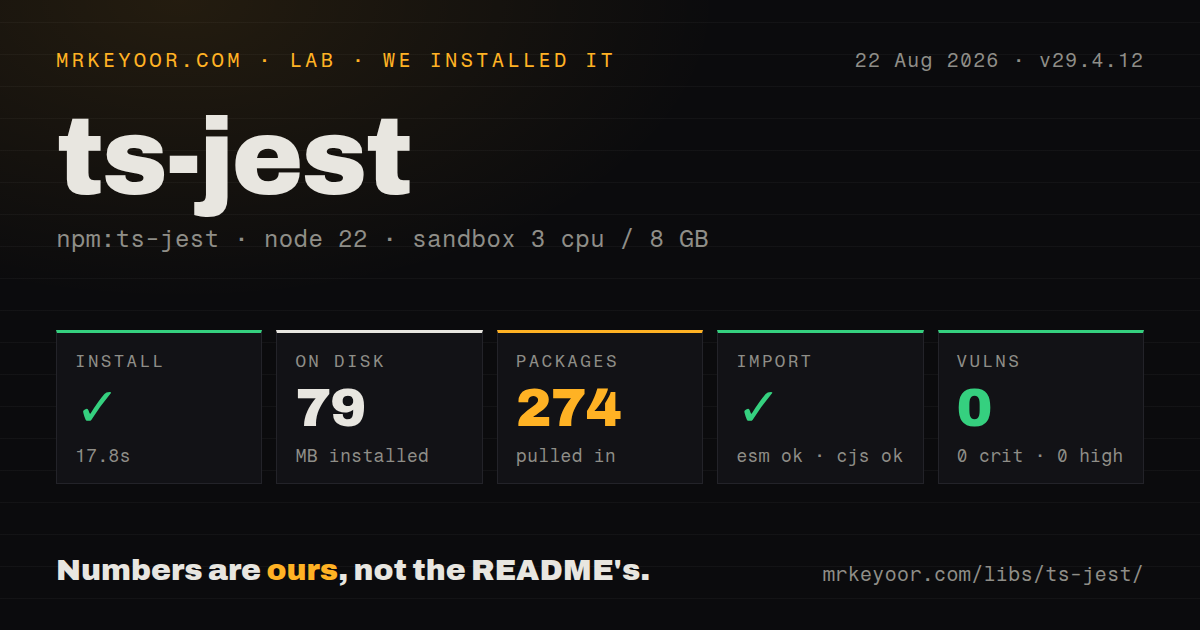
| Install | ✓ · 17.8s | 274 packages on disk · 79 MB · 3 deprecation warnings |
| Import | ✓ | ESM import works · require() works · CommonJS package |
| Browser | n/a | could not be bundled for the browser (Node-only code, most likely) |
| Types | ✓ | TypeScript types bundled |
| Known vulns | 0 | 0 critical · 0 high · 0 moderate · 0 low (npm audit) |
Answers from our run
Does ts-jest install cleanly?
Yes. In a fresh container with an empty cache, npm install ts-jest finished in 18 seconds, leaving 274 packages and 79 MB on disk. npm audit reported no known vulnerabilities. The install printed 3 deprecation warnings.
Can ts-jest run in a browser?
Not directly: esbuild could not bundle it for the browser in our run, which normally means it depends on Node built-ins. Use it on the server, or find a browser-targeted alternative.
Does ts-jest work with both ESM and CommonJS?
Yes. Both import 'ts-jest' and require('ts-jest') worked in Node 22 in our run. The package is published as CommonJS.
Does ts-jest include TypeScript types?
Yes, type declarations ship inside the package, so no @types install is needed.
ts-jest or @swc/jest: which should you use?
@swc/jest: Use it for fast TypeScript syntax transforms while a separate command owns type checking. ts-jest 29.4.12 took 17.8 seconds and 79 MB to install in our sandbox, leaving 274 packages and 3 deprecation warnings despite 0 audit findings.
When should you not use ts-jest?
Choose @swc/jest when transform speed matters more than compiler diagnostics; run tsc --noEmit separately for type errors.
Use it if
- A Jest suite must compile TypeScript syntax and report compiler diagnostics from the same test run.
- Tests depend on TypeScript-only behavior such as custom AST transformers or `Program` access that Babel and SWC do not provide.
- An established Jest 29 or 30 configuration is staying in place, and replacing the runner would cost more than maintaining its transform setup.
- Source maps must point failures back to TypeScript while Jest keeps its mocks, snapshots, fake timers, and worker model.
- Choose `@swc/jest` when transform speed matters more than compiler diagnostics; run `tsc --noEmit` separately for type errors.
- Choose `babel-jest` when the project already uses Babel plugins and only needs TypeScript syntax removed, since Babel does not type-check.
- Consider Vitest for a Vite-native project where ESM, aliases, and transforms should share the application's existing pipeline.
- Do not put ts-jest in browser code. Our esbuild browser bundle failed, and the package depends on Jest and the TypeScript compiler API inside Node.
- Avoid it if TypeScript 7 must be the only installed compiler package. Version 29.4.12 requires a TypeScript 6 compatibility alias because the native compiler does not expose the JavaScript API ts-jest calls.
Setup reality
Our clean Node 22 install of ts-jest 29.4.12 finished in 17.8 seconds, printed 3 deprecation warnings, and left 274 packages occupying 79 MB. npm audit found 0 known vulnerabilities across all severity levels. The package has 9 direct dependencies and 7 peer dependencies, with 1936 KB unpacked. It bundles TypeScript declarations. Both CommonJS require() and ESM import worked, although the package itself is CommonJS and has no exports map.
Install Jest, TypeScript, and the Jest type definitions beside ts-jest. Its peer ranges accept Jest 29 or 30 and TypeScript 4.3 through 6, with optional Babel peers also listed. Start from createDefaultPreset() or createDefaultEsmPreset() and merge the returned transform config into jest.config.ts. Point the transform at a test-specific tsconfig when production compiler settings conflict with Jest's execution model.
Path aliases in compilerOptions.paths are invisible to Jest until pathsToModuleNameMapper() converts them into moduleNameMapper rules. ESM needs matching choices across package.json, TypeScript module, Jest extensions, and the ts-jest ESM preset. Dependencies published in syntax Jest ignores may also need a narrow transformIgnorePatterns exception. Cache output depends on transformer options and source content; use jest --clearCache after changing compiler or transform settings if failures look stale.
The browser build in our lab failed during esbuild bundling, which matches a Node-only test transformer. Type checking inside every Jest worker can also make a large suite expensive. Keep authoritative project checks in a separate tsc --noEmit job if you disable diagnostics or use isolated transpilation. For TypeScript 7, install the native compiler under @typescript/native and alias typescript to @typescript/typescript6; the official guide warns against bypassing the peer check with --legacy-peer-deps.
Patterns
Start with the default TypeScript preset configure-commonjs
import type { Config } from 'jest'
import { createDefaultPreset } from 'ts-jest'

const config: Config = {
  ...createDefaultPreset({ tsconfig: 'tsconfig.spec.json' }),
  testEnvironment: 'node',
}

export default config
The preset supplies the transform rule. Use a test tsconfig whose module target matches the way Jest executes the files.
Transform TypeScript as ESM configure-esm
import type { Config } from 'jest'
import { createDefaultEsmPreset } from 'ts-jest'

const config: Config = {
  ...createDefaultEsmPreset({ tsconfig: 'tsconfig.spec.json' }),
  testEnvironment: 'node',
}

export default config
The ESM preset sets `useESM` and TypeScript extensions. `package.json`, tsconfig module settings, and Jest runtime flags must agree with it.
Translate TypeScript path aliases map-tsconfig-paths
import { pathsToModuleNameMapper } from 'ts-jest'
import { compilerOptions } from './tsconfig.json'

export default {
  moduleNameMapper: pathsToModuleNameMapper(compilerOptions.paths, {
    prefix: '<rootDir>/',
  }),
}
Jest does not read `compilerOptions.paths` as a resolver map. The prefix must match the base directory used by the TypeScript config.
Map aliases for an ESM suite map-esm-paths
moduleNameMapper: pathsToModuleNameMapper(compilerOptions.paths, {
  prefix: '<rootDir>/',
  useESM: true,
})
`useESM: true` adds the extension handling needed for TypeScript ESM imports. Keep it consistent with the ESM preset.
Report diagnostics only for tests limit-diagnostics
...createDefaultPreset({
  tsconfig: 'tsconfig.spec.json',
  diagnostics: {
    pathRegex: '\.(spec|test)\.ts$',
    warnOnly: false,
  },
})
Diagnostics can stop a test run before execution. A separate `tsc --noEmit` job is still the clearer whole-project check.
Suppress one known compiler diagnostic ignore-diagnostic-code
...createDefaultPreset({
  diagnostics: {
    ignoreCodes: [2571],
  },
})
Use a numeric TypeScript diagnostic code and document why it is safe. Broad suppression can turn genuine compiler failures into passing tests.
Use isolated transpilation transpile-without-program
...createDefaultPreset({
  tsconfig: {
    isolatedModules: true,
  },
  diagnostics: false,
})
This avoids a full TypeScript program during transforms and loses compiler diagnostics that require cross-file analysis. Run `tsc --noEmit` elsewhere.
Send JavaScript through Babel transform-js-with-babel
import { createJsWithBabelPreset } from 'ts-jest'

export default {
  ...createJsWithBabelPreset({ tsconfig: 'tsconfig.spec.json' }),
  testEnvironment: 'jsdom',
}
This preset uses Babel for JavaScript and ts-jest for TypeScript. Install compatible `@babel/core` and `babel-jest` peers.
Allow one dependency through the transformer transform-esm-dependency
export default {
  transformIgnorePatterns: [
    'node_modules/(?!(esm-only-package)/)',
  ],
}
Jest skips `node_modules` transforms by default. Keep the exception narrow or startup time rises across the dependency tree.
Register a TypeScript AST transformer use-custom-transformer
...createDefaultPreset({
  astTransformers: {
    before: [
      { path: '<rootDir>/test/transformer.cjs' },
    ],
  },
})
The transformer module must satisfy ts-jest's factory contract and load in Jest's Node process. Compiler API changes can break custom transformers.
Type a Jest mock mock-typed-function
import { jest } from '@jest/globals'
import { loadUser } from './client'

jest.mock('./client')
const mockedLoadUser = jest.mocked(loadUser)
mockedLoadUser.mockResolvedValue({ id: '42' })
Use `jest.mocked()` from Jest. The old ts-jest `mocked` helper was removed from the package.
Keep TypeScript 7 beside the compatibility API run-typescript-seven
npm install --save-dev \
  '@typescript/native@npm:typescript@^7.0.2' \
  'typescript@npm:@typescript/typescript6@^6.0.2'
TypeScript 7's native compiler lacks the JavaScript API ts-jest uses. `npx tsc` runs the native package, while ts-jest resolves the TypeScript 6 alias.
Alternatives
| Package | Registry | Pick it when |
|---|---|---|
| @swc/jest | npm | Use it for fast TypeScript syntax transforms while a separate command owns type checking. |
| babel-jest | npm | Use it when Jest must share Babel plugins and browser-target transforms with the application. |
| vitest | npm | Use it when a Vite project benefits from one ESM-aware transform and alias configuration for app code and tests. |
More testing guides
pytest · chai · vitest · playwright · jsdom · axe-core · the whole shelf →
How this guide is made: grounded in the library's documentation, release notes, changelog, and issue history, on a fixed rubric — not a hands-on install of every release. The 50 most-downloaded entries are additionally install-verified in clean containers. Corrections: contact the desk.