to-readable-stream review
to-readable-stream 4.0.0 puts one existing JavaScript value into a WHATWG `ReadableStream`, emits that value as a single unchanged chunk, and closes. Its generic declaration preserves the chunk type, so a string remains a string and a Uint8Array remains bytes. Version 4 made a breaking switch from Node's `stream.Readable` to the web stream class and raised the runtime floor to Node 18. It does not split large inputs, encode text, iterate collections, delay creation of the value, or connect a producer to backpressure.
to-readable-stream 4.0.0 added 0.2 KB minified in our browser test and installed with no dependencies or audit findings, but it emits exactly one already-materialized chunk. Use it at a web-stream type boundary; construct a real producer for chunking, cancellation, or backpressure.
We installed it
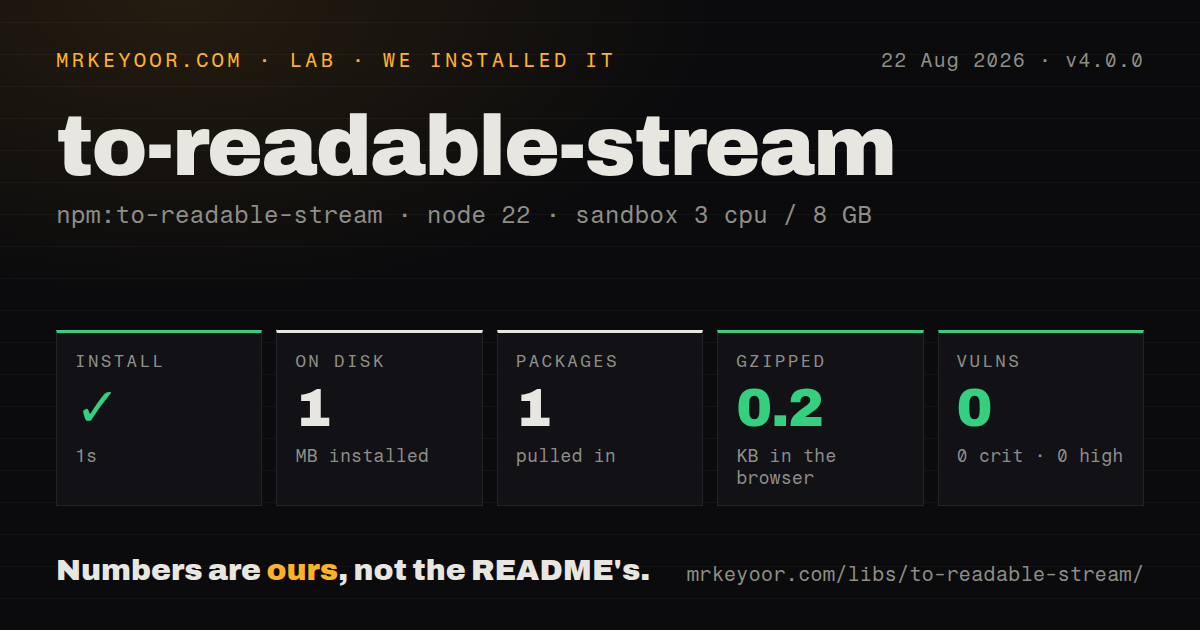
| Install | ✓ · 1s | 1 package on disk · 1 MB |
| Import | ✓ | ESM import works · require() works · ESM package with exports map |
| Browser | 0.2 KB | gzipped (0.2 KB minified), bundled with esbuild |
| Types | ✓ | TypeScript types bundled |
| Known vulns | 0 | 0 critical · 0 high · 0 moderate · 0 low (npm audit) |
Answers from our run
Does to-readable-stream install cleanly?
Yes. In a fresh container with an empty cache, npm install to-readable-stream finished in 1 seconds, leaving 1 package and 1 MB on disk. npm audit reported no known vulnerabilities.
How much does to-readable-stream add to a browser bundle?
0.2 KB gzipped (0.2 KB minified) when the whole package is bundled for the browser with esbuild. Importing only part of it is usually smaller.
Does to-readable-stream work with both ESM and CommonJS?
Yes. Both import 'to-readable-stream' and require('to-readable-stream') worked in Node 22 in our run. The package is published as ESM with an exports map.
Does to-readable-stream include TypeScript types?
Yes, type declarations ship inside the package, so no @types install is needed.
to-readable-stream or into-stream: which should you use?
into-stream: Choose it for a Node stream built from strings, buffers, promises, arrays, iterables, async iterables, or objects. to-readable-stream 4.0.0 added 0.2 KB minified in our browser test and installed with no dependencies or audit findings, but it emits exactly one already-materialized chunk.
When should you not use to-readable-stream?
The consumer wants Node's stream.Readable. Version 4 returns a web stream; the README points Node callers to Readable.from().
Use it if
- One in-memory value must be passed to an API whose parameter is specifically a WHATWG ReadableStream.
- The downstream reader expects the original object type as its only chunk.
- A browser or Node 18+ runtime already provides the global ReadableStream constructor.
- TypeScript should infer `ReadableStream<Value>` without a hand-written underlying-source object.
- The consumer wants Node's `stream.Readable`. Version 4 returns a web stream; the README points Node callers to `Readable.from()`.
- A large buffer must be produced gradually. The entire value exists before the stream and is enqueued in one operation, so peak memory does not fall.
- Text must become UTF-8 bytes. The package performs no TextEncoder conversion, and byte-only consumers may reject a string chunk.
- You need several chunks, an async iterable, pull logic, cancellation, or producer errors. The API accepts one value and no source callbacks.
- A four-line wrapper does not justify a dependency in your codebase. `new ReadableStream({start(controller) {...}})` makes the behavior explicit.
Setup reality
We installed to-readable-stream 4.0.0 in a fresh, unprivileged Node 22 sandbox in 1 second. npm left one package and 1 MB on disk; the tarball metadata reports 24 KB unpacked, 0 direct dependencies, and 0 peer dependencies. npm audit found 0 vulnerabilities at every severity. Our measurement setup used 3 CPUs, 8 GB of RAM, and no cache. The package bundles TypeScript declarations and requires Node 18 or newer.
Version 4.0.0 is an ESM package with an exports map. ESM import worked in our test, and Node 22 also loaded it through require(). That latter result depends on current Node ESM interop; portable usage should follow the documented default import. The package expects a global WHATWG ReadableStream and includes no ponyfill. Our browser build was 0.2 KB minified and 0.2 KB gzipped.
Chunk type is the common surprise. toReadableStream('hello') yields one string, with no UTF-8 conversion. Use new TextEncoder().encode(text) for a byte-oriented consumer. Buffers work as Uint8Array values in Node, but Buffer is not a browser global. An object is allowed too, though only a custom reader or transform that understands objects can consume it meaningfully.
The value is materialized before the 4.0.0 stream starts and is enqueued immediately. Cancellation cannot stop upstream work because none is attached, and backpressure cannot make a one-chunk buffer smaller. A stream can be locked and consumed only once; use tee() before reading when 2 consumers need branches, or create a new wrapper around the original value. Use Readable.toWeb and Readable.fromWeb when crossing Node and web stream models.
Patterns
Emit one string chunk stream-string
import toReadableStream from 'to-readable-stream';

const stream = toReadableStream('hello');
The reader receives the JavaScript string unchanged; version 4.0.0 does not encode it to bytes.
Emit one byte chunk stream-bytes
import toReadableStream from 'to-readable-stream';

const bytes = new TextEncoder().encode('hello');
const stream = toReadableStream(bytes);
TextEncoder makes the chunk a Uint8Array for consumers that require UTF-8 bytes.
Read the only chunk read-value
const reader = stream.getReader();
const first = await reader.read();
const second = await reader.read();

console.log(first.value, first.done);
console.log(second.done);
The first read returns the supplied value; the next read reports completion.
Consume through async iteration consume-with-loop
for await (const chunk of toReadableStream(payload)) {
  consume(chunk);
}
The loop runs once because the package enqueues one chunk and immediately closes.
Pass the value through a transform pipe-through-transform
const upper = new TransformStream({
  transform(chunk, controller) {
    controller.enqueue(chunk.toUpperCase());
  },
});

const output = toReadableStream('hello').pipeThrough(upper);
The transform must accept the unchanged input type, which is string in this example.
Branch before consumption tee-stream
const source = toReadableStream(bytes);
const [forHash, forUpload] = source.tee();
Call `tee()` before a reader locks the stream; each branch receives the same single chunk.
Create a byte response body return-response-body
const body = toReadableStream(new TextEncoder().encode('ok'));
const response = new Response(body, {
  headers: {'content-type': 'text/plain; charset=utf-8'},
});
Using bytes avoids runtimes that reject string chunks in a Response body.
Convert a web stream for Node consumers bridge-node-readable
import { Readable } from 'node:stream';

const webStream = toReadableStream(new Uint8Array([1, 2, 3]));
const nodeStream = Readable.fromWeb(webStream);
Version 4 returns a WHATWG stream. `Readable.fromWeb` makes the model change explicit.
Send one typed object to a custom reader stream-object
const eventStream = toReadableStream({type: 'ready', id: 42});
const {value} = await eventStream.getReader().read();
console.log(value.id);
Object chunks work only with consumers designed for object values; network and file APIs normally expect bytes.
Choose Node Readable for Node APIs use-native-node-stream
import { Readable } from 'node:stream';

const stream = Readable.from([Buffer.from('hello')]);
The package README recommends `Readable.from()` when the target expects Node's stream.Readable rather than a web stream.
Alternatives
| Package | Registry | Pick it when |
|---|---|---|
| into-stream | npm | Choose it for a Node stream built from strings, buffers, promises, arrays, iterables, async iterables, or objects. |
| readable-stream | npm | Choose it when the consumer expects the Node streams API across several Node versions. |
| streamx | npm | Choose it for a broader Node-style readable, writable, and transform implementation. |
More utils guides
lru-cache · type-fest · ajv · zod · p-limit · find-up · the whole shelf →
How this guide is made: grounded in the library's documentation, release notes, changelog, and issue history, on a fixed rubric — not a hands-on install of every release. The 50 most-downloaded entries are additionally install-verified in clean containers. Corrections: contact the desk.