swagger-ui-express review
swagger-ui-express 5.0.1 mounts Swagger UI and an OpenAPI document on an Express route. Its serve middleware delivers the Swagger UI assets; setup() writes an initialization page from an in-memory document or browser-reachable spec URL. It also supports multiple documents, explorer mode, custom CSS or JavaScript, and request-specific documents. The current npm release only bumps dependencies. It does not generate an OpenAPI file, validate traffic, protect the docs route, or parse YAML. Our browser bundle attempt failed, which matches server middleware that should stay in Node.
swagger-ui-express 5.0.1 installed 68 packages and 16 MB in 3.4 seconds with 0 audit findings, giving Express teams a short path to Swagger UI at a noticeable dependency cost. Pin swagger-ui-dist, secure the route, and add separate validation if the OpenAPI document must govern traffic.
We installed it
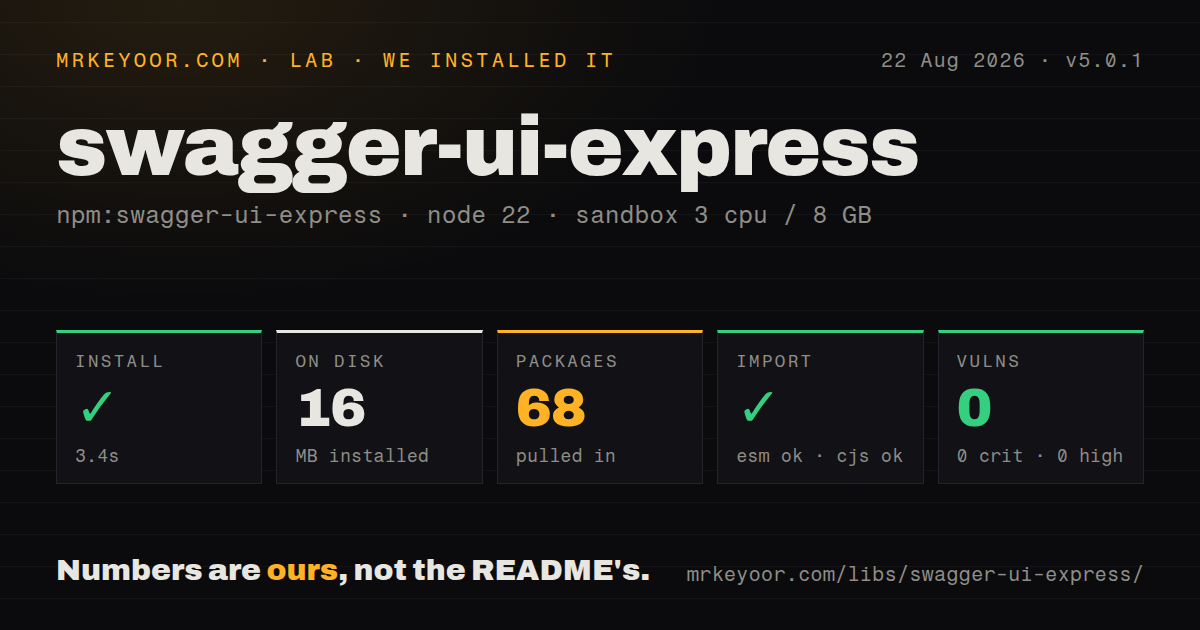
| Install | ✓ · 3.4s | 68 packages on disk · 16 MB |
| Import | ✓ | ESM import works · require() works · CommonJS package |
| Browser | n/a | could not be bundled for the browser (Node-only code, most likely) |
| Types | — | no TypeScript types found |
| Known vulns | 0 | 0 critical · 0 high · 0 moderate · 0 low (npm audit) |
Answers from our run
Does swagger-ui-express install cleanly?
Yes. In a fresh container with an empty cache, npm install swagger-ui-express finished in 3 seconds, leaving 68 packages and 16 MB on disk. npm audit reported no known vulnerabilities.
Can swagger-ui-express run in a browser?
Not directly: esbuild could not bundle it for the browser in our run, which normally means it depends on Node built-ins. Use it on the server, or find a browser-targeted alternative.
Does swagger-ui-express work with both ESM and CommonJS?
Yes. Both import 'swagger-ui-express' and require('swagger-ui-express') worked in Node 22 in our run. The package is published as CommonJS.
Does swagger-ui-express include TypeScript types?
No type declarations were found in our install, so TypeScript users need their own declarations.
swagger-ui-express or @scalar/express-api-reference: which should you use?
@scalar/express-api-reference: Use it for Scalar's Express-hosted API reference and integrated client experience. swagger-ui-express 5.0.1 installed 68 packages and 16 MB in 3.4 seconds with 0 audit findings, giving Express teams a short path to Swagger UI at a noticeable dependency cost.
When should you not use swagger-ui-express?
The server does not use Express. The exported values are Express middleware and do not provide a framework-neutral HTTP adapter.
Use it if
- An Express 4 or 5 service already has an OpenAPI document and needs an interactive reference route.
- The API team wants Swagger UI's request console served by the same host as the application.
- Several specs need separate routes or an explorer dropdown backed by browser-accessible URLs.
- Documentation needs a custom title, favicon, stylesheet, or trusted client script without maintaining a separate frontend.
- The server does not use Express. The exported values are Express middleware and do not provide a framework-neutral HTTP adapter.
- You need request or response enforcement. This package displays a contract but never compares live traffic with it.
- Frontend asset versions must be reproducible without a lockfile override. swagger-ui-dist is declared as >=5.0.0, so later installs may resolve a different UI release.
- First-party TypeScript declarations are required. Version 5.0.1 bundles no types, and TypeScript projects normally add @types/swagger-ui-express.
- The docs must work in a browser bundle or edge runtime. Our esbuild browser build failed, and the package expects Express plus Node file and response behavior.
- You want a fast-moving adapter release line. npm still points to 5.0.1 from May 2024 even though GitHub contains an unpublished 5.0.2 tag from January 2025.
Setup reality
We installed swagger-ui-express 5.0.1 in a fresh Node 22 Bookworm sandbox. npm finished in 3.4 seconds and left 68 packages using 16 MB. The adapter itself is 36 KB unpacked, declares 1 direct dependency and 1 peer, and returned 0 npm audit findings. It is CommonJS with no exports map or bundled TypeScript declarations; require() and ESM import both worked through Node interop. Our esbuild browser build failed, as expected for Express server middleware.
Install Express separately, then mount swaggerUi.serve and swaggerUi.setup(spec) on the same route. YAML needs a separate parser and startup error handling. The direct swagger-ui-dist range is >=5.0.0, and the README explicitly recommends a lockfile or a pinned version. Without that control, the browser UI can change even while swagger-ui-express stays at 5.0.1. TypeScript users also need the external @types package and compatible CommonJS interop settings.
A remote url or urls setting is fetched by the user's browser after the HTML loads. Cross-origin specs therefore need CORS and must be reachable from the client network, not only from the Express process. For 2 independent UIs, use serveFiles(document, options) at each route. Request-specific content goes on req.swaggerDoc; create a fresh top-level object instead of mutating one shared spec with host data from concurrent requests.
The package adds no authentication and leaves Swagger UI's Try it out feature available according to the supplied configuration. Put authorization middleware before both assets and HTML, and remove internal operations from any public document. customJs and customJsStr execute in the page, so use only trusted code and account for script-src in Content Security Policy. Version 5.0.1 contains only dependency updates, while the repository's 5.0.2 tag has not become npm latest.
Patterns
Serve one OpenAPI document mount-json-document
const express = require('express');
const swaggerUi = require('swagger-ui-express');
const openapi = require('./openapi.json');

const app = express();
app.use('/api-docs', swaggerUi.serve, swaggerUi.setup(openapi));
Both asset and HTML middleware share /api-docs. Put access control before them when the document is private.
Attach Swagger UI to an Express Router mount-on-router
const router = require('express').Router();
router.use('/api-docs', swaggerUi.serve);
router.get('/api-docs', swaggerUi.setup(openapi));
Use router.use() for static assets and router.get() for the generated index handler.
Authenticate every documentation request protect-documentation
app.use(
  '/api-docs',
  requireInternalUser,
  swaggerUi.serve,
  swaggerUi.setup(openapi),
);
The package has 0 authorization features. Your middleware must run before the UI assets and document page.
Parse a YAML document before listening load-yaml-at-startup
const fs = require('node:fs');
const YAML = require('yaml');

const source = fs.readFileSync('./openapi.yaml', 'utf8');
const openapi = YAML.parse(source);
app.use('/api-docs', swaggerUi.serve, swaggerUi.setup(openapi));
YAML parsing is outside swagger-ui-express. Let parse errors fail startup rather than serving an empty page.
Set Swagger UI behavior configure-ui-client
const options = {
  explorer: true,
  swaggerOptions: {
    validatorUrl: null,
    displayRequestDuration: true,
    persistAuthorization: false,
  },
};
explorer belongs at the wrapper level. Swagger UI runtime settings belong inside swaggerOptions.
Set title, favicon, and CSS brand-documentation-page
const options = {
  customSiteTitle: 'Payments API',
  customfavIcon: '/assets/favicon.ico',
  customCss: '.swagger-ui .topbar { display: none }',
  customCssUrl: '/assets/api-docs.css',
};
The browser loads customCssUrl. Express must serve that URL and the page's style-src policy must permit it.
Publish the spec as a separate endpoint load-browser-spec-url
const options = { swaggerOptions: { url: '/api-docs/openapi.json' } };

app.get('/api-docs/openapi.json', (_req, res) => res.json(openapi));
app.use('/api-docs', swaggerUi.serveFiles(null, options), swaggerUi.setup(null, options));
The browser fetches the URL after page load. Cross-origin URLs need client-visible networking and CORS headers.
List several documents in explorer offer-spec-dropdown
const options = {
  explorer: true,
  swaggerOptions: {
    urls: [
      { name: 'Public API', url: '/specs/public.json' },
      { name: 'Admin API', url: '/specs/admin.json' },
    ],
  },
};
explorer: true is required for the selector, and the browser fetches each selected URL.
Keep public and admin specs separate mount-independent-docs
app.use('/public-docs', swaggerUi.serveFiles(publicSpec), swaggerUi.setup(publicSpec));
app.use('/admin-docs', requireAdmin, swaggerUi.serveFiles(adminSpec), swaggerUi.setup(adminSpec));
Use serveFiles() for each document. Sharing swaggerUi.serve across differently initialized UIs can mix configuration assets.
Set the server URL from a request build-request-specific-document
app.use('/api-docs', (req, _res, next) => {
  req.swaggerDoc = {
    ...openapi,
    servers: [{ url: `${req.protocol}://${req.get('host')}` }],
  };
  next();
}, swaggerUi.serveFiles(), swaggerUi.setup());
Create a new object per request. Express trust proxy settings determine whether req.protocol reflects the public scheme.
Load one controlled client script inject-trusted-script
const options = { customJs: '/assets/swagger-custom.js' };
app.use('/api-docs', swaggerUi.serve, swaggerUi.setup(openapi, options));
customJs executes in the page. Restrict it to code you own and permit its URL in script-src.
Pass swagger-jsdoc output to the UI display-generated-spec
const spec = swaggerJSDoc({
  definition: { openapi: '3.1.0', info: { title: 'Orders API', version: '1.0.0' } },
  apis: ['./src/routes/**/*.js'],
});
app.use('/api-docs', swaggerUi.serve, swaggerUi.setup(spec));
swagger-jsdoc creates the document; swagger-ui-express only renders it. Contract validation needs another package.
Alternatives
| Package | Registry | Pick it when |
|---|---|---|
| @scalar/express-api-reference | npm | Use it for Scalar's Express-hosted API reference and integrated client experience. |
| redoc-express | npm | Use it when a readable reference document matters more than an in-page request console. |
| swagger-ui | npm | Use the UI directly when you control a separate frontend and do not need an Express adapter. |
| koa2-swagger-ui | npm | Use it for the same Swagger UI job in a Koa application. |
More web backend guides
ws · urllib3 · requests · undici · anyio · express · the whole shelf →
How this guide is made: grounded in the library's documentation, release notes, changelog, and issue history, on a fixed rubric — not a hands-on install of every release. The 50 most-downloaded entries are additionally install-verified in clean containers. Corrections: contact the desk.