sounddevice review
sounddevice 0.5.6 connects Python code to PortAudio input and output devices on Linux, macOS, and Windows. `play()`, `rec()`, and `playrec()` handle short NumPy jobs; blocking and callback streams cover longer work, while Raw streams exchange byte buffers. Version 0.5.6 fixes architecture detection for Windows ARM64. Our binding import took 0.05 seconds, but that check did not prove that a microphone, speaker, host API, or requested sample rate existed. This package moves sample buffers to hardware; it does not decode audio files or supply a mixer and effects graph.
sounddevice 0.5.6 installed in 0.2 seconds and its binding loaded in 0.05 seconds with 2 MB on disk in our sandbox, but no audio device was proven. Use it for PortAudio-backed NumPy I/O only when native routing and callback deadlines are deployment concerns you can test.
We installed it
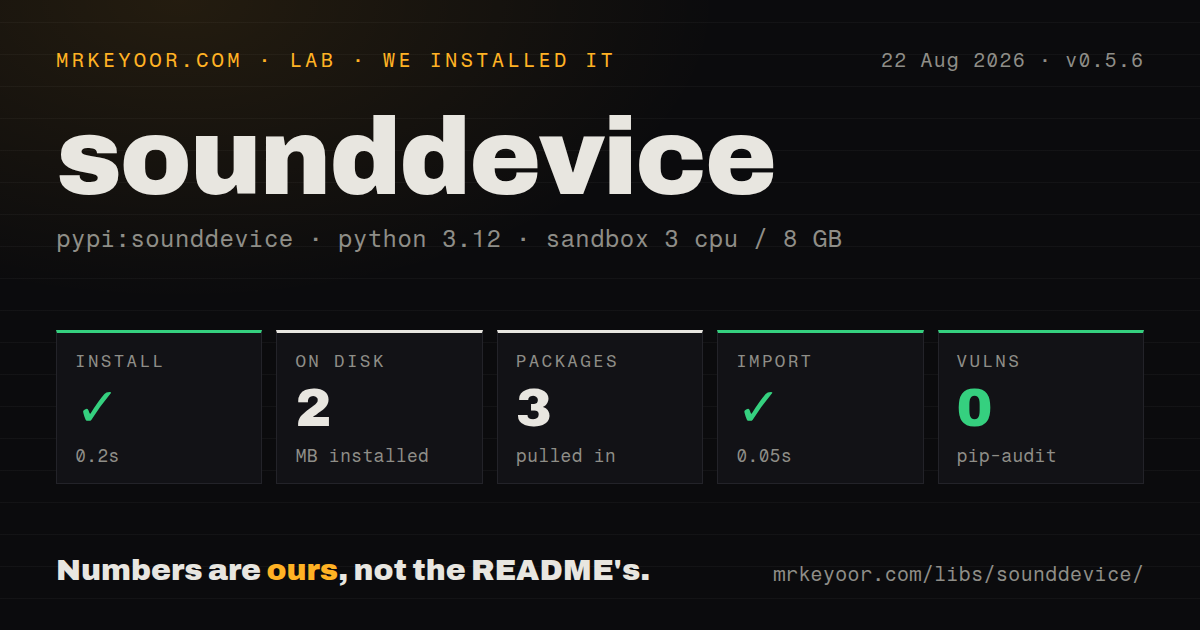
| Install | ✓ · 0.2s | 3 packages on disk · 2 MB |
| Import | ✓ | import _sounddevice in 0.05s · pure Python · requires Python >=3.7 |
| Known vulns | 0 | (pip-audit) |
Answers from our run
Does sounddevice install cleanly?
Yes. In a fresh container with an empty cache, pip install sounddevice finished in 0.2s, leaving 3 packages and 2 MB on disk. pip-audit reported no known vulnerabilities.
What does sounddevice need to run?
Python >=3.7, and nothing compiled: it is pure Python. In our run import _sounddevice succeeded in 0.05s.
sounddevice or PyAudio: which should you use?
PyAudio: Use it when maintaining a PortAudio codebase already organized around PyAudio's stream API. sounddevice 0.5.6 installed in 0.2 seconds and its binding loaded in 0.05 seconds with 2 MB on disk in our sandbox, but no audio device was proven.
When should you not use sounddevice?
The task is decoding, encoding, resampling, or editing files. sounddevice talks to hardware; a file codec library handles stored audio.
Use it if
- A desktop Python tool needs direct microphone capture or speaker playback through a PortAudio host API.
- Measurement, synthesis, or signal-processing code works with NumPy buffers and can obey real-time callback limits.
- A script needs a fixed-duration recording or quick playback from the default device.
- An existing binary pipeline wants `RawInputStream` or `RawOutputStream` without NumPy conversion.
- The task is decoding, encoding, resampling, or editing files. sounddevice talks to hardware; a file codec library handles stored audio.
- You cannot provision PortAudio, an OS audio service, and working hardware drivers. A pure-Python wheel does not remove that native stack.
- The callback must perform network requests, disk writes, locks, large allocations, or slow logging. Missing PortAudio deadlines causes glitches and dropped frames.
- Callback exceptions must automatically reach the main task. Ordinary callback failures stop processing and are printed to stderr instead.
- Policy requires package-declared license metadata and `py.typed`. PyPI reports no license value and our 0.5.6 install had no typing marker.
Setup reality
Our install of sounddevice 0.5.6 completed in 0.2 seconds in a clean Python 3.12 container. Three packages occupied 2 MB, importing _sounddevice took 0.05 seconds, and pip-audit reported 0 known vulnerabilities. The pure-Python package has 2 direct dependencies, requires Python 3.7 or newer, and contains no py.typed marker. PyPI's license field is empty, although the repository README states MIT.
Loading the binding does not validate audio hardware. PortAudio is still native code. Windows and macOS wheels commonly include it; Linux often needs a system library plus ALSA, PulseAudio, PipeWire, or JACK routing. Capture query_hostapis() and query_devices() in diagnostics. Device indexes can change after reconnection, and a name fragment can be ambiguous. Run check_input_settings() or check_output_settings() with the exact device, channel count, sample rate, and dtype before opening a persistent stream.
play(), rec(), and playrec() return before completion unless blocking=True is used or wait() follows. Starting a second convenience operation stops the first because those helpers share module state. Use separate Stream objects for overlap. A callback must fill every output frame with outdata[:], inspect status flags, and put slow work onto a bounded queue. blocksize=0 lets PortAudio choose buffers and often has more scheduling margin than an aggressively small fixed block.
Low latency reduces the time available before an underflow or overflow. Normal callback exceptions do not propagate to the main thread; use CallbackStop or CallbackAbort for documented control and communicate other failures through shared state or a queue. Windows ASIO depends on the PortAudio DLL that loads. For the pip build switch, set SD_ENABLE_ASIO before importing sounddevice. Version 0.5.6 only fixes Windows ARM64 detection, so every target device and driver still needs a real playback and capture test.
Patterns
List device channel capacities list-audio-devices
import sounddevice as sd

for index, device in enumerate(sd.query_devices()):
    print(index, device['name'], device['max_input_channels'], device['max_output_channels'])
Device indexes can change after reboot or reconnection. Store a human-readable identity and validate the selected index again at startup.
Inspect the loaded PortAudio host APIs inspect-host-apis
import sounddevice as sd

for api in sd.query_hostapis():
    print(api['name'], api['default_input_device'], api['default_output_device'])
The machine and loaded PortAudio DLL determine this list. Installing version 0.5.6 does not guarantee ASIO, JACK, or another named backend.
Check a device format before opening it validate-input-format
sd.check_input_settings(device='USB Audio', channels=1, samplerate=48000, dtype='float32')A text selector must match one device unambiguously. Query devices after a failure and verify all 4 parameters against the intended hardware.
Play samples and wait for completion play-numpy-array
sd.play(samples, samplerate=48000)
status = sd.wait()
if status: print(status)
`play()` starts asynchronously. `wait()` blocks until completion and returns callback status, including output underflow information.
Record 5 seconds of mono audio record-fixed-duration
rate = 48000
audio = sd.rec(5 * rate, samplerate=rate, channels=1, dtype='float32')
sd.wait()
The returned NumPy array is still being filled until `wait()` completes. Validate the input format before depending on its 240000 frames.
Capture input while playing an array play-and-record
recorded = sd.playrec(output_samples, samplerate=48000, channels=1, dtype='float32')
sd.wait()
The playback array shape sets output channels, while `channels=1` selects the number of recorded input channels.
Set process-wide input and output defaults configure-default-devices
sd.default.device = ('USB Microphone', 'Built-in Output')
sd.default.samplerate = 48000
sd.default.channels = (1, 2)
These assignments mutate module-wide state. Reusable libraries should pass stream arguments rather than changing the host application's defaults.
Copy microphone frames to the output run-duplex-callback
def callback(indata, outdata, frames, time_info, status):
    outdata[:] = indata

with sd.Stream(samplerate=48000, channels=1, blocksize=0, callback=callback):
    sd.sleep(5000)
Use headphones to avoid feedback. Move logging and other slow work out of the callback, and copy with `outdata[:]` so the supplied buffer is filled.
Stop after the source buffer ends stop-output-stream
position = 0
def callback(outdata, frames, time_info, status):
    global position
    count = min(frames, len(samples) - position)
    outdata.fill(0)
    outdata[:count] = samples[position:position + count]
    position += count
    if count < frames: raise sd.CallbackStop
Zero unused frames before raising `CallbackStop`. A normal exception is printed to stderr and does not arrive as an exception in the main thread.
Read one input block outside a callback read-blocking-input
with sd.InputStream(samplerate=48000, channels=1, dtype='float32') as stream:
    block, overflowed = stream.read(1024)
Blocking reads are simple only when the caller drains frames fast enough. Check `overflowed` on every 1024-frame read.
Read int16 frames without NumPy capture-raw-bytes
with sd.RawInputStream(samplerate=48000, channels=1, dtype='int16') as stream:
    data, overflowed = stream.read(1024)
    payload = bytes(data)
Raw consumers must agree on byte order, 16-bit sample format, channel order, and frame boundaries. The buffer carries no self-describing header.
Request the pip ASIO build before import enable-windows-asio
import os
os.environ['SD_ENABLE_ASIO'] = '1'
import sounddevice as sd
print(sd.query_hostapis())
Set the variable before the first import. A different PortAudio DLL earlier on PATH can still determine which host APIs appear.
Alternatives
| Package | Registry | Pick it when |
|---|---|---|
| PyAudio | PyPI | Use it when maintaining a PortAudio codebase already organized around PyAudio's stream API. |
| SoundCard | PyPI | Use it for a compact NumPy capture and playback layer over native platform audio backends. |
| simpleaudio | PyPI | Use it for straightforward playback when recording and callback streams are unnecessary. |
More utils guides
lru-cache · type-fest · ajv · zod · p-limit · find-up · the whole shelf →
How this guide is made: grounded in the library's documentation, release notes, changelog, and issue history, on a fixed rubric — not a hands-on install of every release. The 50 most-downloaded entries are additionally install-verified in clean containers. Corrections: contact the desk.