rapidfuzz review
RapidFuzz 3.14.5 scores spelling and token overlap with compiled implementations of Levenshtein, Damerau-Levenshtein, Hamming, Jaro, Jaro-Winkler, indel, and FuzzyWuzzy-style ratios. Its process module ranks known candidates or computes pair and cross-product arrays without a Python loop. It can also expose alignments and edit operations. The current patch fixes release automation for a Pyodide wheel after recent typing and platform-wheel work. Version 3 performs no automatic lowercase, whitespace, or punctuation normalization, and none of these scorers understand meaning or aliases.
RapidFuzz 3.14.5 installed in 0.3 seconds, used 12 MB, and returned zero pip-audit findings in our sandbox. It is a strong fit for bounded lexical matching; it does not replace semantic search or candidate blocking.
We installed it
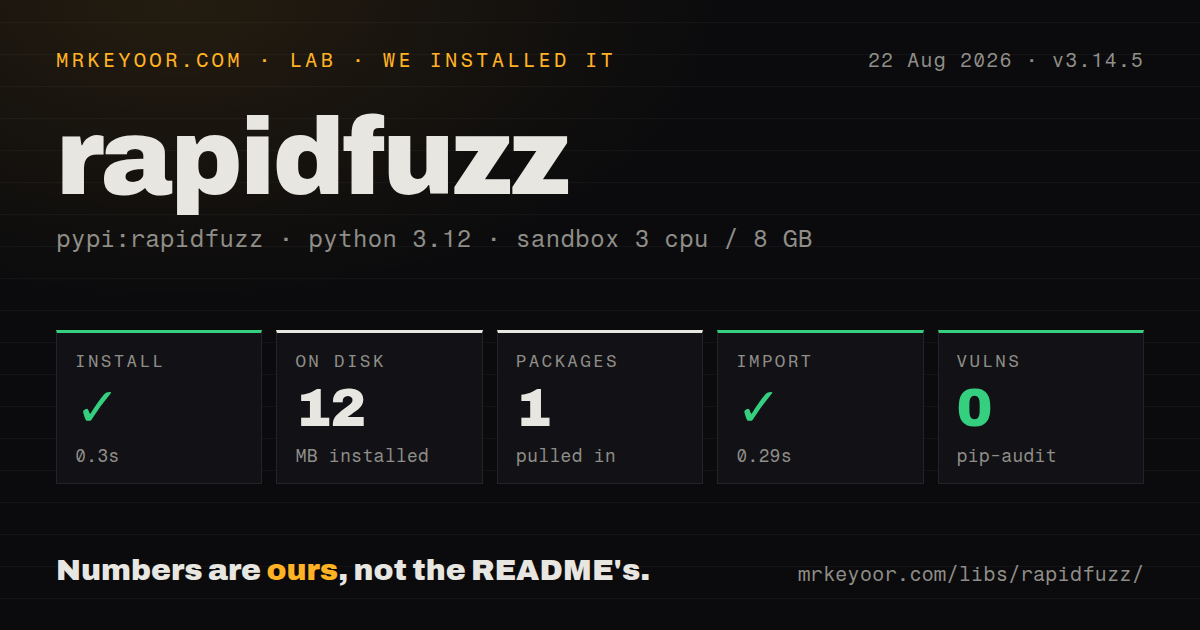
| Install | ✓ · 0.3s | 1 package on disk · 12 MB |
| Import | ✓ | import rapidfuzz in 0.29s · compiled extensions · py.typed · requires Python >=3.10 |
| Known vulns | 0 | (pip-audit) |
Answers from our run
Does rapidfuzz install cleanly?
Yes. In a fresh container with an empty cache, pip install rapidfuzz finished in 0.3s, leaving 1 package and 12 MB on disk. pip-audit reported no known vulnerabilities.
What does rapidfuzz need to run?
Python >=3.10, and a platform wheel with compiled extensions. In our run import rapidfuzz succeeded in 0.29s, and the package ships py.typed for type checkers.
rapidfuzz or thefuzz: which should you use?
thefuzz: Use it when maintenance code must keep the older fuzzywuzzy-style import surface. RapidFuzz 3.14.5 installed in 0.3 seconds, used 12 MB, and returned zero pip-audit findings in our sandbox.
When should you not use rapidfuzz?
A match depends on meaning or aliases such as NYC and New York City; character distance cannot infer that relationship.
Discussed on
Use it if
- Misspelled names, addresses, SKUs, or titles need ranking against a bounded candidate set.
- Pairwise or matrix scoring should run in compiled process.cpdist or process.cdist code.
- The application needs a named edit metric, weighted operations, or the exact edit script.
- FuzzyWuzzy-style scorer names are useful but active maintenance and an MIT project are preferred.
- A match depends on meaning or aliases such as NYC and New York City; character distance cannot infer that relationship.
- Records cannot be compared all-to-all at their current scale. RapidFuzz scores candidates but does not build a blocking index.
- One rare comparison can use difflib and a compiled extension is unwanted.
- Existing cutoffs assume FuzzyWuzzy preprocessing. RapidFuzz 3 leaves case, punctuation, and spaces unchanged unless a processor is supplied.
- The deployment has no compatible wheel and cannot compile C++17 code or accept the slower fallback path.
Setup reality
We installed RapidFuzz 3.14.5 in 0.3 seconds in a fresh Python 3.12 container. One package used 12 MB, and pip-audit found zero known vulnerabilities. The measured metadata reports one direct dependency and Python >=3.10. py.typed and compiled .so extensions were present; import rapidfuzz succeeded in 0.29 seconds. Our inspection did not determine a license, so record the terms from the distribution or repository during compliance review.
No account or configuration file is needed. Mainstream deployments generally use wheels. Building from the source repository requires a C++17 compiler and its recursive submodules, while Windows needs the documented Visual C++ runtime. Verify the production image imports the compiled implementation; a correct fallback can still change throughput enough to invalidate a batch window or request latency target.
Version 3 leaves text untouched by default. Pass utils.default_process or a domain normalizer when case and punctuation should be ignored, then store that processor beside the scorer and cutoff. A threshold learned with WRatio and preprocessing is not meaningful with raw ratio input. token_set_ratio can return 100 when one token set is contained in another, which is often too permissive for identity or product matching.
process.cdist allocates a query-by-choice array, and workers=-1 may consume every CPU. Bound both dimensions and worker count in a shared service. score_cutoff can abandon expensive work, though a distance above the cutoff may return a sentinel instead of the exact value. Use search or blocking to create candidates before RapidFuzz when the full cross product is too large.
Patterns
Score full-string similarity score-two-strings
from rapidfuzz import fuzz
score = fuzz.ratio('invoice 1042', 'invoice 1043')
fuzz scorers return floating-point values from 0 to 100; choose a cutoff from labeled domain examples.
Apply the built-in normalizer normalize-before-scoring
from rapidfuzz import fuzz, utils
score = fuzz.WRatio('ACME, Inc.', 'acme inc', processor=utils.default_process)
RapidFuzz 3 has no default processor. Changing normalization requires retuning every stored threshold.
Compare reordered tokens ignore-word-order
score = fuzz.token_sort_ratio('blue cotton shirt', 'shirt cotton blue')token_sort_ratio discards word order, so avoid it where order changes the identity or meaning.
Return one match above a cutoff find-best-candidate
from rapidfuzz import process
match = process.extractOne(query, choices, scorer=fuzz.WRatio, score_cutoff=80)
extractOne returns None when no candidate reaches score_cutoff; otherwise it returns value, score, and index or mapping key.
Keep the five strongest matches rank-candidates
matches = process.extract(query, choices, scorer=fuzz.WRatio, score_cutoff=70, limit=5)Every candidate is still considered; limit bounds the returned list rather than creating a search index.
Compute a bounded cross product build-score-matrix
import numpy as np
matrix = process.cdist(queries, choices, scorer=fuzz.ratio, dtype=np.uint8, workers=4)
Memory grows with len(queries) times len(choices). Set workers deliberately instead of using every CPU in a shared service.
Compare rows one by one score-aligned-pairs
scores = process.cpdist(left_names, right_names, scorer=fuzz.WRatio)cpdist requires equal-length collections and scores aligned pairs; cdist compares every query with every choice.
Price substitutions differently weighted-edit-distance
from rapidfuzz.distance import Levenshtein
distance = Levenshtein.distance(source, target, weights=(1, 1, 2))
The weights tuple is insertion, deletion, then substitution cost.
Inspect the edits between strings get-edit-operations
operations = Levenshtein.editops('kitten', 'sitting')
for op in operations: print(op.tag, op.src_pos, op.dest_pos)
Generate edit operations only after candidate selection; score-only ranking carries less work and less result data.
Alternatives
| Package | Registry | Pick it when |
|---|---|---|
| thefuzz | PyPI | Use it when maintenance code must keep the older fuzzywuzzy-style import surface. |
| jellyfish | PyPI | Use it when Soundex, Metaphone, or other phonetic encodings matter with string distances. |
| textdistance | PyPI | Use it when metric breadth matters more than RapidFuzz's compiled process helpers. |
More utils guides
lru-cache · type-fest · ajv · zod · p-limit · find-up · the whole shelf →
How this guide is made: grounded in the library's documentation, release notes, changelog, and issue history, on a fixed rubric — not a hands-on install of every release. The 50 most-downloaded entries are additionally install-verified in clean containers. Corrections: contact the desk.