python-telegram-bot review
python-telegram-bot is an asyncio client and application framework for Telegram's Bot API. The telegram package models API objects and methods; telegram.ext adds Application, handlers, conversations, persistence hooks, scheduled jobs, filters, and polling or webhook runners. Version 22.8 adds Bot API 9.6 and 10.0 support, including new poll fields, fixes merged-filter type checking and effective_user for channel posts, and begins Python 3.15 beta support. Our Python 3.12 install loaded the telegram module successfully and included py.typed.
python-telegram-bot 22.8 installed in 0.3 seconds, used 7 MB across 8 packages, and imported in 0.62 seconds with no audit findings in our sandbox. It fits maintained async bots with handlers and lifecycle needs; synchronous notification scripts and MTProto clients should use smaller, different tools.
We installed it
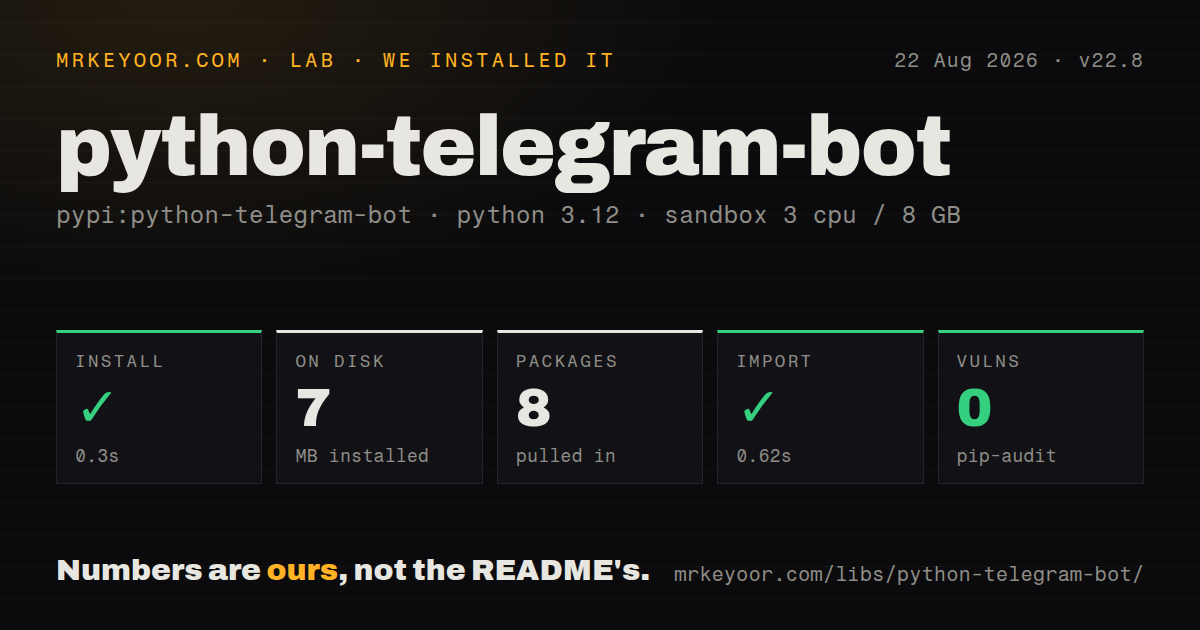
| Install | ✓ · 0.3s | 8 packages on disk · 7 MB |
| Import | ✓ | import telegram in 0.62s · pure Python · py.typed · requires Python >=3.10 |
| Known vulns | 0 | (pip-audit) |
Answers from our run
Does python-telegram-bot install cleanly?
Yes. In a fresh container with an empty cache, pip install python-telegram-bot finished in 0.3s, leaving 8 packages and 7 MB on disk. pip-audit reported no known vulnerabilities.
What does python-telegram-bot need to run?
Python >=3.10, and nothing compiled: it is pure Python. In our run import telegram succeeded in 0.62s, and the package ships py.typed for type checkers.
python-telegram-bot or aiogram: which should you use?
aiogram: Use it for an async router and middleware design with a first-class finite-state-machine workflow. python-telegram-bot 22.8 installed in 0.3 seconds, used 7 MB across 8 packages, and imported in 0.62 seconds with no audit findings in our sandbox.
When should you not use python-telegram-bot?
The calling application is synchronous and sends only occasional notifications. A direct Bot API request avoids managing an event loop and framework lifecycle
Use it if
- A Python bot needs command, message, callback-query, conversation, and error dispatch in one async framework
- The project wants close tracking of new Telegram Bot API object and method fields
- Polling should work for development while the same Application can move to a webhook deployment
- Scheduled jobs, persistence, rate limiting, or arbitrary callback data justify installing the matching optional extras
- The calling application is synchronous and sends only occasional notifications. A direct Bot API request avoids managing an event loop and framework lifecycle
- Existing code or tutorials use the pre-v20 Dispatcher and synchronous handlers. The current library is async and those examples need a rewrite
- The account must act as a Telegram user, read channel history unavailable to bots, or use MTProto. Telethon covers that different protocol
- Several threads must mutate Application, ConversationHandler, persistence, or filters. The maintainers explicitly do not promise thread safety
- LGPLv3 terms fail the deployment's legal review, especially when redistributing a modified or statically linked copy
Setup reality
We installed python-telegram-bot 22.8 in a fresh Python 3.12 Bookworm container. The install completed in 0.3 seconds and left 8 packages using 7 MB. The measured package declares 22 direct dependencies, requires Python 3.10 or newer, contains no compiled extension, and ships py.typed. Importing telegram worked in 0.62 seconds. pip-audit found no known vulnerabilities, and the measured license is LGPLv3.
A bot token from BotFather is the required credential. Keep it in the environment or a secret store and build the Application once. run_polling and run_webhook manage lifecycle for a standalone process; embedding PTB inside an existing asyncio server needs explicit initialize, start, stop, and shutdown calls so one component does not try to own the other's loop. Every handler is async, and bot methods must be awaited.
Features outside the base HTTP client use extras. JobQueue needs the job-queue extra, run_webhook needs webhooks, AIORateLimiter needs rate-limiter, and arbitrary callback objects need callback-data. Missing extras often appear only when the corresponding property is None or a runner is called. Pin the resolved httpx range alongside other SDKs that share it. Polling and webhooks are mutually exclusive at Telegram's delivery layer.
Updates run sequentially by default. concurrent_updates increases throughput but removes the simple ordering assumption across shared user_data, chat_data, conversations, and persistence. PTB is asyncio-oriented rather than thread-safe, including on free-threaded Python. Version 22.8 changes poll models for Bot API 9.6 and 10.0 while keeping temporary compatibility fields; use keyword arguments and read the deprecations before upgrading poll code.
Patterns
Run a minimal polling bot minimal-bot
from telegram import Update
from telegram.ext import Application, CommandHandler, ContextTypes

async def start(update: Update, context: ContextTypes.DEFAULT_TYPE) -> None:
    await update.message.reply_text("I am alive")

app = Application.builder().token("YOUR_BOT_TOKEN").build()
app.add_handler(CommandHandler("start", start))
app.run_polling()
run_polling owns the standalone lifecycle. Handlers must be async functions and bot calls must be awaited.
Replace a pre-v20 example avoid-v13-updater
# Pre-2023 tutorials and most LLM output look like this. It does NOT run on v20+:
#   updater = Updater("TOKEN", use_context=True)
#   updater.dispatcher.add_handler(CommandHandler("start", start))
#   updater.start_polling(); updater.idle()

# Current API since v20:
app = Application.builder().token("TOKEN").build()
app.add_handler(CommandHandler("start", start))  # start is async def now
app.run_polling()
Dispatcher and synchronous handler tutorials target an obsolete API; current bots build an Application.
Read command arguments command-arguments
async def caps(update: Update, context: ContextTypes.DEFAULT_TYPE) -> None:
    if not context.args:
        await update.message.reply_text("Usage: /caps some text")
        return
    await update.message.reply_text(" ".join(context.args).upper())

app.add_handler(CommandHandler("caps", caps))
context.args contains whitespace-split text after the command. Group visibility still depends on BotFather privacy settings.
Compose message filters message-filters
from telegram.ext import MessageHandler, filters

async def echo(update: Update, context: ContextTypes.DEFAULT_TYPE) -> None:
    await update.message.reply_text(update.message.text)

app.add_handler(MessageHandler(filters.TEXT & ~filters.COMMAND, echo))
app.add_handler(MessageHandler(filters.PHOTO, on_photo))
app.add_handler(MessageHandler(filters.Regex(r"(?i)refund"), on_refund))
Within a handler group, registration order decides which first matching handler runs. Exclude COMMAND from a general text rule.
Answer an inline button press inline-keyboard-callbacks
from telegram import InlineKeyboardButton, InlineKeyboardMarkup
from telegram.ext import CallbackQueryHandler

async def menu(update: Update, context: ContextTypes.DEFAULT_TYPE) -> None:
    kb = [[InlineKeyboardButton("Approve", callback_data="ok"),
           InlineKeyboardButton("Reject", callback_data="no")]]
    await update.message.reply_text("Decide:", reply_markup=InlineKeyboardMarkup(kb))

async def on_button(update: Update, context: ContextTypes.DEFAULT_TYPE) -> None:
    query = update.callback_query
    await query.answer()
    await query.edit_message_text(f"You chose: {query.data}")

app.add_handler(CommandHandler("menu", menu))
app.add_handler(CallbackQueryHandler(on_button))
Call query.answer even when no alert text is needed, otherwise the Telegram client keeps showing its progress indicator.
Model a multi-step conversation conversation-handler
from telegram.ext import ConversationHandler

NAME, AGE = range(2)

async def signup(update, context):
    await update.message.reply_text("Your name?")
    return NAME

async def got_name(update, context):
    context.user_data["name"] = update.message.text
    await update.message.reply_text("Your age?")
    return AGE

async def got_age(update, context):
    await update.message.reply_text(f"Done, {context.user_data['name']}.")
    return ConversationHandler.END

async def cancel(update, context):
    return ConversationHandler.END

app.add_handler(ConversationHandler(
    entry_points=[CommandHandler("signup", signup)],
    states={NAME: [MessageHandler(filters.TEXT & ~filters.COMMAND, got_name)],
            AGE: [MessageHandler(filters.Regex(r"^\d+$"), got_age)]},
    fallbacks=[CommandHandler("cancel", cancel)],
))
Return the next state or ConversationHandler.END. Configure persistence if conversations must survive a restart.
Send a photo or document send-files-photos
from pathlib import Path

async def report(update: Update, context: ContextTypes.DEFAULT_TYPE) -> None:
    msg = await update.message.reply_photo(
        photo=Path("chart.png"), caption="Daily chart")
    context.bot_data["chart_file_id"] = msg.photo[-1].file_id

    await context.bot.send_document(
        chat_id=update.effective_chat.id,
        document=open("report.pdf", "rb"),
        filename="report.pdf")
Reuse Telegram file_id values to avoid uploading the same bytes again. File limits come from the Bot API or self-hosted server.
Expose a webhook webhook-vs-polling
# pip install "python-telegram-bot[webhooks]"   (pulls tornado)
app.run_webhook(
    listen="127.0.0.1",
    port=8443,
    url_path="telegram",
    secret_token="random-string-you-generate",
    webhook_url="https://example.com/telegram",
)
Install the webhooks extra and verify secret_token. Telegram and the public TLS endpoint must agree on the active webhook URL.
Schedule a bot job job-queue
# pip install "python-telegram-bot[job-queue]"   (pulls APScheduler)

async def remind(context: ContextTypes.DEFAULT_TYPE) -> None:
    await context.bot.send_message(chat_id=context.job.chat_id, text="Reminder!")

async def set_timer(update: Update, context: ContextTypes.DEFAULT_TYPE) -> None:
    context.job_queue.run_once(remind, when=300, chat_id=update.effective_chat.id)

app.job_queue.run_repeating(nightly_sync, interval=86400, first=10)
Install the job-queue extra first. Job callbacks receive context and read their arguments from context.job.
Report handler failures error-handler
import logging

logger = logging.getLogger(__name__)

async def on_error(update: object, context: ContextTypes.DEFAULT_TYPE) -> None:
    logger.error("Update %s caused error", update, exc_info=context.error)
    # optionally: await context.bot.send_message(chat_id=DEV_CHAT_ID, text=str(context.error))

app.add_error_handler(on_error)
Network failures and programming errors both reach the error handler, so classify them before paging or retrying.
Send once from a script sync-code-bridge
import asyncio
from telegram import Bot

def notify(text: str) -> None:
    async def _send():
        async with Bot("YOUR_BOT_TOKEN") as bot:
            await bot.send_message(chat_id=CHAT_ID, text=text)
    asyncio.run(_send())
asyncio.run is suitable for a one-shot synchronous entrypoint, but cannot be nested inside an event loop already running.
Handle several updates at once concurrent-updates
app = (
    Application.builder()
    .token("YOUR_BOT_TOKEN")
    .concurrent_updates(True)
    .build()
)
Concurrent updates trade ordering for throughput. Protect shared state and be cautious with ConversationHandler.
Alternatives
| Package | Registry | Pick it when |
|---|---|---|
| aiogram | PyPI | Use it for an async router and middleware design with a first-class finite-state-machine workflow. |
| pyTelegramBotAPI | PyPI | Use it when a small bot benefits from a synchronous interface, with an async variant available later. |
| Telethon | PyPI | Use it for MTProto, user accounts, channel history, and Telegram capabilities outside the Bot API. |
More web backend guides
ws · urllib3 · requests · undici · anyio · express · the whole shelf →
How this guide is made: grounded in the library's documentation, release notes, changelog, and issue history, on a fixed rubric — not a hands-on install of every release. The 50 most-downloaded entries are additionally install-verified in clean containers. Corrections: contact the desk.