python-slugify review
python-slugify 8.0.4 converts free text into path-shaped strings through `slugify()`. It can transliterate scripts to ASCII, retain Unicode letters, decode HTML entities, remove stopwords, cap length at a word boundary, apply replacements, preserve case, and select a separator. The distribution also installs a `slugify` command. Version 8.0.4 fixes uppercase special characters in its pre-translation table. Our Python 3.12 sandbox imported the pure Python package in 0.09 seconds, but slug creation still needs application rules for collisions, empty results, and permanent URLs.
python-slugify 8.0.4 installed in 0.2 seconds as 2 packages using 1 MB in our sandbox, with 0 audit findings and a 0.09-second import. It is a good text-to-path converter, but teams needing unique, permanent, or linguistically exact names must build those policies outside the function.
We installed it
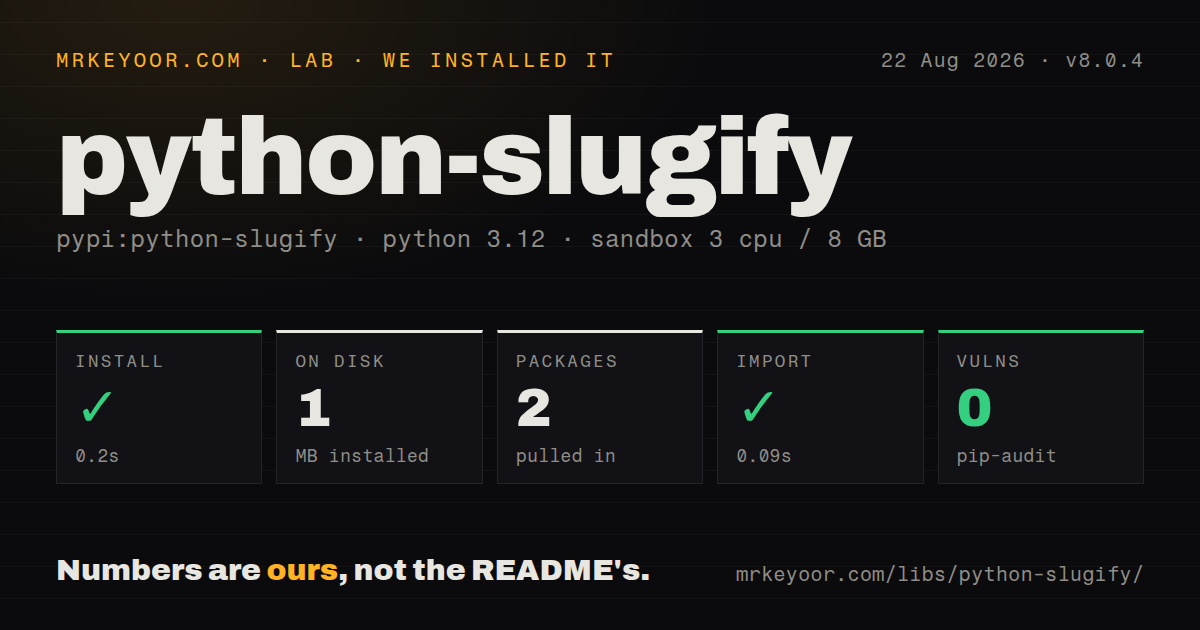
| Install | ✓ · 0.2s | 2 packages on disk · 1 MB |
| Import | ✓ | import slugify in 0.09s · pure Python · py.typed · requires Python >=3.7 |
| Known vulns | 0 | (pip-audit) |
Answers from our run
Does python-slugify install cleanly?
Yes. In a fresh container with an empty cache, pip install python-slugify finished in 0.2s, leaving 2 packages and 1 MB on disk. pip-audit reported no known vulnerabilities.
What does python-slugify need to run?
Python >=3.7, and nothing compiled: it is pure Python. In our run import slugify succeeded in 0.09s, and the package ships py.typed for type checkers.
python-slugify or awesome-slugify: which should you use?
awesome-slugify: Use it only when its older language-specific helpers and dependency set match a legacy project. python-slugify 8.0.4 installed in 0.2 seconds as 2 packages using 1 MB in our sandbox, with 0 audit findings and a 0.09-second import.
When should you not use python-slugify?
Dependency review rejects the default transliterator's GPL and Artistic dual-license options, even though python-slugify itself uses MIT.
Use it if
- Titles from accented Latin, Cyrillic, Greek, CJK, or other scripts need readable ASCII route segments.
- One call should own length, separator, stopword, case, entity, replacement, and Unicode policy.
- A site intentionally keeps original-script letters in public URLs with `allow_unicode=True`.
- Shell scripts need the same conversion through an installed command.
- Dependency review rejects the default transliterator's GPL and Artistic dual-license options, even though python-slugify itself uses MIT.
- The framework already generates acceptable slugs for every supported language, making another transliteration dependency redundant.
- The function is expected to ensure uniqueness, keep a URL stable after edits, or guarantee a nonempty result. It implements none of those storage decisions.
- Names require culturally correct transliteration. Character tables produce useful path text but can disagree with a person's chosen spelling.
- Install instructions may use the separate `slugify` distribution by mistake. `python-slugify` is the package name even though the import is `slugify`.
Setup reality
We installed python-slugify 8.0.4 in a fresh Python 3.12 Bookworm sandbox in 0.2 seconds. It left 2 packages and 1 MB on disk. pip-audit reported 0 known vulnerabilities. Our measurement lists 2 direct dependencies, pure Python code, a Python 3.7 minimum, py.typed, and the MIT license. import slugify completed in 0.09 seconds.
Pin python-slugify in project metadata and import slugify; PyPI also contains an unrelated package named slugify. The default dependency is text-unidecode, whose README identifies GPL and Artistic license choices. The optional python-slugify[unidecode] backend is GPL. Review the selected transliterator under your organization's license policy instead of treating the top-level MIT declaration as the whole dependency answer.
Slug output is not an identifier until storage code makes it one. Emoji-only or punctuation-only text can collapse to an empty string, and different titles can collapse to the same slug. Provide a fallback, add an immutable record ID or collision suffix, and enforce uniqueness in the database. Decide whether renaming a title creates a redirect or preserves the old path. If max_length is set, reserve characters for the suffix.
allow_unicode=True retains many letters but continues to remove disallowed symbols and emoji. Replacements run before cleanup and suit domain spellings such as C# or percent. Stopword comparison becomes case sensitive when lowercase=False. A custom regex_pattern describes characters to remove, so reversing the character class can erase the content you wanted. Version 8.0.4 changed uppercase special-character output; pin representative strings for every supported language before upgrading.
Patterns
Convert a title to ASCII slug-title
from slugify import slugify

slug = slugify("C'est déjà l'été")
assert slug == 'c-est-deja-l-ete'
The distribution is named `python-slugify`; the module imported by application code is `slugify`.
Transliterate two non-Latin scripts transliterate-script
assert slugify('Компьютер') == 'kompiuter'
assert slugify('影師嗎') == 'ying-shi-ma'
Table-based transliteration suits route text, but it does not promise the spelling a person uses for a name.
Keep original-script letters preserve-unicode
assert slugify('影師嗎', allow_unicode=True) == '影師嗎'
assert slugify('Компьютер', allow_unicode=True) == 'компьютер'
Unicode mode still removes many symbols and emoji. Logs and analytics can display the path in percent-encoded form.
Cut at a complete word limit-at-word
slug = slugify(
    'one two three four',
    max_length=12,
    word_boundary=True,
    save_order=True,
)
assert slug == 'one-two'
`save_order=True` prevents a shorter later word from moving forward merely because it fits under the length cap.
Select one route separator change-separator
assert slugify('Quarterly Report', separator='_') == 'quarterly_report'Changing the separator after publishing URLs creates another path form, so settle this policy before indexing.
Remove configured stopwords remove-stopwords
slug = slugify(
    'the quick brown fox over the fence',
    stopwords=['the', 'over'],
)
assert slug == 'quick-brown-fox-fence'
When `lowercase=False`, stopword matching becomes case sensitive and the list may need multiple spellings.
Translate meaningful symbols first replace-symbols
slug = slugify(
    'C# costs 10%',
    replacements=[['#', 'sharp'], ['%', 'percent']],
)
assert slug == 'csharp-costs-10percent'
Replacements run before ordinary cleanup, which preserves domain terms that would otherwise lose `#` or `%`.
Retain _ with a regex keep-extra-character
slug = slugify(
    '___This is a test___',
    regex_pattern=r'[^-a-z0-9_]+',
)
assert slug == '___this-is-a-test___'
`regex_pattern` matches disallowed characters. Test custom patterns because reversing the class removes the characters intended for output.
Preserve input capitalization preserve-case
assert slugify('Release Candidate', lowercase=False) == 'Release-Candidate'Case-sensitive routes behave differently across filesystems, reverse proxies, and caches; normalize lookup consistently.
Allocate space for a collision suffix build-unique-slug
def choose_slug(title, exists):
    base = slugify(title, max_length=56, word_boundary=True) or 'item'
    candidate = base
    number = 2
    while exists(candidate):
        candidate = f'{base[:56 - len(str(number))]}-{number}'
        number += 1
    return candidate
The database still needs a unique constraint because two concurrent writers can choose the same available candidate.
Control HTML entity decoding decode-entities
assert slugify('Tea & Coffee') == 'tea-coffee'
assert slugify('Tea & Coffee', entities=False) == 'tea-amp-coffee'
Entity decoding defaults to enabled and can be switched separately from decimal and hexadecimal character-reference handling.
Separate CLI options from source text use-command-line
echo 'Taking input from STDIN' | slugify --stdin
# taking-input-from-stdin

slugify --stopwords the over -- the fox over the fence
# fox-fence
After multi-value switches, `--` stops option parsing so the remaining words become the input string.
Alternatives
| Package | Registry | Pick it when |
|---|---|---|
| awesome-slugify | PyPI | Use it only when its older language-specific helpers and dependency set match a legacy project. |
| unicode-slugify | PyPI | Use it when retaining Unicode letters by default matches the route policy. |
| slugify | PyPI | Use this separate minimal project only after verifying its tiny API and maintenance history are sufficient. |
More utils guides
lru-cache · type-fest · ajv · zod · p-limit · find-up · the whole shelf →
How this guide is made: grounded in the library's documentation, release notes, changelog, and issue history, on a fixed rubric — not a hands-on install of every release. The 50 most-downloaded entries are additionally install-verified in clean containers. Corrections: contact the desk.