parse-latin review
parse-latin 7.0.0 turns Latin-script prose into an nlcst tree with paragraphs, sentences, words, whitespace, punctuation, symbols, and exact source positions. Its rules keep forms such as `non-profit`, `she's`, `G.I.`, `11:00`, and `N/A` together and avoid treating every period as a sentence boundary. It performs tokenization and structural splitting only: there is no tagging, stemming, entity recognition, sentiment, or model inference. That makes `utils` a more accurate category than the queue's `ai-ml` hint.
parse-latin 7.0.0 added 10 packages and 1 MB in our sandbox, bundled to 10 KB gzipped, and produced 0 audit findings with types included. Install it for offset-accurate Latin-script token trees or retext work; do not install it for AI, linguistic tagging, or a simple boundary list that `Intl.Segmenter` can supply.
We installed it
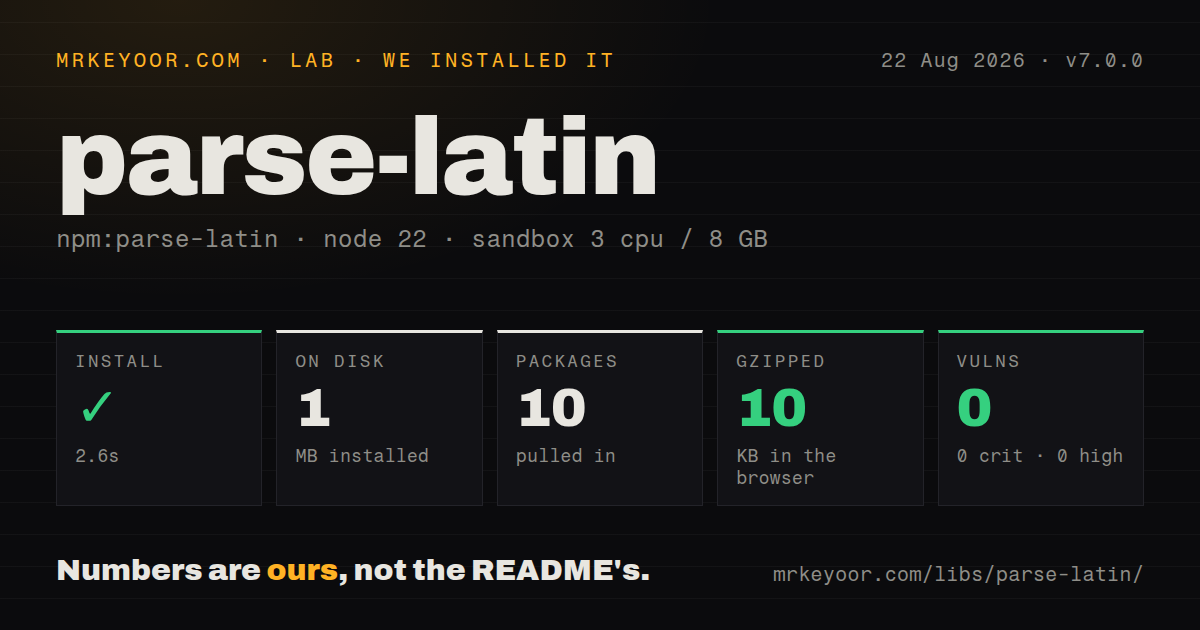
| Install | ✓ · 2.6s | 10 packages on disk · 1 MB |
| Import | ✓ | ESM import works · require() works · ESM package with exports map |
| Browser | 10 KB | gzipped (28.5 KB minified), bundled with esbuild |
| Types | ✓ | TypeScript types bundled |
| Known vulns | 0 | 0 critical · 0 high · 0 moderate · 0 low (npm audit) |
Answers from our run
Does parse-latin install cleanly?
Yes. In a fresh container with an empty cache, npm install parse-latin finished in 3 seconds, leaving 10 packages and 1 MB on disk. npm audit reported no known vulnerabilities.
How much does parse-latin add to a browser bundle?
10 KB gzipped (28.5 KB minified) when the whole package is bundled for the browser with esbuild. Importing only part of it is usually smaller.
Does parse-latin work with both ESM and CommonJS?
Yes. Both import 'parse-latin' and require('parse-latin') worked in Node 22 in our run. The package is published as ESM with an exports map.
Does parse-latin include TypeScript types?
Yes, type declarations ship inside the package, so no @types install is needed.
parse-latin or retext-latin: which should you use?
retext-latin: Use it when a unified processor and plugins should own the parse rather than direct tree construction. parse-latin 7.0.0 added 10 packages and 1 MB in our sandbox, bundled to 10 KB gzipped, and produced 0 audit findings with types included.
When should you not use parse-latin?
You need part-of-speech tags, lemmas, entities, sentiment, or semantic similarity. parse-latin produces token structure and never performs those analyses.
Use it if
- A prose linter or editor needs word and sentence nodes that point back to exact line, column, and offset positions.
- You are writing a retext plugin and want the nlcst shape used by the unified text ecosystem.
- Latin-script input contains abbreviations, initials, contractions, or hyphenated words that defeat a period or whitespace split.
- One parser must handle several Latin-script languages without pretending to provide language-specific linguistic analysis.
- You need part-of-speech tags, lemmas, entities, sentiment, or semantic similarity. parse-latin produces token structure and never performs those analyses.
- The corpus is specifically English or Dutch. The README directs those users to `parse-english` or `parse-dutch`, which add language-specific rules on top of this parser.
- A flat list of coarse word boundaries is sufficient. `Intl.Segmenter` is built into current JavaScript runtimes and avoids adopting nlcst plus tree utilities.
- The primary scripts are CJK, Arabic, or Hebrew. Version 7 targets Latin script and only claims partial usefulness for Cyrillic, Georgian, and Armenian.
- Your project requires a recently released tokenizer or newer Unicode tables. Version 7.0.0 dates to July 2023, the last push was October 2024, and its generated expressions reference Unicode 15.0.0.
Setup reality
We installed parse-latin 7.0.0 in 2.6 seconds in a fresh Node 22 Bookworm sandbox. The install left 10 packages and 1 MB on disk. parse-latin has 6 direct dependencies, no peers, a 212 KB unpacked size, and an MIT license. npm audit found 0 known vulnerabilities. The package includes TypeScript declarations. Our minified browser build measured 28.5 KB and 10 KB gzipped.
Version 7 declares ESM with an exports map. Both require() and ESM import worked in our Node 22 measurement, but the README promises ESM usage and Node 16 compatibility, so use the named ParseLatin export in portable examples. There is no default export, credential, config file, native build, or background service. Browser documentation uses esm.sh; bundler users can import the npm package normally.
The public API looks small because parse(value) is the documented entry point, but the returned nlcst tree is the actual integration contract. Parent nodes store children instead of a value; use nlcst-to-string to reconstruct text and a unist visitor to traverse nodes. Positions refer to the exact input string. Trimming, newline conversion, or Unicode normalization after parsing breaks offset mapping back to the original source.
Sentence boundaries are rules, not linguistic understanding. Version 7 merges punctuation inside known word shapes and handles terminal punctuation followed by quotes or parentheses, yet language-specific abbreviations can still need parse-english, parse-dutch, or a custom pass. For retext applications, install retext-latin or use retext's configured parser instead of parsing a second tree beside the processor. The 10 KB gzipped browser result is reasonable for editor tooling, but Intl.Segmenter is cheaper when you only need segmentation.
Patterns
Create an nlcst document tree parse-document
import { ParseLatin } from 'parse-latin';

const parser = new ParseLatin();
const tree = parser.parse('First sentence. Second sentence.');
Version 7 has no default export. `parse()` returns RootNode, then ParagraphNode and SentenceNode children with source positions.
Print a readable nlcst tree inspect-syntax-tree
import { ParseLatin } from 'parse-latin';
import { inspect } from 'unist-util-inspect';

const tree = new ParseLatin().parse('A small example.');
console.log(inspect(tree));
`unist-util-inspect` is separate from parse-latin. It displays node types, child counts, values, and offsets more clearly than a raw object dump.
Extract sentence text collect-sentences
import { visit } from 'unist-util-visit';
import { toString } from 'nlcst-to-string';

const sentences = [];
visit(tree, 'SentenceNode', (node) => {
  sentences.push(toString(node));
});
Sentence nodes have children rather than a text property. `nlcst-to-string` joins their leaves without discarding punctuation or whitespace.
Count tokenizer-defined words count-word-nodes
import { visit } from 'unist-util-visit';

let count = 0;
visit(tree, 'WordNode', () => {
  count += 1;
});
Version 7 can keep `non-profit`, `11:00`, and `N/A` as one WordNode, so this count differs from whitespace splitting.
Slice the original text by node offsets map-node-to-source
visit(tree, 'WordNode', (node) => {
  const { start, end } = node.position;
  const original = source.slice(start.offset, end.offset);
  console.log(start.line, start.column, original);
});
Offsets match the exact parsed string. Do not normalize or trim `source` before applying them to editor ranges.
Inspect sentence splitting around abbreviations find-abbreviation-boundaries
const source = 'Use e.g. a fixture. Then inspect the tree.';
const tree = new ParseLatin().parse(source);
const sentences = [];
visit(tree, 'SentenceNode', (node) => sentences.push(toString(node)));
The built-in rules avoid ending a sentence at common forms such as `e.g.`. Domain abbreviations can still require a language parser or custom handling.
Read the children of a merged word preserve-contractions
const tree = new ParseLatin().parse("she's ready");
const word = tree.children[0].children[0].children[0];
console.log(word.type, toString(word), word.children);
A merged WordNode may contain text and punctuation children. Match reconstructed text when an apostrophe matters instead of assuming one TextNode.
Report a word from a retext plugin lint-word-in-retext
import { visit } from 'unist-util-visit';
import { toString } from 'nlcst-to-string';

export default function noTodo() {
  return (tree, file) => {
    visit(tree, 'WordNode', (node) => {
      if (toString(node).toLowerCase() === 'todo') {
        file.message('Remove TODO from prose', node);
      }
    });
  };
}
Passing the node to `file.message` carries its line, column, and offset into the diagnostic automatically.
Use the parser through retext run-retext-parser
import { retext } from 'retext';
import retextRepeatedWords from 'retext-repeated-words';

const file = await retext()
  .use(retextRepeatedWords)
  .process('It it repeats.');
console.error(file.messages);
retext uses retext-latin as its normal Latin-script parser. Avoid constructing a separate parse-latin tree when the processor already owns one.
Visit paragraphs separated by newlines handle-multiple-paragraphs
const tree = new ParseLatin().parse('First paragraph.

Second paragraph.');
for (const paragraph of tree.children) {
  console.log(toString(paragraph));
}
Whitespace containing line endings drives paragraph structure. Preserve the original newline sequence if positions must map back to a file.
Load the named export from CommonJS load-from-commonjs
async function parseText(value) {
  const { ParseLatin } = await import('parse-latin');
  return new ParseLatin().parse(value);
}
Our Node 22 `require()` check worked, but the package documents ESM usage. Dynamic import is the portable CommonJS bridge for version 7.
Use a native alternative for flat boundaries segment-with-native-api
const segmenter = new Intl.Segmenter('en', { granularity: 'word' });
const words = [...segmenter.segment(text)]
  .filter((part) => part.isWordLike)
  .map((part) => ({ value: part.segment, index: part.index }));
`Intl.Segmenter` returns flat locale-aware boundaries and offsets, not nlcst paragraphs, punctuation nodes, or retext-compatible trees.
Alternatives
| Package | Registry | Pick it when |
|---|---|---|
| retext-latin | npm | Use it when a unified processor and plugins should own the parse rather than direct tree construction. |
| wink-tokenizer | npm | Use it for a flat tokenizer with categories such as emoji, URL, mention, and number. |
| natural | npm | Use it when tokenization must sit beside stemming, classification, phonetics, or other English NLP tools. |
| franc | npm | Use it to identify a text's likely language rather than split it into nlcst nodes. |
More utils guides
lru-cache · type-fest · ajv · zod · p-limit · find-up · the whole shelf →
How this guide is made: grounded in the library's documentation, release notes, changelog, and issue history, on a fixed rubric — not a hands-on install of every release. The 50 most-downloaded entries are additionally install-verified in clean containers. Corrections: contact the desk.