node-rsa review
node-rsa 2.0.0 is an RSA key, encryption, and signature wrapper for Node 20+ and current browser bundlers. It imports and exports PEM, DER, OpenSSH, and raw components, then performs OAEP or PKCS#1 encryption and PSS or PKCS#1 signatures. Version 2 is a TypeScript rewrite with conditional Node and pure-JavaScript browser engines. Our install bundled types and loaded from require() and ESM. It does not define a message envelope, certificate workflow, JWT format, or key rotation system.
node-rsa 2.0.0 installed in 0.9 seconds with 0 audit findings on our box, but its browser import was 24.6 KB gzipped and Node 20 is mandatory. Choose it for required RSA interoperability; use a defined envelope library for a new application protocol.
We installed it
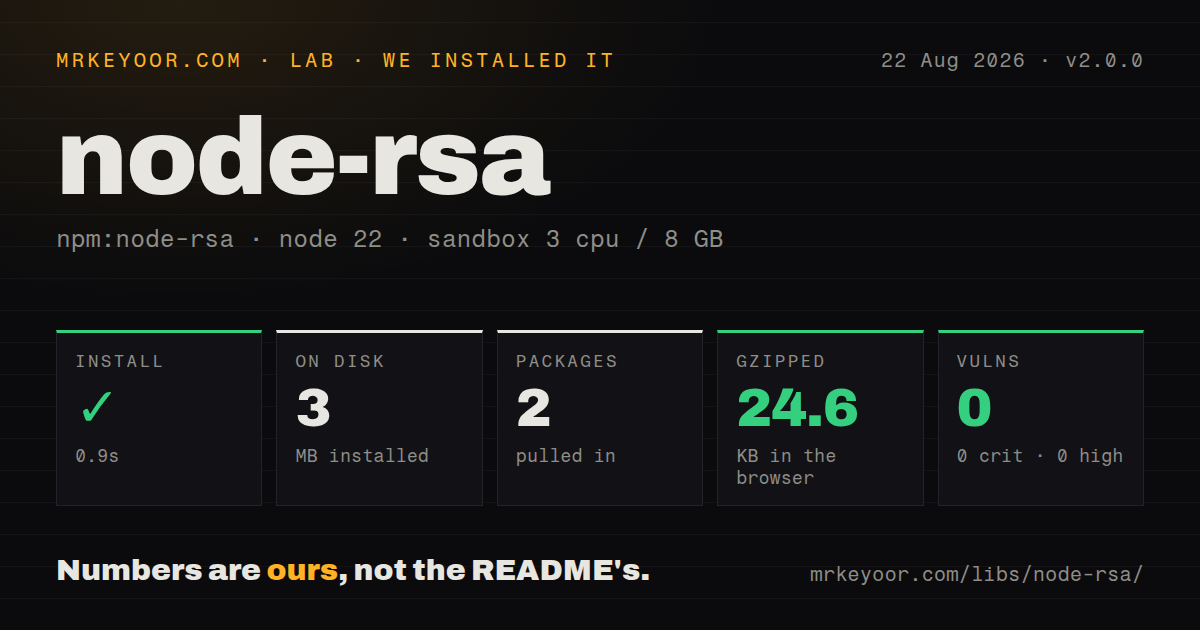
| Install | ✓ · 0.9s | 2 packages on disk · 3 MB |
| Import | ✓ | ESM import works · require() works · ESM package with exports map |
| Browser | 24.6 KB | gzipped (73.8 KB minified), bundled with esbuild |
| Types | ✓ | TypeScript types bundled |
| Known vulns | 0 | 0 critical · 0 high · 0 moderate · 0 low (npm audit) |
Answers from our run
Does node-rsa install cleanly?
Yes. In a fresh container with an empty cache, npm install node-rsa finished in 0.9s, leaving 2 packages and 3 MB on disk. npm audit reported no known vulnerabilities.
How much does node-rsa add to a browser bundle?
24.6 KB gzipped (73.8 KB minified) when the whole package is bundled for the browser with esbuild. Importing only part of it is usually smaller.
Does node-rsa work with both ESM and CommonJS?
Yes. Both import 'node-rsa' and require('node-rsa') worked in Node 22 in our run. The package is published as ESM with an exports map.
Does node-rsa include TypeScript types?
Yes, type declarations ship inside the package, so no @types install is needed.
node-rsa or jose: which should you use?
jose: Use it for JWT, JWS, JWE, and JWK with standard serialization. node-rsa 2.0.0 installed in 0.9 seconds with 0 audit findings on our box, but its browser import was 24.6 KB gzipped and Node 20 is mandatory.
When should you not use node-rsa?
You are designing a new token or encrypted-message protocol; a standard such as JOSE supplies headers, serialization, and algorithm identifiers
Use it if
- An existing protocol requires RSA keys and you need format conversion plus cryptographic operations behind one API
- The same code must use Node crypto on the server and a conditional pure-JavaScript implementation in modern browsers
- A node-rsa 1.x application is being migrated with explicit review of changed signature defaults
- You need to inspect maximum plaintext size or convert PKCS#1, PKCS#8, OpenSSH, DER, PEM, and components
- You are designing a new token or encrypted-message protocol; a standard such as JOSE supplies headers, serialization, and algorithm identifiers
- Large payloads need encryption; RSA has a padding-dependent message limit and should normally wrap a symmetric content key
- The deployment uses Node 18 or earlier; version 2 declares Node >=20
- Existing peers assume node-rsa 1.x defaults; version 2 signs with PSS by default while OAEP still defaults to SHA-1
- Attacker-controlled ciphertext requires PKCS#1 v1.5 decryption; the security notes say its valid-versus-invalid padding oracle cannot be removed
Setup reality
Our unprivileged Node 22 container installed node-rsa 2.0.0 in 0.9 seconds. It left 2 packages and 3 MB on disk. The package is 1,452 KB unpacked with one direct dependency and 0 peers, and npm audit found 0 known vulnerabilities. It is ESM with an exports map; require() and ESM import both worked. Declarations are bundled. Our complete browser import measured 73.8 KB minified and 24.6 KB gzipped.
No native build or configuration file is required, but version 2 needs Node 20. A modern bundler must honor conditional exports to select the browser engine without Buffer, crypto, or process polyfills. Remove the old @types/node-rsa package because declarations now ship here. Make schemes and hashes explicit: PSS with SHA-256 is the current signing default, while OAEP encryption still defaults to SHA-1 unless configured otherwise. Interoperating services must agree on padding, hash, salt length, and encoding.
getMaxMessageSize() reports the single-operation plaintext ceiling for the chosen key and padding. Files and large JSON should use an authenticated symmetric cipher, with RSA wrapping only that random key. Key generation is synchronous, so keep it off request paths. Private PEM belongs in a restricted secret store and never in a browser bundle. The package will import, export, sign, and decrypt keys, but application code still owns key identifiers, rotation, revocation, recipient selection, and envelope versioning.
Patterns
Generate a 2048-bit key pair generate-key-pair
import NodeRSA from 'node-rsa';

const key = new NodeRSA({ b: 2048 });
console.log(key.getKeySize());
Key generation is synchronous and defaults to 2048 bits, so generate outside latency-sensitive request handling.
Import a private PEM key export-pem-keys
const privatePem = key.exportKey('pkcs8-private-pem');
const publicPem = key.exportKey('pkcs8-public-pem');
Import format can be stated explicitly when automatic detection would make protocol review ambiguous.
Export only the public key import-pem-key
import NodeRSA from 'node-rsa';

const key = new NodeRSA(process.env.RSA_PRIVATE_KEY);
if (!key.isPrivate()) throw new Error('private RSA key required');
A public PKCS#8 PEM can be distributed without exposing the private exponent.
Encrypt with OAEP and SHA-256 encrypt-oaep-sha256
const publicKey = new NodeRSA(publicPem);
publicKey.setOptions({
  encryptionScheme: { scheme: 'pkcs1_oaep', hash: 'sha256' },
});

const ciphertext = publicKey.encrypt('small secret', 'base64');
OAEP defaults to SHA-1 in 2.0.0; configure SHA-256 when the other endpoint supports it.
Decrypt a base64 ciphertext decrypt-oaep-sha256
const privateKey = new NodeRSA(privatePem);
privateKey.setOptions({
  encryptionScheme: { scheme: 'pkcs1_oaep', hash: 'sha256' },
});

const plaintext = privateKey.decrypt(ciphertext, 'utf8');
Input and output encodings are part of the protocol and must match the encrypting service exactly.
Sign with PSS and SHA-256 check-message-limit
const bytes = new TextEncoder().encode(message);
const max = publicKey.getMaxMessageSize();
if (bytes.byteLength > max) {
  throw new Error(`use hybrid encryption; RSA limit is ${max} bytes`);
}
const encrypted = publicKey.encrypt(bytes, 'base64');
PSS with SHA-256 is the version 2 signing default, but explicit settings protect interoperability.
Verify an encoded signature sign-pss-sha256
const signer = new NodeRSA(privatePem);
signer.setOptions({
  signingScheme: { scheme: 'pss', hash: 'sha256', saltLength: 32 },
});

const signature = signer.sign(payload, 'base64');
verify() returns a boolean and needs the same message bytes, signature encoding, padding, and hash.
Check the message-size ceiling verify-pss-signature
const verifier = new NodeRSA(publicPem);
verifier.setOptions({
  signingScheme: { scheme: 'pss', hash: 'sha256', saltLength: 32 },
});

const valid = verifier.verify(payload, signature, 'utf8', 'base64');
getMaxMessageSize() varies with key size and padding; data above it needs hybrid encryption.
Convert a key to DER use-commonjs
const NodeRSA = require('node-rsa').default;

const key = new NodeRSA(publicPem);
DER output is binary Uint8Array or Buffer-compatible data, so do not treat it as UTF-8 text.
Read raw public components use-browser-bundle
import NodeRSA from 'node-rsa';

const publicKey = new NodeRSA(publicPem);
publicKey.setOptions({
  encryptionScheme: { scheme: 'pkcs1_oaep', hash: 'sha256' },
});
const ciphertext = publicKey.encrypt(formValue, 'base64');
Public components expose n and e; private component imports require the full CRT parameter set.
Select the browser engine on Node convert-key-format
const key = new NodeRSA(pkcs1Pem, 'pkcs1-private-pem');
const pkcs8Pem = key.exportKey('pkcs8-private-pem');
environment: browser forces the pure-JavaScript engine and bypasses the Node crypto fast path.
Wrap a symmetric content key export-openssh-public
const key = new NodeRSA(privateOrPublicPem);
const authorizedKey = key.exportKey('openssh-public');
RSA should encrypt the random content key, while an authenticated symmetric cipher handles the payload.
Alternatives
| Package | Registry | Pick it when |
|---|---|---|
| jose | npm | Use it for JWT, JWS, JWE, and JWK with standard serialization. |
| node-forge | npm | Use it when RSA is part of certificate, CSR, ASN.1, or wider PKI work. |
| openpgp | npm | Use it for OpenPGP messages, armored identities, and multiple recipients. |
| @noble/curves | npm | Use it for modern curve primitives when RSA compatibility is unnecessary. |
More security guides
cryptography · jose · pyjwt · dompurify · jsonwebtoken · oauthlib · the whole shelf →
How this guide is made: grounded in the library's documentation, release notes, changelog, and issue history, on a fixed rubric — not a hands-on install of every release. The 50 most-downloaded entries are additionally install-verified in clean containers. Corrections: contact the desk.