node-forge review
node-forge implements cryptographic primitives and file formats in JavaScript: RSA, Ed25519, AES, hashes, HMAC, PBKDF2, ASN.1, X.509, CSRs, PKCS#7, PKCS#8, and PKCS#12. Its useful niche is certificate and container work that Node crypto and browser WebCrypto do not expose. Version 1.4.0 is primarily a security release fixing four high-severity flaws in big-integer inversion, RSA verification, Ed25519 verification, and certificate-chain checks. Our full browser import was 279.9 KB minified and 73.9 KB gzipped.
Install node-forge for X.509, CSR, ASN.1, or PKCS container work that platform crypto does not cover. Pin 1.4.0 or newer, convert byte formats explicitly, and use node:crypto or WebCrypto for ordinary primitives.
We installed it
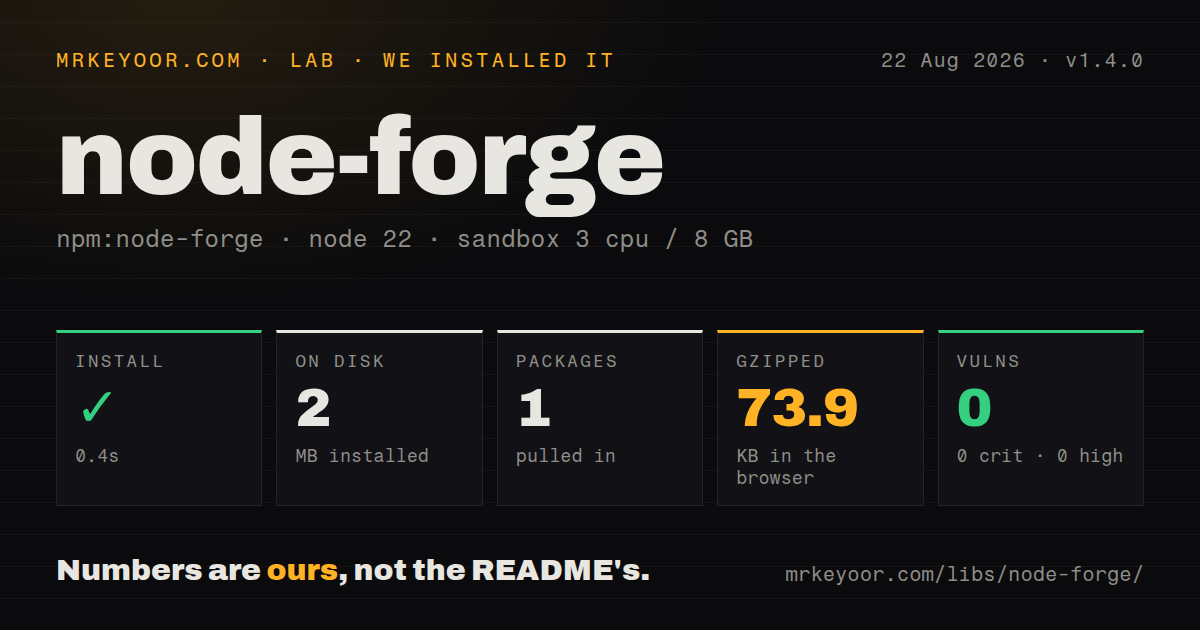
| Install | ✓ · 0.4s | 1 package on disk · 2 MB |
| Import | ✓ | ESM import works · require() works · CommonJS package |
| Browser | 73.9 KB | gzipped (279.9 KB minified), bundled with esbuild |
| Types | — | no TypeScript types found |
| Known vulns | 0 | 0 critical · 0 high · 0 moderate · 0 low (npm audit) |
Answers from our run
Does node-forge install cleanly?
Yes. In a fresh container with an empty cache, npm install node-forge finished in 0.4s, leaving 1 package and 2 MB on disk. npm audit reported no known vulnerabilities.
How much does node-forge add to a browser bundle?
73.9 KB gzipped (279.9 KB minified) when the whole package is bundled for the browser with esbuild. Importing only part of it is usually smaller.
Does node-forge work with both ESM and CommonJS?
Yes. Both import 'node-forge' and require('node-forge') worked in Node 22 in our run. The package is published as CommonJS.
Does node-forge include TypeScript types?
No type declarations were found in our install, so TypeScript users need their own declarations.
node-forge or pkijs: which should you use?
pkijs: Choose it for ASN.1, X.509, and CMS APIs built around WebCrypto. Install node-forge for X.509, CSR, ASN.1, or PKCS container work that platform crypto does not cover.
When should you not use node-forge?
You only need common hashes, HMAC, AES, RSA, or Ed25519 on Node; node:crypto uses the platform implementation and adds no package
Use it if
- You must parse, create, or inspect X.509 certificates and certificate signing requests in JavaScript
- Your application reads or writes PKCS#12, PKCS#7, PKCS#8, or raw ASN.1 structures
- The same certificate-processing code must run in Node and a browser without a native module
- An existing system already stores byte data in Forge ByteBuffer and binary-string forms
- You only need common hashes, HMAC, AES, RSA, or Ed25519 on Node; node:crypto uses the platform implementation and adds no package
- You only need standard primitives in a browser; WebCrypto avoids a 73.9 KB gzipped full import
- Untrusted signatures or certificates will be accepted by versions below 1.4.0, which lack the four high-severity fixes listed in the 1.4.0 changelog
- You require bundled types: our inspection found none, so TypeScript users depend on the separate @types/node-forge package
- You need a small modern API: this CommonJS package has no exports map and includes older TLS, HTTP, SSH, and socket subsystems alongside PKI code
Setup reality
Our clean Node 22 install of 1.4.0 completed in 0.4 seconds. It placed 1 package on disk using 2 MB. node-forge has no direct or peer dependencies and is 1,772 KB unpacked. npm audit reported 0 known vulnerabilities. require() and ESM import both worked. The package is CommonJS without an exports map, and we found no TypeScript declarations.
The first practical snag is byte representation. Many Forge methods consume or return binary strings and forge.util.ByteBuffer, not Node Buffer or Uint8Array. Convert a Buffer with buf.toString('binary') and convert back with Buffer.from(bytes, 'binary'). Omitting that encoding silently changes bytes above ASCII. Text input often needs an explicit utf8 argument too.
Version 1.4.0 is the minimum sensible pin for security-sensitive work. Its changelog fixes CVE-2026-33891, CVE-2026-33894, CVE-2026-33895, and CVE-2026-33896. These cover a modInverse infinite loop, RSA PKCS#1 v1.5 signature forgery, non-canonical Ed25519 signatures, and a basicConstraints chain-verification bypass. npm audit was clean for the version we installed; that result does not make older releases safe.
Our esbuild import measured 279.9 KB minified and 73.9 KB gzipped. Build a narrower entry or choose a format-specific library for browser delivery. Synchronous RSA generation and high-iteration PBKDF2 can block the event loop or UI thread. Prefer callbacks, workers, or platform crypto where possible. The license is BSD-3-Clause OR GPL-2.0, so record the selected option in compliance files.
Patterns
Convert Forge bytes and Node buffers convert-bytes
const forgeBytes = inputBuffer.toString('binary');
const buffer = forge.util.createBuffer(forgeBytes);
const outputBuffer = Buffer.from(buffer.getBytes(), 'binary');
Forge binary strings map one character to one byte. UTF-8 conversion corrupts arbitrary key or ciphertext data.
Hash UTF-8 text with SHA-256 hash-text
const digest = forge.md.sha256.create();
digest.update(message, 'utf8');
console.log(digest.digest().toHex());
Pass utf8 for text containing non-ASCII characters. Raw binary input needs different handling.
Derive a key with PBKDF2 and SHA-256 derive-password-key
const salt = forge.random.getBytesSync(16);
const key = forge.pkcs5.pbkdf2(
  password, salt, 600000, 32, forge.md.sha256.create()
);
The synchronous form blocks for the full iteration count. Use the callback form in request handlers and browser interfaces.
Encrypt authenticated data with AES-GCM encrypt-aes-gcm
const key = forge.random.getBytesSync(32);
const iv = forge.random.getBytesSync(12);
const cipher = forge.cipher.createCipher('AES-GCM', key);
cipher.start({ iv, additionalData: aad, tagLength: 128 });
cipher.update(forge.util.createBuffer(plaintext, 'utf8'));
if (!cipher.finish()) throw new Error('encryption failed');
const ciphertext = cipher.output.getBytes();
const tag = cipher.mode.tag.getBytes();
Store the unique IV and authentication tag with the ciphertext. Never reuse an IV with the same GCM key.
Reject modified AES-GCM ciphertext decrypt-aes-gcm
const decipher = forge.cipher.createDecipher('AES-GCM', key);
decipher.start({ iv, additionalData: aad, tagLength: 128, tag });
decipher.update(forge.util.createBuffer(ciphertext));
if (!decipher.finish()) throw new Error('authentication failed');
const plaintext = decipher.output.toString();
finish() returns false on authentication failure. Reading output without checking it accepts untrusted plaintext.
Generate RSA keys asynchronously generate-rsa-keypair
forge.pki.rsa.generateKeyPair({ bits: 2048, workers: -1 }, (error, keys) => {
  if (error) throw error;
  const privatePem = forge.pki.privateKeyToPem(keys.privateKey);
  const publicPem = forge.pki.publicKeyToPem(keys.publicKey);
});
The synchronous form can pause the event loop. workers: -1 lets Forge estimate worker use where supported.
Use RSA-OAEP with SHA-256 encrypt-rsa-oaep
const options = { md: forge.md.sha256.create(), mgf1: { md: forge.md.sha256.create() } };
const encrypted = publicKey.encrypt(secretBytes, 'RSA-OAEP', options);
const decrypted = privateKey.decrypt(encrypted, 'RSA-OAEP', options);
RSA only handles a short payload. Encrypt a random symmetric key rather than a document or request body.
Read fields from a PEM certificate parse-certificate
const certificate = forge.pki.certificateFromPem(pem);
const commonName = certificate.subject.getField('CN')?.value;
const san = certificate.getExtension('subjectAltName');
const expiresAt = certificate.validity.notAfter;
Do not assume commonName exists. Modern identity checks usually use subject alternative names.
Verify a chain against a CA store verify-certificate-chain
const caStore = forge.pki.createCaStore(caPemList);
const chain = presentedPemList.map(pem => forge.pki.certificateFromPem(pem));
forge.pki.verifyCertificateChain(caStore, chain);
Use version 1.4.0 or newer because earlier chain checks could accept a non-CA intermediate missing required constraints.
Create a CSR with a DNS SAN create-csr
const csr = forge.pki.createCertificationRequest();
csr.publicKey = keys.publicKey;
csr.setSubject([{ name: 'commonName', value: 'api.example.com' }]);
csr.setAttributes([{ name: 'extensionRequest', extensions: [{
  name: 'subjectAltName', altNames: [{ type: 2, value: 'api.example.com' }]
}] }]);
csr.sign(keys.privateKey, forge.md.sha256.create());
const pem = forge.pki.certificationRequestToPem(csr);
Certificate authorities read SANs from extensionRequest. Signing without an explicit digest can select an unsuitable legacy default.
Read a password-protected PKCS#12 file open-pkcs12
const der = pfxBuffer.toString('binary');
const asn1 = forge.asn1.fromDer(der);
const p12 = forge.pkcs12.pkcs12FromAsn1(asn1, password);
const bags = p12.getBags({ bagType: forge.pki.oids.certBag });
An empty password and an omitted password can take different parsing paths. Preserve the exporter's exact password behavior.
Create a short-lived development certificate create-self-signed-cert
const cert = forge.pki.createCertificate();
cert.publicKey = keys.publicKey;
cert.serialNumber = '01';
cert.validity.notBefore = new Date();
cert.validity.notAfter = new Date(Date.now() + 86400000);
cert.setSubject([{ name: 'commonName', value: 'localhost' }]);
cert.setIssuer(cert.subject.attributes);
cert.setExtensions([{ name: 'basicConstraints', cA: false }, { name: 'subjectAltName', altNames: [{ type: 2, value: 'localhost' }] }]);
cert.sign(keys.privateKey, forge.md.sha256.create());
Use this for local tooling, not a public trust chain. Browsers still require the issuing root to be trusted.
Alternatives
| Package | Registry | Pick it when |
|---|---|---|
| pkijs | npm | Choose it for ASN.1, X.509, and CMS APIs built around WebCrypto. |
| @peculiar/x509 | npm | Choose it when certificate and CSR work needs a smaller modern WebCrypto-oriented surface. |
| jose | npm | Choose it when the real requirement is JWT, JWS, JWE, or JWK rather than PKI containers. |
| jsrsasign | npm | Compare it when a pure-JavaScript PKI toolkit is mandatory and format coverage matters more than API size. |
More security guides
cryptography · jose · pyjwt · dompurify · jsonwebtoken · requests-oauthlib · the whole shelf →
How this guide is made: grounded in the library's documentation, release notes, changelog, and issue history, on a fixed rubric — not a hands-on install of every release. The 50 most-downloaded entries are additionally install-verified in clean containers. Corrections: contact the desk.