libphonenumber-js review
libphonenumber-js 1.13.11 converts national or international phone input into a `PhoneNumber` carrying an E.164 value, country calling code, national number, optional extension, formatters, and possibility or validity checks. It also formats partial input through `AsYouType` and finds phone numbers in prose. The package deliberately omits emergency numbers, SMS short codes, alphabetic vanity numbers, geographic lookup, carrier lookup, and mobile-dialing formatting from Google's broader library. Its min, max, mobile, and core entry points trade numbering metadata against validation and type detection. Version 1.13.11 updates its source metadata to Google's 9.0.37 data, including phone-plan changes for 17 listed regions.
libphonenumber-js 1.13.11 installed in 0.9 seconds with 0 audit findings, while our full browser import measured 190.2 KB minified and 44.4 KB gzipped. It earns that cost for international parsing and live formatting; choose the metadata entry deliberately and keep strict-validation data updated.
We installed it
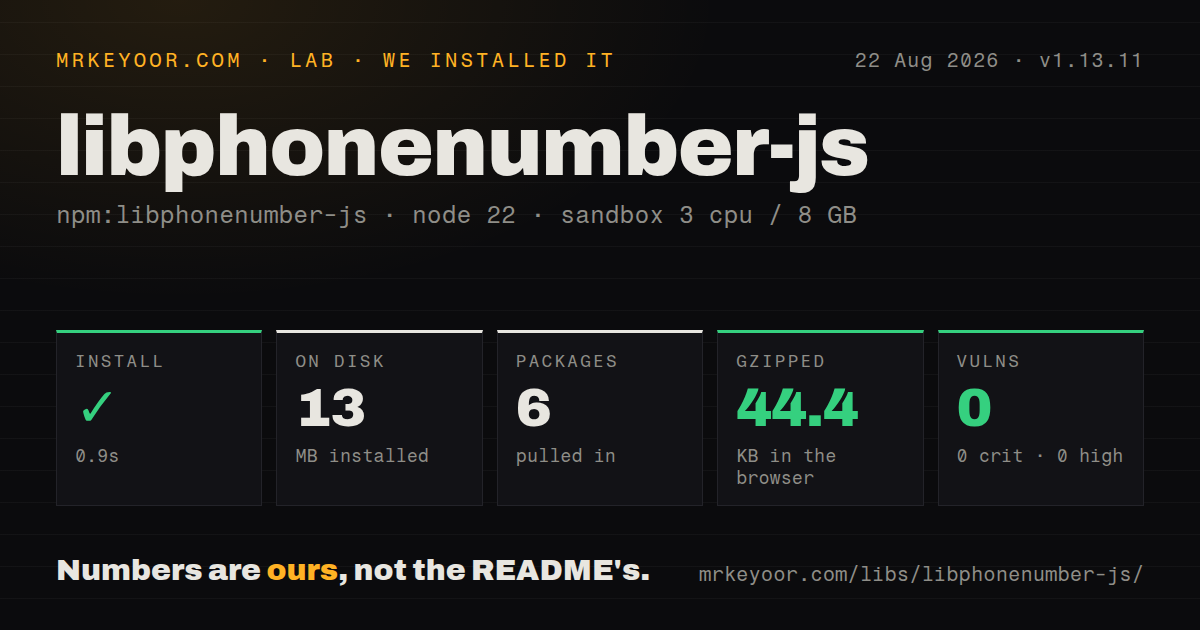
| Install | ✓ · 0.9s | 6 packages on disk · 13 MB |
| Import | ✓ | ESM import works · require() works · ESM package with exports map |
| Browser | 44.4 KB | gzipped (190.2 KB minified), bundled with esbuild |
| Types | ✓ | TypeScript types bundled |
| Known vulns | 0 | 0 critical · 0 high · 0 moderate · 0 low (npm audit) |
Answers from our run
Does libphonenumber-js install cleanly?
Yes. In a fresh container with an empty cache, npm install libphonenumber-js finished in 0.9s, leaving 6 packages and 13 MB on disk. npm audit reported no known vulnerabilities.
How much does libphonenumber-js add to a browser bundle?
44.4 KB gzipped (190.2 KB minified) when the whole package is bundled for the browser with esbuild. Importing only part of it is usually smaller.
Does libphonenumber-js work with both ESM and CommonJS?
Yes. Both import 'libphonenumber-js' and require('libphonenumber-js') worked in Node 22 in our run. The package is published as ESM with an exports map.
Does libphonenumber-js include TypeScript types?
Yes, type declarations ship inside the package, so no @types install is needed.
libphonenumber-js or google-libphonenumber: which should you use?
google-libphonenumber: Choose it when closer coverage of Google's larger JavaScript port is worth more code and metadata. libphonenumber-js 1.13.11 installed in 0.9 seconds with 0 audit findings, while our full browser import measured 190.2 KB minified and 44.4 KB gzipped.
When should you not use libphonenumber-js?
A trusted upstream already sends one enforced E.164 format. Re-parsing international numbering plans adds little in that pipeline.
Use it if
- Users enter national phone numbers from several countries and the application stores one E.164 representation.
- An input needs country-aware formatting after each keystroke through `AsYouType`.
- Phone numbers must be located inside messages with their start and end character positions.
- The bundle can choose min, max, mobile, or custom metadata according to its validation and number-type needs.
- A trusted upstream already sends one enforced E.164 format. Re-parsing international numbering plans adds little in that pipeline.
- The feature needs short codes, emergency numbers, vanity numbers such as `1-800-FLOWERS`, carrier names, or geographic descriptions. The README lists those outside this library's scope.
- You must produce country-specific carrier prefixes for mobile dialing. The Google API's `formatNumberForMobileDialing()` equivalent is absent.
- The client cannot afford the 44.4 KB gzipped result from our whole-package browser import. Use a narrower metadata build, server-side normalization, or a simpler contract.
- Metadata will be frozen for years while strict digit validation remains a hard rejection rule. New number ranges can arrive after the embedded patterns and be rejected.
Setup reality
We installed libphonenumber-js 1.13.11 in a fresh Node 22 Bookworm sandbox in 0.9 seconds. The run left 6 packages and 13 MB on disk, with 0 known vulnerabilities from npm audit. The package itself declares 0 direct dependencies and 0 peers and is 12,576 KB unpacked. It ships TypeScript types, uses an ESM package declaration with an exports map, and loaded successfully through both require() and ESM import.
There are no credentials or config files. The import path is the configuration. The bare package aliases /min, whose smaller metadata favors parsing, formatting, and length checks. /max carries digit patterns for stricter validation and type detection. /mobile keeps detailed mobile rules and can reject or fail to type non-mobile numbers. /core bundles no ready metadata; every relevant call needs your generated metadata argument. Avoid mixing entry points or multiple metadata JSON files in one client bundle.
A national string needs defaultCountry or defaultCallingCode. An input beginning with + supplies its own calling code, so defaultCountry: 'US' does not restrict the result to the United States. Compare phone.country after parsing when a product permits one country. Non-geographic plans intentionally leave country undefined; isNonGeographic() distinguishes that outcome from a failed parse. Use extract: false on form fields so surrounding prose is rejected.
Our full browser import measured 190.2 KB minified and 44.4 KB gzipped. isPossible() checks numbering-plan length; isValid() also depends on digit patterns and the chosen metadata set. Version 1.13.11 embeds metadata 9.0.37, so strict checks age with the deployed package. AsYouType accumulates characters across calls. Recreate it when a controlled component passes the complete input value each time rather than only the new character.
Patterns
Interpret a national number parse-national-input
import parsePhoneNumber from 'libphonenumber-js';

const phone = parsePhoneNumber('020 7946 0018', 'GB');
if (!phone) throw new Error('cannot parse phone');
console.log(phone.number); // +442079460018
National input has no calling code, so version 1.13.11 needs a default country or default calling code to interpret it.
Normalize a possible number store-e164-number
function toE164(input, country) {
  const phone = parsePhoneNumber(input, {
    defaultCountry: country,
    extract: false,
  });
  return phone?.isPossible() ? phone.number : undefined;
}
`phone.number` is the E.164 form. `extract: false` refuses labels or prose surrounding the field value.
Catch a specific parse reason explain-parse-failure
import { parsePhoneNumberWithError, ParseError } from 'libphonenumber-js';

try {
  return parsePhoneNumberWithError(value, { defaultCountry: 'US', extract: false });
} catch (error) {
  if (error instanceof ParseError) return { error: error.message };
  throw error;
}
ParseError messages include `NOT_A_NUMBER`, `INVALID_COUNTRY`, `TOO_SHORT`, and `TOO_LONG` in the documented API.
Use a possibility check check-number-length
import { isPossiblePhoneNumber } from 'libphonenumber-js';

const possible = isPossiblePhoneNumber('(213) 373-4253', 'US');
isPossiblePhoneNumber checks the permitted length for the plan and depends less on newly assigned digit prefixes than strict validation.
Validate with max metadata apply-strict-validation
import { isValidPhoneNumber } from 'libphonenumber-js/max';

const valid = isValidPhoneNumber('+1 213 373 4253');
The max entry includes the detailed digit patterns required for strict `isValidPhoneNumber()` checks across countries.
Create labels and a tel URI format-phone-number
const phone = parsePhoneNumber('+12133734253');
if (phone) {
  console.log(phone.formatInternational());
  console.log(phone.formatNational());
  console.log(phone.getURI());
}
For this E.164 input, formatting follows the detected numbering plan and `getURI()` produces the telephone link value.
Format the current field value format-controlled-input
import { AsYouType } from 'libphonenumber-js';

function displayPhone(value, country) {
  return new AsYouType(country).input(value);
}
An AsYouType instance appends each call to prior state. Recreate it when `value` is the entire controlled field on every render.
Read a number type detect-phone-type
import parsePhoneNumber from 'libphonenumber-js/max';

const phone = parsePhoneNumber(value, 'US');
const type = phone?.getType();
if (type === 'MOBILE') sendSms(phone.number);
Use max or mobile metadata for type patterns. Some plans return `FIXED_LINE_OR_MOBILE` because digits do not distinguish the service.
Reject another country's international number enforce-selected-country
const phone = parsePhoneNumber(value, {
  defaultCountry: selectedCountry,
  extract: false,
});
const allowed = Boolean(phone && phone.country === selectedCountry && phone.isPossible());
defaultCountry interprets national input; a leading plus sign overrides it, so the country comparison enforces the product rule.
Recognize a global service number handle-non-geographic-plan
const phone = parsePhoneNumber(value);
if (phone?.isNonGeographic()) {
  console.log(phone.country); // undefined
  console.log(phone.countryCallingCode);
}
Non-geographic numbering plans have no ISO country, and version 1.13.11 leaves `country` undefined by design.
Locate phone spans in text find-numbers-in-prose
import { findPhoneNumbersInText } from 'libphonenumber-js';

for (const hit of findPhoneNumbersInText(message, 'US')) {
  console.log(hit.number.number, hit.startsAt, hit.endsAt);
}
Each match carries character offsets plus a parsed PhoneNumber, which is enough to build linked text without reparsing.
Use a country-trimmed metadata file call-core-with-metadata
import parsePhoneNumber from 'libphonenumber-js/core';
import metadata from './phone-metadata.json' with { type: 'json' };

const phone = parsePhoneNumber(value, 'US', metadata);
Core functions do not include default metadata; pass the generated data as the final argument to every call that needs it.
Alternatives
| Package | Registry | Pick it when |
|---|---|---|
| google-libphonenumber | npm | Choose it when closer coverage of Google's larger JavaScript port is worth more code and metadata. |
| awesome-phonenumber | npm | Choose it for a wrapper API built on the Google phone-number implementation. |
| libphonenumber | npm | Choose it only to support an existing application already coupled to that older npm package. |
More utils guides
lru-cache · type-fest · ajv · zod · p-limit · find-up · the whole shelf →
How this guide is made: grounded in the library's documentation, release notes, changelog, and issue history, on a fixed rubric — not a hands-on install of every release. The 50 most-downloaded entries are additionally install-verified in clean containers. Corrections: contact the desk.