keyring review
keyring 25.7.0 gives Python a small common API for the credential store owned by the current operating-system user. The same set_password(), get_password(), and delete_password() calls can reach macOS Keychain, Windows Credential Locker, Linux Secret Service, KWallet, or an installed third-party backend. Entries are Unicode strings indexed by service and username; this is password storage, not a database for structured secrets, leases, or access policy. Version 25.7.0 improves KWallet 6 support and removes residual Python 3.8 code. Our Python 3.12 import passed, and the installed package included py.typed metadata.
keyring 25.7.0 installed in 0.5 seconds, occupied 17 MB across 10 packages, imported in 0.40 seconds, and produced 0 pip-audit findings in our Linux sandbox. Install it for desktop software and developer CLIs that should use the current user's credential store; use a deployment secret manager for headless services unless D-Bus and the keyring daemon are already managed infrastructure.
We installed it
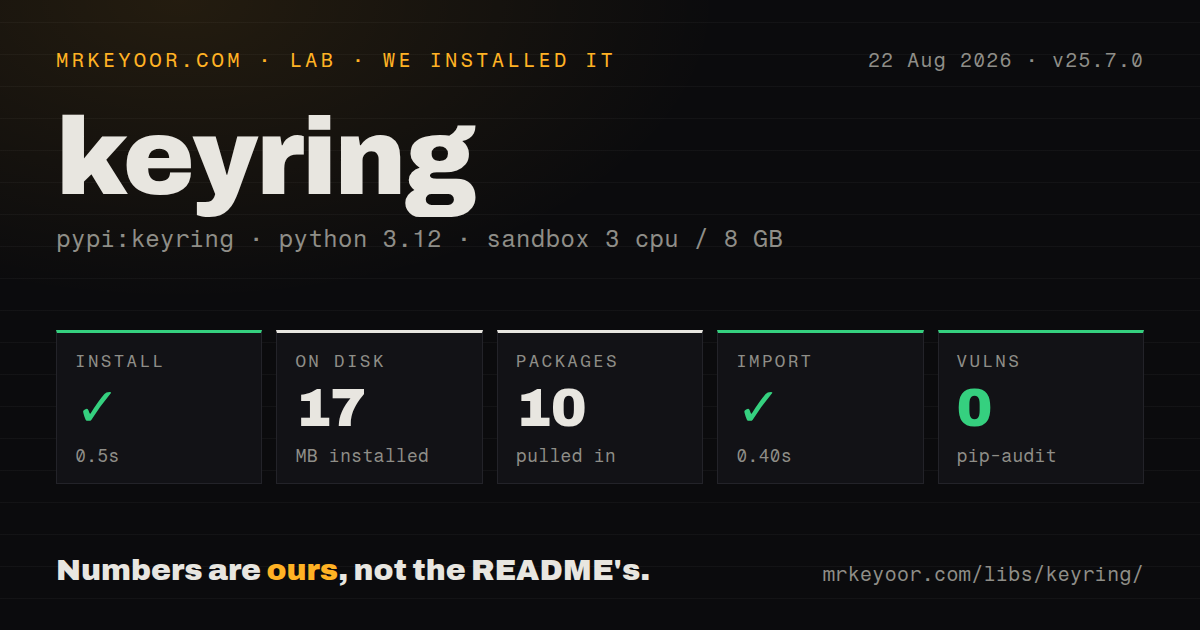
| Install | ✓ · 0.5s | 10 packages on disk · 17 MB |
| Import | ✓ | import keyring in 0.40s · pure Python · py.typed · requires Python >=3.9 |
| Known vulns | 0 | (pip-audit) |
Answers from our run
Does keyring install cleanly?
Yes. In a fresh container with an empty cache, pip install keyring finished in 0.5s, leaving 10 packages and 17 MB on disk. pip-audit reported no known vulnerabilities.
What does keyring need to run?
Python >=3.9, and nothing compiled: it is pure Python. In our run import keyring succeeded in 0.40s, and the package ships py.typed for type checkers.
keyring or keyrings.alt: which should you use?
keyrings.alt: Use it only when an opt-in file or other non-recommended backend is acceptable on a machine without a system store. keyring 25.7.0 installed in 0.5 seconds, occupied 17 MB across 10 packages, imported in 0.40 seconds, and produced 0 pip-audit findings in our Linux sandbox.
When should you not use keyring?
The code runs in CI, Kubernetes, or a short-lived server container. Those environments usually have no logged-in user's credential session, so injected secrets or a deployment secret manager fit better.
Use it if
- A desktop app or developer CLI should save a personal API token in the user's existing OS credential store instead of a plaintext file.
- One Python code path must work with Keychain, Credential Locker, Secret Service, and KWallet while leaving backend choice to each machine.
- Users need the option to install a password-manager backend through Python entry points without changing the application's calls.
- The included keyring command and application code should read the same service-and-username entry.
- The code runs in CI, Kubernetes, or a short-lived server container. Those environments usually have no logged-in user's credential session, so injected secrets or a deployment secret manager fit better.
- You need rotation, leases, audit events, team permissions, or structured records. The core contract stores one string under a service and username.
- Linux hosts cannot supply D-Bus plus Secret Service or KWallet. Automatic discovery can end with NoKeyringError even though the Python import succeeds.
- Adding 10 installed packages and 17 MB for a few short secrets is too much for the application. Those were the totals in our Debian sandbox.
- Secrets must be isolated from other processes running as the same OS user. Access follows the selected backend and that user's open credential session, not an application-specific security boundary.
Setup reality
We installed keyring 25.7.0 in an unprivileged Python 3.12 Bookworm sandbox with no cache. The install took 0.5 seconds and left 10 packages using 17 MB. Measured metadata listed 24 direct dependencies, Python 3.9 or newer, pure Python code, and py.typed. The license field was unknown. pip-audit found 0 known vulnerabilities, and import keyring worked in 0.40 seconds. Conditional packages mean Windows and macOS resolve a different installed set from this Linux run.
Windows and macOS normally connect to their built-in stores. Linux still needs a usable desktop service. Secret Service talks over D-Bus; KWallet can need dbus-python from the operating-system package manager because a pip build may fail. Release 25.7.0 specifically improves KWallet 6 support. Run python -m keyring diagnose to see which backend won and where keyringrc.cfg lives before blaming application code.
A headless Linux process can use Secret Service only after it starts a D-Bus session, launches gnome-keyring-daemon, opens or creates a keyring, and runs the application inside that same session. The README's Docker transcript adds --privileged to avoid permission errors. That is a serious container permission expansion for a password API. Under tox, DBUS_SESSION_BUS_ADDRESS is filtered unless pass_env includes it, which can make a backend disappear only during tests.
Backend choice is based on priority and can change when someone installs another backend distribution. Pin it with keyringrc.cfg, PYTHON_KEYRING_BACKEND, or set_keyring() when that machine-specific choice is deliberate. get_password() returns None for an absent entry, but delete_password() raises PasswordDeleteError. Since 25.3.0, empty usernames are deprecated and backends reject an empty string when setting a password. Use a stable label such as api-token when the service has one secret.
Patterns
Save and read an API token store-secret
import keyring

SERVICE = 'acme-deploy'
USERNAME = 'api-token'

keyring.set_password(SERVICE, USERNAME, token)
stored = keyring.get_password(SERVICE, USERNAME)
The service string is the application's namespace. Keep both labels stable or later runs will create a different credential entry.
Create a credential only when missing prompt-on-miss
token = keyring.get_password('acme-deploy', 'api-token')
if token is None:
    token = prompt_for_token()
    keyring.set_password('acme-deploy', 'api-token', token)
A missing entry returns None. Test for None because an empty stored string is still a stored value.
Delete an entry safely delete-secret
import keyring
from keyring.errors import PasswordDeleteError

try:
    keyring.delete_password('acme-deploy', 'api-token')
except PasswordDeleteError:
    pass
delete_password() raises PasswordDeleteError when removal fails or the entry does not exist. Reads use None for a miss instead.
Let CI use an injected secret fallback-to-environment
import os
import keyring
from keyring.errors import NoKeyringError

def load_token():
    token = os.environ.get('ACME_TOKEN')
    if token is not None:
        return token
    try:
        return keyring.get_password('acme-deploy', 'api-token')
    except NoKeyringError:
        return None
NoKeyringError means no usable backend was found. An environment fallback avoids creating a desktop credential session in CI.
Check the active backend inspect-selected-backend
import keyring

backend = keyring.get_keyring()
print(type(backend).__module__, type(backend).__name__)
python -m keyring diagnose also prints backend and configuration details when two machines select different stores.
Require Secret Service explicitly pin-backend-in-code
import keyring
from keyring.backends.SecretService import Keyring

keyring.set_keyring(Keyring())
This choice gives up automatic portability and still requires a working Linux D-Bus session plus Secret Service.
Select a backend in keyringrc.cfg pin-backend-in-config
[backend]
default-keyring=keyring.backends.SecretService.Keyring
Run python -m keyring diagnose to find the platform-specific config path. The named class must be importable in that environment.
Disable keyring for one process disable-keyring
export PYTHON_KEYRING_BACKEND=keyring.backends.null.Keyring
python -m pip install -r requirements.txt
The null backend returns no credentials so the caller can use another path. python -m keyring --disable writes a persistent user choice.
Read username and password together retrieve-credential
import keyring

credential = keyring.get_credential('acme-deploy', 'release-bot')
if credential is not None:
    print(credential.username)
    use_token(credential.password)
get_credential() may return a username different from the requested value. Since 25.5.0, a named username miss returns None.
Manage the same entry from the shell use-command-line
python -m keyring set acme-deploy api-token
python -m keyring get acme-deploy api-token
python -m keyring del acme-deploy api-token
Using python -m keyring ties the command to the intended interpreter. A bare keyring executable may belong to another virtual environment.
Encode a small token pair as one string store-token-record
import json
import keyring

record = json.dumps({'access': access_token, 'refresh': refresh_token})
keyring.set_password('acme-deploy', 'oauth', record)

raw = keyring.get_password('acme-deploy', 'oauth')
tokens = None if raw is None else json.loads(raw)
The API stores Unicode strings and backend size limits differ. Use a database or secret manager for large, searchable records.
Keep tests out of the real keychain fake-backend-for-tests
import keyring
from keyring.backend import KeyringBackend

class MemoryKeyring(KeyringBackend):
    priority = 1

    def __init__(self):
        self.items = {}

    def set_password(self, service, username, password):
        self.items[service, username] = password

    def get_password(self, service, username):
        return self.items.get((service, username))

    def delete_password(self, service, username):
        del self.items[service, username]

keyring.set_keyring(MemoryKeyring())
Set the fake before application imports that read credentials. Otherwise a test can still trigger an OS prompt or change a real entry.
Alternatives
| Package | Registry | Pick it when |
|---|---|---|
| keyrings.alt | PyPI | Use it only when an opt-in file or other non-recommended backend is acceptable on a machine without a system store. |
| python-dotenv | PyPI | Use it for local development when secrets already enter the process as environment values and a .env file is an explicit compromise. |
| hvac | PyPI | Use it when a deployed service retrieves centrally controlled secrets from an existing HashiCorp Vault. |
More security guides
cryptography · jose · pyjwt · dompurify · jsonwebtoken · requests-oauthlib · the whole shelf →
How this guide is made: grounded in the library's documentation, release notes, changelog, and issue history, on a fixed rubric — not a hands-on install of every release. The 50 most-downloaded entries are additionally install-verified in clean containers. Corrections: contact the desk.