jinja2 review
Our fresh Python 3.12 environment installed Jinja 3.1.6 with MarkupSafe and imported jinja2 successfully. Jinja turns templates containing expressions, blocks, loops, filters, macros and inheritance into rendered text. An Environment owns the loader, escaping rules, undefined-value behavior, extensions and compiled-template cache. It works for HTML as well as email, configuration and code generation. Version 3.1.6 is a security-only release: the attr filter now goes through the environment's attribute lookup so SandboxedEnvironment can enforce its checks.
Jinja2 3.1.6 installed in 0.2 seconds as two packages using 1 MB and imported in 0.32 seconds in our sandbox, with no known vulnerabilities from pip-audit. It fits Python-owned rendering when escaping and undefined values are configured deliberately, but its sandbox should not be the only boundary around attacker-supplied templates.
We installed it
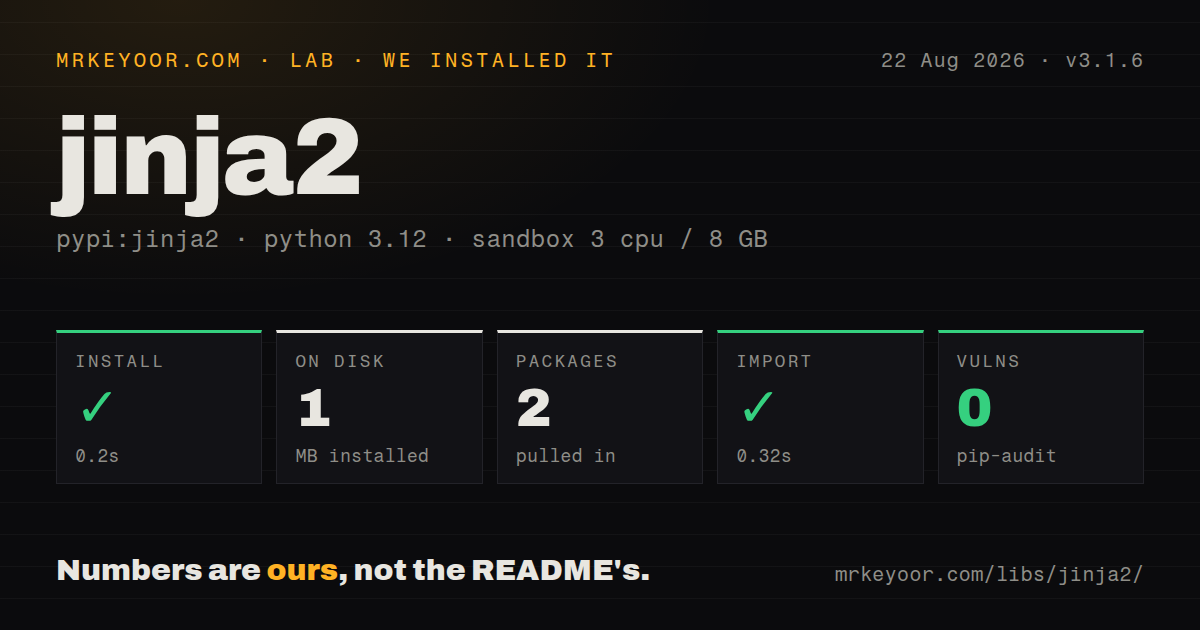
| Install | ✓ · 0.2s | 2 packages on disk · 1 MB |
| Import | ✓ | import jinja2 in 0.32s · pure Python · py.typed · requires Python >=3.7 |
| Known vulns | 0 | (pip-audit) |
Answers from our run
Does jinja2 install cleanly?
Yes. In a fresh container with an empty cache, pip install jinja2 finished in 0.2s, leaving 2 packages and 1 MB on disk. pip-audit reported no known vulnerabilities.
What does jinja2 need to run?
Python >=3.7, and nothing compiled: it is pure Python. In our run import jinja2 succeeded in 0.32s, and the package ships py.typed for type checkers.
jinja2 or mako: which should you use?
mako: Choose it when templates need Python expression syntax and only trusted authors can edit them. Jinja2 3.1.6 installed in 0.2 seconds as two packages using 1 MB and imported in 0.32 seconds in our sandbox, with no known vulnerabilities from pip-audit.
When should you not use jinja2?
A frontend renders all presentation from JSON; adding a server template layer would duplicate component and escaping rules
Discussed on
Use it if
- You render server-side HTML and need inheritance, includes, macros and context-aware escaping
- You generate repeatable text such as emails, configuration or source files from Python data
- Your host framework already exposes a Jinja Environment and its extension points
- You need package, filesystem or custom template loaders with one shared compiled-template cache
- A frontend renders all presentation from JSON; adding a server template layer would duplicate component and escaping rules
- Users can submit templates and you need isolation against hostile code; the latest release fixed an attr-filter sandbox bypass, so process isolation is still the safer boundary
- You want current feature development; the repository's last push was June 14, 2025 and 3.1.6 changed only security behavior
- The template needs database access or branching business rules; Jinja allows substantial expression logic, but those decisions become difficult to test inside markup
- You require templates that remain valid XML before rendering; Jinja block syntax breaks that constraint and Chameleon is a closer fit
Setup reality
Our clean Python 3.12 sandbox installed Jinja2 3.1.6 in 0.2 seconds. Two packages occupied 1 MB, and import jinja2 completed in 0.32 seconds. pip-audit reported zero known vulnerabilities. The package declares two direct dependencies, requires Python 3.7 or newer, is pure Python and includes py.typed. PyPI identifies its license as BSD License. There are no native build steps, services, credentials or peer packages.
Create one Environment during application startup. A plain Environment does not enable HTML escaping, so pass select_autoescape() or use the environment supplied by your framework. Filename rules matter: page.html.j2 ends in j2 and will not match the default html extension set. Add the extensions you use or set a default for string templates. Choose StrictUndefined when a misspelled variable must fail instead of rendering an empty string.
Loader choice controls where templates can come from. FileSystemLoader needs an explicit root, PackageLoader follows installed package resources, and ChoiceLoader can make overrides possible. get_template() uses the environment cache; constructing an Environment for each request throws that cache away. Custom filters, tests and globals should be registered before templates are loaded, since changing them after compilation makes behavior harder to reason about.
Autoescaping covers rendered values, not every unsafe context. JavaScript, CSS and URL construction still need context-specific design, and Markup or the safe filter bypasses escaping for that value. SandboxedEnvironment limits attribute and callable access, yet version 3.1.6 exists because attr previously bypassed those checks. Keep current, minimize the context, cap execution and output, and use a separate process when the template author is hostile. Async rendering requires enable_async=True and render_async() throughout that environment.
Patterns
Configure HTML rendering once environment-setup
from jinja2 import Environment, FileSystemLoader, select_autoescape

env = Environment(
    loader=FileSystemLoader("templates"),
    autoescape=select_autoescape(),
)
template = env.get_template("index.html")
select_autoescape checks the template filename. Reuse this Environment so its loader and compiled-template cache survive across renders.
Pass values into a template render-with-variables
html = template.render(title="Members", users=users)
html = template.render(**context)

# in the template: {{ title }}, {{ users[0].name }}, {{ user.get("email") }}
Dot lookup tries attributes before mapping keys; bracket lookup tries the key first. render() returns text and does not write a response or file.
Fill blocks from a child template template-inheritance
{# base.html #}
<html><head><title>{% block title %}{% endblock %}</title></head>
<body>{% block content %}{% endblock %}</body></html>

{# page.html #}
{% extends "base.html" %}
{% block title %}Members{% endblock %}
{% block content %}
  <ul>{% for user in users %}<li>{{ user.username }}</li>{% endfor %}</ul>
{% endblock %}
Put extends before output in the child. Content outside a block is discarded, while super() renders the parent block inside an override.
Reuse markup through a macro macros-and-imports
{# forms.html #}
{% macro input(name, value="", type="text") -%}
  <input type="{{ type }}" name="{{ name }}" value="{{ value }}">
{%- endmacro %}

{# page.html #}
{% from "forms.html" import input %}
{{ input("username") }}
{{ input("password", type="password") }}
An imported macro has no caller context unless the import says with context. Pass ordinary inputs as macro arguments when possible.
Expose application helpers custom-filters-globals-tests
def currency(value, symbol="$"):
    return f"{symbol}{value:,.2f}"

env.filters["currency"] = currency
env.globals["site_name"] = "mrkeyoor"
env.tests["expired"] = lambda item: item.expires < now()

# {{ order.total | currency("EUR ") }}
# {% if session is expired %}...{% endif %}
A filter receives the piped value first, and a test should return a boolean. Register helpers before loading templates into the environment cache.
Escape custom template extensions select-autoescape-extensions
env = Environment(
    loader=FileSystemLoader("templates"),
    autoescape=select_autoescape(
        enabled_extensions=("html", "htm", "xml", "j2", "jinja"),
    ),
)
Extension matching uses the final suffix. Add j2 or jinja explicitly if those files produce HTML.
Fail on a missing variable strict-undefined
from jinja2 import Environment, FileSystemLoader, StrictUndefined

env = Environment(
    loader=FileSystemLoader("templates"),
    undefined=StrictUndefined,
)
# {{ mispelled_var }} now raises UndefinedError
Default Undefined can print as an empty string. StrictUndefined turns missing configuration and misspelled context names into exceptions.
Default a missing nested value chainable-undefined
from jinja2 import Environment, ChainableUndefined

env = Environment(undefined=ChainableUndefined)
t = env.from_string("{{ user.profile.avatar | default('/static/anon.png') }}")
print(t.render(user={}))  # /static/anon.png
ChainableUndefined lets the lookup reach the final default filter. It can also hide a bad intermediate field, so use it for genuinely optional data.
Control blank lines and indentation whitespace-control
env = Environment(
    loader=FileSystemLoader("templates"),
    trim_blocks=True,
    lstrip_blocks=True,
    keep_trailing_newline=True,
)

# or per tag:
# {%- for host in hosts %}
# {{ host }}
# {%- endfor %}
trim_blocks removes the newline after a block tag; lstrip_blocks removes whitespace before it. Snapshot generated configuration to catch indentation changes.
Apply sandbox attribute checks sandbox-untrusted-templates
from jinja2.sandbox import SandboxedEnvironment

env = SandboxedEnvironment()
t = env.from_string(user_supplied_template)
print(t.render(name="customer"))
# probes such as {{ ''.__class__.__mro__ }} raise SecurityError
SandboxedEnvironment restricts attribute and callable access. Keep untrusted rendering away from secrets and add process, time and output limits because version 3.1.6 fixed a sandbox bypass.
Render an async iterable async-rendering
env = Environment(
    loader=FileSystemLoader("templates"),
    enable_async=True,
)

async def handler():
    template = env.get_template("report.html")
    return await template.render_async(rows=fetch_rows())
enable_async compiles templates for async execution. Use render_async() consistently for that environment.
Load templates from an installed package load-templates-from-package
from jinja2 import Environment, PackageLoader, select_autoescape

env = Environment(
    loader=PackageLoader("myapp", "templates"),
    autoescape=select_autoescape(),
)
PackageLoader resolves resources from the installed package instead of assuming a source-tree path beside the module.
Alternatives
| Package | Registry | Pick it when |
|---|---|---|
| mako | PyPI | Choose it when templates need Python expression syntax and only trusted authors can edit them |
| chameleon | PyPI | Choose it when template source must remain valid XML or HTML before values are inserted |
| chevron | PyPI | Choose it for logic-light Mustache templates shared with other languages |
More web backend guides
ws · urllib3 · requests · undici · anyio · express · the whole shelf →
How this guide is made: grounded in the library's documentation, release notes, changelog, and issue history, on a fixed rubric — not a hands-on install of every release. The 50 most-downloaded entries are additionally install-verified in clean containers. Corrections: contact the desk.