image-ssim review
image-ssim 0.2.0 compares two decoded pixel arrays with the structural similarity index and returns `ssim` plus mean contrast-structure, `mcs`. It accepts grayscale, grayscale with alpha, RGB, or RGBA data with matching dimensions. Our browser build was 2.4 KB minified and 1.3 KB gzipped. Version 0.2.0 is also the only npm release, so there is no recent feature set to migrate to. It does not decode files, resize mismatched images, draw a diff, or supply a test threshold.
image-ssim 0.2.0 installed in 0.6 seconds and bundled to 1.3 KB gzipped in our sandbox, but a one-pixel edge window can return `NaN` and the repository has not been pushed since 2017. Keep it only for compatibility with established scores; start new SSIM work with ssim.js.
We installed it
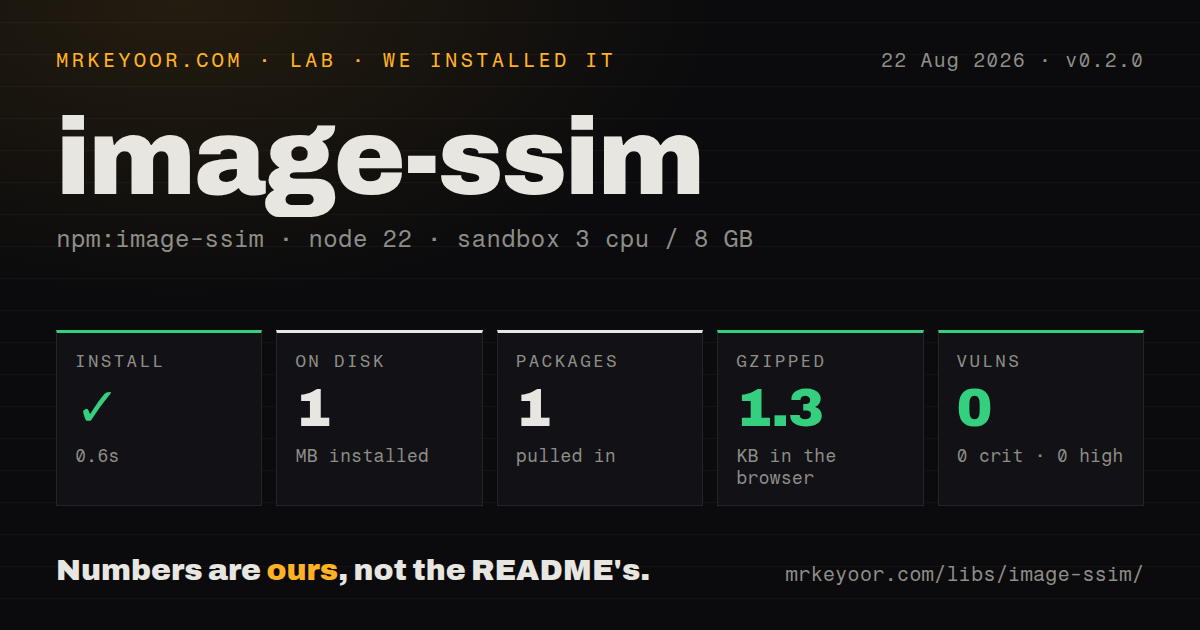
| Install | ✓ · 0.6s | 1 package on disk · 1 MB |
| Import | ✓ | ESM import works · require() works · CommonJS package |
| Browser | 1.3 KB | gzipped (2.4 KB minified), bundled with esbuild |
| Types | ✓ | TypeScript types bundled |
| Known vulns | 0 | 0 critical · 0 high · 0 moderate · 0 low (npm audit) |
Answers from our run
Does image-ssim install cleanly?
Yes. In a fresh container with an empty cache, npm install image-ssim finished in 0.6s, leaving 1 package and 1 MB on disk. npm audit reported no known vulnerabilities.
How much does image-ssim add to a browser bundle?
1.3 KB gzipped (2.4 KB minified) when the whole package is bundled for the browser with esbuild. Importing only part of it is usually smaller.
Does image-ssim work with both ESM and CommonJS?
Yes. Both import 'image-ssim' and require('image-ssim') worked in Node 22 in our run. The package is published as CommonJS.
Does image-ssim include TypeScript types?
Yes, type declarations ship inside the package, so no @types install is needed.
image-ssim or ssim.js: which should you use?
ssim.js: Choose it for a maintained SSIM implementation with current algorithms and TypeScript support. image-ssim 0.2.0 installed in 0.6 seconds and bundled to 1.3 KB gzipped in our sandbox, but a one-pixel edge window can return NaN and the repository has not been pushed since 2017.
When should you not use image-ssim?
You are choosing an SSIM package for new work: npm has only version 0.2.0 and GitHub shows no push since May 2017
Use it if
- You already have equal-sized decoded pixels and need the package's exact SSIM and MCS results
- An existing CommonJS test suite depends on image-ssim 0.2.0 behavior
- You need a 1.3 KB gzipped comparator inside a browser worker or canvas tool
- Your inputs use 1, 2, 3, or 4 channels and you can validate dimensions and output yourself
- You are choosing an SSIM package for new work: npm has only version 0.2.0 and GitHub shows no push since May 2017
- You need to compare PNG or JPEG paths directly: `compare` accepts decoded samples and has no file loader
- Your captures may differ in size: the source throws `Images have different sizes!` and performs no alignment, crop, or resize
- Your dimensions can leave a single-pixel edge window: open issue 2 shows that this makes both returned scores `NaN`
- You need a visible failure artifact: the result contains two numbers and no changed-pixel mask or diff image
Setup reality
Our install of image-ssim 0.2.0 completed in 0.6 seconds and left 1 package using 1 MB on disk. The package has 0 direct dependencies, 0 peer dependencies, and 0 audit findings. It is CommonJS with no exports map; both require() and ESM import worked in Node 22. Declaration files are bundled, although package metadata does not name a types entry. Our browser build measured 2.4 KB minified and 1.3 KB gzipped.
There are no credentials or config files. The missing setup is image decoding: use a separate PNG, JPEG, canvas, or sharp path to produce raw samples, width, height, and the right channel count. RGBA data declared as RGB shifts the byte stride and ruins every pixel after the first. Alpha contributes as multiplication against black in the source, so composite onto the page background first when transparent assets are judged as rendered.
compare is synchronous and defaults to 8 by 8 windows, K1 0.01, K2 0.03, luminance conversion, and 8 bits per component. All tuning uses positional arguments. Equal dimensions are mandatory. A 9 by 9 image with the default window leaves one sample in the last window; the variance divisor becomes 0 and the current code returns NaN. Check Number.isFinite, pick thresholds from your own approved images, and move large batches off the main event loop.
Patterns
Compare two RGBA arrays compare-rgba-pixels
const { compare, Channels } = require('image-ssim');

const result = compare(
  { data: actual, width, height, channels: Channels.RGBAlpha },
  { data: expected, width, height, channels: Channels.RGBAlpha }
);
console.log(result.ssim, result.mcs);
Both arrays must contain decoded RGBA samples and use the same width and height.
Decode PNG files before comparison decode-png-inputs
const fs = require('node:fs');
const { PNG } = require('pngjs');
const { compare, Channels } = require('image-ssim');

const a = PNG.sync.read(fs.readFileSync('actual.png'));
const b = PNG.sync.read(fs.readFileSync('expected.png'));
const result = compare(
  { data: a.data, width: a.width, height: a.height, channels: Channels.RGBAlpha },
  { data: b.data, width: b.width, height: b.height, channels: Channels.RGBAlpha }
);
`pngjs` is a separate package. image-ssim cannot read compressed PNG bytes itself.
Compare pixels from two canvases compare-canvas-data
const a = ctxA.getImageData(0, 0, canvasA.width, canvasA.height);
const b = ctxB.getImageData(0, 0, canvasB.width, canvasB.height);
const result = compare(
  { data: a.data, width: a.width, height: a.height, channels: Channels.RGBAlpha },
  { data: b.data, width: b.width, height: b.height, channels: Channels.RGBAlpha }
);
A canvas tainted by an image without suitable CORS headers makes `getImageData` throw before image-ssim runs.
Apply a project threshold reject-low-score
const { ssim } = compare(actual, expected);
const minimum = 0.985;
if (!Number.isFinite(ssim) || ssim < minimum) {
  throw new Error(`SSIM ${ssim} is below ${minimum}`);
}
0.985 is an application choice in this example. Calibrate the cutoff with approved and rejected images from your own test suite.
Reject different image sizes cleanly guard-dimensions
function compareSameSize(a, b) {
  if (a.width !== b.width || a.height !== b.height) {
    return { ok: false, reason: `${a.width}x${a.height} != ${b.width}x${b.height}` };
  }
  return { ok: true, result: compare(a, b) };
}
The package throws `Images have different sizes!` when either dimension differs.
Compare packed RGB samples compare-rgb-pixels
const result = compare(
  { data: rgbA, width, height, channels: Channels.RGB },
  { data: rgbB, width, height, channels: Channels.RGB }
);
RGB mode consumes exactly 3 samples per pixel. Remove alpha bytes before declaring this channel mode.
Compare grayscale samples compare-grayscale-pixels
const result = compare(
  { data: grayA, width, height, channels: Channels.Grey },
  { data: grayB, width, height, channels: Channels.Grey }
);
`Grey` consumes 1 sample per pixel; use `GreyAlpha` when each pixel has a second alpha sample.
Composite RGBA onto white composite-transparent-pixels
function onWhite(rgba) {
  const rgb = new Uint8Array((rgba.length / 4) * 3);
  for (let s = 0, d = 0; s < rgba.length; s += 4) {
    const alpha = rgba[s + 3] / 255;
    rgb[d++] = rgba[s] * alpha + 255 * (1 - alpha);
    rgb[d++] = rgba[s + 1] * alpha + 255 * (1 - alpha);
    rgb[d++] = rgba[s + 2] * alpha + 255 * (1 - alpha);
  }
  return rgb;
}
The package's alpha path multiplies color by alpha, which corresponds to black behind transparent pixels. Pre-composite for another background.
Change the SSIM window set-window-size
const result = compare(actual, expected, 4);The default window is 8. Avoid dimensions that leave a 1-pixel final window because version 0.2.0 can return `NaN`.
Sum RGB channels without weighting disable-luminance-weights
const result = compare(
  actual,
  expected,
  8,
  0.01,
  0.03,
  false
);
The sixth positional argument disables luminance weights. Preserve the 8, 0.01, and 0.03 defaults ahead of it.
Compare 16-bit component values set-bit-depth
const result = compare(
  imageA,
  imageB,
  8,
  0.01,
  0.03,
  true,
  16
);
The last argument changes the dynamic range to 16 bits. You still must decode file bytes into component values before calling `compare`.
Sort comparisons by SSIM rank-image-batch
const ranked = candidates
  .map(({ name, image }) => {
    const { ssim } = compare(image, baseline);
    return { name, ssim };
  })
  .filter(({ ssim }) => Number.isFinite(ssim))
  .sort((a, b) => a.ssim - b.ssim);
`compare` is synchronous and scans the image. Run large batches in workers if blocking the Node event loop would delay other work.
Alternatives
| Package | Registry | Pick it when |
|---|---|---|
| ssim.js | npm | Choose it for a maintained SSIM implementation with current algorithms and TypeScript support |
| looks-same | npm | Choose it when screenshot files, tolerance controls, and diff images belong in one workflow |
| pixelmatch | npm | Choose it for pixel-level comparisons that produce a visible changed-pixel image |
More testing guides
pytest · chai · jsdom · vitest · playwright · coverage · the whole shelf →
How this guide is made: grounded in the library's documentation, release notes, changelog, and issue history, on a fixed rubric — not a hands-on install of every release. The 50 most-downloaded entries are additionally install-verified in clean containers. Corrections: contact the desk.