http-server review
http-server is a Node command that exposes a directory over HTTP. It can list folders, choose index and 404 files, set cache headers, serve prebuilt gzip or Brotli siblings, add CORS or custom headers, require Basic authentication, terminate TLS, and proxy requests that miss local files. That makes it useful for opening a generated site, a coverage report, or a browser-test fixture without writing server code. It has no application router, middleware stack, template engine, live reload, asset builder, or automatic certificate handling. Version 14.1.1 is still current; its May 2022 release patched CVE-2021-44906 and updated `follow-redirects`, with no newer npm release since then.
http-server remains handy for a named directory inside a trusted development or CI environment. Its open bind, listings, caching defaults, and old release make it a poor public origin without a protective layer that removes most of the reason to use it.
We installed it
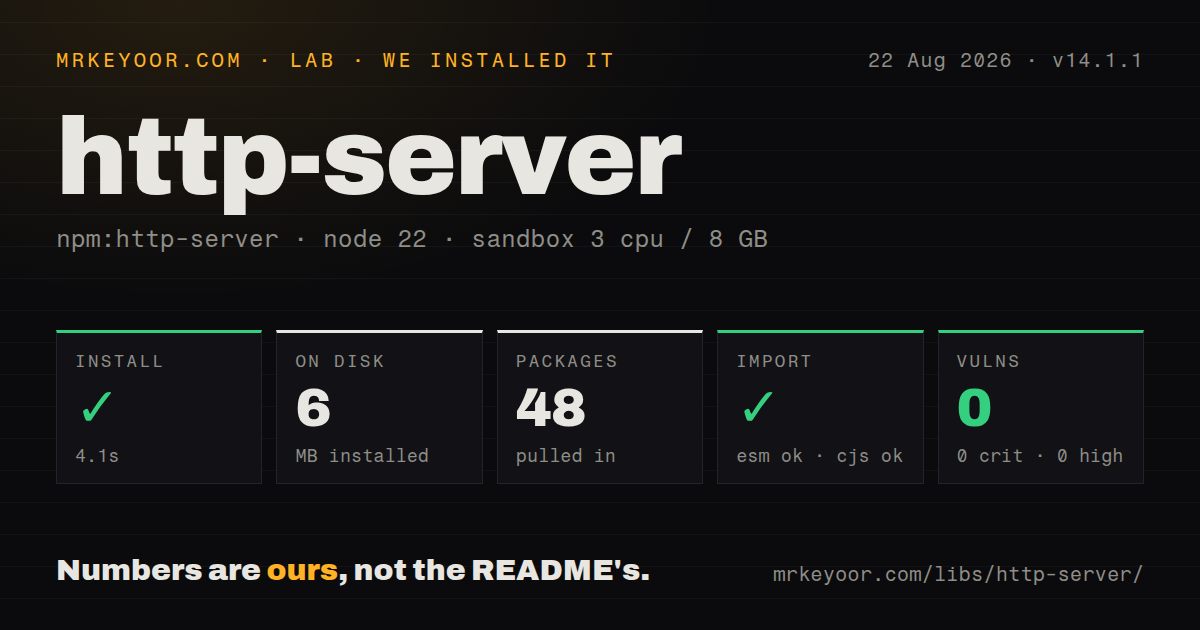
| Install | ✓ · 4.1s | 48 packages on disk · 6 MB · 1 deprecation warning |
| Import | ✓ | ESM import works · require() works · CommonJS package |
| Browser | n/a | could not be bundled for the browser (Node-only code, most likely) |
| Types | — | no TypeScript types found |
| Known vulns | 0 | 0 critical · 0 high · 0 moderate · 0 low (npm audit) |
Answers from our run
Does http-server install cleanly?
Yes. In a fresh container with an empty cache, npm install http-server finished in 4 seconds, leaving 48 packages and 6 MB on disk. npm audit reported no known vulnerabilities. The install printed 1 deprecation warning.
Can http-server run in a browser?
Not directly: esbuild could not bundle it for the browser in our run, which normally means it depends on Node built-ins. Use it on the server, or find a browser-targeted alternative.
Does http-server work with both ESM and CommonJS?
Yes. Both import 'http-server' and require('http-server') worked in Node 22 in our run. The package is published as CommonJS.
Does http-server include TypeScript types?
No type declarations were found in our install, so TypeScript users need their own declarations.
http-server or serve: which should you use?
serve: Choose it for a static deployment preview with direct single-page-app mode and a current CLI experience. http-server remains handy for a named directory inside a trusted development or CI environment.
When should you not use http-server?
You expect safe local-only defaults. It binds to 0.0.0.0, shows directory listings, enables auto-index pages, and caches for 3,600 seconds unless flags change those settings.
Use it if
- A static build or test fixture needs a repeatable local URL from an npm script.
- You need to check cache headers, CORS, custom response headers, or precompressed files without building an Express app.
- A frontend preview should forward only missing files to a development API.
- The same small CLI must run on developer machines and a controlled CI container.
- You expect safe local-only defaults. It binds to `0.0.0.0`, shows directory listings, enables auto-index pages, and caches for 3,600 seconds unless flags change those settings.
- The project needs live reload when files change. The documented server has no watcher or browser reload channel; `live-server` is built for that workflow.
- Requests need route handlers, sessions, authorization policy, rate limits, dynamic rendering, or structured logging. This is a static-file CLI with an optional proxy.
- You want a current release cadence for an internet-facing origin. Version 14.1.1 dates to May 2022 even though repository work continued in 2026.
- Your container policy requires an official published image. The README says no public image is provided and tells users to build the included Dockerfile themselves.
Setup reality
We installed http-server 14.1.1 in a clean Node 22 Bookworm container. npm finished in 4.1 seconds, printed one deprecation warning, and left 48 packages using 6 MB. The package declares 13 direct dependencies and no peers, has a 208 KB unpacked size, requires Node 12 or newer, and uses the MIT license. npm audit found no known vulnerabilities. CommonJS require() and ESM import worked, but no TypeScript declarations were present. Our browser build failed in esbuild, as expected for a Node CLI and server.
Defaults are the first surprise. With no path, the command serves ./public when that folder exists and ./ otherwise. It listens on every interface at port 8080, exposes directory listings and auto-index pages, and sends a one-hour cache lifetime. A cautious local script should name the directory, bind 127.0.0.1, disable caching with -c-1, hide dotfiles, and usually disable listings. Use -p 0 only when the caller can discover the selected port; browser tests usually need a fixed port.
The compression flags do not compress anything. --gzip and --brotli select existing .gz or .br siblings when the request accepts them, with Brotli preferred when both are enabled. --cors sends Access-Control-Allow-Origin: *, so it is unsuitable for a selective origin policy. The SPA recipe proxies unresolved requests back to the same server with a trailing ?; test that behavior with asset 404s because it is a catch-all trick rather than a dedicated history-fallback option.
TLS needs certificate and key files supplied with -C and -K. An encrypted key reads its passphrase from NODE_HTTP_SERVER_SSL_PASSPHRASE. Basic-auth credentials passed as command arguments may be visible in shell history or process listings. Proxy options can disable certificate verification, but that should stay in isolated development. For public hosting, put static files behind a maintained CDN or reverse proxy with access controls, observability, certificate renewal, and explicit cache rules.
Patterns
Serve a build on loopback serve-build-locally
npx http-server ./dist -a 127.0.0.1 -p 8080 -c-1 --no-dotfilesNaming the directory avoids the `./public` or current-directory fallback. Loopback and disabled caching are safer local defaults.
Pin a preview command add-package-script
{
  "scripts": {
    "preview:static": "http-server ./dist -a 127.0.0.1 -p 8080 -c-1 --no-dotfiles"
  },
  "devDependencies": {
    "http-server": "14.1.1"
  }
}
A local dev dependency keeps CI and developer machines on the same command version.
Find an available preview port choose-open-port
npx http-server ./coverage -a 127.0.0.1 -p 0 -c-1Port zero searches from 8080. Do not use it when another process needs a predetermined URL and cannot read the server output.
Hide directory listings and indexes disable-directory-pages
npx http-server ./public -a 127.0.0.1 -d false -i false --no-dotfilesDirectory listings and auto-index pages are enabled by default. Disabling them does not add application authorization.
Allow cross-origin fixture requests enable-test-cors
npx http-server ./fixtures -a 127.0.0.1 -p 8090 --cors -c-1The flag sends `Access-Control-Allow-Origin: *`. Use it for controlled fixtures, not a credentialed production policy.
Add isolation headers set-response-headers
npx http-server ./dist \
  -a 127.0.0.1 \
  -H 'Cross-Origin-Opener-Policy: same-origin' \
  -H 'Cross-Origin-Embedder-Policy: require-corp'
Repeat `-H` for multiple headers. Confirm every asset is compatible with the chosen browser isolation policy.
Prefer Brotli and gzip siblings serve-precompressed-assets
npx http-server ./dist -a 127.0.0.1 --brotli --gzipBuild `.br` and `.gz` files beforehand. The server selects them but does not create compressed assets.
Forward unresolved paths to an API proxy-api-misses
npx http-server ./dist -a 127.0.0.1 -p 8080 -P http://127.0.0.1:3000Only requests that miss local files are proxied unless `--proxy-all` is set. Keep the upstream on a trusted address.
Use the documented SPA catch-all add-spa-fallback
npx http-server ./dist -a 127.0.0.1 -p 8080 --proxy 'http://127.0.0.1:8080?'The trailing question mark is required by the documented recipe. Verify that missing assets still fail in the way your app expects.
Protect a temporary preview require-basic-auth
http-server ./dist -a 127.0.0.1 --username reviewer --password "$PREVIEW_PASSWORD"Command-line arguments can appear in process inspection. Use an isolated short-lived environment and do not treat Basic authentication as a full access layer.
Start HTTPS with supplied files serve-local-tls
NODE_HTTP_SERVER_SSL_PASSPHRASE=secret \
  http-server ./dist -a 127.0.0.1 -S -C cert.pem -K key.pem
The browser must trust the certificate. Store the passphrase in secret management rather than a committed script.
Restrict accepted Host headers block-unexpected-hosts
npx http-server ./dist -a 0.0.0.0 --allowed-hosts localhost,preview.example.testThis narrows Host headers but still exposes the listener on every interface. Add firewall or reverse-proxy controls for shared networks.
Alternatives
| Package | Registry | Pick it when |
|---|---|---|
| serve | npm | Choose it for a static deployment preview with direct single-page-app mode and a current CLI experience. |
| live-server | npm | Choose it when changing a file should refresh the browser automatically. |
| sirv-cli | npm | Choose it for a small static server with explicit development, compression, and single-page flags. |
More web backend guides
ws · urllib3 · requests · undici · anyio · express · the whole shelf →
How this guide is made: grounded in the library's documentation, release notes, changelog, and issue history, on a fixed rubric — not a hands-on install of every release. The 50 most-downloaded entries are additionally install-verified in clean containers. Corrections: contact the desk.