graphql review
GraphQL.js 17.0.2 is the JavaScript reference implementation of the GraphQL specification. It turns schemas and operation documents into validated execution results, and it exposes the AST, visitor, introspection, scalar, and subscription APIs used by server frameworks and developer tools. It does not open an HTTP socket, authenticate callers, batch database reads, or select a WebSocket protocol. The current major adds Node diagnostics-channel tracing and directives on directive definitions, while rejecting Node releases before 22.
GraphQL.js 17.0.2 installed in 0.7 seconds with 0 dependencies and 0 audit findings in our sandbox, but its Node 22 floor and 58.5 KB gzipped full browser import are real constraints. Install it directly for schema or execution control; use a server package when you also need HTTP transport and operational defaults.
We installed it
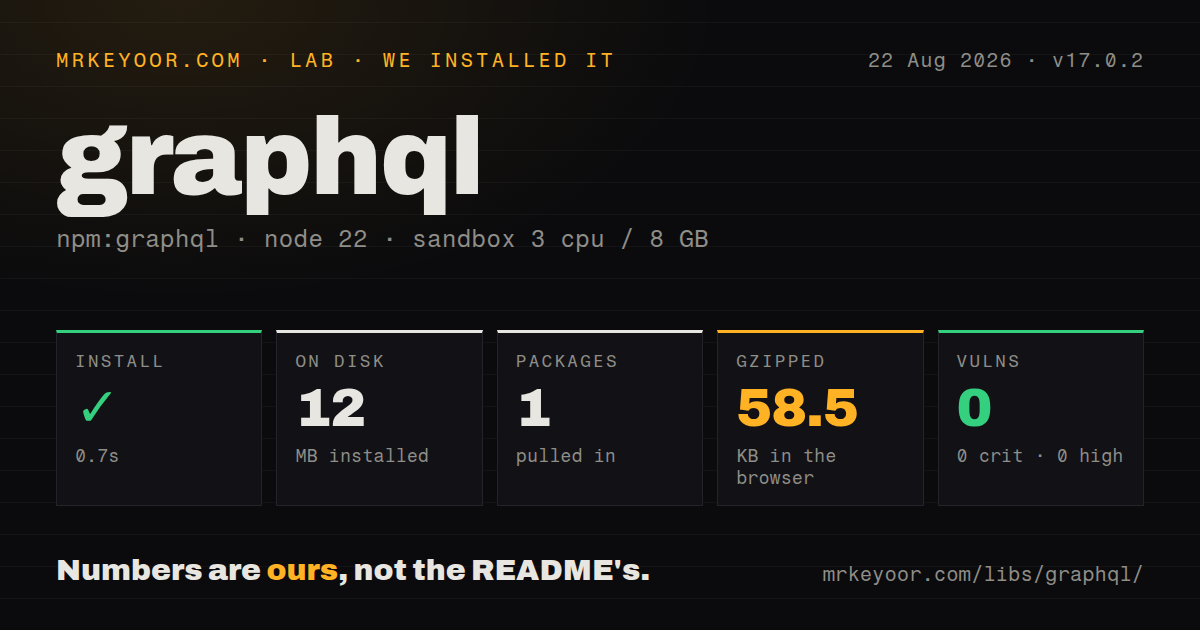
| Install | ✓ · 0.7s | 1 package on disk · 12 MB |
| Import | ✓ | ESM import works · require() works · CommonJS package with exports map |
| Browser | 58.5 KB | gzipped (228.5 KB minified), bundled with esbuild |
| Types | ✓ | TypeScript types bundled |
| Known vulns | 0 | 0 critical · 0 high · 0 moderate · 0 low (npm audit) |
Answers from our run
Does graphql install cleanly?
Yes. In a fresh container with an empty cache, npm install graphql finished in 0.7s, leaving 1 package and 12 MB on disk. npm audit reported no known vulnerabilities.
How much does graphql add to a browser bundle?
58.5 KB gzipped (228.5 KB minified) when the whole package is bundled for the browser with esbuild. Importing only part of it is usually smaller.
Does graphql work with both ESM and CommonJS?
Yes. Both import 'graphql' and require('graphql') worked in Node 22 in our run. The package is published as CommonJS with an exports map.
Does graphql include TypeScript types?
Yes, type declarations ship inside the package, so no @types install is needed.
graphql or graphql-yoga: which should you use?
graphql-yoga: Choose it when you want a GraphQL HTTP server with request handling and sensible transport defaults. GraphQL.js 17.0.2 installed in 0.7 seconds with 0 dependencies and 0 audit findings in our sandbox, but its Node 22 floor and 58.5 KB gzipped full browser import are real constraints.
When should you not use graphql?
You want an HTTP endpoint from one install; GraphQL.js has no listener, request parser, CORS policy, or server shutdown lifecycle, so GraphQL Yoga, Apollo Server, or Mercurius is a closer fit
Discussed on
- hnAfter 6 years, I'm over GraphQL1,259 points
- hnGraphQL kinda sucks720 points
- hnElixir, Phoenix, Absinthe, GraphQL, React, and Apollo526 points
- hnJohn Resig: Introducing the GraphQL Guide506 points
- hnWhy not use GraphQL?460 points
Use it if
- You are building a JavaScript or TypeScript GraphQL server and want direct control over parsing, validation, execution, and context
- You are writing schema tooling, a linter, a code generator, or an operation transformer that needs GraphQL AST nodes and visitors
- Your server framework declares graphql as a peer and you need one compatible copy shared by the entire GraphQL stack
- You have a custom transport and need execution or subscription primitives without adopting another server lifecycle
- You want an HTTP endpoint from one install; GraphQL.js has no listener, request parser, CORS policy, or server shutdown lifecycle, so GraphQL Yoga, Apollo Server, or Mercurius is a closer fit
- Production is still on Node 20 or older; graphql 17.0.2 declares Node 22, 24, 25, or 26 and newer in its engines field
- You need query cost controls, authorization rules, persisted operations, or response caching out of the box; the execution library leaves those policies to your host application
- Your framework and plugins cannot agree on one GraphQL.js major; objects created by duplicate package copies can fail the library's instance checks
- Your API is small and fixed enough for ordinary routes or a typed RPC layer; GraphQL adds schema ownership, resolver behavior, operation validation, and abuse limits that still need maintenance
Setup reality
Our install of graphql 17.0.2 on Node 22 finished in 0.7 seconds and left 1 package using 12 MB on disk. npm audit reported 0 known vulnerabilities. The package has 0 direct dependencies and 0 peer dependencies, and its TypeScript declarations ship in the tarball. Both require() and ESM import worked through the exports map. A full browser import measured 228.5 KB minified and 58.5 KB gzipped.
There is no executable or default config after installation. Your HTTP layer must turn a request into source text, variables, an operation name, and a request-scoped contextValue. It must also decide how authentication, authorization, error formatting, request cancellation, and subscriptions reach GraphQL.js. Version 17 can publish tracing data through Node diagnostics channels, but tracing does not choose a metrics backend or protect sensitive resolver arguments.
The graphql() convenience function parses, validates, and executes each supplied source. For repeated trusted operations, cache parsed documents only after validation against the current schema, cap that cache, and replace it when the schema changes. Resolver fan-out can still cause one database call per list item because GraphQL.js supplies no DataLoader behavior. Put loaders in the per-request context so cached user data cannot leak into another request.
Node 22 is the hard floor for 17.0.2, and the repository offers no LTS release. Its policy gives the latest major full fixes while the previous major receives limited support. Check the server, plugins, code generator, and test helpers before upgrading together. In browser tooling, avoid importing the whole package when only graphql/language is needed; our full import cost 58.5 KB gzipped.
Patterns
Build a schema and run one query execute-simple-query
import { buildSchema, graphql } from 'graphql';

const schema = buildSchema(`
  type Query { greeting(name: String!): String! }
`);

const result = await graphql({
  schema,
  source: '{ greeting(name: "Mira") }',
  rootValue: { greeting: ({ name }) => `Hello ${name}` },
});
graphql() performs parsing, validation, and execution for this source. rootValue resolves root fields only, so nested application schemas usually attach field resolvers another way.
Attach a resolver to a field define-code-first-schema
import { GraphQLID, GraphQLObjectType, GraphQLSchema, GraphQLString } from 'graphql';

const User = new GraphQLObjectType({
  name: 'User',
  fields: { id: { type: GraphQLID }, name: { type: GraphQLString } },
});

export const schema = new GraphQLSchema({
  query: new GraphQLObjectType({
    name: 'Query',
    fields: {
      user: {
        type: User,
        args: { id: { type: GraphQLID } },
        resolve: (_, { id }, ctx) => ctx.users.load(id),
      },
    },
  }),
});
The resolver receives source, arguments, context, and resolve info. Keep user-specific loaders in the request context rather than in a process-wide variable.
Separate syntax and schema checks parse-validate-operation
import { parse, validate } from 'graphql';

let document;
try {
  document = parse(source);
} catch (syntaxError) {
  return { errors: [syntaxError] };
}

const validationErrors = validate(schema, document);
if (validationErrors.length > 0) return { errors: validationErrors };
parse throws for invalid GraphQL syntax, while validate returns an array of errors found against the supplied schema.
Execute a cached document execute-preparsed-document
import { execute } from 'graphql';

const result = await execute({
  schema,
  document: cachedDocument,
  operationName: 'GetUser',
  variableValues: { id: '42' },
  contextValue: { users: createUserLoader(db) },
});
execute expects a parsed document and does not run the standard validation rules for you. Cache only documents already validated against this schema version.
Log field errors without discarding data preserve-partial-data
const result = await graphql({ schema, source, contextValue });

for (const error of result.errors ?? []) {
  logger.warn({
    message: error.message,
    path: error.path,
    locations: error.locations,
  });
}

return result;
GraphQL results may contain data and errors together. Nullability determines how far a failed field propagates through the returned data.
Replace a field in an operation transform-operation-ast
import { Kind, parse, print, visit } from 'graphql';

const document = parse('{ account { oldName } }');
const updated = visit(document, {
  Field(node) {
    if (node.name.value !== 'oldName') return;
    return { ...node, name: { kind: Kind.NAME, value: 'newName' } };
  },
});

console.log(print(updated));
Visitor callbacks replace nodes by returning a new node. Editing the received AST object in place can break consumers that treat documents as immutable.
Parse and serialize a Date scalar define-date-scalar
import { GraphQLError, GraphQLScalarType, Kind } from 'graphql';

export const DateScalar = new GraphQLScalarType({
  name: 'Date',
  serialize(value) {
    if (!(value instanceof Date)) throw new GraphQLError('Date result required');
    return value.toISOString();
  },
  parseValue(value) {
    if (typeof value !== 'string') throw new GraphQLError('Date string required');
    return new Date(value);
  },
  parseLiteral(node) {
    if (node.kind !== Kind.STRING) throw new GraphQLError('Date string required');
    return new Date(node.value);
  },
});
parseValue receives variable input and parseLiteral receives an inline literal. Test both paths and reject invalid dates according to your API contract.
Create an introspection artifact introspect-schema
import { getIntrospectionQuery, graphql } from 'graphql';

const result = await graphql({
  schema,
  source: getIntrospectionQuery(),
});

if (result.errors?.length) throw result.errors[0];
await saveJson('schema.json', result.data);
Code generators can read this result. If the public endpoint blocks introspection, create the artifact in CI from the same schema object used by the server.
Write deterministic schema SDL print-stable-schema
import { lexicographicSortSchema, printSchema } from 'graphql';

const sorted = lexicographicSortSchema(schema);
const sdl = printSchema(sorted);
await writeFile('schema.graphql', sdl, 'utf8');
lexicographicSortSchema removes construction-order noise before printing. The output still omits resolver functions because SDL describes types, not runtime code.
Consume subscription results run-subscription
import { parse, subscribe } from 'graphql';

const result = await subscribe({
  schema,
  document: parse('subscription { orderUpdated { id status } }'),
  contextValue,
});

if (Symbol.asyncIterator in result) {
  for await (const payload of result) sendPayload(payload);
} else {
  sendPayload(result);
}
subscribe returns an AsyncIterable for a live stream or an execution result when setup fails. GraphQL.js does not send those payloads over WebSocket or SSE.
Add SDL types to an existing schema extend-schema-sdl
import { extendSchema, parse } from 'graphql';

const nextSchema = extendSchema(
  schema,
  parse(`
    extend type Query { health: String! }
  `),
);
extendSchema returns a new schema object. SDL alone cannot attach the runtime resolver for health, so wire execution behavior in the host's resolver layer.
Load only language utilities import-language-subpath
import { parse, print, visit } from 'graphql/language';

const document = parse(queryText);
const output = print(visit(document, visitor));
Our full-package browser import measured 228.5 KB minified and 58.5 KB gzipped. Use the documented language subpath when schema and execution code are unnecessary.
Alternatives
| Package | Registry | Pick it when |
|---|---|---|
| graphql-yoga | npm | Choose it when you want a GraphQL HTTP server with request handling and sensible transport defaults |
| @apollo/server | npm | Choose it when Apollo plugins, usage reporting, or Apollo's server integrations define the stack |
| mercurius | npm | Choose it when GraphQL should run inside Fastify and use Fastify hooks, schemas, and lifecycle |
More web backend guides
ws · urllib3 · requests · undici · anyio · express · the whole shelf →
How this guide is made: grounded in the library's documentation, release notes, changelog, and issue history, on a fixed rubric — not a hands-on install of every release. The 50 most-downloaded entries are additionally install-verified in clean containers. Corrections: contact the desk.