gql review
gql 4.0.0 is a Python GraphQL client with interchangeable HTTP, WebSocket, Phoenix, and AWS AppSync transports. It parses documents, can validate them against a local or introspected schema, executes queries and mutations, streams subscriptions, batches operations, and supports multipart uploads. Version 4 changes `gql()` to return a GraphQLRequest that can carry variables and an operation name; passing those separately to `execute()` still works but is deprecated. Our Python 3.12 install took 0.4 seconds and occupied 5 MB.
gql 4.0.0 installed in 0.4 seconds as 9 packages using 5 MB, imported in 0.65 seconds, and produced 0 audit findings in our sandbox. Choose it for schema-aware Python clients, reused async sessions, subscriptions, batching, or uploads; fixed HTTP queries are simpler with HTTPX.
We installed it
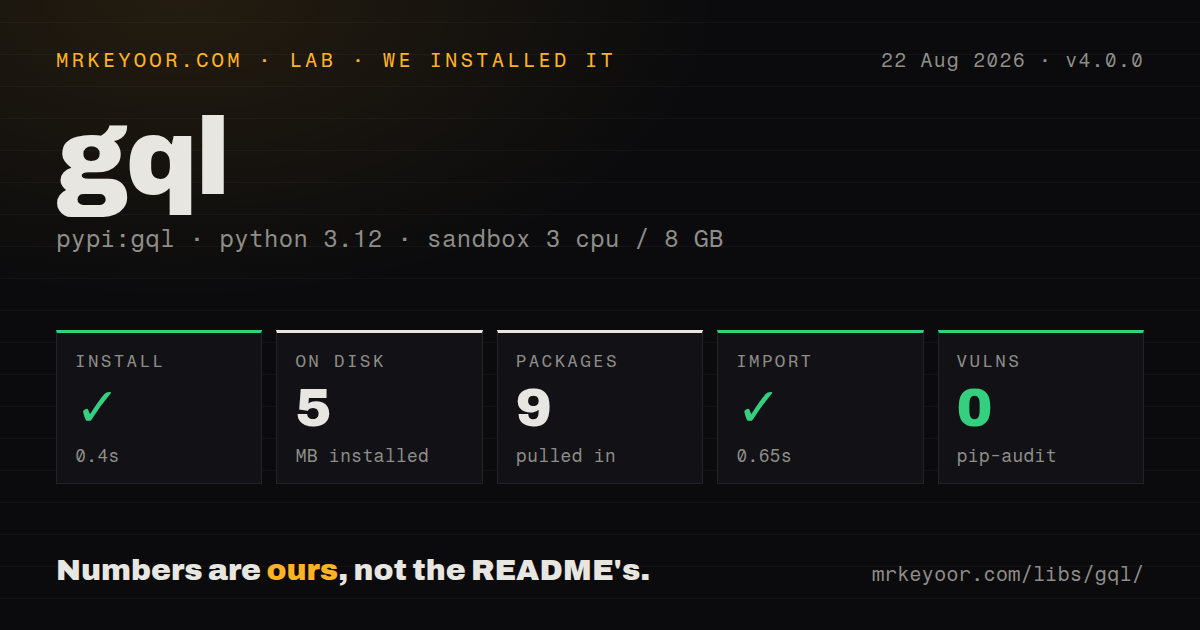
| Install | ✓ · 0.4s | 9 packages on disk · 5 MB |
| Import | ✓ | import gql in 0.65s · pure Python · py.typed · requires Python >=3.8.1 |
| Known vulns | 0 | (pip-audit) |
Answers from our run
Does gql install cleanly?
Yes. In a fresh container with an empty cache, pip install gql finished in 0.4s, leaving 9 packages and 5 MB on disk. pip-audit reported no known vulnerabilities.
What does gql need to run?
Python >=3.8.1, and nothing compiled: it is pure Python. In our run import gql succeeded in 0.65s, and the package ships py.typed for type checkers.
gql or graphql-core: which should you use?
graphql-core: Use it to parse, validate, or execute GraphQL locally when no remote client transport is needed. gql 4.0.0 installed in 0.4 seconds as 9 packages using 5 MB, imported in 0.65 seconds, and produced 0 audit findings in our sandbox.
When should you not use gql?
You send a few fixed GraphQL-over-HTTP calls. httpx.post() with a query and variables avoids gql's transport and schema layers.
Use it if
- A Python service needs one client API across sync HTTP, async HTTP, WebSocket subscriptions, or AWS AppSync.
- You want GraphQL documents checked locally against a schema before a request reaches the server.
- The application will reuse async sessions for concurrent operations, automatic batching, or long-lived subscriptions.
- Your endpoint requires GraphQL multipart uploads, custom scalars, Phoenix channels, or protocol-specific authentication.
- You send a few fixed GraphQL-over-HTTP calls. `httpx.post()` with a query and variables avoids gql's transport and schema layers.
- You expect generated result models. gql returns mapping-shaped results and its DSL builds requests; it does not generate Python models from a schema.
- You need an Apollo-style normalized cache with watchers and pagination policies. This client executes operations and keeps no reactive entity cache.
- Your synchronous code runs inside Jupyter or ASGI. The README warns that the basic sync AIOHTTP example fails when an asyncio loop is already running.
- Your production server blocks introspection and no schema file is available. `fetch_schema_from_transport=True` then fails before local validation can help.
Setup reality
We installed gql 4.0.0 in a fresh Python 3.12 Bookworm sandbox. The install finished in 0.4 seconds, left 9 packages, and used 5 MB on disk. Our package inspection counted 64 declared direct dependency entries, including optional extras. The distribution is pure Python, requires Python 3.8.1 or newer, ships py.typed, and uses MIT. import gql worked in 0.65 seconds, while pip-audit found 0 known vulnerabilities.
A base install does not select every transport. Add the narrow extra for your code, such as gql[requests], gql[httpx], gql[aiohttp], or gql[websockets]; gql[all] pulls several independent network stacks. Authentication, TLS verification, proxies, timeouts, token refresh, and retry rules belong in the chosen transport and your application.
Version 4 packages the document, variables, and operation name in GraphQLRequest. The older execute(request, variable_values=...) form is deprecated. An async client context opens one reusable session; opening a new context per query throws away pooling. Cancellation now propagates asyncio.CancelledError from active subscriptions, so task shutdown code must handle it.
Schema introspection adds a network request during connection and may fail against servers that reject includeDeprecated on input fields. A checked-in schema avoids that startup dependency but can drift. Uploads now use FileVar; streaming uploads are tied to AIOHTTPTransport. GraphQL errors in an HTTP 200 response raise TransportQueryError, while connection and protocol failures use separate transport exceptions.
Patterns
Run a query with Requests sync-http-query
from gql import Client, gql
from gql.transport.requests import RequestsHTTPTransport

transport = RequestsHTTPTransport(
    url="https://api.example.com/graphql",
    timeout=10,
)
client = Client(transport=transport)
request = gql("query { viewer { id name } }")
result = client.execute(request)
Install `gql[requests]`. A synchronous transport fits scripts and worker code that does not already run an asyncio loop.
Reuse one async HTTP session async-http-session
from gql import Client, gql
from gql.transport.aiohttp import AIOHTTPTransport

client = Client(
    transport=AIOHTTPTransport(url="https://api.example.com/graphql")
)

async with client as session:
    result = await session.execute(
        gql("query { viewer { id name } }")
    )
Install `gql[aiohttp]`. Calls made through the open session reuse its connection instead of reconnecting for every operation.
Put variables on a GraphQLRequest attach-variables
request = gql("""
  query User($id: ID!) {
    user(id: $id) { id name }
  }
""")
request.variable_values = {"id": user_id}

result = client.execute(request)
Version 4 prefers variables on GraphQLRequest. Passing `variable_values` separately to `execute()` remains available but is deprecated.
Select one operation from a document choose-operation
request = gql("""
  query Viewer { viewer { id } }
  query Team { team { id name } }
""")
request.operation_name = "Team"

result = client.execute(request)
Set `operation_name` when a document contains several named operations or the server cannot choose which one to run.
Send a bearer token bearer-auth
transport = RequestsHTTPTransport(
    url="https://api.example.com/graphql",
    headers={"Authorization": f"Bearer {token}"},
    timeout=10,
)
client = Client(transport=transport)
A static header does not refresh an expiring token. Credential renewal and secret storage stay in application code.
Validate against a checked-in schema local-schema
from pathlib import Path
from gql import Client, gql

schema = Path("schema.graphql").read_text(encoding="utf-8")
client = Client(transport=transport, schema=schema)
result = client.execute(gql("query { viewer { id } }"))
Local validation avoids an introspection call, but the file can drift from the deployed server and needs its own update process.
Fetch the server schema on connection fetch-schema
client = Client(
    transport=transport,
    fetch_schema_from_transport=True,
)
result = client.execute(gql("query { viewer { id } }"))
This sends introspection before normal work. It fails when the credential cannot introspect or the server rejects the v4 introspection fields.
Send a mutation with input mutation-request
request = gql("""
  mutation Rename($id: ID!, $name: String!) {
    renameUser(id: $id, name: $name) { id name }
  }
""")
request.variable_values = {"id": user_id, "name": "Ada"}
result = client.execute(request)
GraphQL mutations are not automatically safe to retry. Add retries only when the server operation has an idempotency design.
Consume a WebSocket subscription websocket-subscription
from gql import Client, gql
from gql.transport.websockets import WebsocketsTransport

client = Client(transport=WebsocketsTransport(
    url="wss://api.example.com/graphql"
))

async with client as session:
    async for event in session.subscribe(
        gql("subscription { jobChanged { id status } }")
    ):
        print(event["jobChanged"])
Install `gql[websockets]` and confirm the protocol used by the server. Version 4 lets `asyncio.CancelledError` propagate during cancellation.
Upload with FileVar upload-file
from gql import FileVar, gql

request = gql("""
  mutation Upload($file: Upload!) {
    upload(file: $file) { id }
  }
""")
request.variable_values = {
    "file": FileVar("report.pdf", content_type="application/pdf")
}
result = client.execute(request, upload_files=True)
Version 4 makes FileVar the preferred upload input. Streaming file data requires the aiohttp transport.
Execute a batch explicitly batch-requests
first = gql("query { viewer { id } }")
second = gql("query { team { id } }")

results = client.execute_batch([first, second])
Version 4 supports batch execution on sync and async transports. The GraphQL server and selected HTTP transport must also accept batching.
Distinguish query and connection failures separate-errors
from gql.transport.exceptions import (
    TransportConnectionFailed,
    TransportQueryError,
)

try:
    result = client.execute(request)
except TransportQueryError as exc:
    print(exc.errors)
except TransportConnectionFailed as exc:
    raise RuntimeError("GraphQL endpoint unavailable") from exc
A server may return HTTP 200 with GraphQL errors, which raises TransportQueryError. Network dependency failures are wrapped as TransportConnectionFailed.
Alternatives
| Package | Registry | Pick it when |
|---|---|---|
| graphql-core | PyPI | Use it to parse, validate, or execute GraphQL locally when no remote client transport is needed. |
| sgqlc | PyPI | Use it when schema code generation and Python type objects matter more than transport breadth. |
| python-graphql-client | PyPI | Use it for a smaller query, mutation, and subscription wrapper with fewer client-side features. |
More web backend guides
urllib3 · requests · ws · anyio · httpx · undici · the whole shelf →
How this guide is made: grounded in the library's documentation, release notes, changelog, and issue history, on a fixed rubric — not a hands-on install of every release. The 50 most-downloaded entries are additionally install-verified in clean containers. Corrections: contact the desk.