fuzzysort review
fuzzysort 4.0.2 searches strings or selected fields in an in-memory array by rewarding ordered character matches. Our esbuild check produced a 20.8 KB minified browser bundle, 8.3 KB after gzip, with no runtime dependencies. A result carries its score, matching character positions, original record, and a highlight formatter. Major version 4 moves the package to ESM, adds reusable `snapshot()` targets, exposes worker-safe score and highlight functions, and normalizes diacritics plus common lookalike characters. It also drops `options.all`; a blank query now returns a result set. There is no persistent index or remote search layer.
Our fuzzysort 4.0.2 install took 0.8 seconds, left one 1 MB package, and bundled to 8.3 KB gzipped with no audit findings, which makes it an economical choice for local command palettes and pickers. Use an indexed service or a typo-oriented matcher when the corpus or spelling behavior exceeds ordered-character search.
We installed it
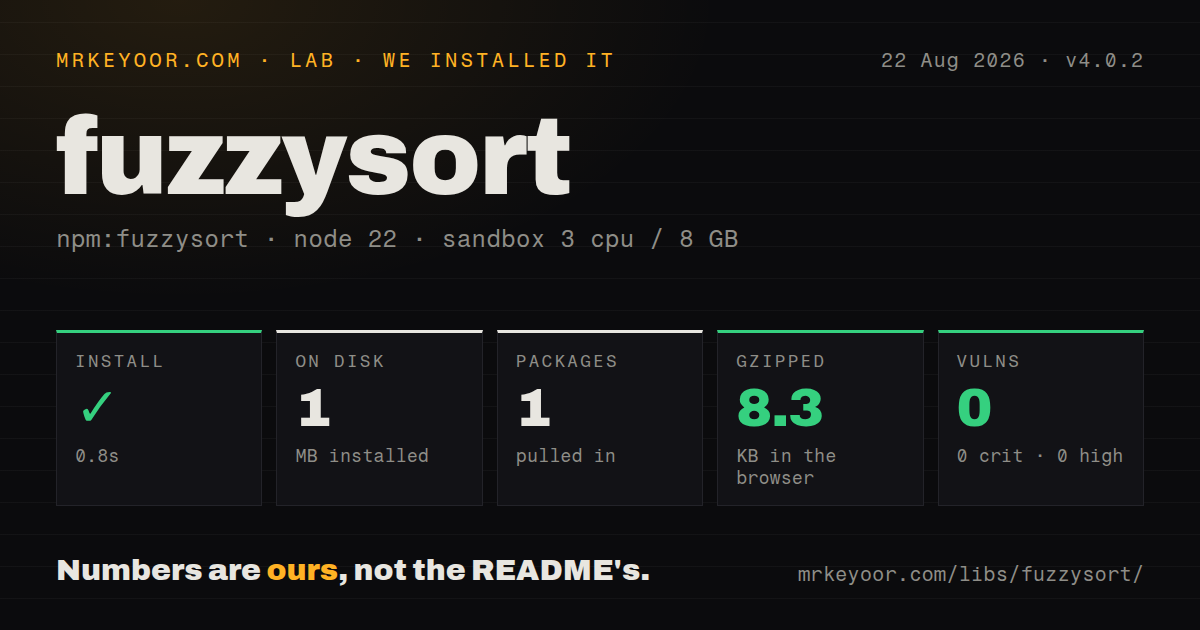
| Install | ✓ · 0.8s | 1 package on disk · 1 MB |
| Import | ✓ | ESM import works · require() works · ESM package with exports map |
| Browser | 8.3 KB | gzipped (20.8 KB minified), bundled with esbuild |
| Types | ✓ | TypeScript types bundled |
| Known vulns | 0 | 0 critical · 0 high · 0 moderate · 0 low (npm audit) |
Answers from our run
Does fuzzysort install cleanly?
Yes. In a fresh container with an empty cache, npm install fuzzysort finished in 0.8s, leaving 1 package and 1 MB on disk. npm audit reported no known vulnerabilities.
How much does fuzzysort add to a browser bundle?
8.3 KB gzipped (20.8 KB minified) when the whole package is bundled for the browser with esbuild. Importing only part of it is usually smaller.
Does fuzzysort work with both ESM and CommonJS?
Yes. Both import 'fuzzysort' and require('fuzzysort') worked in Node 22 in our run. The package is published as ESM with an exports map.
Does fuzzysort include TypeScript types?
Yes, type declarations ship inside the package, so no @types install is needed.
fuzzysort or fuse.js: which should you use?
fuse.js: Choose it for typo tolerance, weighted fields, and more ranking controls. Our fuzzysort 4.0.2 install took 0.8 seconds, left one 1 MB package, and bundled to 8.3 KB gzipped with no audit findings, which makes it an economical choice for local command palettes and pickers.
When should you not use fuzzysort?
Fuzzysort 4 follows ordered characters and removed the old allowTypo option, so users expecting edit-distance spelling repair should choose Fuse.js or fast-fuzzy
Use it if
- fuzzysort.go can rank a command palette, file list, or small catalog that is already in browser memory
- Result indexes are needed to mark the exact characters responsible for a match
- snapshot() can prepare one unchanged collection for many keystroke-by-keystroke searches
- A zero-dependency matcher with bundled TypeScript declarations fits the project's dependency budget
- Fuzzysort 4 follows ordered characters and removed the old allowTypo option, so users expecting edit-distance spelling repair should choose Fuse.js or fast-fuzzy
- The README describes array scans, prepared values, and snapshots; it has no disk index, query server, pagination, stemming, or language analysis for a large remote corpus
- Version 4 declares type: module and an exports map, which can be a migration problem for older bundlers despite require() working in our Node 22 check
- An empty search returns results in version 4 after options.all was removed, so a UI that should show recents needs its own blank-query branch
- highlight() can return a string containing caller-selected tags; untrusted target text must go through a safe renderer instead of direct innerHTML
Setup reality
We installed fuzzysort 4.0.2 in 0.8 seconds inside a fresh, unprivileged Node 22 Bookworm sandbox with 3 CPUs and 8 GB of RAM. One package occupied 1 MB on disk. npm audit reported zero vulnerabilities at every severity. The published package has 0 direct and 0 peer dependencies, is 100 KB unpacked, and includes TypeScript declarations. It declares ESM through type: module and an exports map; both require() and ESM import succeeded in our checks.
Our browser entry build measured 20.8 KB minified and 8.3 KB gzipped with esbuild. No token, environment variable, or config file is needed. Choose key for one field, keys for several fields, or pass strings directly. Version 4 applies a default threshold and limit, so set both when the exact visible result count and cutoff are part of the product behavior. Blank input now returns matches unless the application intercepts it.
Call snapshot() once for a collection that stays unchanged across searches. If records change, rebuild the snapshot or store fuzzysort.prepare() output beside each current source record. The matcher runs synchronously; a sufficiently large scan can delay input and paint even if its preparation is cached. Move that work to a Web Worker or search service when real device profiling shows a keystroke crossing the UI's latency budget.
Structured cloning removes the getters on result objects. Version 4 provides fuzzysort.score(result) and fuzzysort.highlight(result) for data returned from a worker. NFKD normalization strips diacritics and remaps a built-in set of quote, dash, slash, ellipsis, and lookalike characters. Register custom remap() entries before taking a snapshot, or the query and the prepared 1 MB package data can follow different normalization rules.
Patterns
Rank file names against a query search-strings
import fuzzysort from 'fuzzysort'

const files = ['src/App.tsx', 'src/api/users.ts', 'README.md']
const results = fuzzysort.go('sau', files, { limit: 20, threshold: 0.4 })
for (const result of results) console.log(result.target, result.score)
Version 4 scores matches between 0 and 1, and go() sorts the larger scores first.
Match command labels search-object-key
const commands = [
  { id: 'open', label: 'Open file' },
  { id: 'settings', label: 'Open settings' },
]
const results = fuzzysort.go('opset', commands, { key: 'label' })
console.log(results[0]?.obj.id)
With key: 'label', result.obj remains the source command and result.target contains its label.
Query a nested description search-nested-key
const results = fuzzysort.go('special attack', items, {
  key: 'meta.description',
  limit: 25,
})
A null meta.description supplies no searchable text, so normalize records with inconsistent shapes first.
Search title, description, and tags search-multiple-keys
const targets = fuzzysort.snapshot(products, {
  keys: ['title', 'description', product => product.tags?.join(' ') ?? ''],
})
const results = fuzzysort.go('attack berry', targets)
A multi-key result uses numeric positions for each matched field while result.obj keeps the product.
Raise bookmarked matches custom-score
const results = fuzzysort.go(query, targets, {
  scoreFn(result) {
    return result.score * (result.obj.bookmarked ? 1.2 : 1)
  },
})
scoreFn controls ordering and can return more than 1 after the 1.2 multiplier.
Wrap matching characters in mark tags highlight-html
const result = fuzzysort.single('cfg', 'src/config.ts')
const html = result?.highlight('<mark>', '</mark>') ?? ''
This highlight call returns an HTML string; sanitize outside text before placing it in innerHTML.
Build React children for a match highlight-react
function Match({ result }) {
  return result.highlight((text, index) => (
    <mark key={index}>{text}</mark>
  ))
}
The callback form produces an array of text and React nodes, so this example does not use innerHTML.
Prepare a fixed file list once snapshot-targets
const targets = fuzzysort.snapshot(files, { key: 'path' })

function searchFiles(query) {
  return fuzzysort.go(query, targets, { limit: 50 })
}
snapshot() is immutable; create another snapshot whenever files are added, removed, or renamed.
Cache each normalized path prepare-field
const records = files.map(file => ({
  ...file,
  preparedPath: fuzzysort.prepare(file.path),
}))
const results = fuzzysort.go(query, records, { key: 'preparedPath' })
Storing preparedPath on each record keeps result.obj connected to the current source data.
Show recents for blank input empty-query
const results = query.trim()
  ? fuzzysort.go(query, targets, { limit: 20 })
  : recentCommands.slice(0, 20)
Version 4 returns matches for an empty query, so this branch preserves a 20-item recent list.
Treat decimal comma as a dot custom-remap
fuzzysort.remap({ ',': '.' })
const prices = fuzzysort.snapshot(['12.5', '18.0'])
const results = fuzzysort.go('12,5', prices)
Call remap() before snapshot(); prepared targets keep the normalization rules active at creation time.
Format a worker-cloned result worker-result
worker.onmessage = ({ data: results }) => {
  const first = results[0]
  console.log(fuzzysort.score(first))
  console.log(fuzzysort.highlight(first, '<mark>', '</mark>'))
}
Structured cloning drops result getters; version 4's score() and highlight() functions read the cloned fields directly.
Alternatives
| Package | Registry | Pick it when |
|---|---|---|
| fuse.js | npm | Choose it for typo tolerance, weighted fields, and more ranking controls |
| fast-fuzzy | npm | Choose it when edit-distance matching fits the user's spelling errors better |
| match-sorter | npm | Choose it for deterministic UI filtering based on ranked matching tiers |
More utils guides
lru-cache · type-fest · ajv · zod · p-limit · find-up · the whole shelf →
How this guide is made: grounded in the library's documentation, release notes, changelog, and issue history, on a fixed rubric — not a hands-on install of every release. The 50 most-downloaded entries are additionally install-verified in clean containers. Corrections: contact the desk.