fastest-stable-stringify review
fastest-stable-stringify 2.0.2 turns JSON-like JavaScript data into compact text after sorting object keys lexicographically at every level. Equal objects produce equal bytes even when properties were inserted in different orders, which helps with cache keys, hashes, and snapshots. Arrays retain their order, and `toJSON` still runs. Our browser build was 1.2 KB minified and 0.7 KB gzipped. The current version is not current work: npm published 2.0.2 in May 2018, and its one-function API has no comparator, replacer, spacing, cycle, or BigInt option.
fastest-stable-stringify 2.0.2 installed in 0.6 seconds and bundled to 0.7 KB gzipped in our sandbox, but npm has not shipped a release since 2018. Keep it where its exact output is already a contract; choose a maintained configurable stringifier for new code.
We installed it
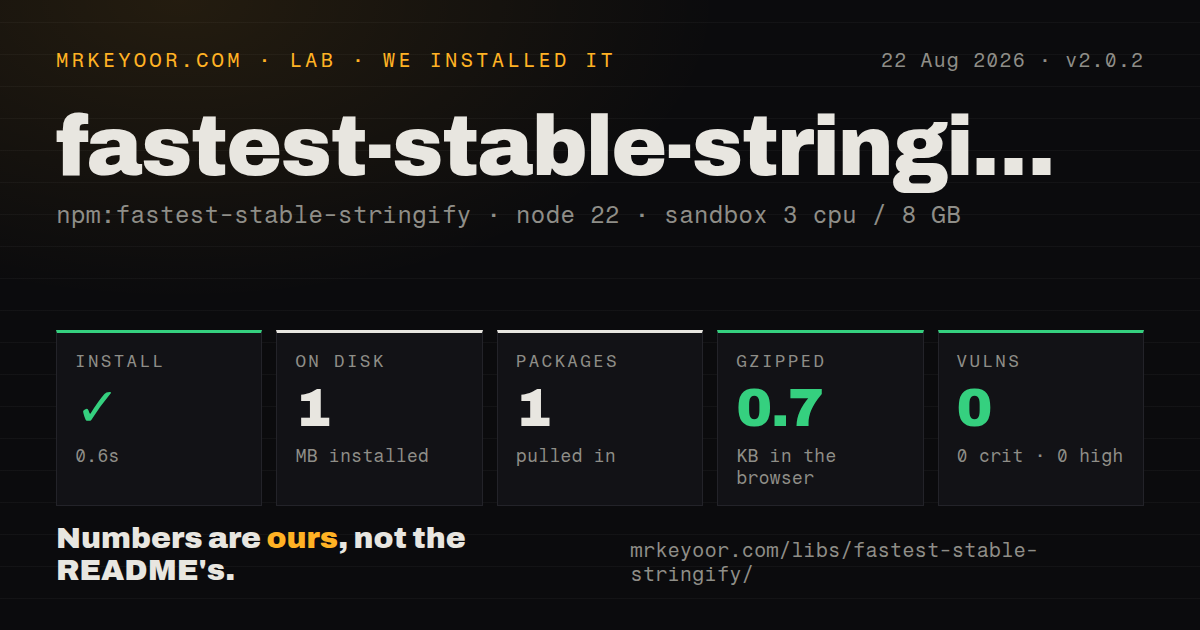
| Install | ✓ · 0.6s | 1 package on disk · 1 MB |
| Import | ✓ | ESM import works · require() works · CommonJS package |
| Browser | 0.7 KB | gzipped (1.2 KB minified), bundled with esbuild |
| Types | — | no TypeScript types found |
| Known vulns | 0 | 0 critical · 0 high · 0 moderate · 0 low (npm audit) |
Answers from our run
Does fastest-stable-stringify install cleanly?
Yes. In a fresh container with an empty cache, npm install fastest-stable-stringify finished in 0.6s, leaving 1 package and 1 MB on disk. npm audit reported no known vulnerabilities.
How much does fastest-stable-stringify add to a browser bundle?
0.7 KB gzipped (1.2 KB minified) when the whole package is bundled for the browser with esbuild. Importing only part of it is usually smaller.
Does fastest-stable-stringify work with both ESM and CommonJS?
Yes. Both import 'fastest-stable-stringify' and require('fastest-stable-stringify') worked in Node 22 in our run. The package is published as CommonJS.
Does fastest-stable-stringify include TypeScript types?
No type declarations were found in our install, so TypeScript users need their own declarations.
fastest-stable-stringify or safe-stable-stringify: which should you use?
safe-stable-stringify: Use it for configurable cycle and BigInt handling in maintained application code. fastest-stable-stringify 2.0.2 installed in 0.6 seconds and bundled to 0.7 KB gzipped in our sandbox, but npm has not shipped a release since 2018.
When should you not use fastest-stable-stringify?
New code may encounter cycles or BigInt; version 2.0.2 throws instead of offering a configurable representation
Use it if
- An existing cache or signature depends on the exact bytes emitted by version 2.0.2
- Your values are acyclic JSON data and default lexicographic key order is the desired contract
- You need a dependency-free CommonJS function in an older Node application
- A benchmark using your real payloads shows this implementation is worth keeping
- New code may encounter cycles or BigInt; version 2.0.2 throws instead of offering a configurable representation
- You need a comparator, replacer, indentation, or cycle policy because extra arguments are not part of the exported API
- Your TypeScript or ESM policy requires declarations and an exports map; our package inspection found neither
- You need RFC 8785 canonical JSON for signatures across languages; sorting JavaScript object keys is a different contract
- You prefer actively released dependencies: npm has not received a new version since 2018
Setup reality
Our clean install of fastest-stable-stringify 2.0.2 took 0.6 seconds and left 1 package using 1 MB on disk. The package was 84 KB unpacked, declared 0 dependencies and 0 peers, and npm audit reported 0 known vulnerabilities. It is CommonJS without an exports map. Both require() and ESM import worked in our Node 22 sandbox; no TypeScript types were bundled.
Setup ends at importing one function. There are no credentials, native modules, or config files. The function always uses JavaScript's default lexicographic key sort. Passing a comparator, replacer, or spacing argument does not add a supported feature, even if old examples elsewhere resemble APIs from related stable-stringify packages.
The namespace browser bundle measured 1.2 KB minified and 0.7 KB gzipped. Input behavior is the larger concern. Circular objects recurse until an error, BigInt throws, and Map or Set normally becomes {} because it exposes no enumerable string keys. Dates pass through toJSON; custom toJSON methods can execute code and replace the value before keys are sorted.
Undefined object fields disappear, undefined array entries become null, and non-finite numbers also become null. At the top level, this package returns the string null for undefined, unlike native JSON.stringify, which returns undefined. Getters run while walking the object. Validate and normalize data before hashing it, and pin the serializer wherever byte-for-byte output forms a stored cache or signature contract.
Patterns
Sort nested object keys stringify-object
const stringify = require('fastest-stable-stringify')

const a = stringify({ b: 2, a: 1 })
const b = stringify({ a: 1, b: 2 })
console.log(a, a === b)
Both values become `{"a":1,"b":2}` because object keys are sorted; array elements keep their input order.
Hash normalized structured input create-cache-key
const stringify = require('fastest-stable-stringify')
const { createHash } = require('node:crypto')

function cacheKey(value) {
  return createHash('sha256').update(stringify(value)).digest('hex')
}
Reject cycles and normalize Map, Set, and BigInt first, or distinct inputs may throw or collapse to the same text.
Compare JSON data across insertion order compare-json-data
function sameJsonData(left, right) {
  return stringify(left) === stringify(right)
}

sameJsonData({ x: 1, y: 2 }, { y: 2, x: 1 }) // true
This is not general deep equality: prototypes disappear, undefined fields are omitted, and `toJSON` may replace an object.
Write stable compact JSON write-reproducible-file
const { writeFile } = require('node:fs/promises')

async function writeManifest(path, data) {
  await writeFile(path, stringify(data) + '\n', 'utf8')
}
Version 2.0.2 has no indentation option. The added newline is caller policy and changes the bytes used for a hash.
Let Date supply its JSON value serialize-date
stringify({
  createdAt: new Date('2026-08-22T12:00:00.000Z'),
})
// {"createdAt":"2026-08-22T12:00:00.000Z"}
Any object's `toJSON` method runs before sorting, including user-defined methods with side effects.
Turn Map entries into an object first convert-map
const headers = new Map([
  ['content-type', 'application/json'],
  ['accept', 'application/json'],
])
const json = stringify(Object.fromEntries(headers))
A raw Map normally serializes as `{}`. Decide how non-string keys should be represented before conversion.
Convert BigInt through a JSON replacer first encode-bigint
function jsonReady(value) {
  return JSON.parse(JSON.stringify(value, (_, item) =>
    typeof item === 'bigint' ? item.toString() : item
  ))
}
const text = stringify(jsonReady({ id: 9007199254740993n }))
Calling fastest-stable-stringify directly on BigInt throws in version 2.0.2; string conversion also changes its data type.
Use Node's CommonJS default import load-esm
import stringify from 'fastest-stable-stringify'

console.log(stringify({ z: 3, a: 1 }))
Our Node 22 ESM import worked, although the package has no exports map or native ESM build; confirm other bundlers separately.
Alternatives
| Package | Registry | Pick it when |
|---|---|---|
| safe-stable-stringify | npm | Use it for configurable cycle and BigInt handling in maintained application code. |
| fast-json-stable-stringify | npm | Use it when a documented key comparator or optional cycle handling is required. |
| json-stable-stringify | npm | Use it when replacer and spacing controls are part of the serialization job. |
More utils guides
lru-cache · type-fest · ajv · zod · p-limit · find-up · the whole shelf →
How this guide is made: grounded in the library's documentation, release notes, changelog, and issue history, on a fixed rubric — not a hands-on install of every release. The 50 most-downloaded entries are additionally install-verified in clean containers. Corrections: contact the desk.