emoji review
emoji 2.15.0 is a Python Unicode data and text utility, not an image renderer. It expands official shortcodes or optional aliases, converts characters back to names, finds complete emoji sequences with Python string offsets, replaces matches, and exposes metadata such as the Emoji version. The 2.15.0 release updates its table to Unicode 17.0. English is the default, with 14 documented translated name sets. Its parser understands flags, skin tones, variation selectors, and joined sequences that a one-code-point loop will split incorrectly.
emoji 2.15.0 installed in 0.2 seconds, occupied 5 MB, imported in 0.27 seconds, and had 0 audit findings in our sandbox, making it an easy choice for Unicode-aware emoji text work on Python 3.8+. Do not install it for glyph rendering, sentiment analysis, display-width calculation, or immutable multilingual identifiers.
We installed it
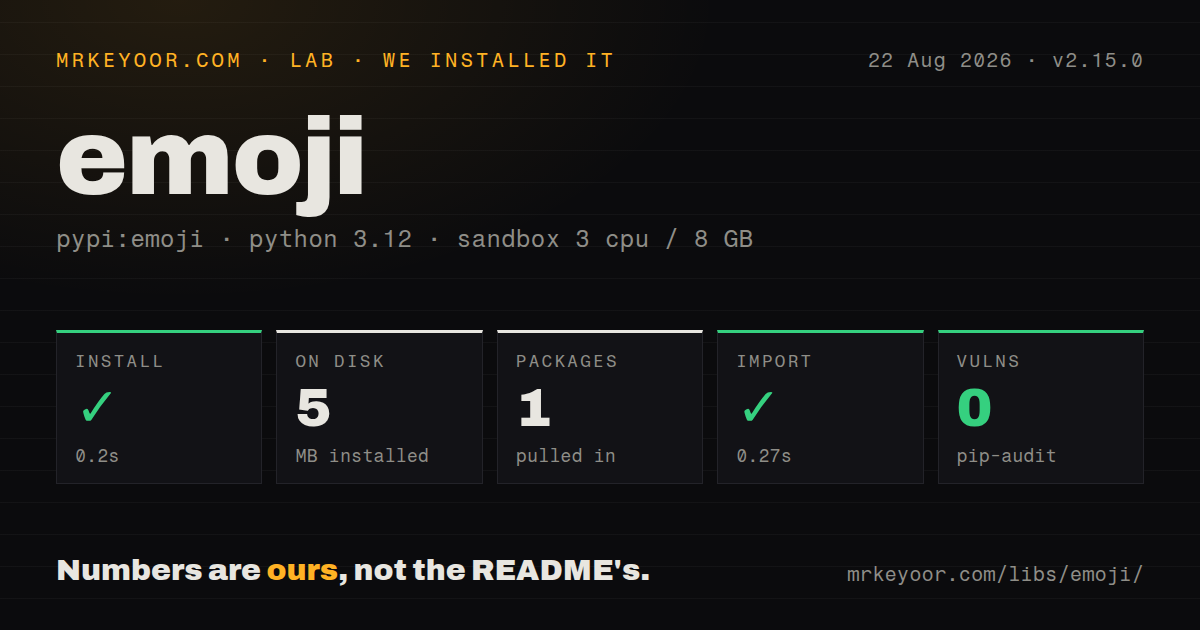
| Install | ✓ · 0.2s | 1 package on disk · 5 MB |
| Import | ✓ | import emoji in 0.27s · pure Python · py.typed · requires Python >=3.8 |
| Known vulns | 0 | (pip-audit) |
Answers from our run
Does emoji install cleanly?
Yes. In a fresh container with an empty cache, pip install emoji finished in 0.2s, leaving 1 package and 5 MB on disk. pip-audit reported no known vulnerabilities.
What does emoji need to run?
Python >=3.8, and nothing compiled: it is pure Python. In our run import emoji succeeded in 0.27s, and the package ships py.typed for type checkers.
emoji or demoji: which should you use?
demoji: Use it for a smaller find, describe, replace, and remove API when localized shortcode expansion is unnecessary. emoji 2.15.0 installed in 0.2 seconds, occupied 5 MB, imported in 0.27 seconds, and had 0 audit findings in our sandbox, making it an easy choice for Unicode-aware emoji text work on Python 3.8+.
When should you not use emoji?
You need bitmap artwork, a font, or consistent cross-platform rendering; this package only returns and inspects Unicode text
Use it if
- Your Python service needs shortcode expansion or `demojize` output using Unicode 17.0 data
- Text scanning must treat skin tones, flags, and zero-width-joiner families as emoji sequences
- You need names in English or one of the 14 documented translated language sets
- Older clients require Emoji-version filtering with a replacement for unsupported characters
- You need bitmap artwork, a font, or consistent cross-platform rendering; this package only returns and inspects Unicode text
- You need sentiment or intent classification; names and Unicode metadata do not explain what an emoji means in a conversation
- Your design requires a public giant emoji regex; version 2 removed `get_emoji_regexp` because that approach was slow and missed long sequences
- Translated shortcodes will be permanent database identifiers; CLDR name changes can alter serialized text between package releases
- You need general grapheme segmentation or terminal display width; the API reports emoji matches and Python indexes, not every user-perceived character
Setup reality
Our install of emoji 2.15.0 finished in 0.2 seconds in a fresh Python 3.12 container. It left 1 package and 5 MB on disk, and pip-audit found 0 known vulnerabilities. The measured package had 2 direct dependencies, required Python 3.8 or newer, contained only Python code, and imported successfully in 0.27 seconds. It ships py.typed, so type checkers can use the package's annotations.
Official English names work without configuration. Common spellings such as :thumbsup: require language='alias'; the normal English table expects official names such as :thumbs_up:. A translated call selects a documented language code. Code that reads a translated entry directly from EMOJI_DATA must call emoji.config.load_language(code) first, which adds that language to process-wide module data.
Treat demojized names as presentation or interchange text rather than fixed IDs. The 2.0 migration changed translated names when the project adopted newer CLDR data, and some emoji lack a name in some languages. Version 2.15.0 adds Unicode 17.0 data, but client fonts and operating systems still decide whether a new symbol renders as intended.
emoji_list returns Python string indexes. A family, flag, or toned character may occupy several code points, so those offsets are not byte positions or terminal columns. is_emoji requires the entire input to be one recognized entry; purely_emoji accepts a string made only from emoji tokens. Non-RGI joined-sequence behavior also uses module-level configuration, so changing it inside a reusable library affects other callers in the same process.
Patterns
Expand an official shortcode emojize
import emoji

text = emoji.emojize('Deploy complete :check_mark_button:')
print(text)
English official names are the default in 2.15.0. An unknown shortcode stays in the string unchanged.
Allow chat-style aliases alias-names
import emoji

text = emoji.emojize(
    'Nice work :thumbsup: :+1:',
    language='alias',
)
Alias mode adds informal spellings to the official English table. Those aliases are unsuitable as permanent identifiers.
Turn emoji into searchable names demojize
import emoji

stored = emoji.demojize('Ship it 👍')
# 'Ship it :thumbs_up:'
Unicode and CLDR updates can rename serialized output. Pin version 2.15.0 if another system treats these names as a protocol.
Use braces around names custom-delimiters
import emoji

rendered = emoji.emojize(
    'Status {green_circle}',
    delimiters=('{', '}'),
)
Pass the same delimiter pair to `demojize` when a round trip must keep brace-based syntax.
Use the Spanish name table localized-names
import emoji

rendered = emoji.emojize(
    'Todo bien :pulgar_hacia_arriba:',
    language='es',
)
names = emoji.demojize(rendered, language='es')
Some entries have no translation, and CLDR updates can change a localized name between releases.
Get the span of each emoji sequence match-offsets
import emoji
for item in emoji.emoji_list('A 👩🚀 aboard a 🚀'):
print(item['emoji'], item['match_start'], item['match_end'])The returned positions index the Python string. `👩🚀` spans several code points even though the parser returns one match.
Read a match's name and Emoji version inspect-metadata
import emoji

for token in emoji.analyze('Launch 🚀'):
    match = token.value
    print(token.chars, match.start, match.end)
    if match.data is not None:
        print(match.data['en'], match.data['E'])
`analyze` is a generator. A non-RGI joined token may be recognized while carrying no combined metadata dictionary.
Count total and distinct emoji count-matches
import emoji

text = '🌍 😂 😃 😂 🌍 🌦️'
total = emoji.emoji_count(text)
unique = emoji.emoji_count(text, unique=True)
values = sorted(emoji.distinct_emoji_list(text))
Sort the distinct list when output order matters because uniqueness is derived through a set.
Delete recognized emoji remove-matches
import emoji

plain = emoji.replace_emoji('Alert 🚨 resolved ✅', replace='')
This removes emoji entries known to version 2.15.0. It is not a general filter for every Unicode symbol or grapheme.
Replace each match with its English name replacement-callback
import emoji

def english_name(chars, data):
    return f' {data["en"]} '

searchable = emoji.replace_emoji(
    'Weather 🌧️ improving ☀️',
    replace=english_name,
)
The callback receives the matched sequence and its data. Normalize the extra spaces if the result feeds a search index.
Substitute emoji newer than version 3.0 version-limit
import emoji

safe = emoji.emojize(
    'A :T-Rex: eats a :croissant:',
    version=3.0,
    handle_version='[unsupported emoji]',
)
`version=3.0` refers to the Unicode Emoji data value, not Python, Android, iOS, or the package release.
Tell one emoji from an emoji-only string validate-input
import emoji

assert emoji.is_emoji('👍')
assert not emoji.is_emoji('👍👍')
assert emoji.purely_emoji('👍👍')
`is_emoji` expects one complete recognized entry. `purely_emoji` tokenizes the whole input and accepts multiple emoji.
Alternatives
| Package | Registry | Pick it when |
|---|---|---|
| demoji | PyPI | Use it for a smaller find, describe, replace, and remove API when localized shortcode expansion is unnecessary. |
| emot | PyPI | Use it when social-text parsing must include ASCII emoticons alongside Unicode emoji. |
| pilmoji | PyPI | Use it when Pillow must draw emoji images instead of merely inspecting Unicode strings. |
More utils guides
lru-cache · type-fest · ajv · zod · p-limit · find-up · the whole shelf →
How this guide is made: grounded in the library's documentation, release notes, changelog, and issue history, on a fixed rubric — not a hands-on install of every release. The 50 most-downloaded entries are additionally install-verified in clean containers. Corrections: contact the desk.