crypto-js review
We installed crypto-js 4.2.0 and found a dependency-free CommonJS collection of hashes, HMACs, encoders, password-based key derivation, and older symmetric ciphers. Its WordArray type and OpenSSL-compatible passphrase format explain why it remains embedded in browser code and cross-language examples. The maintainers have discontinued it and tell new projects to use native Crypto APIs. The current release dates to October 2023. It changed PBKDF2 defaults to SHA-256 with 250,000 iterations, added a configurable KDF hasher, and added Blowfish. Those safer defaults matter for new derivations, but they also change results for applications that previously omitted the PBKDF2 options.
Do not install crypto-js for a new application; its own maintainers have ended development, native crypto avoids the dependency, and the cipher catalog lacks authenticated encryption. Keep 4.2.0 only where compatibility with stored crypto-js output or a legacy protocol is the actual requirement.
We installed it
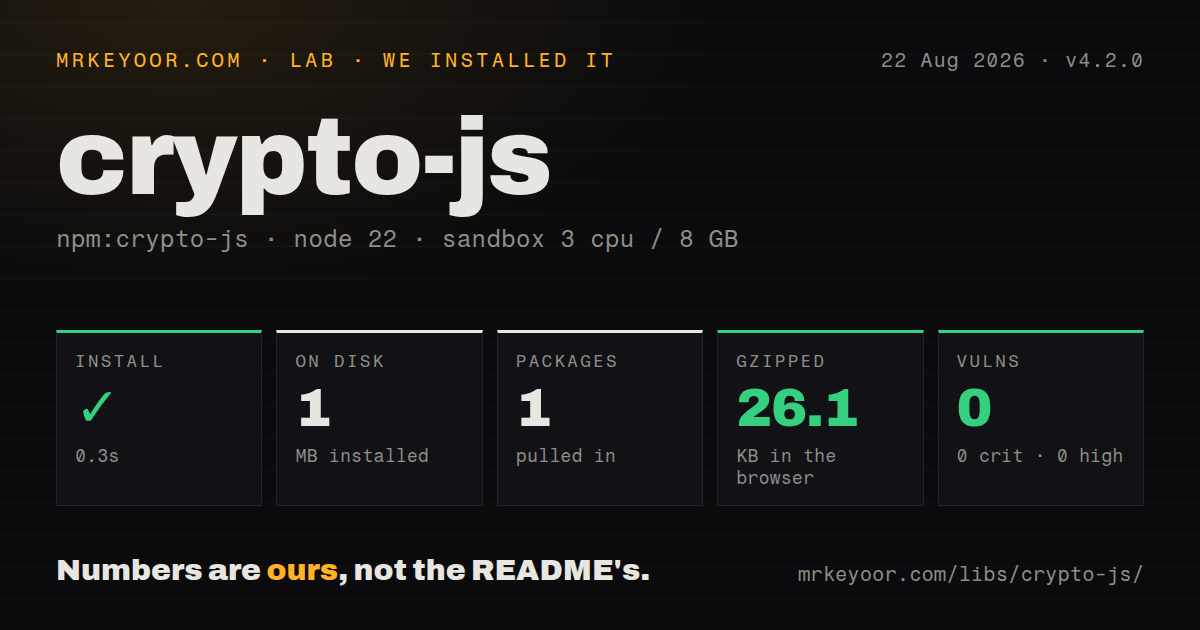

| Install | ✓ · 0.3s | 1 package on disk · 1 MB · 1 deprecation warning |
| Import | ✓ | ESM import works · require() works · CommonJS package |
| Browser | 26.1 KB | gzipped (71 KB minified), bundled with esbuild |
| Types | — | no TypeScript types found |
| Known vulns | 0 | 0 critical · 0 high · 0 moderate · 0 low (npm audit) |
Answers from our run
Does crypto-js install cleanly?
Yes. In a fresh container with an empty cache, npm install crypto-js finished in 0.3s, leaving 1 package and 1 MB on disk. npm audit reported no known vulnerabilities. The install printed 1 deprecation warning.
How much does crypto-js add to a browser bundle?
26.1 KB gzipped (71 KB minified) when the whole package is bundled for the browser with esbuild. Importing only part of it is usually smaller.
Does crypto-js work with both ESM and CommonJS?
Yes. Both import 'crypto-js' and require('crypto-js') worked in Node 22 in our run. The package is published as CommonJS.
Does crypto-js include TypeScript types?
No type declarations were found in our install, so TypeScript users need their own declarations.
crypto-js or tweetnacl: which should you use?
tweetnacl: Use it when a small audited API for public-key boxes, secret boxes, signatures, and hashes fits better than a catalog of legacy algorithms. Do not install crypto-js for a new application; its own maintainers have ended development, native crypto avoids the dependency, and the cipher catalog lacks authenticated encryption.
When should you not use crypto-js?
This is new code. The README labels development discontinued and directs Node and browser users to their native Crypto implementations
Use it if
- You must decrypt ciphertext or verify digests already produced by crypto-js, including its OpenSSL Salted__ passphrase format
- A legacy protocol requires synchronous MD5, SHA-1, RC4, Rabbit, or another algorithm deliberately absent from WebCrypto
- You are maintaining a working integration whose wire format depends on WordArray encodings and cannot migrate both ends together
- A browser request-signing path must stay synchronous while you plan an asynchronous WebCrypto migration
- This is new code. The README labels development discontinued and directs Node and browser users to their native Crypto implementations
- You need authenticated encryption. The package has CBC, CTR, CFB, OFB, and ECB modes, but no AES-GCM or ChaCha20-Poly1305 construction with an authentication tag
- TypeScript support must come from the package itself. Our install found no bundled declarations, so you need the separately maintained @types/crypto-js package
- Your security review rejects abandoned cryptographic dependencies. The last npm release was in October 2023, the repository last pushed in August 2024, and GitHub showed 278 open issues and pull requests
- Bundle cost matters and native crypto is available. Importing the whole package produced a 71 KB minified, 26.1 KB gzipped browser bundle in our measurement
Setup reality
We installed 4.2.0 in a fresh Node 22 Bookworm container with no cache. npm finished in 0.3 seconds, printed one deprecation warning, and left one package occupying 1 MB on disk. The package is 628 KB unpacked and has zero direct and zero peer dependencies. npm audit reported zero known vulnerabilities. require() worked, and ESM import also worked through CommonJS interoperability. The package has no exports map and includes no TypeScript declarations.
There are no credentials, native builds, or configuration files. The awkward part is module selection. Requiring crypto-js exposes the entire suite, while paths such as crypto-js/sha256 or crypto-js/aes load individual modules. Our full import bundled to 71 KB minified and 26.1 KB gzipped with esbuild. TypeScript projects have to add @types/crypto-js. Old bundlers generally understand the CommonJS layout, though modern ESM tooling cannot rely on an exports map because none exists.
Version 4.2.0 changes what CryptoJS.PBKDF2 returns when its hasher and iteration count are omitted: SHA-256 and 250,000 iterations are now the defaults. Pin those parameters wherever stored data depends on the derived key. Passphrase-mode AES is a separate trap. Giving AES.encrypt a string invokes the library's OpenSSL-compatible password formatter and KDF. Passing a parsed WordArray means a raw key and requires you to provide and store the IV yourself.
CryptoJS values are WordArray objects, not Uint8Array values. Encoding modules convert between UTF-8, hex, and Base64, and calling toString() without an encoder produces hex. Version 4 requires a native secure-random source, so environments without Web Crypto or Node crypto can fail when generating salts and IVs. The cipher modes do not authenticate their output. If an existing format uses AES-CBC, pair decryption with the protocol's existing integrity check rather than treating successful UTF-8 decoding as proof of authenticity.
Patterns
Compute a SHA-256 digest hash-sha256
const SHA256 = require("crypto-js/sha256");

const digestHex = SHA256("invoice:42").toString();
toString() emits lowercase hex unless you pass another encoder. Use a password-hashing function rather than SHA-256 for stored passwords.
Create an HMAC-SHA256 signature sign-hmac
const HmacSHA256 = require("crypto-js/hmac-sha256");
const Hex = require("crypto-js/enc-hex");

const signature = HmacSHA256(canonicalRequest, sharedSecret).toString(Hex);
The verifier still needs a constant-time comparison. JavaScript string equality is not suitable for checking a secret-dependent signature.
Derive a key with explicit PBKDF2 settings derive-pbkdf2
const CryptoJS = require("crypto-js");

const key = CryptoJS.PBKDF2(password, salt, {
  keySize: 256 / 32,
  iterations: 250000,
  hasher: CryptoJS.algo.SHA256,
});
Write every parameter into the format or configuration. Release 4.2.0 changed the defaults, so omitted settings can break decryption after an upgrade.
Generate a salt or IV generate-random-bytes
const CryptoJS = require("crypto-js");

const salt = CryptoJS.lib.WordArray.random(16);
const iv = CryptoJS.lib.WordArray.random(16);
The argument is a byte count. CryptoJS 4.x depends on the platform's secure random source and may throw in an older browser or embedded JavaScript runtime that lacks one.
Produce the legacy OpenSSL passphrase format encrypt-legacy-passphrase
const CryptoJS = require("crypto-js");

const encoded = CryptoJS.AES.encrypt(
  "existing-format payload",
  passphrase,
).toString();
A string key selects passphrase mode and an OpenSSL-compatible formatter. Keep this for format compatibility; it is a poor design for new encrypted data because the result has no authentication tag.
Read existing passphrase ciphertext decrypt-legacy-passphrase
const CryptoJS = require("crypto-js");

const words = CryptoJS.AES.decrypt(encoded, passphrase);
const plaintext = words.toString(CryptoJS.enc.Utf8);
if (plaintext.length === 0) throw new Error("Decryption failed");
A wrong passphrase does not provide a dependable authentication failure. UTF-8 conversion may return an empty string or throw on malformed bytes.
Encrypt with a raw AES key and IV encrypt-explicit-key
const CryptoJS = require("crypto-js");

const key = CryptoJS.enc.Hex.parse(keyHex);
const iv = CryptoJS.lib.WordArray.random(16);
const result = CryptoJS.AES.encrypt(plaintext, key, {
  iv,
  mode: CryptoJS.mode.CBC,
  padding: CryptoJS.pad.Pkcs7,
});
Passing WordArray skips passphrase derivation. Store the IV with the ciphertext and retain the existing protocol's MAC, since CBC does not detect modification.
Decrypt raw ciphertext with its IV decrypt-explicit-key
const CryptoJS = require("crypto-js");

const params = CryptoJS.lib.CipherParams.create({
  ciphertext: CryptoJS.enc.Base64.parse(ciphertextB64),
});
const words = CryptoJS.AES.decrypt(params, key, {
  iv: CryptoJS.enc.Hex.parse(ivHex),
});
const plaintext = words.toString(CryptoJS.enc.Utf8);
Wrap bare ciphertext in CipherParams. Passing a string directly makes decrypt expect the library's formatted OpenSSL payload.
Convert UTF-8 to Base64 and hex convert-encodings
const CryptoJS = require("crypto-js");

const words = CryptoJS.enc.Utf8.parse("hello");
const base64 = CryptoJS.enc.Base64.stringify(words);
const hex = CryptoJS.enc.Hex.stringify(words);
parse creates a WordArray, while stringify reads one. Buffer, TextEncoder, atob, and btoa are better choices when encoding is the only task.
Decode Base64 as UTF-8 decode-base64
const CryptoJS = require("crypto-js");

const text = CryptoJS.enc.Base64.parse(input)
  .toString(CryptoJS.enc.Utf8);
Invalid byte sequences can throw a malformed UTF-8 error. Treat external Base64 as untrusted input and catch that conversion failure.
Feed a hash in chunks hash-incrementally
const CryptoJS = require("crypto-js");

const hash = CryptoJS.algo.SHA256.create();
hash.update(headerChunk);
hash.update(bodyChunk);
const digest = hash.finalize().toString();
The API is incremental, but it does not connect to Node streams and the work runs in JavaScript. node:crypto is a better fit for large server-side files.
Hash browser binary data hash-array-buffer
const CryptoJS = require("crypto-js");

const bytes = new Uint8Array(await file.arrayBuffer());
const words = CryptoJS.lib.WordArray.create(bytes);
const digest = CryptoJS.SHA256(words).toString();
Typed-array handling comes from lib-typedarrays, included by the full package entry. Check submodule-only builds before assuming Uint8Array conversion is present.
Alternatives
| Package | Registry | Pick it when |
|---|---|---|
| tweetnacl | npm | Use it when a small audited API for public-key boxes, secret boxes, signatures, and hashes fits better than a catalog of legacy algorithms |
| node-forge | npm | Use it when browser code must handle certificates, PKCS structures, TLS-related formats, or other legacy cryptographic plumbing |
| jose | npm | Use it for JWT, JWS, JWE, JWK, and OAuth token work so application code does not assemble those protocols from primitives |
More security guides
cryptography · jose · pyjwt · dompurify · jsonwebtoken · requests-oauthlib · the whole shelf →
How this guide is made: grounded in the library's documentation, release notes, changelog, and issue history, on a fixed rubric — not a hands-on install of every release. The 50 most-downloaded entries are additionally install-verified in clean containers. Corrections: contact the desk.