compression review
compression 1.8.1 is Node response middleware for Express, Connect, or a manually wrapped node:http server. It reads Accept-Encoding, checks whether the response type is compressible, and can send Brotli, gzip, or deflate output. It also honors Cache-Control: no-transform and exposes res.flush() for buffered streams. The 1.8.1 release updates on-headers and fixes documentation links; Brotli support and enforceEncoding came in 1.8.0. Our package check found a CommonJS, Node-only module with no bundled TypeScript declarations.
compression 1.8.1 took 0.7 seconds and 1 MB in our sandbox, but its browser build failed because it belongs in a Node response path. Install it when the application server must negotiate dynamic response encoding; leave it out when a CDN or proxy already does that job.
We installed it
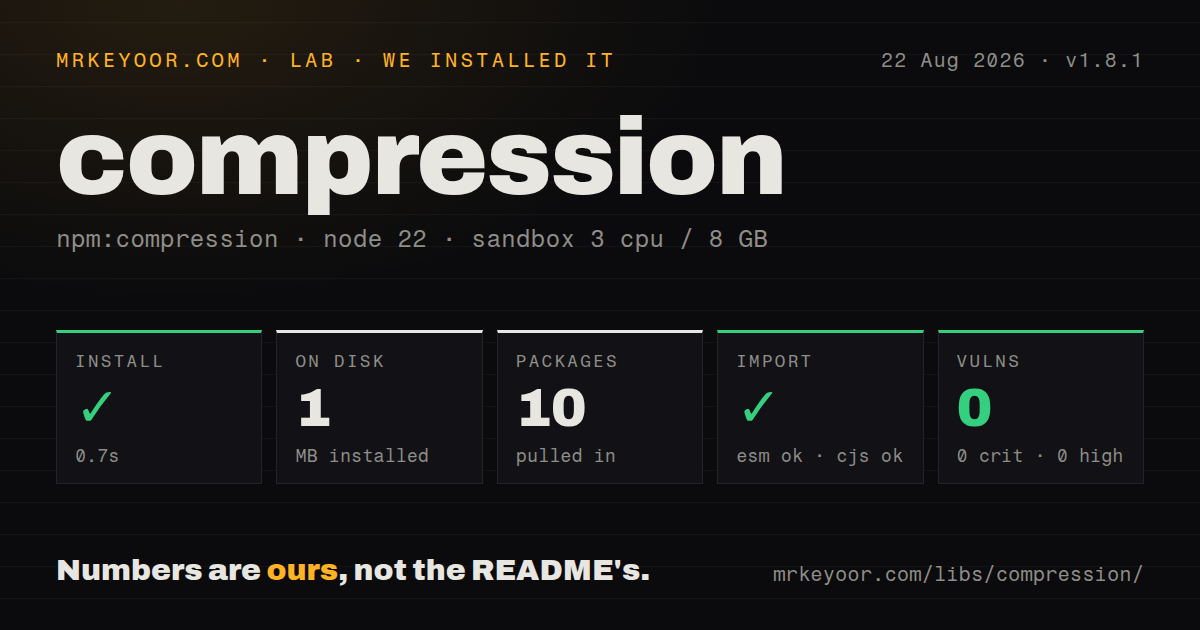
| Install | ✓ · 0.7s | 10 packages on disk · 1 MB |
| Import | ✓ | ESM import works · require() works · CommonJS package |
| Browser | n/a | could not be bundled for the browser (Node-only code, most likely) |
| Types | — | no TypeScript types found |
| Known vulns | 0 | 0 critical · 0 high · 0 moderate · 0 low (npm audit) |
Answers from our run
Does compression install cleanly?
Yes. In a fresh container with an empty cache, npm install compression finished in 0.7s, leaving 10 packages and 1 MB on disk. npm audit reported no known vulnerabilities.
Can compression run in a browser?
Not directly: esbuild could not bundle it for the browser in our run, which normally means it depends on Node built-ins. Use it on the server, or find a browser-targeted alternative.
Does compression work with both ESM and CommonJS?
Yes. Both import 'compression' and require('compression') worked in Node 22 in our run. The package is published as CommonJS.
Does compression include TypeScript types?
No type declarations were found in our install, so TypeScript users need their own declarations.
compression or shrink-ray-current: which should you use?
shrink-ray-current: Use it when Express response compression needs a broader set of tuning features and you accept a larger middleware surface. compression 1.8.1 took 0.7 seconds and 1 MB in our sandbox, but its browser build failed because it belongs in a Node response path.
When should you not use compression?
A CDN, Nginx, Caddy, or an ingress already owns response compression; a second layer spends Node CPU and makes Content-Encoding problems harder to trace
Discussed on
- hnQOI: Lossless Image Compression in O(n) Time1,057 points
- hnSmaller and faster data compression with Zstandard819 points
- hnCompression is prediction674 points
- hnAn Interesting Pattern in the Prime Numbers: Parallax Compression626 points
- hnBonsai 2 27B: Near-Lossless Compression in a 9x Smaller Footprint589 points
Use it if
- The Node process sends changing HTML, JSON, CSS, or text without a CDN or reverse proxy compressing it
- Different routes need different thresholds, zlib settings, or a filter based on request and response headers
- Clients must negotiate Brotli, gzip, deflate, or identity from one Express middleware
- A server-sent event route can call res.flush() after each event that must leave the compression buffer
- A CDN, Nginx, Caddy, or an ingress already owns response compression; a second layer spends Node CPU and makes Content-Encoding problems harder to trace
- The workload is mostly versioned static files; precompressed .br and .gz assets avoid encoding the same bytes on each request
- The code runs in a browser or edge isolate without Node zlib; our esbuild browser build failed on Node-only imports
- Your TypeScript build cannot take a separate declaration package; compression 1.8.1 contains no types, so typed projects usually add @types/compression
- You require zstd responses; the documented negotiation choices are Brotli, gzip, deflate, and identity
Setup reality
We installed compression 1.8.1 in a clean Node 22 sandbox in 0.7 seconds. The result was 10 packages and 1 MB on disk, with seven direct dependencies and no peer dependencies. npm audit reported zero known vulnerabilities. The package itself was 40 KB unpacked. require() and ESM import both succeeded, although the package is CommonJS and has no exports map. It ships no TypeScript types. Our browser build failed because the dependency path uses Node APIs.
There are no credentials and no required config file. Mount compression before any route whose response it should wrap. The default threshold is 1 KB, but that check is advisory when Content-Length is unknown as headers are written. Cache-Control: no-transform always opts a response out. A custom filter should call compression.filter for ordinary content types, or it can accidentally compress archives and images that gain nothing from another pass.
Encoding happens inside the application process. Levels 0 through 9 control zlib work, while Brotli accepts Node's separate parameter object. A higher setting can save bytes and still lose overall if it ties up CPU during busy periods. Measure real HTML and JSON at expected concurrency. When an upstream proxy also handles encoding, choose one owner and confirm that caches vary on Accept-Encoding.
Compressed streams buffer output. For server-sent events, call res.flush() after a complete event or set no-transform on that route. Our 1 MB install does not remove this runtime delay. In a bare node:http server, the callback passed to the middleware must handle an error and finish the response. Express routes still need normal disconnect cleanup so intervals and upstream reads stop when the client closes.
Patterns
Compress eligible Express responses mount-in-express
const compression = require('compression')
const express = require('express')

const app = express()
app.use(compression())
app.get('/items', (req, res) => res.json(items))
The middleware must run before the route writes headers or ends the response.
Avoid encoding small known bodies raise-size-threshold
app.use(compression({ threshold: '4kb' }))A 4 KB threshold is reliable only when Content-Length is known before headers are sent.
Add a route opt-out header extend-content-filter
function shouldCompress(req, res) {
  if (req.headers['x-no-compression']) return false
  return compression.filter(req, res)
}

app.use(compression({ filter: shouldCompress }))
Calling compression.filter preserves the built-in check for compressible Content-Type values.
Keep one response byte-for-byte set-no-transform
app.get('/archive.zip', (req, res) => {
  res.setHeader('Cache-Control', 'private, no-transform')
  createArchiveStream().pipe(res)
})
compression skips every response carrying the no-transform directive.
Choose the fastest zlib level favor-gzip-speed
const zlib = require('node:zlib')

app.use(compression({
  level: zlib.constants.Z_BEST_SPEED,
}))
Level 1 reduces CPU work compared with the default level 6, usually at the cost of larger responses.
Tune Brotli separately set-brotli-quality
const zlib = require('node:zlib')

app.use(compression({
  brotli: {
    params: {
      [zlib.constants.BROTLI_PARAM_QUALITY]: 4,
    },
  },
}))
Brotli options pass through to Node zlib; quality 4 is an example value, so benchmark it against your own traffic.
Push a complete server-sent event flush-sse-event
app.get('/events', (req, res) => {
  res.setHeader('Content-Type', 'text/event-stream')
  const timer = setInterval(() => {
    res.write('data: ping\n\n')
    res.flush()
  }, 2000)
  res.on('close', () => clearInterval(timer))
})
res.flush() asks the compression stream to emit the event instead of waiting for more input.
Send a live stream without transformation disable-sse-compression
app.get('/progress', (req, res) => {
  res.setHeader('Content-Type', 'text/event-stream')
  res.setHeader('Cache-Control', 'no-cache, no-transform')
  progressStream.pipe(res)
})
Use no-transform when immediate delivery matters more than shrinking a long-running stream.
Use compression without Express wrap-node-http
const http = require('node:http')
const compress = require('compression')({ threshold: 0 })

http.createServer((req, res) => {
  compress(req, res, (error) => {
    if (error) {
      res.statusCode = error.status || 500
      return res.end(error.message)
    }
    res.setHeader('Content-Type', 'text/plain')
    res.end('hello')
  })
}).listen(3000)
The callback owns middleware errors when no Express error chain is present.
Keep identity for an absent header default-missing-encoding
app.use(compression({ enforceEncoding: 'identity' }))identity is the documented default when the request has no Accept-Encoding header.
Add external declarations import-with-typescript
// npm install compression
// npm install --save-dev @types/compression
import compression from 'compression'

app.use(compression())
compression 1.8.1 has no bundled types; the default import also requires CommonJS interop in TypeScript.
Inspect the selected encoding check-negotiated-response
curl -sI \
  -H 'Accept-Encoding: br, gzip' \
  http://localhost:3000/items
Look for Content-Encoding and Vary: Accept-Encoding. A missing encoding may come from the type, 1 KB default threshold, filter, middleware order, or no-transform.
Alternatives
| Package | Registry | Pick it when |
|---|---|---|
| shrink-ray-current | npm | Use it when Express response compression needs a broader set of tuning features and you accept a larger middleware surface |
| express-static-gzip | npm | Use it when the build already emits .br or .gz files and Express only needs to select the right static variant |
| koa-compress | npm | Use it for Koa so compression follows that framework's middleware and response model |
More web backend guides
ws · urllib3 · requests · undici · anyio · express · the whole shelf →
How this guide is made: grounded in the library's documentation, release notes, changelog, and issue history, on a fixed rubric — not a hands-on install of every release. The 50 most-downloaded entries are additionally install-verified in clean containers. Corrections: contact the desk.