c8 review
c8 12.0.0 is a Node command-line coverage collector built on V8's native coverage output. It runs your test command as a child process, converts the recorded byte ranges into Istanbul coverage, remaps generated JavaScript through source maps, and writes reporters such as text, HTML, JSON, and lcov. It can include source files that tests never loaded and fail a CI job on line, branch, function, or statement thresholds. Version 12 updates yargs and raises the supported runtime floor to Node 20.19.0, Node 22.12.0, or Node 23 and newer. c8 measures code execution; you still bring the test runner and assertions.
c8 12.0.0 installed in 2.8 seconds and occupied 11 MB in our sandbox, with bundled types and 0 audit findings; it is a sensible coverage layer for current Node test commands that need Istanbul reports. Skip it when coverage already belongs to Vitest or Jest, or when the executed code lives outside Node.
We installed it
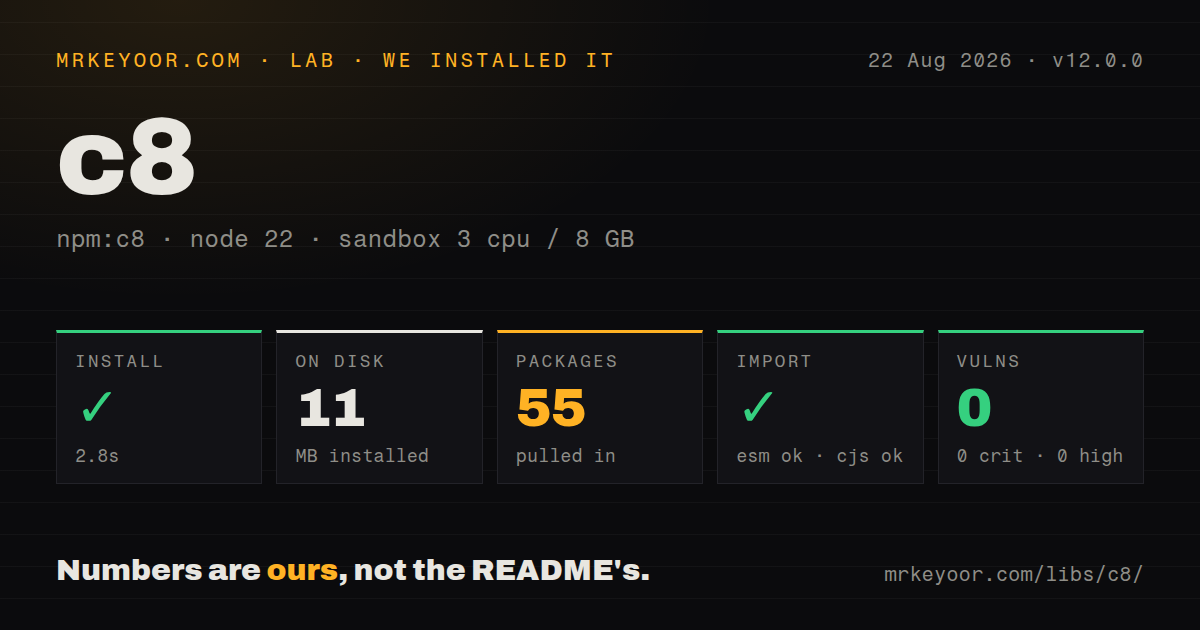
| Install | ✓ · 2.8s | 55 packages on disk · 11 MB |
| Import | ✓ | ESM import works · require() works · CommonJS package |
| Browser | n/a | could not be bundled for the browser (Node-only code, most likely) |
| Types | ✓ | TypeScript types bundled |
| Known vulns | 0 | 0 critical · 0 high · 0 moderate · 0 low (npm audit) |
Answers from our run
Does c8 install cleanly?
Yes. In a fresh container with an empty cache, npm install c8 finished in 3 seconds, leaving 55 packages and 11 MB on disk. npm audit reported no known vulnerabilities.
Can c8 run in a browser?
Not directly: esbuild could not bundle it for the browser in our run, which normally means it depends on Node built-ins. Use it on the server, or find a browser-targeted alternative.
Does c8 work with both ESM and CommonJS?
Yes. Both import 'c8' and require('c8') worked in Node 22 in our run. The package is published as CommonJS.
Does c8 include TypeScript types?
Yes, type declarations ship inside the package, so no @types install is needed.
c8 or nyc: which should you use?
nyc: Use it for Istanbul's instrumentation-led workflow or an older Node project already configured around nyc. c8 12.0.0 installed in 2.8 seconds and occupied 11 MB in our sandbox, with bundled types and 0 audit findings; it is a sensible coverage layer for current Node test commands that need Istanbul reports.
When should you not use c8?
Your runtime is below Node 20.19.0 or Node 22.12.0. Version 12's package engine range rejects those older releases even though the README still contains an outdated Node 12 statement.
Use it if
- A Node test runner or custom script needs coverage without inserting Istanbul counters during compilation.
- CI consumes lcov or another Istanbul reporter and must reject a build below explicit coverage thresholds.
- Tests spawn Node child processes whose V8 coverage should be collected under one wrapper command.
- TypeScript or JSX is compiled with source maps that c8 can use to report against the original files.
- Your runtime is below Node 20.19.0 or Node 22.12.0. Version 12's package engine range rejects those older releases even though the README still contains an outdated Node 12 statement.
- Vitest or Jest already supplies the coverage behavior, reporters, and watch integration your suite needs. A separate c8 wrapper adds another configuration surface around the same test command.
- The code under test runs mainly in a browser, Deno, Bun, or a non-Node worker runtime. Our browser build failed, and c8's collection path depends on Node's V8 coverage environment.
- You need coverage from source files that have no usable source maps after transpilation. c8 can remap inline or external maps, but it cannot reconstruct original TypeScript or JSX locations without mapping data.
- You expect the experimental Monocart reporters to work from the base install. The README requires a separate `monocart-coverage-reports` v2 installation, exposed as c8's one peer dependency.
Setup reality
We installed c8 12.0.0 in a fresh Node 22 Bookworm sandbox in 2.8 seconds. The install left 55 packages and 11 MB on disk. npm audit found 0 known vulnerabilities. The c8 package itself has 11 direct dependencies, one peer dependency, and an 80 KB unpacked size. It is CommonJS without an exports map; both require() and ESM import worked in our checks, and TypeScript declarations ship in the package.
There are no credentials or native compilers to arrange. Run c8 before the command that starts the tests, for example c8 node --test. Configuration may live under c8 in package.json or in .c8rc, .c8rc.json, .nycrc, or .nycrc.json; the search starts at the working directory and walks upward. File options in JSON omit their CLI -- prefix. Version 12 requires Node ^20.19.0 || ^22.12.0 || >=23.
V8 records only files loaded by default. Add --all with a narrow --src or include pattern when untouched modules must count as 0% instead of disappearing from the report. Source maps control whether compiled JavaScript maps back to TypeScript or JSX. --exclude-after-remap applies exclusions to original paths after that conversion, which matters when build and source directories have different names.
c8 writes temporary V8 data through NODE_V8_COVERAGE, then cleans its temp directory before a normal run unless --clean=false is set. The browser bundle test failed in esbuild, matching a Node-only CLI rather than code for a web bundle. Child Node processes inherit the coverage environment, but work executed in browsers or another runtime needs that runtime's own collector. Monocart output remains experimental and requires monocart-coverage-reports v2.
Patterns
Cover the built-in Node test runner cover-node-tests
npx c8 node --testc8 must wrap the process that starts the tests so spawned Node work inherits the V8 coverage directory.
Write console and lcov reports write-ci-reports
npx c8 --reporter=text --reporter=lcov --reports-dir=coverage npm testMultiple `--reporter` flags are cumulative. lcov output can be uploaded by CI after the wrapped command exits.
Keep repeatable options in package.json configure-package-json
{
  "scripts": {
    "test:coverage": "c8 npm test"
  },
  "c8": {
    "all": true,
    "reporter": ["text", "lcov"],
    "reports-dir": "coverage",
    "exclude": ["test/**"]
  }
}
JSON configuration uses long option names without the CLI `--` prefix. c8 also accepts the same shape in `.c8rc.json`.
Count source files that tests never load count-unloaded-files
npx c8 --all --src=src --include='src/**/*.js' npm testWithout `--all`, V8 reports only loaded files. Unloaded matching files enter this report at 0% coverage.
Fail CI below coverage targets enforce-thresholds
npx c8 --check-coverage --lines=90 --branches=85 --functions=90 --statements=90 npm testA missed threshold makes the c8 command exit unsuccessfully after the test command completes.
Apply thresholds to every file enforce-per-file
npx c8 --check-coverage --per-file --lines=80 --branches=75 npm test`--per-file` stops a heavily tested module from hiding a weak file behind the project-wide average.
Remap compiled TypeScript paths remap-typescript
npx tsc -p tsconfig.json
npx c8 --exclude-after-remap --include='src/**/*.ts' node --test dist/**/*.test.js
Enable source maps in TypeScript. `--exclude-after-remap` evaluates filters against original source paths rather than generated files.
Ignore one platform-only branch ignore-unreachable-branch
/* c8 ignore next */
if (process.platform === 'win32') {
  enableWindowsFallback()
}
The comment applies to the next line or block. Use it for code the current test platform cannot execute, not to conceal an ordinary missing test.
Ignore a generated code range ignore-code-range
/* c8 ignore start */
function generatedAdapter() {
  return runtimeGeneratedValue
}
/* c8 ignore stop */
Start and stop comments exclude every line in the range. Keep the pair close so later code does not vanish from coverage by accident.
Render another report from saved coverage regenerate-report
npx c8 report --reporter=html --reports-dir=coverage-html`c8 report` reads coverage already collected in the temp directory; preserve that data if report generation runs in a later CI step.
Keep raw V8 coverage between commands preserve-temp-data
NODE_V8_COVERAGE=.coverage-tmp npx c8 --clean=false node script-a.js
NODE_V8_COVERAGE=.coverage-tmp npx c8 --clean=false node script-b.js
NODE_V8_COVERAGE=.coverage-tmp npx c8 report --reporter=text
The default clean behavior removes old temp data before a run. Set one explicit directory and disable cleaning only when results should accumulate.
Try direct V8 Monocart output use-monocart-reporters
npm install --save-dev monocart-coverage-reports@2
npx c8 --experimental-monocart --reporter=v8 --reporter=console-details node app.js
Monocart support is experimental in c8 12 and requires the separately installed `monocart-coverage-reports` v2 peer package.
Alternatives
| Package | Registry | Pick it when |
|---|---|---|
| nyc | npm | Use it for Istanbul's instrumentation-led workflow or an older Node project already configured around nyc. |
| vitest | npm | Use it when the project wants a test runner with coverage, watch mode, mocking, and Vite-aware transforms in one tool. |
| jest | npm | Use it when an established Jest suite benefits more from its integrated runner and coverage flags than from an external wrapper. |
More testing guides
pytest · chai · vitest · playwright · jsdom · axe-core · the whole shelf →
How this guide is made: grounded in the library's documentation, release notes, changelog, and issue history, on a fixed rubric — not a hands-on install of every release. The 50 most-downloaded entries are additionally install-verified in clean containers. Corrections: contact the desk.