Xray-core is the engine behind the app
At commit 2323273, our checkout contained 1,032 files and roughly 150,076 lines of source. That scale matches what Xray-core is: a programmable network core, not a tray icon with a connect button. It accepts traffic through configured inbounds, applies DNS and routing decisions, and forwards it through outbounds. The project covers VLESS, Trojan, Shadowsocks, WireGuard, Hysteria, WebSocket, gRPC, XHTTP, TLS, and REALITY among its available pieces.
The distinction matters when choosing it. Xray-core does not provide an account screen, server picker, or guided security setup. Its README links to separate Windows, Android, Apple, Linux, router, and web-panel projects. That ecosystem gives users plenty of front ends, but each one adds its own release schedule and defaults. If you install a panel, you are reviewing the panel and its update mechanism as well as the core.
Xray-core began as a fork of V2Fly's core and has since developed its own protocol direction. The MPL 2.0 license applies to the repository, while optional bundled components such as Wintun keep their own licenses. For a team embedding the engine in another product, those file-level obligations and component notices deserve a licensing pass before distribution.
JSON decides where traffic and DNS go
The official configuration reference documents inbounds, outbounds, DNS, routing, policies, metrics, statistics, observatories, and geodata. One JSON file can send selected domains directly, proxy another group, reject unwanted traffic, or expose several local listeners. This is the appeal: Xray-core can express a network policy that a single-purpose VPN profile cannot.
It can also encode a bad policy perfectly. Client IDs, server addresses, ports, transport details, and security settings must agree across both ends. DNS choices can change which resolver sees a query. A listener bound too broadly can expose a service you meant to keep local. The official issue template asks reporters to understand every field instead of stacking attractive defaults, and that is sound operating advice.
Open issue #6600 gives the risk a concrete shape. The reporter supplied 2 configurations for the same connection and saw different enforcement of the rule that blocks VLESS without TLS or another encryption layer. The thread was still active on August 25, 2026. That report does not prove every VLESS configuration is unsafe, but it is a good reason to validate the exact syntax you deploy instead of assuming equivalent-looking forms behave alike.
What happened when we ran it
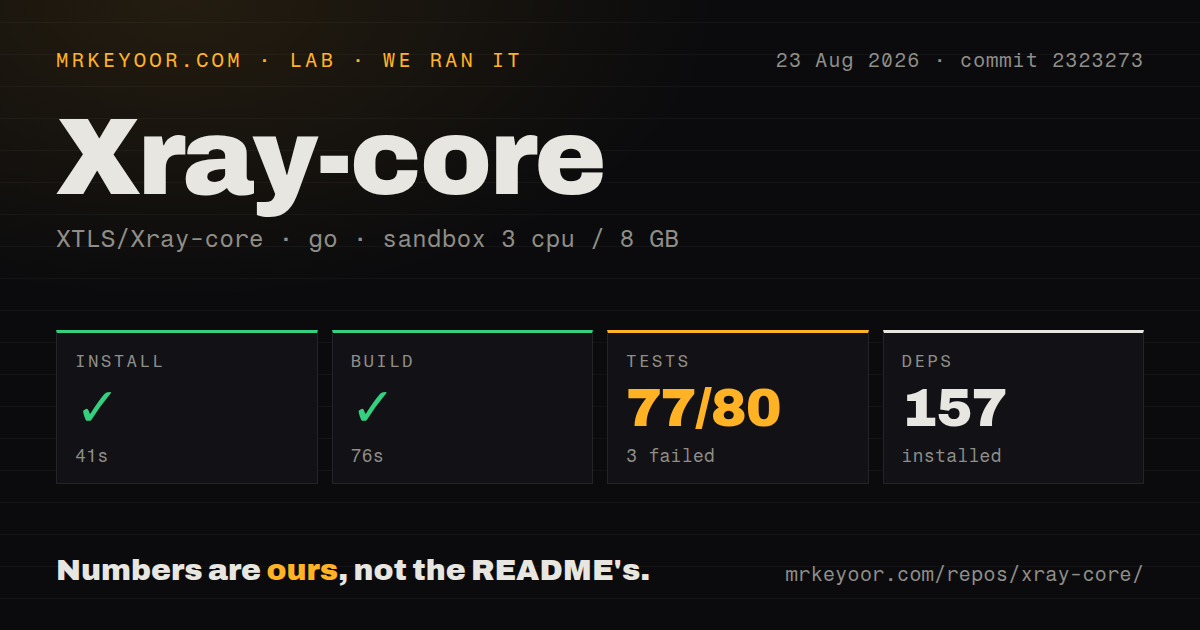
Our run installed 157 packages in 41 seconds, then compiled Xray-core successfully in 76 seconds. The sandbox was an unprivileged golang:1.24-bookworm container with 3 CPUs, 8 GB of RAM, and no secrets. Compilation was therefore the easy part of the evaluation. The repository occupied 4.3 MB after checkout and did not include a Dockerfile.
The test step ran for 338 seconds and exited with status 1. We measured 77 passed packages and 3 failed packages out of 80. The log tail does not name the failing assertions: it shows KCP, SplitHTTP, TCP, TLS, UDP, WebSocket, and pipe packages reporting ok, several packages reporting no test files, then the final FAIL. Assigning a cause from that tail would be guesswork.
That result is a caution rather than a verdict that the program cannot run. Installation and compilation both completed, and many transport packages passed. Still, a team that gates adoption on a clean upstream suite has work left: reproduce the same commit and environment, capture the full failure output, and decide whether the failures affect its intended protocol path. Our testing method records the fresh-container result; it does not turn 77 of 80 into a pass.
Distribution is easy, operation is the work
The README offers an official Linux installation script, GHCR image, release archives, Homebrew package, and one-line Go compilation commands. It also lists many community installers and panels. These paths reduce typing, but none chooses the right inbound, generates a complete security policy, opens only the intended firewall port, or confirms that DNS follows the route you expected.
A basic deployment needs matching client and server JSON plus identifiers or keys. TLS setups need certificate handling; REALITY setups need their own server and client values. Production also needs process supervision, log rotation, upgrades, rollback access, and a way to verify the listener after each change. A remote server is a bad place to discover that the only working client profile was overwritten.
The source tree has 5 CI workflow files but no top-level tests directory. Tests live beside Go packages, which is normal for Go and explains why the log reports package results rather than one central suite. There is also no repository Dockerfile even though an official image exists. Contributors who care about image provenance should inspect how that published image is built rather than infer it from a missing local file.
Current activity is high, while stable and prerelease tracks differ
GitHub showed 41,216 stars, 68 open issues and pull requests, and a last push on August 25, 2026. Recent activity included work on XHTTP data races, Hysteria synchronization, routing settings, and OpenBSD tunnel behavior. Those are signs of active maintenance, although a busy queue says nothing about whether your particular networking bug will be simple to reproduce.
GitHub's latest stable-release endpoint returned v26.3.27, published March 27, 2026. The releases list also contained newer prereleases through v26.7.28. The stable notes cover Finalmask, mKCP, Hysteria 2, XHTTP, REALITY, TLS ECH, WireGuard, reverse proxy work, and API changes. Much of that release text is Chinese, while the main README and a substantial official configuration site have English versions.
Xray-core is worth the effort when those named capabilities solve a network problem you actually have. The failed 80-package run keeps it out of the set-and-forget category, and the broad JSON surface calls for a network engineer rather than an installer alone. For ordinary home access, a narrower tool is easier to reason about. For XHTTP, REALITY, or fine-grained proxy routing, Xray-core remains a serious core once you budget for tests and rollback.