The web panel sits on top of a research VM engine
vphone-web is useful only after vphone-cli already works. The panel adds accounts, roles, per-user device assignment, live screen control, hardware-button input, IPA installation, logs, a root shell, and a file browser. Administrators can create copy-on-write VMs from a base image and decide which users may open them. That is a coherent product for a small internal lab, especially when command-line access has become a queue of people asking one Mac owner for help.
The repository itself is small: our checkout had 32 files, about 3,473 lines of source, and occupied 0.3 MB. Most of the visible product is a FastAPI service plus static browser assets. The heavy part is excluded. You must recursively clone the vphone-cli submodule, compile and sign its engine, then create a base VM containing the disk, NVRAM, SEP storage, configuration, booter files, and a signed helper.
macOS 15 and disabled host protections are hard requirements
The README requires Apple Silicon and macOS 15 or newer because the engine uses Apple's Virtualization framework with a research VM configuration. It also says to disable System Integrity Protection and AMFI so private virtualization entitlements can work. That is a serious host decision. A dedicated research Mac is the reasonable boundary; weakening the workstation that holds your daily credentials and personal files is much harder to defend.
Python 3.11 or newer, Xcode command-line tools, Homebrew, and fast disk are also part of setup. Open issue 1 shows what happens when the toolchain falls back to Apple's Python 3.9: make setup_tools reaches xonsh and stops on match syntax it cannot parse. The issue does not show a maintainer reply. It reinforces the README's version requirement without proving that every Python 3.11 installation will finish.
Base creation is its own operation. vphone-cli downloads firmware inputs, restores and patches the VM, installs its custom software, and performs a first boot. The web repository does not bundle those large files. It can point different environment variables at several iOS bases, but only versions with an actual Disk.img appear in the interface. Shut a VM down cleanly before copying a base, since the README warns that a hard kill leaves APFS replay work for the next boot.
What happened when we ran it
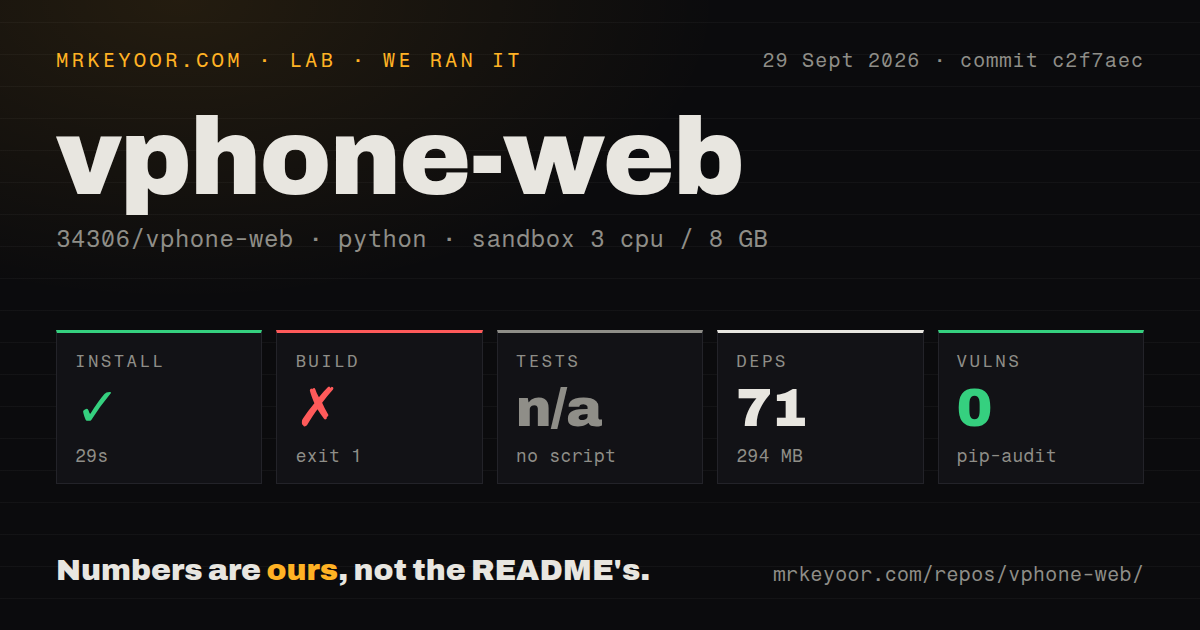
Our sandbox installed commit c2f7aec in 29 seconds. The Python environment pulled 71 packages and occupied 294 MB on disk. Pip-audit reported 0 known vulnerabilities. Those are encouraging dependency results, but they cover a fresh Debian container rather than the required Apple virtualization host and do not prove that the VM engine can boot an iPhone image.
The build failed with exit code 1 after 7 seconds. The supplied lab record does not include the failing line or traceback, so assigning the failure to Linux, a missing Apple framework, or a source defect would be guesswork. We can report only the outcome: this commit did not complete our build step. The project exposes no test script or target, so the test phase was skipped.
Our scan also found 0 CI workflow files, no Dockerfile, and no tests directory. That leaves the README's manual function check as the main assurance offered by the author. A project tied to private entitlements and VM images cannot be fully exercised in an ordinary Linux runner, but it can still test account permissions, database rules, path handling, and browser routes away from the hypervisor. This repository does not supply that visible safety net.
The browser adds useful controls and a large trust boundary
The default configuration gives a VM 4 CPUs and 4,096 MB of memory, with a 12,288 MB total running-memory budget. Per-VM copy-on-write storage keeps cloning quick, while the administrator assigns devices to one or more accounts. WebRTC carries local video and control traffic. When a Cloudflare Tunnel cannot proxy WebRTC's UDP path, the application falls back to MJPEG over WebSocket.
Remote access deserves more care than the short tunnel recipe suggests. An assigned user can reach an in-browser root shell, browse VM files, and install .ipa or .tipa packages. The admin page can create and assign machines, and a separate dashboard live-tails logs. Bind the service to localhost, protect the tunnel identity layer, use a strong seeded administrator password, and treat a shared cookie domain as a security choice rather than a convenience checkbox.
A GUI login session is required for the virtual machines, so unattended recovery uses per-user LaunchAgents and optional automatic login rather than a system LaunchDaemon. That makes this closer to a remotely operated Mac workstation than a headless Linux appliance. Internal SSD storage is strongly recommended because first boot performs many small writes. Capacity planning must include the base images, clones, memory budget, and a logged-in desktop session.
Two commits and one open setup issue make this an early project
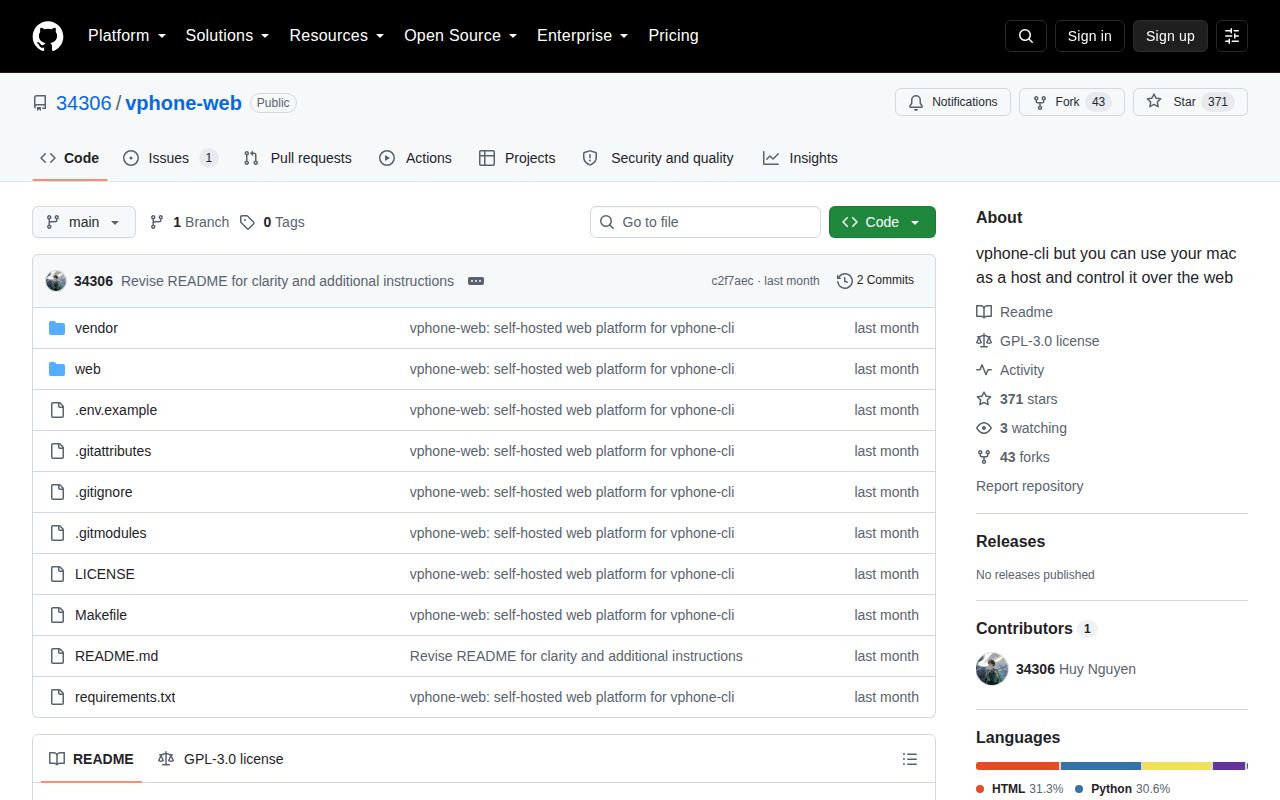
GitHub showed 371 stars and 1 open issue or pull request on September 30, 2026. The only open item is the Python 3.9 setup failure. The repository was created and last pushed on September 5, with 2 commits and no published release. That is recent enough to avoid an abandonment claim, but there is too little history to judge upgrade discipline or response time.
The README deserves credit for stating the dangerous and inconvenient parts: disabled protections, missing VM images, internal-SSD advice, clean shutdowns, tunnel behavior, and the need for a GUI login. The code may save real coordination work for a vphone-cli lab. Our failed 7-second build and the absence of tests keep it out of production-device-farm territory. Adopt it as a research console, on a machine whose security posture you chose for that purpose.