The 17,758-file repository is larger than the product quick start
Supabase gives an application a Postgres database, authentication, REST and GraphQL APIs, realtime subscriptions, file storage, functions, and a dashboard. The architecture assembles Postgres with services such as PostgREST, GoTrue, Realtime, Storage, and Envoy. That choice keeps the database familiar and lets clients use standard SQL concepts, but it also means the full system has several moving parts behind the friendly dashboard.
The repository makes that breadth visible. Our checkout at commit 7353782 held 17,758 files, roughly 1,078,048 lines of source, and occupied 790.8 MB before installation. It is a pnpm workspace containing the public website, documentation, Studio, shared packages, and deployment material. Cloning it is useful for contributing to Supabase itself. A developer who only wants a local backend should follow the CLI or Docker route instead of treating the root monorepo as the shortest installation path.
What happened when we ran it
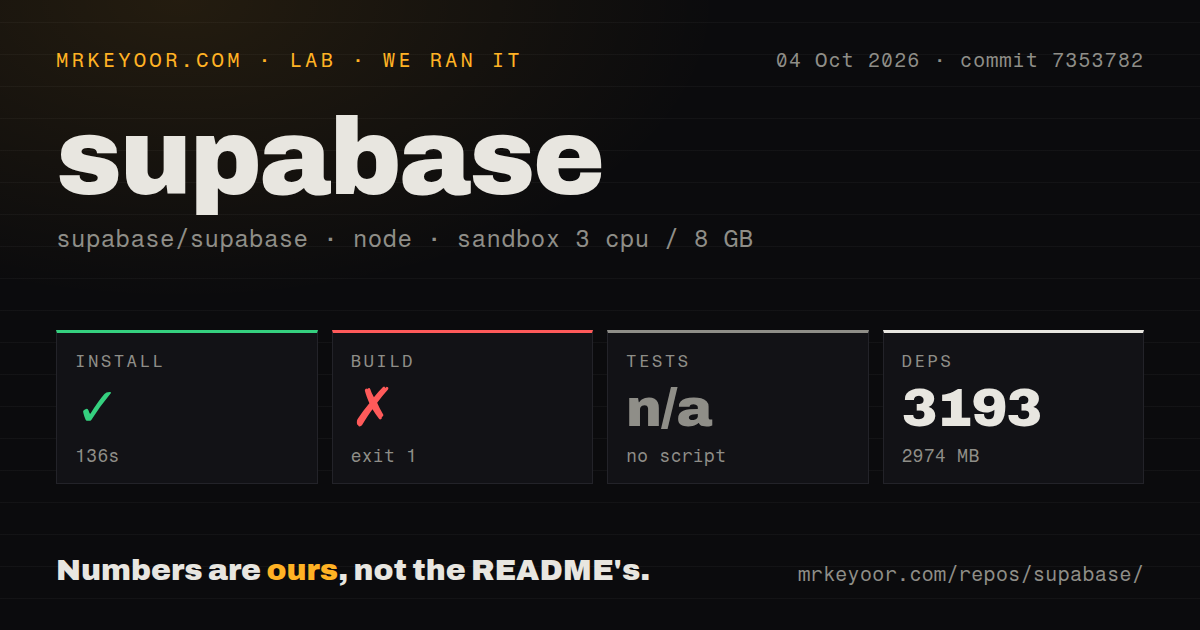
Our sandbox installed commit 7353782 in 136 seconds. That step succeeded, pulling 3,193 packages and taking 2,974 MB on disk. The measurement setup was a fresh unprivileged Debian container with 3 CPUs, 8 GB of RAM, Node 22, and no secrets. Those figures describe repository setup only. They do not measure database throughput, API latency, or the resources consumed by a running self-hosted Supabase stack.
The build failed after 23 seconds. Its final output named docs#build:federated-content as the failed task, with 1 successful task among 10 total tasks and no cached work. The tail also showed lifecycle failures for learn, library, Studio, and the docs reference-code generation path. It did not expose the underlying cause, so blaming a missing package, network access, or a code defect would go beyond the log. The defensible result is that the root build did not complete in our fresh container.
No test script or test target was available to the lab runner, so it skipped the test step. The repository contained 54 CI workflow files and no top-level tests directory or Dockerfile in the scan. Those signals show substantial automation, but they do not substitute for a test result from the command surface our runner found. A team changing Studio or docs should identify the relevant workspace checks and run them separately rather than reading the skipped root test as a passing suite.
Self-hosting starts at 4 GB of RAM and an operations checklist
The official Docker guide lists 4 GB of RAM, 2 CPU cores, and a 40 GB SSD as minimum resources for all components. It recommends 8 GB or more, 4 or more cores, and at least 80 GB of SSD storage. Services such as Realtime, Storage, imgproxy, and Edge Runtime can be removed to reduce that footprint. The default setup also omits Logs and Analytics unless you enable the extra services, which raise resource use.
A Linux setup script can install prerequisites, copy the Docker configuration, generate secrets, prompt for URLs, and pull images. Manual setup asks you to create the environment file, generate database and API keys, set public and callback URLs, then put TLS in front of the gateway for Internet access. Supabase warns against starting with the placeholder credentials. The local CLI stack has a different purpose: its documentation says it is not hardened for production and must stay off public traffic.
One self-hosted project loses several managed features
Self-hosted Supabase runs as 1 project, and Studio does not manage multiple organizations or projects there. The self-hosting guide also excludes branching, advanced metrics beyond logs, managed backups and point-in-time recovery, analytics and vector buckets, ETL, and the Management API. That gap is easy to miss if your evaluation begins in the hosted dashboard and moves to Docker only after the application is built.
The operator owns server maintenance, security updates, service configuration, Postgres care, scaling, disaster recovery, and uptime. Updates have improved: current installs record a release and the supplied update script performs a three-way merge. It still does not back up Postgres or Storage data, and older untracked installs may need manual conflict work. A self-hosted/v0.8.2 example in the guide pins deployment files, which is safer than following the moving master branch without review.
111,097 stars come with current code and a large work queue
GitHub showed 111,097 stars and 1,146 open issues and pull requests on October 5, 2026. The repository was pushed that same day, so the August release entry is not evidence of a dormant project. The queue is large enough that prospective contributors should search existing reports before opening another, while adopters should judge a problem by activity in its specific component rather than the combined count.
The latest GitHub release entry was v1.26.08, published August 7, 2026 as a monthly developer update. Its notes covered hosted services, integrations, and product changes rather than one monorepo build artifact. That distinction matches the repository itself: Supabase is a platform assembled from several open-source services, and its release page is a product bulletin. Pin the self-hosted release tags and images named by the deployment documentation instead of assuming the latest GitHub release maps to every component.
The 23-second failure matters most to contributors
Supabase is an easy recommendation for a team that wants Postgres with authentication, storage, realtime data, and generated APIs without assembling each service alone. The hosted route removes much of the operational burden. The self-hosted route is credible for organizations with compliance or isolation needs, but its missing managed features turn database ownership into part of the purchase. For contributors, the finding is narrower and less flattering: 3,193 packages installed cleanly, yet the 23-second root build failed before the monorepo could prove itself on our box.