Rook manages 3 storage interfaces through Ceph
Rook 1.20 exposes 3 kinds of storage to Kubernetes applications: block volumes, shared file systems, and S3-compatible object stores. The operator turns custom resources into Ceph monitors, managers, storage daemons, metadata servers, gateways, pools, and buckets. CSI handles volume provisioning and mounts. Rook stays out of the data path, so application I/O goes through Ceph rather than through the operator. That is the right architecture for storage, but it also means Rook does not make Ceph's failure modes disappear.
Version 1.20 packages a broad control plane around Ceph rather than a single storage driver. A block claim can mount on one node, CephFS can supply shared access to several nodes, and the object gateway gives applications an S3 endpoint plus credentials in a Kubernetes Secret. Rook watches the declared state and replaces or adjusts Ceph services as the cluster changes. Advanced placement groups and CRUSH settings remain available through Ceph tools when the simplified resources are not enough.
Production bare metal starts at 3 worker nodes
Rook's production bare-metal example requires at least 3 worker nodes, while the test manifest is meant for environments such as Minikube. The supported Kubernetes range is v1.31 through v1.37, and released images target amd64 and arm64. The quickstart warns users to test inside a virtual machine because its storage discovery can consume local devices. That warning deserves attention: a storage operator works below the level where a mistaken device choice is easy to undo.
Each storage node needs a running udev daemon and eligible storage, such as a raw device, an unformatted partition, an unformatted logical volume, or a block-mode persistent volume. LVM must be installed for encrypted devices, metadata devices, or more than 1 OSD per device. RBD needs kernel support. CephFS recommends kernel 4.17 or newer so requested PVC sizes are enforced, while kernel 5.4 or newer unlocks extra RBD image features documented by the project.
What happened when we ran it
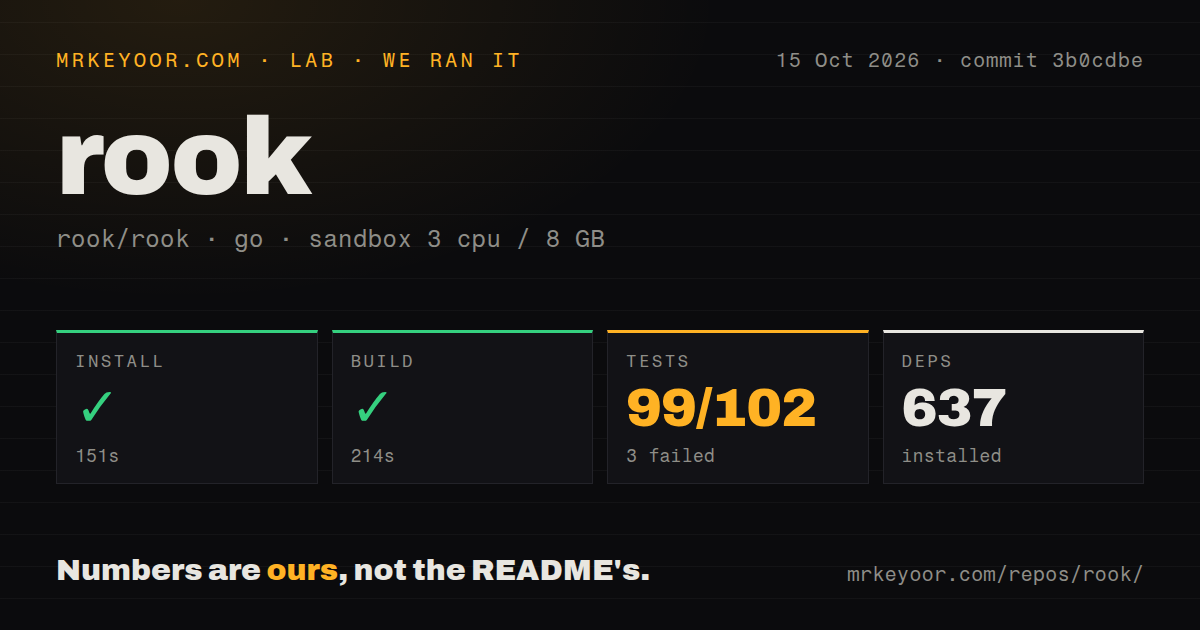
Our sandbox installed commit d364b1e in 215 seconds and added 638 packages. The build succeeded in 221 seconds. The test command ran for 159 seconds, then exited 1 with 100 passed and 3 failed out of 103. Those 3 failures make the result mixed: the Go code compiled, and most tests passed, but the complete command did not finish cleanly in our fresh Debian container with 3 CPUs and 8 GB of RAM.
Our harness recorded TestCephObjectSuite, TestCephSmokeSuite, and TestCephUpgradeSuite as the failing top-level cases in the integration package. The upgrade suite tail also printed labels for Ceph-to-Squid, Ceph-to-Tentacle, Helm, and Rook upgrade cases. It did not include an assertion message or environmental cause, so we will not supply one. The 14.5 MB checkout contained 1,330 files and about 208,115 source lines, with 29 CI workflows, a tests directory, and no Dockerfile.
Rook v1.20 makes CSI a separate admin-managed layer
Rook v1.20 stops deploying CSI drivers itself and hands that job to the Ceph CSI operator. The documented Helm order is now rook-ceph, then ceph-csi-drivers, then rook-ceph-cluster. Existing CSI settings need to move from the old ConfigMap or chart values into the new resources. The current upgrade guide supports v1.19.x to v1.20.x and official releases only. It also warns that storage can be briefly unavailable and that an upgrade can damage cluster health or cause data loss.
Ceph versions have their own compatibility line. Rook 1.20 supports Squid v19.2.0 or newer and Tentacle v20.2.1 or newer. The docs advise against Tentacle v20.2.0 because read affinity can trigger a known data-corruption problem. Rook performs rolling daemon updates and stops when Ceph reports HEALTH_ERR, but the operator cannot replace pre-upgrade health checks and an observed maintenance window. A Rook upgrade and a Ceph upgrade are separate changes even when Helm starts both.
Teardown has 3 places to clear and one unreliable success signal
Across a 3-node production cluster, the cleanup guide identifies 3 surfaces that must be cleared: Kubernetes resources, files under dataDirHostPath on every node, and devices used by OSDs. Applications and their claims should go first, or volumes can hang and nodes may need a restart. Deleting the CephCluster after setting the confirmation string permanently removes data. If automated cleanup cannot finish, the manual instructions reach host directories, partition tables, LVM metadata, and finalizers. Teardown needs the same change control as infrastructure retirement.
Open issue 18089 shows why cleanup needs independent verification. Its reproduction deliberately blocked device access, causing the sanitization commands to fail, yet the Job completed with exit code 0. The report traces errors that are logged without reaching the process status. It does not claim that a live decommission left readable data, and neither do we. It does show that a green Job status alone cannot prove erasure. Check the logs and inspect each device before reassigning or disposing of it.
Version 1.20.7 is active, while encryption still needs a wire check
Rook v1.20.7 was released on September 2, 2026, and GitHub recorded a repository push on September 3. A new issue arrived September 4, so both code and issue activity are current. The repository had 13,637 stars and 132 combined open issues and pull requests when fetched on September 5. The patch release includes Ceph operator fixes, CSI 3.17.1, security-related changes, and upgrade documentation. The combined open count is an activity signal, not a count of confirmed defects.
Issue 18319 reports that a Rook v1.19.10 cluster accepted an unencrypted CRC connection to a Ceph monitor even with network encryption and messenger v2 required. The report is specific to that environment and does not establish the behavior of every v1.20.7 cluster. It is still a good acceptance test for deployments where encryption is mandatory. Teams that can run these checks have a workable Ceph operator. Teams trying to avoid storage engineering should choose a narrower system.