Rancher pays off when one cluster becomes a fleet
Rancher places a central management layer over Kubernetes clusters in clouds and data centers. Teams can import existing clusters or provision new ones, then manage access, projects, applications, upgrades, and continuous delivery through one dashboard and API. It is closely associated with RKE2 and K3s but also manages other Kubernetes installations. The gain is consistency across teams that would otherwise repeat identity, policy, inventory, and lifecycle work on every cluster.
That scope is excessive for 1 uncomplicated cluster. Rancher itself holds broad access and runs agents in downstream clusters, so it becomes privileged infrastructure with its own availability, security, backup, and upgrade requirements. A shared platform group can justify that cost across a fleet. A small team may get clearer failure boundaries from native Kubernetes tools, a GitOps controller, and provider-specific cluster management.
The Docker demo is not the production architecture
The README offers a single privileged Docker command that binds ports 80 and 443. It is a useful lab because an evaluator can see the interface without first building a management cluster. Production guidance points elsewhere: Rancher should run on a supported Kubernetes environment with Helm, a stable hostname, trusted certificates, persistent storage, ingress or load balancing, and a recovery plan. Identity providers and downstream registration add further trust relationships.
Version rules are part of that architecture. The README names v2.14.3 as the stable release, while GitHub lists v2.15.0 as the latest community minor. V2.15 adds Kubernetes 1.36 and removes 1.33. It also requires the Kubernetes API aggregation layer. Rancher 2.12 and later need Helm 3.18 or newer for management, and RKE1 is past end of life. Choose the release channel and supported matrix before scheduling an upgrade.
What happened when we ran it
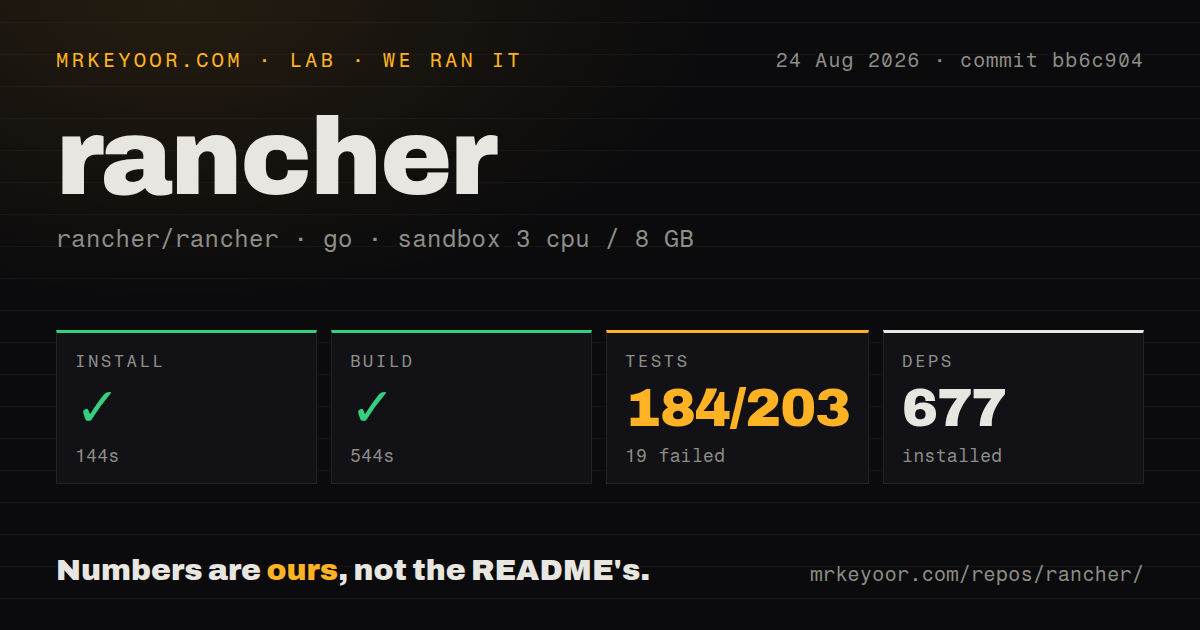
Our sandbox fetched 677 Go packages in 144 seconds, then completed the build in 544 seconds. The source checkout contained 3,046 files, about 603,301 lines, and 23.5 MB. We used commit bb6c904 in a fresh unprivileged Debian container with 3 CPUs, 8 GB of RAM, and no secrets. The repository had 26 CI workflows, a tests directory, and no Dockerfile.
Tests reached the 900-second cap rather than completing. Go reported 184 passed and 19 failed out of 203 observed tests. The log tail shows etcd-snapshot operation tests posting to http://localhost:8080/api/v1/namespaces and receiving connect: connection refused. That proves the checked-out suite expected a local API service that our sandbox did not provide. It does not prove those operations fail in a correctly assembled Rancher integration environment.
Upgrades change Kubernetes and chart availability
V2.15 starts retaining Rancher application chart versions for the 7 most recent Rancher minor releases, described as roughly 2.5 years. Older chart versions remain in existing installations but disappear from newer release branches after aging out. The release notes advise upgrading applications before upgrading Rancher. Teams using old chart versions should inventory them first rather than discovering the retention rule during rollback or replacement.
The same release notes require a backup before upgrade and explain that rollback means restoring the previous version's backup. Changes made after that backup are then lost. AD FS users may also need to refresh relying-party metadata or add a signature certificate manually after upgrades from v2.10.1 onward. A maintenance window should include identity login, cluster access, application catalog, Fleet, and restore checks, not only a healthy Rancher pod.
One broken webhook can stall unrelated cluster reads
Issue 55624 documents a sharp failure mode in v2.14.1. A downstream CRD kept a conversion-webhook reference after its provider was removed, leaving the webhook service unavailable. The report says Rancher's cluster cache held a lock while waiting up to 15 minutes for the broken resource, so unrelated Pods, Namespaces, and Deployments became inaccessible through the Rancher UI and API for 10 to 20 minutes. Kubernetes itself still returned the webhook error for the affected resource.
The bad CRD is a cluster configuration problem, but a management plane should isolate it. Until the fix reaches the version you run, alert on repeated conversion-webhook failures and remove orphaned CRDs or restore their services promptly. Issue 56914 exposes a narrower client problem: on Windows, Azure AD authorization-code URLs lose parameters after the first ampersand, including scope, because the CLI passes the URL through cmd.exe. The default device-code flow is unaffected.
Current activity supports serious fleet use
GitHub showed 25,872 stars, 3,355 combined issues and pull requests, and a last push on August 26, 2026. That open count is large and includes pull requests across a broad provider and version matrix; it is not a bug total. Same-day work covered integration-test migration, authentication, role bindings, LDAP, Cluster API backup, and webhook behavior. Release v2.15.0 was published on July 30.
Documentation is one of Rancher's strongest operating assets. The short README points into versioned installation, support, upgrade, backup, and security material, while release notes state behavior changes and known issues plainly. The 544-second build and timed-out integration suite match the product's scale. Rancher is a sound shortlist choice for a staffed platform team, provided its management cluster receives the same engineering discipline as the workloads it governs.