PEASS-ng enumerates escalation paths instead of exploiting them
PEASS-ng packages two main families: LinPEAS for Linux, Unix, and macOS, plus WinPEAS for Windows. They inspect the local machine for permissions, users, processes, services, software, scheduled work, files, and configuration that may expose a privilege-escalation route. Findings are grouped and color-coded, with links into HackTricks for explanation. The result is a fast way for a qualified tester to gather leads after obtaining access to a host.
The distinction between a lead and proof matters. LinPEAS says red and yellow marks a configuration it considers highly likely to lead to escalation, while red alone is suspicious. Neither color is a verified exploit or a business-impact rating. A tester must reproduce the path, account for compensating controls, and write the remediation. PEASS-ng saves enumeration time; it does not replace judgment or turn raw terminal output into a defensible finding.
The release offers separate Linux and Windows artifacts
The September 8, 2026 release includes LinPEAS shell variants, Linux binaries for several architectures, macOS binaries, a WinPEAS batch file, and multiple Windows executables. LinPEAS can run as /bin/sh source or as a binary. WinPEAS also has C#, PowerShell, and batch projects, with .NET 4.5.2 or newer required for the executable project. That range is useful when a target lacks a compiler or blocks one interpreter.
Choosing the artifact is part of the engagement plan. The standard LinPEAS script includes the usual checks and an embedded Linux exploit suggester. The fat variant embeds all checks and third-party applications, while the small script keeps only selected high-value checks. The project also lets users build a custom LinPEAS with chosen sections. On a sensitive server, a reviewed custom set is easier to justify than copying the largest script and hoping every command is acceptable.
What happened when we ran it
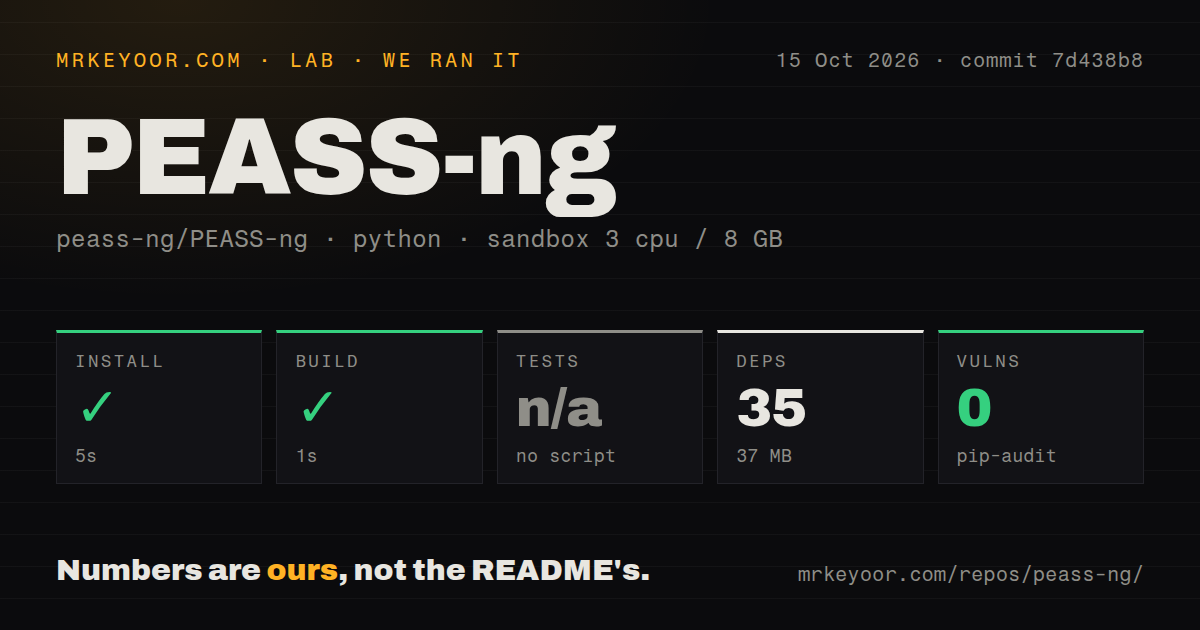
Our sandbox installed 35 Python packages in 18 seconds and left 37 MB on disk. The build then succeeded in 8 seconds. Pip-audit found 0 known vulnerabilities in the installed dependency set. These are clean repository mechanics for commit 8e0aabe in an unprivileged Debian container with 3 CPUs and 8 GB of RAM. They say nothing about whether a particular target permits or safely handles every enumeration flag.
The test step was skipped because our harness found no tests script or target. There was also no tests directory in the 1,577-file checkout. That absence is worth separating from an outright failure: the lab did not receive a suite it could execute, so there is no passing test result to report. The repository did contain 7 CI workflow files, and the sole open item was a pull request addressing a named CI master-test failure.
At roughly 289,466 source lines and 33.2 MB checked out, PEASS-ng is larger than its copy-and-run image suggests. Much of the user experience arrives as generated release scripts and binaries rather than a Python application that needs installation on the assessed host. Our 18-second dependency install applies to the repository workflow; a field user will usually download the appropriate release asset and inspect its digest before transfer.
Intensive LinPEAS flags can touch credentials and networks
The default LinPEAS behavior avoids writing to disk and does not try to log in as another user with su. That restraint changes with options. The -a path adds deeper file and hash checks, process monitoring, and password attempts against users. The -r path searches accessible files for hundreds of API-key patterns. Network discovery and port-scan flags can call tools such as ping, fping, or nc, and some modes write temporary information.
Those features are valid in a penetration test and risky in an ordinary production audit. Password attempts may trigger alerts or account controls. Network scans can cross the approved host boundary. Regex searches can put credentials, paths, and customer data into the captured output. Select named sections with -o, agree on noisy actions in writing, and store the result as sensitive evidence rather than attaching an unredacted terminal dump to a general ticket.
The parsers help one report at a time
Included Python scripts convert PEASS output to JSON, then render that JSON as HTML or PDF. The documented structure preserves raw text, cleaned text, colors, explanatory links, and up to 3 section levels. This is useful when a consultant needs an artifact that is easier to search or share than ANSI-colored terminal output. The parser README points bulk users to a separate project, which signals that PEASS-ng's own path is centered on individual files.
Licensing deserves attention before building automation around those parsers. The repository uses GPLv2 or later with project-specific clarification. Its license text says applications that execute PEASS and parse the results are considered derived works, and it offers alternative licenses for proprietary applications and appliances. A company planning a closed-source scanner, dashboard, or agent around the output should have counsel review those terms before engineering starts.
September 2026 activity is frequent and heavily automated
GitHub showed 20,492 stars, a last push on September 8, 2026, and one open issue or pull request. The latest release was published that day from commit 8e0aabe by GitHub Actions. Recently closed work included Linux and Windows vulnerability-definition updates, new checks, word-list refreshes, parser fixes, and repaired HackTricks links. A tiny open queue here accompanies frequent merged automation, so it is more useful to inspect the change stream than celebrate the count.
That speed creates its own operating rule: pin and archive the exact artifact used in an assessment. A host report should record the release tag, selected options, execution identity, scope, and digest. Our lab found a successful build and 0 audited dependency findings, yet no runnable local suite. PEASS-ng is best treated as examiner-controlled code whose output starts an investigation, with every intensive flag approved before it touches the target.