What our run established
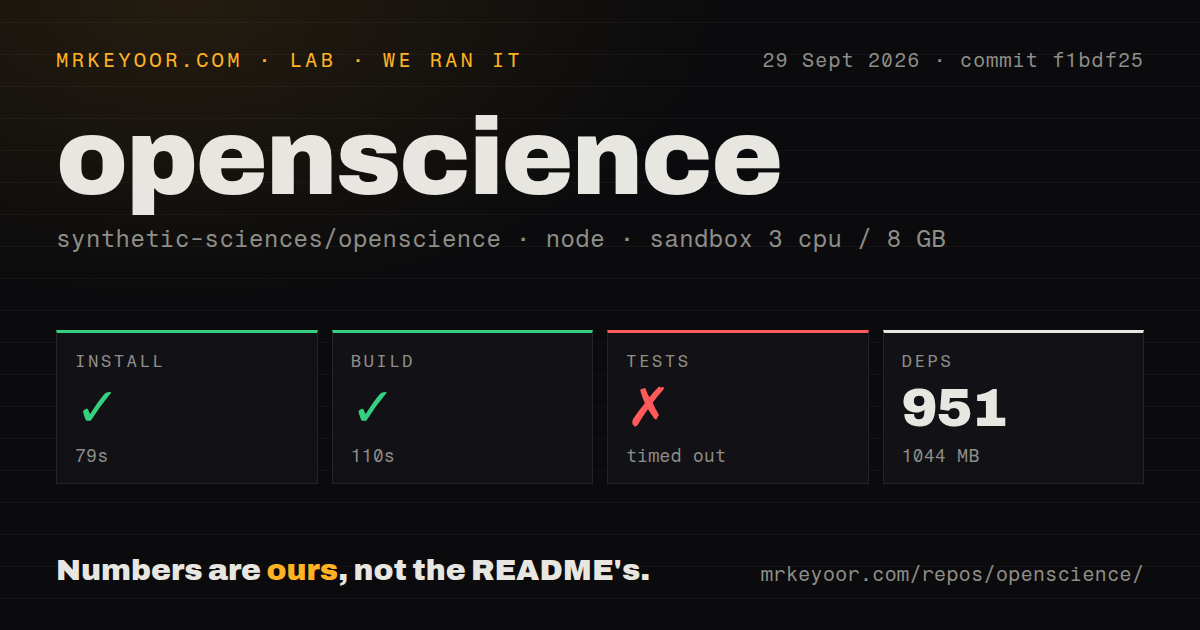
Our run on September 29, 2026, tested commit f1bdf25 in our sandbox. Installation completed in 79 seconds and build completed in 110 seconds; both commands returned exit code 0. The test command timed out after 900 seconds with exit code 124.
The harness records command outcomes separately: success status, elapsed time, exit code and whether the command timed out. A successful build establishes that the build command completed in this environment. It does not establish that the desktop application, CLI research workflow, model providers, scientific connectors or remote compute worked in practice. We did not run a scientific workload, test containment or validate generated findings.
The MrKeyoor testing methodology explains how command results reach a review and why one sandbox run has limits. That page provides provenance context; its current procedure is not evidence that this September run used every detail of today's methodology. This correction uses the existing stored run, without new execution.
The test log contains failures before the overall timeout
The retained tail includes failures in attachment permissions, research budgets and context preflight. An attachment case reports that a one-shot attachment prompt timed out; another fails while checking whether grant revocation wins before attachment access. Research-budget cases time out while checking legacy-limit migration and reservations against a parent contract. Context-preflight cases time out while checking compaction and preservation of queued unanswered prompts.
Other cases in the same tail pass, including tool-outcome handling. The overall command remains unfinished, and the individual failures remain failures observed during that unfinished command. The supplied record has no aggregate test total, so this review gives no passing percentage or exhaustive failure count. The tail alone does not establish whether the failures came from application defects, resource contention or another environmental cause.
For source adoption, the next useful check is to reproduce the named failing cases in your intended environment and allow the full test command enough time to finish. A build alone is insufficient evidence for approving a research deployment.
What the workbench is designed to do
OpenScience runs as a desktop app, a browser workspace or a terminal command. The README describes an agent that gathers literature, writes and runs code, executes experiments and returns results for review. These are documented capabilities, rather than workloads verified by our run.
The architecture places the workspace, durable state, permissions and compute control plane on your machine. Configured model calls, scientific connectors and approved remote jobs can use external services. Local execution therefore does not mean that all research data stays on the machine.
This arrangement suits a lab that wants to inspect the path from a request to files and results. Before a substantial task, check which scientific tools are actually available, agree on the method and budget, and define the artifacts a researcher must inspect before accepting the answer.
Account setup and trace sharing need separate decisions
First-run setup asks for an OpenScience account, while headless openscience run does not. The README also distinguishes your own provider keys and local models from the managed Ace route. An account prompt and a model-billing route are separate setup considerations.
The security policy says signed-in installations share session traces by default, subject to saved account preferences. Those traces can include prompts, responses, exposed reasoning, tool inputs and outputs, and usage records, including sessions using your own keys or local models. Known-credential redaction does not remove every kind of sensitive research content.
Before using confidential material, review Share session traces under Customize → General → Data & privacy. The policy says disabling it stops this device's uploads and clears pending traces. Also review the policies of each model provider, connector and MCP service you invoke.
Containment has platform limits
Windows has no sandbox backend, and the boundary is not a full VM. The security policy describes macOS Seatbelt and Linux bubblewrap for contained execution and says to verify the backend before relying on it. It recommends a container or VM for hostile code.
A permission prompt is a decision about whether an action may proceed; the policy explicitly says it is not an isolation boundary by itself. External MCP servers also sit outside the stated trust boundary. Our run did not verify any of these protections, and the attached audit result is null. Advisory results and scan coverage are unknown.
Choose an alternative by the work you need
PaperQA2 focuses on answering questions with grounded responses and in-text citations. Consider it instead when the job is document retrieval and cited answers. Its README cautions that its question-answering focus does not suit writing code. It can also complement a broader research workspace as a separate literature tool; the supplied evidence does not establish an OpenScience integration.
Agent Laboratory organizes research into literature review, experimentation and report writing. Consider it as an alternative workflow to evaluate when those phases match your project. Its README also documents a copilot mode for human involvement. Neither its description nor our OpenScience run establishes a comparative reliability advantage.
How to read the editorial scores
Scores use a five-point rubric: 1 means substantial documented obstacles, 2 means significant limitations, 3 means workable with material caveats, 4 means strong supporting evidence with bounded gaps, and 5 requires broad evidence with few material gaps. These are editorial assessments, not benchmark results. A dimension without sufficient evidence remains unassessed.
Setup ease is 3 because installation and build completed, while model configuration and tool availability still need attention. Documentation is 4 because the supplied README, architecture and security policy explain setup, system boundaries and privacy controls; our run did not verify every documented path. Maturity is 2 because the recorded test command timed out with failures involving permissions, budgets and compaction. That score reflects this verification evidence, not a claim about every deployment. Community remains unassessed because the supplied extracts do not establish current participation or support responsiveness.