A .science package carries a research record, with limits
Before using an AI-generated figure from a colleague, you need to find the code and inputs behind it. AIPOCH Open-Science's documented artifact records retain available code, execution history and environment evidence beside generated files. The appeal is being able to inspect an output without reconstructing its history from a chat transcript.
The workbench combines scientific agents with Python and R execution, literature tools and data connectors. Its README describes portable .science packages containing selected conversation branches, file versions, Notebook records and verification evidence. That scope suits researchers whose handoff includes both a result and its working record. Our source run didn't validate that workflow, so the recommendation rests on documented capabilities and a clearly bounded setup finding.
What happened when we ran it
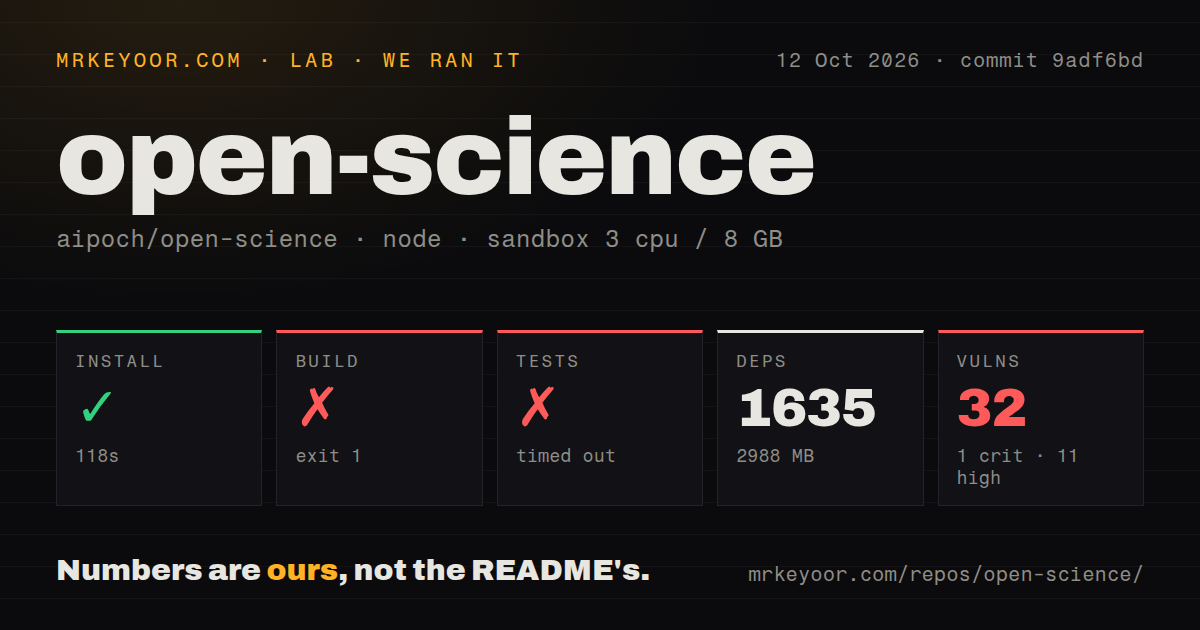
Our sandbox installed Open-Science commit 9adf6bd in 118 seconds, recording 1,635 dependencies and 2,988 MB on disk. The build failed with exit 1 after 70 seconds, and tests timed out after 900 seconds. The October 12, 2026 run used 3 CPUs and 8 GB of RAM. A 187.1 MB checkout became a much larger working environment before we had a successful build.
The build tail shows node-gyp configuring packages/credential-identity-probe-native with build_node_secret enabled. It records Node v24.19.0, node-gyp v12.4.0 and package version 0.37.1. The visible error says gyp failed with exit code 1. The tail doesn't expose the underlying cause. It supports reporting the failed native configuration step, without prescribing a package change or attributing the failure to a missing system tool.
Although the image label was lab-node:22, the actual Node version recorded in the log was v24.19.0. The test tail contains successful MCP and workspace-sidebar cases, but no complete suite result. We can't turn those excerpts into a total passing count. The scan found 33 CI workflow files and a tests directory, with no Dockerfile; those signals didn't produce a completed run in our sandbox.
npm audit reported 32 known vulnerabilities: 1 critical, 11 high, 12 moderate and 8 low. The supplied summary doesn't identify the affected packages or reachable code paths. Obtain the advisory details before deciding whether to use that dependency tree with sensitive material. This audit result belongs to the measured checkout, and it doesn't establish the security state of a later desktop package.
Imported replay doesn't execute the research
The README says imported records remain read-only, and watching a replay doesn't execute code, call a model or restore credentials. Received verification records describe the sender's checks. Re-executing a result still requires a complete recipe, required inputs and an available runtime. A recipient can therefore receive a useful account of an experiment without having everything needed to repeat it.
That boundary should shape your adoption trial. Use a small analysis with an expected result you understand, then export it and inspect the package on the intended recipient's computer. Check whether the selected files include the input data and whether the producing code and runtime evidence are available. Attempt any fresh execution separately. This is a proposed evaluation, not a reproduction we completed. A recorded check and a new result answer different questions.
Local storage still sends context to your chosen provider
Open-Science stores project data and provenance evidence locally, according to its README. Model requests still send prompts and necessary context to the selected provider, and searches or remote connectors send their displayed parameters to external services. Researchers with a rule against sending unpublished data to a cloud provider need to review that route before attaching files. Local storage alone won't satisfy that rule.
The setup wizard includes agent-runtime checks and a model connection test. Cloud providers need their requested credentials, subscription routes need supported logins, and custom gateways require a compatible protocol and exact model ID. Python/R Notebook setup is optional until you need notebook execution. Start an unfamiliar workflow with Ask for approval and inspect the effective permissions: existing grants and the chosen backend affect what requires another prompt.
v1.0.1 postdates our measured 0.37.1 checkout
Release v1.0.1 was published October 20, 2026. Its notes describe security fixes for MCP OAuth credential handling, including binding stored credentials to their authorization server before use. Those changes are relevant to a workspace connecting external research tools, but they aren't a rerun of our npm audit or evidence that every advisory we recorded has been resolved.
The repository's last push was October 21, 2026. Issue 3693, updated that day, reports a disconnected model stream on Windows with app version 1.0.0. Together with the fresh release, this shows active development and current user reports. It doesn't establish how v1.0.1 behaves on that user's configuration. Our 0.37.1 source result also can't settle the reliability of today's desktop downloads.
JupyterLab and marimo fit work centered on notebooks
JupyterLab provides notebooks, a terminal, a text editor and a file browser. Choose it when interactive computation is the main job and you prefer to assemble the surrounding research workflow yourself. marimo stores notebooks as pure Python and can execute them as scripts or deploy them as apps. Choose it when a Python notebook that fits Git and script execution is the handoff you need. These are scope comparisons, without performance measurements.
Open-Science deserves a separate desktop trial if your recipient needs the connection between agent activity and generated research files. Bring a non-sensitive analysis whose output you can check. Before committing a project to the workspace, make the recipient identify the producing code and required inputs from its exported package, then establish whether they can actually run it again.