Five view types make structured data approachable
NocoDB's README names five main ways to work with records: grid, gallery, form, Kanban, and calendar. That range is the project's clearest reason to exist. A developer can keep data in tables while colleagues sort, filter, group, hide fields, or submit a form without writing SQL. Linked records, lookups, rollups, attachments, formulas, and user fields cover the work that usually turns a shared spreadsheet into an improvised internal system.
The interface also has permissions for views, public or private sharing, REST APIs, and an SDK. Its integration catalog covers chat, email, and object storage providers. Those pieces make NocoDB useful as the human-facing layer around inventory, editorial calendars, customer operations, or approval queues. The fit is strongest when several people need to update the same records but only a few of them should understand the database underneath.
Port 8080 gets a trial running, while production adds services
The quickest README path runs the published Docker image with SQLite, mounts a persistent data directory, and exposes port 8080. That is a sensible evaluation route because it keeps the first decision small. A PostgreSQL example is also provided, with NC_DB carrying the connection details and NC_AUTH_JWT_SECRET set explicitly. Neither route requires you to compile the 159.4 MB source checkout that our lab inspected.
NocoDB's production helper has a wider blast radius. Its single auto-upstall command generates Docker Compose and installs Docker prerequisites, PostgreSQL, Redis, and Traefik. It can configure and renew SSL after you supply a domain or subdomain. That is useful automation, but read the script before piping it into Bash on a real server. The simple product demo and the production topology are different commitments.
What happened when we ran it
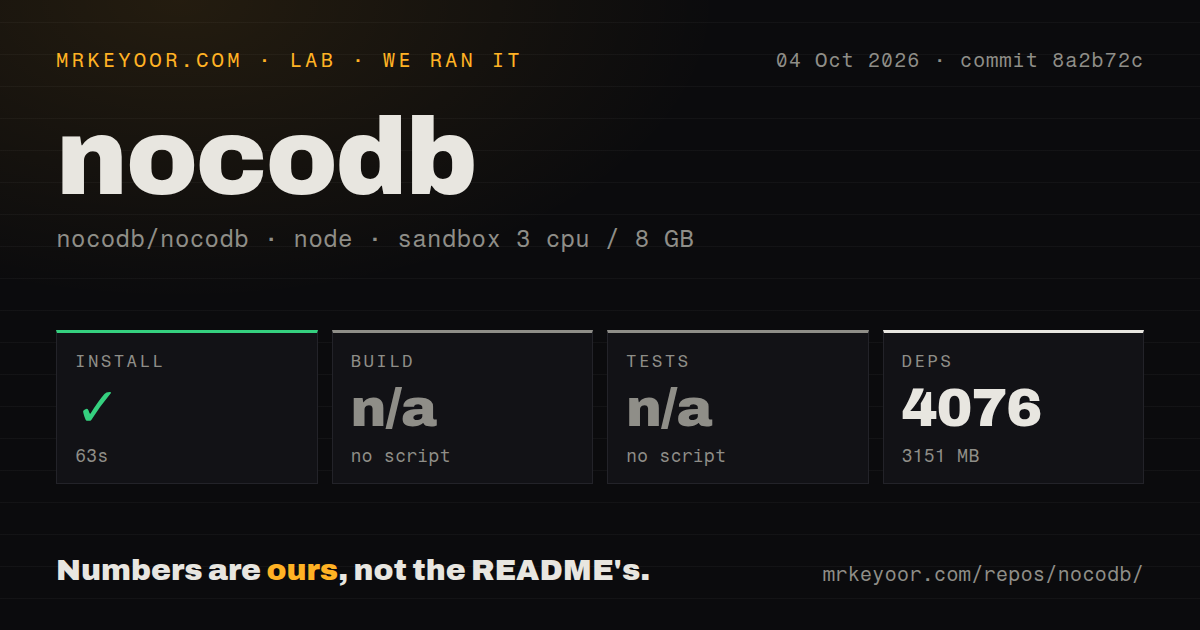
Our sandbox installed commit 8a2b72c in 63 seconds on 3 CPUs with 8 GB of RAM. Pnpm installed 4,076 packages, and the working tree plus dependencies occupied 3,151 MB. Installation succeeded without secrets or elevated container privileges. These figures describe source setup only. We did not measure page speed, database throughput, import capacity, or the published Docker image.
The checkout contained 4,798 files, about 705,847 lines of source, and 159.4 MB before installation. It was a pnpm workspace monorepo with 10 CI workflow files. Our runner found no build script or target, so it skipped the build. It also found no test script or target and skipped tests. The repository scan found no Dockerfile and no tests directory. A skipped step gives us no evidence that compilation or tests pass at this commit.
Release 2026.09.1 draws a clear line between editions
Release 2026.09.1 puts account-wide MCP connections on cloud and paid on-prem plans, while Community Edition gets table-level MCP tools. The release says the account-wide server exposes 199 tools, including attachment upload, upsert, audit logs, trash restore, and publishing. This is enough to make MCP a material feature, but the scope you receive depends on where and how you run NocoDB.
The same release reserves Timeline summaries for paid plans and excludes YouTrack Sync from Community Edition. Table tools and field-specific last-modified tracking remain available there. This split is readable in the release table, which is better than discovering it after deployment. It also means a proof of concept should use the edition you intend to keep, especially if an MCP client, timeline reporting, or ticket sync is central to the workflow.
Sustainable Use License 1.0 rules out some commercial uses
NocoDB's license file was updated on January 29, 2026 and applies the Sustainable Use License 1.0 to the master and develop branches. It allows internal business use plus non-commercial or personal use. Distribution must be free of charge and for non-commercial purposes, and the grant is non-transferable and non-sublicensable. A company planning to sell a hosted fork or redistribute modified builds should get legal advice or choose a project whose license already permits that model.
October 5 activity is high, and the queue is large
GitHub showed 65,188 stars when checked on October 5, 2026. The repository was pushed that day, and the latest release had shipped on September 29. GitHub's combined counter showed 709 open issues and pull requests; separate searches broke that into 383 issues and 326 pull requests. Those figures describe a busy project with a substantial queue, rather than a dormant repository.
Issue activity supports the same reading. GitHub found 266 issues updated since September 1, and the most recently updated list included an October 5 report about a PostgreSQL integration failing silently alongside a proposed fix. Release 2026.09.1 also lists fixes across views, imports, APIs, MCP, sign-in, SQL Server, and Airtable import. Maintenance is current, though adopters should still search the issue tracker for their database and workflow before committing data.
Three alternatives lead to three different products
Baserow is the nearest broad comparison if you want another self-hosted spreadsheet database and an application builder. Grist puts more weight on formulas and document-style modeling. Directus starts from the API and admin-app side of SQL data. All three repositories were live when checked, but their licenses, paid features, and deployment shapes differ. Pick the product whose center matches the job instead of counting checkboxes around the edges.
The 3,151 MB install makes the intended audience clear
NocoDB gives non-developers a credible way to work with structured data, and its one-container SQLite trial is easy to justify. The source tree is a 705,847-line application whose install pulled 4,076 packages, not a small library to tuck into an existing service. If the five view types, role controls, API, and integrations can replace several fragile sheets, that weight may be reasonable. If you need only an admin API or formula-heavy spreadsheet, use the narrower tool.