Karpenter provisions EC2 capacity from pod requirements
Karpenter watches for pods that Kubernetes cannot schedule, reads their resource requests and placement constraints, then asks AWS for nodes that fit. It considers selectors, affinities, tolerations, topology spread, zones, architectures, and other requirements rather than merely increasing a predefined node group's size. When demand falls, it can remove empty capacity or replace nodes to consolidate workloads. That makes it attractive for clusters with changing instance needs.
Our checkout at commit 1d92708 contained 1,081 files, about 105,089 source lines, and used 19.2 MB. This repository is specifically the AWS provider. A NodePool describes constraints and disruption policy, while an EC2NodeClass supplies AWS details such as AMI selection, subnets, security groups, instance profile behavior, and kubelet settings. Karpenter will not provision anything until at least one NodePool exists.
Direct instance selection beats fixed groups for varied workloads
Cluster Autoscaler generally changes the size of node groups whose machine choices were decided earlier. Karpenter can evaluate a wider set of EC2 options at scheduling time. A single NodePool can admit several zones, instance families, processor architectures, and capacity types, then choose among allowed combinations for the pods waiting now. This reduces the pressure to maintain a separate group for each anticipated workload shape.
That flexibility depends on accurate workload declarations. Our source build took 180 seconds, but no controller can infer CPU, memory, topology, or hardware needs that pods fail to express. Loose requirements may admit machines an application team did not expect; tight requirements may leave no available option. Platform teams should set NodePool limits, enforce request policies, and review which labels workloads are allowed to select before granting application namespaces freedom to steer EC2 purchases.
What happened when we ran it
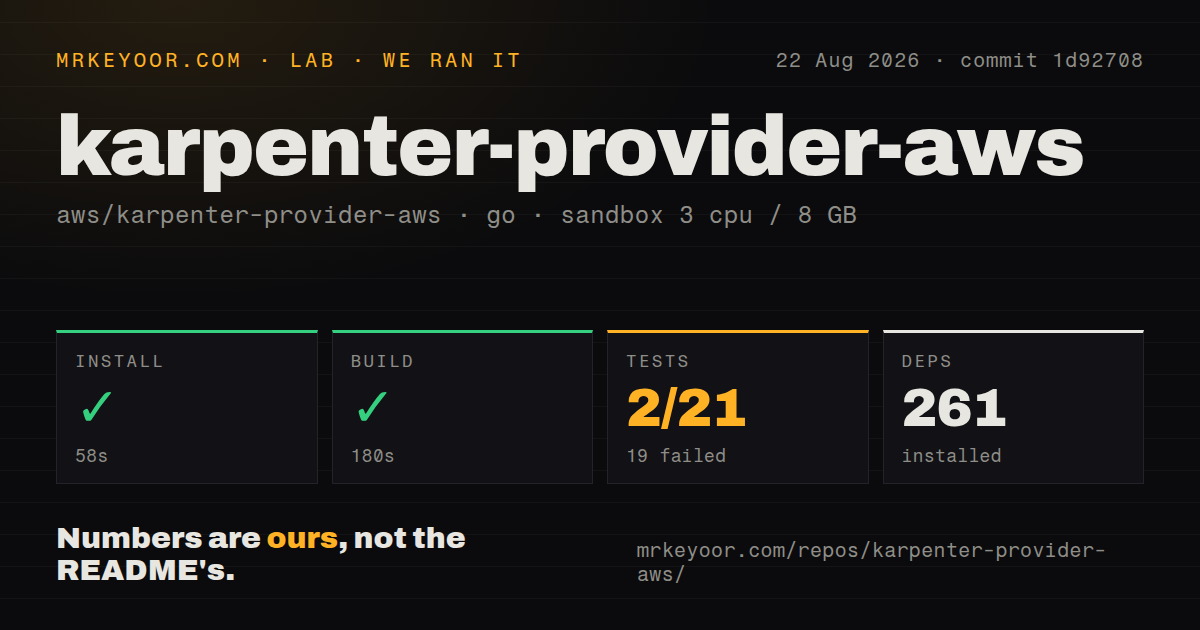
Our Go install finished in 58 seconds and installed 261 packages. The build succeeded in 180 seconds inside an unprivileged golang:1.24-bookworm container with 3 CPUs, 8 GB of RAM, and no secrets. At commit 1d92708, the repository had 29 CI workflow files, no Dockerfile, and a tests directory. The compile result shows the source was buildable in that plain Go image.
Tests failed after 103 seconds: 2 packages passed and 19 failed out of 21. The log tail shows the scheduling-best-effort suite starting, then scheduling-strict starting 43 specs, and storage starting 13 specs. Each package ended as failed, but the visible lines contain no failed assertion or stated dependency. We therefore cannot attribute the result to missing AWS access, Kubernetes services, container limits, or a specific defect.
The high failure count still matters for contributors. Nineteen failing packages mean a generic go test invocation did not provide a clean baseline in our sandbox, even though installation and compilation passed. Anyone changing scheduling or storage behavior should reproduce the documented development environment, identify the first underlying failure rather than read only the package summary, and avoid merging on the assumption that all red suites share one environmental cause.
IAM and discovery tags are part of the security boundary
The EKS guide installs Karpenter with Helm and creates controller permissions through IRSA or pod identity. It also establishes node roles, cluster discovery tags, and resources for interruption handling and spot use. The controller must be allowed to inspect AWS capacity and launch or terminate instances. Those permissions are expected, but they put Karpenter much closer to the cloud control plane than an ordinary in-cluster application.
The documentation gives a specific warning about 3 tracking tags used to map cloud machines to Kubernetes resources. A user who can create or delete those tags on EC2 instances can cause Karpenter to create or delete machines as a side effect. AWS administrators should enforce tag-based IAM rules so users without RunInstances or TerminateInstances cannot acquire equivalent influence through tag changes. Review instance-profile, subnet, and security-group discovery permissions with the same care.
Consolidation saves money by moving real workloads
Karpenter's disruption controller handles drift and consolidation, while its termination controller taints and drains a node before removing the underlying claim. Replacement capacity can be started first when the scheduling simulation says it is needed. Pod disruption budgets and NodePool disruption budgets limit what can move and how quickly. This is more careful than terminating a cheap-looking instance, yet applications still experience eviction and rescheduling.
Our 103-second test run reached scheduling and storage suites but did not validate a live disruption cycle. Production rollout needs a staging cluster with representative pod budgets, local storage, daemonsets, topology rules, and shutdown times. The documented default consolidation policy considers empty or underused nodes, with consolidateAfter set to 0s when omitted. Conservative teams should choose explicit budgets and settings rather than accept disruption defaults without testing them.
Version 1.14.1 is active, with current operational reports
The repository was pushed on August 25, 2026, and v1.14.1 was released on August 21. GitHub listed 500 open issues and pull requests together. Recent reports covered unexpected drift toward smaller instances, large interruption-queue metric values, unnecessary drift from CA bundle changes, GPU resource-claim provisioning, and classification of instance-profile, subnet, or security-group failures. These are concrete edge cases in the AWS control loop, not generic popularity signals.
Karpenter earns its place when EKS capacity is varied enough that fixed groups become an operating burden. The 180-second passing build shows a substantial Go project that compiles cleanly, while 19 failing test packages warn source contributors to use the intended harness. Platform teams should adopt it only with explicit IAM limits, NodePool constraints, disruption tests, and monitoring. If those controls sound excessive for the cluster, Cluster Autoscaler is probably the better fit.