xml-crypto review
xml-crypto 6.1.2 implements XML Digital Signature for Node. `SignedXml` canonicalizes selected nodes, hashes references, creates or verifies RSA signatures, embeds certificate information, and lets protocol code register custom transforms or algorithms. The 6.1 line added `getSignedReferences()` so callers can consume authenticated XML instead of trusting the original wrapper; 6.1.2 clears all stored reference XML when any reference is corrupt. It does not provide XML Encryption, SAML response rules, schema validation, certificate-chain trust, replay protection, or a safe parsed business object by itself.
xml-crypto 6.1.2 installed in 1.1 seconds with 0 audit findings, but our browser bundle failed and safe verification requires consuming only `getSignedReferences()` output. Use it when XMLDSig interop is unavoidable and your protocol layer enforces signer trust, signature count, expected targets, and rejection on both false results and exceptions.
We installed it
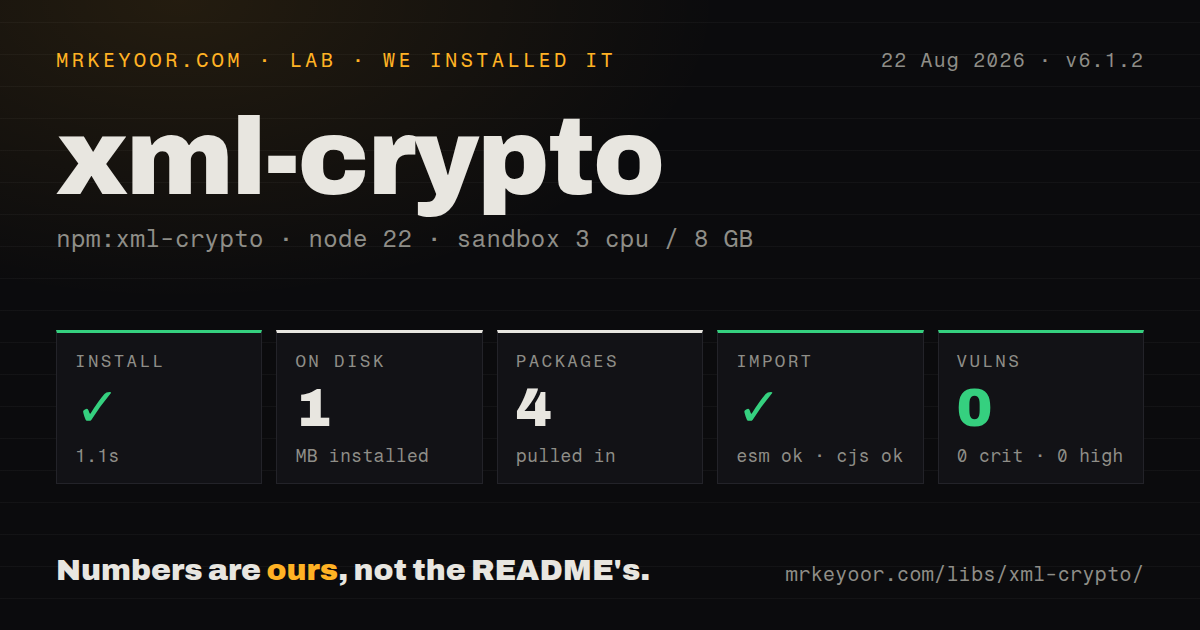
| Install | ✓ · 1.1s | 4 packages on disk · 1 MB |
| Import | ✓ | ESM import works · require() works · CommonJS package |
| Browser | n/a | could not be bundled for the browser (Node-only code, most likely) |
| Types | — | no TypeScript types found |
| Known vulns | 0 | 0 critical · 0 high · 0 moderate · 0 low (npm audit) |
Answers from our run
Does xml-crypto install cleanly?
Yes. In a fresh container with an empty cache, npm install xml-crypto finished in 1 seconds, leaving 4 packages and 1 MB on disk. npm audit reported no known vulnerabilities.
Can xml-crypto run in a browser?
Not directly: esbuild could not bundle it for the browser in our run, which normally means it depends on Node built-ins. Use it on the server, or find a browser-targeted alternative.
Does xml-crypto work with both ESM and CommonJS?
Yes. Both import 'xml-crypto' and require('xml-crypto') worked in Node 22 in our run. The package is published as CommonJS.
Does xml-crypto include TypeScript types?
No type declarations were found in our install, so TypeScript users need their own declarations.
xml-crypto or xmldsigjs: which should you use?
xmldsigjs: Use it for a TypeScript XMLDSig implementation based on Web Crypto and CryptoKey, including browser-oriented work. xml-crypto 6.1.2 installed in 1.1 seconds with 0 audit findings, but our browser bundle failed and safe verification requires consuming only getSignedReferences() output.
When should you not use xml-crypto?
You need XML Encryption. Despite the repository description, version 6.1.2 exposes signing and canonicalization APIs, not document encrypt and decrypt calls.
Use it if
- A SAML, SOAP, WS-Security, or partner integration requires XMLDSig and you can test its exact canonicalization profile.
- Trusted certificates or signer authorization come from application configuration rather than untrusted KeyInfo content.
- Application fields will be parsed only from `getSignedReferences()` output after reference count and meaning are checked.
- The team has XML signature experience and can review custom transforms, namespace rules, algorithms, and protocol constraints.
- You need XML Encryption. Despite the repository description, version 6.1.2 exposes signing and canonicalization APIs, not document encrypt and decrypt calls.
- The real job is SAML login. `@node-saml/node-saml` or samlify also handles timestamps, audience, metadata, bindings, and assertion rules.
- A sender-provided certificate will be trusted automatically. Historical critical advisories show why KeyInfo must not replace an application trust decision.
- Browser execution is required. Our esbuild browser bundle failed, matching this package's Node crypto, PEM, XPath, and DOM-oriented workflow.
- RSA-PSS is mandatory. The README lists an MGF1 URI, but the 6.1.2 shipped algorithm registry does not provide that implementation.
- HMAC is the required profile. Only HMAC-SHA1 is built in, it is disabled by default due to key-confusion risk, and main has security work not yet released in 6.1.2.
Setup reality
We installed xml-crypto 6.1.2 in 1.1 seconds in a fresh Node 22 Bookworm sandbox. It left 4 packages and 1 MB on disk. npm audit found 0 known vulnerabilities. The package is 356 KB unpacked, declares 3 direct dependencies and no peers, and requires Node 16 or newer. Both CommonJS require() and ESM import worked, though this is a CommonJS package with no exports map. Our package inspection found no TypeScript declarations.
The browser esbuild probe failed, so keep this in Node and do not quote a browser size. Signing needs a PEM private key, explicit signature and canonicalization algorithm URIs, and at least one reference with XPath, transforms, and digest algorithm. Convert PFX material outside the library. Prefer RSA-SHA256 or RSA-SHA512 when the partner profile permits; several README examples still use SHA1. If application code imports DOMParser, declare @xmldom/xmldom directly rather than relying on dependency hoisting.
Verification takes separate inputs. Parse the untrusted XML, locate signature elements, enforce the count required by your protocol, create SignedXml with a pinned certificate, load the chosen signature, and pass the original XML string to checkSignature. A digest mismatch may return false, while malformed structures, duplicate IDs, missing keys, unsupported algorithms, or bad signature values can throw. Every path is a rejection.
A true result authenticates referenced subsets, not the surrounding document. Read only getSignedReferences(), verify the expected number and target, then parse those returned strings for application fields. The older getReferences() and .references data are deprecated and explicitly unsafe. Canonicalization, inherited namespaces, comments, prefix lists, ID attributes, and signature placement frequently cause interop failures. Versions 6.0.1 and 6.1.x addressed critical wrapping and reference-handling flaws, so pin 6.1.2 or newer and review advisories during upgrades.
Patterns
Sign one element with RSA-SHA256 sign-element
const fs = require('node:fs');
const { SignedXml } = require('xml-crypto');

const signer = new SignedXml({
  privateKey: fs.readFileSync('signing-key.pem'),
  signatureAlgorithm: 'http://www.w3.org/2001/04/xmldsig-more#rsa-sha256',
  canonicalizationAlgorithm: 'http://www.w3.org/2001/10/xml-exc-c14n#',
});

signer.addReference({
  xpath: "//*[local-name(.)='Order']",
  transforms: ['http://www.w3.org/2001/10/xml-exc-c14n#'],
  digestAlgorithm: 'http://www.w3.org/2001/04/xmlenc#sha256',
});
signer.computeSignature(xml);
const signedXml = signer.getSignedXml();
Use SHA-256 or stronger when the partner profile permits. `getSignedXml()` is meaningful only after `computeSignature()` completes.
Include the public certificate in KeyInfo embed-certificate
const signer = new SignedXml({
  privateKey: fs.readFileSync('signing-key.pem'),
  publicCert: fs.readFileSync('signing-cert.pem'),
  signatureAlgorithm: 'http://www.w3.org/2001/04/xmldsig-more#rsa-sha256',
  canonicalizationAlgorithm: 'http://www.w3.org/2001/10/xml-exc-c14n#',
  getKeyInfoContent: SignedXml.getKeyInfoContent,
});
KeyInfo tells a verifier which certificate the sender supplied; it does not authorize that signer. Trust must come from pinned or validated configuration.
Insert the signature next to a protocol node place-signature
signer.computeSignature(xml, {
  prefix: 'ds',
  location: {
    reference: "//*[local-name(.)='Header']",
    action: 'after',
  },
});
Location changes are protocol-specific and can affect enveloped transforms. Version 6.1.2 accepts four placement actions: append, prepend, before, and after.
Verify exactly one signature with a pinned certificate verify-pinned-certificate
const { DOMParser } = require('@xmldom/xmldom');
const { SignedXml } = require('xml-crypto');

const doc = new DOMParser().parseFromString(xml, 'text/xml');
const verifier = new SignedXml({
  publicCert: fs.readFileSync('trusted-signer.pem'),
  getCertFromKeyInfo: () => null,
});
const signatures = verifier.findSignatures(doc);
if (signatures.length !== 1) throw new Error('Expected one XML signature');
verifier.loadSignature(signatures[0]);
if (!verifier.checkSignature(xml)) throw new Error('Invalid XML signature');
Forcing `getCertFromKeyInfo` to return null prevents document content from replacing the pinned certificate. Enforce the protocol's signature count first.
Parse only authenticated reference bytes consume-signed-reference
const signed = verifier.getSignedReferences();
if (signed.length !== 1) throw new Error('Expected one signed reference');

const authenticatedDoc = new DOMParser().parseFromString(signed[0], 'text/xml');
const order = authenticatedDoc.documentElement;
processVerifiedOrder(order);
A valid signature covers referenced XML only. Parse business fields from these authenticated bytes, never from unsigned siblings in the original document.
Handle false results and thrown errors handle-verification-failure
let valid = false;
try {
  valid = verifier.checkSignature(xml);
} catch (error) {
  auditVerificationFailure(error);
}

if (!valid) {
  throw new Error('XML signature rejected');
}
Digest mismatch may return false, while malformed XMLDSig and several algorithm or ID errors throw. Handle both paths as one rejection outcome.
Resolve namespaces in a signing XPath sign-namespaced-node
signer.addReference({
  xpath: '//app:Order',
  transforms: ['http://www.w3.org/2001/10/xml-exc-c14n#'],
  digestAlgorithm: 'http://www.w3.org/2001/04/xmlenc#sha256',
});

signer.computeSignature(xml, {
  existingPrefixes: { app: 'urn:example:orders' },
});
XPath prefixes are not inferred. Bind each prefix to the exact document namespace used by the signed element.
Enforce the protocol's signed-reference count verify-expected-references
if (!verifier.checkSignature(xml)) throw new Error('Invalid signature');

const signedReferences = verifier.getSignedReferences();
if (signedReferences.length !== expectedReferenceCount) {
  throw new Error('Unexpected signed-reference count');
}
Cryptographic validity does not prove that every required protocol element was signed. Check both reference count and semantic target.
Recognize a protocol-specific id attribute use-custom-id-attribute
const verifier = new SignedXml({
  publicCert: trustedCert,
  idAttribute: 'AssertionID',
  getCertFromKeyInfo: () => null,
});
A custom ID name is checked with built-in Id, ID, and id handling. Duplicate matching IDs cause rejection as a wrapping defense.
Generate WS-Security style ids use-ws-security-id
const signer = new SignedXml({
  idMode: 'wssecurity',
  privateKey,
  signatureAlgorithm: 'http://www.w3.org/2001/04/xmldsig-more#rsa-sha256',
  canonicalizationAlgorithm: 'http://www.w3.org/2001/10/xml-exc-c14n#',
});
`idMode: 'wssecurity'` changes generated IDs and references; it does not implement SOAP headers or WS-Security policy.
Retrieve only the Signature XML return-detached-signature
signer.computeSignature(xml);
const signatureXml = signer.getSignatureXml();
const originalWithIds = signer.getOriginalXmlWithIds();
Detached transport needs the signature plus the exact XML containing generated IDs. Call both accessors only after signing.
Match an undocumented canonicalization transform add-implicit-transform
const verifier = new SignedXml({
  publicCert: trustedCert,
  getCertFromKeyInfo: () => null,
  implicitTransforms: [
    'http://www.w3.org/2001/10/xml-exc-c14n#',
  ],
});
Add an implicit transform only after reproducing the partner's actual canonicalization. Trying transforms until verification passes hides interop defects.
Alternatives
| Package | Registry | Pick it when |
|---|---|---|
| xmldsigjs | npm | Use it for a TypeScript XMLDSig implementation based on Web Crypto and `CryptoKey`, including browser-oriented work. |
| @node-saml/node-saml | npm | Use it when XML signatures are one part of complete Node SAML request and response validation. |
| samlify | npm | Use it for SAML service-provider or identity-provider metadata, bindings, schemas, and protocol checks. |
| xml-encryption | npm | Use it when XML Encryption, rather than XML Digital Signature, is the missing operation. |
More security guides
cryptography · jose · pyjwt · dompurify · jsonwebtoken · oauthlib · the whole shelf →
How this guide is made: grounded in the library's documentation, release notes, changelog, and issue history, on a fixed rubric — not a hands-on install of every release. The 50 most-downloaded entries are additionally install-verified in clean containers. Corrections: contact the desk.