tuf-js review
tuf-js 6.0.0 is a Node client for repositories that implement The Update Framework. Starting from a trusted local root, Updater verifies root rotation, timestamp expiry, snapshot and targets metadata, delegated roles, target length, and signed hashes before accepting a download. It consumes an existing TUF repository and does not create metadata or operate signing keys. Version 6 drops Node 20 and moves to @tufjs/models 5. Our esbuild browser build failed on Node-only code, which matches a client built around local metadata and target caches.
tuf-js 6.0.0 installed in 1.5 seconds, used 2 MB, and produced zero audit findings in our Node 22 sandbox; its browser build failed. Use it only with a real TUF repository and an independently shipped trusted root.
We installed it
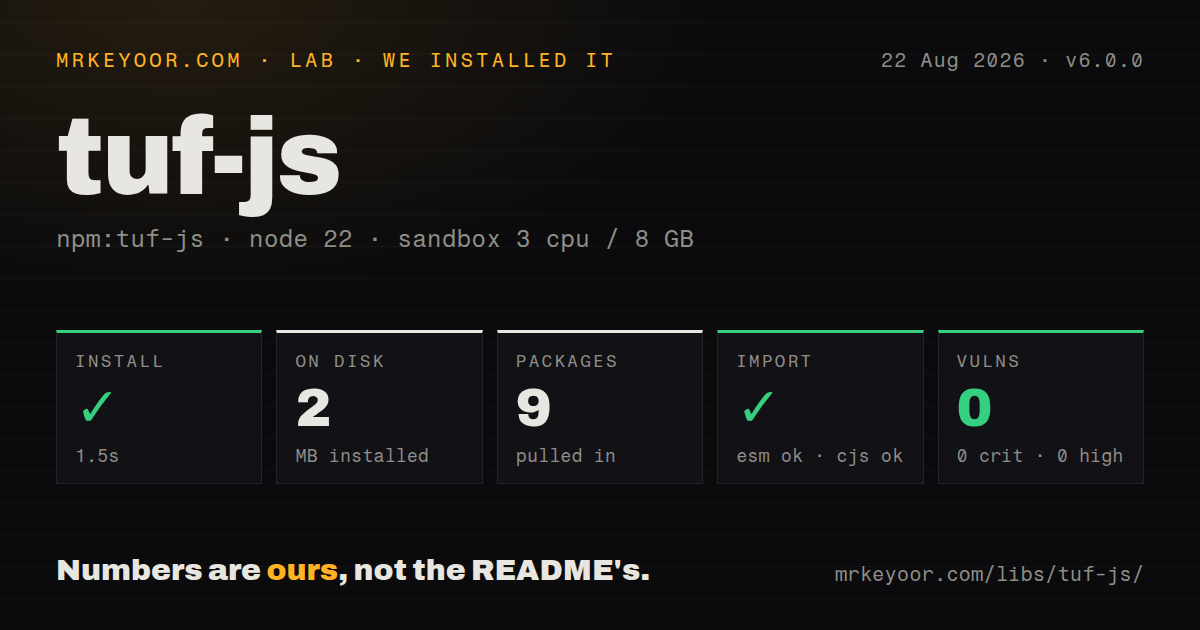
| Install | ✓ · 1.5s | 9 packages on disk · 2 MB |
| Import | ✓ | ESM import works · require() works · CommonJS package |
| Browser | n/a | could not be bundled for the browser (Node-only code, most likely) |
| Types | ✓ | TypeScript types bundled |
| Known vulns | 0 | 0 critical · 0 high · 0 moderate · 0 low (npm audit) |
Answers from our run
Does tuf-js install cleanly?
Yes. In a fresh container with an empty cache, npm install tuf-js finished in 2 seconds, leaving 9 packages and 2 MB on disk. npm audit reported no known vulnerabilities.
Can tuf-js run in a browser?
Not directly: esbuild could not bundle it for the browser in our run, which normally means it depends on Node built-ins. Use it on the server, or find a browser-targeted alternative.
Does tuf-js work with both ESM and CommonJS?
Yes. Both import 'tuf-js' and require('tuf-js') worked in Node 22 in our run. The package is published as CommonJS.
Does tuf-js include TypeScript types?
Yes, type declarations ship inside the package, so no @types install is needed.
tuf-js or tuf: which should you use?
tuf: Use the Python implementation when tooling must also create and sign repository metadata. tuf-js 6.0.0 installed in 1.5 seconds, used 2 MB, and produced zero audit findings in our Node 22 sandbox; its browser build failed.
When should you not use tuf-js?
You only verify one file against a known checksum or detached signature; TUF adds repository roles and recurring metadata operations.
Use it if
- A Node updater must survive compromise of a CDN, repository server, or online signing key.
- The organization already publishes standards-conforming TUF metadata for its artifacts.
- Rollback checks, expiry, threshold signatures, root rotation, and delegated target roles are explicit requirements.
- A package-security component needs to refresh a locally cached trust root through TUF.
- You only verify one file against a known checksum or detached signature; TUF adds repository roles and recurring metadata operations.
- There is no TUF repository. This client does not generate metadata, protect offline root keys, or run signing ceremonies.
- The target is a browser or edge worker. Our browser build failed because the package requires Node and local file facilities.
- Your Node version is outside ^22.22.2, ^24.15.0, or >=26.0.0; the v6 engine field excludes other releases.
- Operators cannot refresh timestamp and snapshot metadata before expiry. Clients fail closed on expired signed metadata instead of fetching unsigned content.
Setup reality
We installed tuf-js 6.0.0 in 1.5 seconds under Node 22. Nine packages occupied 2 MB. tuf-js declares three direct dependencies, zero peers, 116 KB unpacked, bundled TypeScript declarations, and an MIT license. npm audit found zero vulnerabilities. It is CommonJS without an exports map; require() and ESM import both worked in our checks.
The esbuild browser build failed, which is a concrete Node-only boundary. Bootstrap begins with a trusted root.json delivered outside the update server. Copy it into the metadata directory before creating Updater, and create metadata and target directories explicitly. Downloading the first root from the same endpoint it is supposed to authenticate gives a compromised server control of the trust anchor.
refresh verifies metadata in the TUF order and caches accepted versions locally. Expiry is intentional: an offline client with stale timestamp metadata must stop until the repository publishes fresh signed data. Consistent snapshots may prefix target filenames with hashes. A 404 can therefore mean the client's prefixTargetsWithHash setting disagrees with repository layout rather than that the signed target is absent.
Set finite fetch timeouts, retry counts, and metadata and target length limits. Use findCachedTarget to verify a cached file against signed data instead of trusting its presence. No result from getTargetInfo means current signed metadata does not authorize that name. Treat refresh, signature, expiry, length, and hash failures as terminal for that update; an unsigned fallback defeats the package's purpose.
Patterns
Install an embedded trust anchor seed-trusted-root
fs.mkdirSync(metadataDir, {recursive: true})
fs.mkdirSync(targetDir, {recursive: true})
const root = path.join(metadataDir, 'root.json')
if (!fs.existsSync(root)) fs.copyFileSync('./assets/1.root.json', root)
Ship the initial root through an independent trusted release channel; do not fetch it from the repository it will authenticate.
Point Updater at one repository create-updater
import {Updater} from 'tuf-js'
const updater = new Updater({
  metadataDir, metadataBaseUrl: 'https://updates.example/metadata',
  targetDir, targetBaseUrl: 'https://updates.example/targets'
})
The constructor expects the trusted root in metadataDir; downloads also need targetDir and targetBaseUrl.
Verify current repository metadata refresh-trusted-metadata
await updater.refresh()Signature, version, rollback, and expiry failures must stop the update flow rather than trigger an unsigned download.
Reuse or fetch a verified target download-authorized-target
const info = await updater.getTargetInfo('releases/agent.tar.gz')
if (!info) throw new Error('not authorized')
const cached = await updater.findCachedTarget(info)
const localPath = cached ?? await updater.downloadTarget(info)
findCachedTarget checks signed length and hashes; a missing target record is an authorization result, not an HTTP miss.
Set network and size ceilings bound-client-resources
const updater = new Updater({
  metadataDir, metadataBaseUrl, targetDir, targetBaseUrl,
  config: {fetchTimeout: 15000, fetchRetry: 3, targetsMaxLength: 20000000}
})
Choose limits for the repository. Retries do not turn signature, expiry, or authorization failures into transient errors.
Check a local artifact against metadata verify-existing-file
const info = await updater.getTargetInfo(targetName)
if (!info) throw new Error('unknown target')
await info.verify(fs.createReadStream(existingPath))
A rejected length or hash check is a trust failure; never execute the file after catching and suppressing it.
Match hash-prefixed target layout use-consistent-snapshots
const updater = new Updater({
  metadataDir, metadataBaseUrl, targetDir, targetBaseUrl,
  config: {prefixTargetsWithHash: true}
})
This setting must agree with the repository's consistent-snapshot layout or authorized downloads can return 404.
Trace TUF fetch and cache work debug-update-flow
DEBUG='tuf:fetch,tuf:cache' node update.jsDebug namespaces help diagnose URLs and cached versions; keep credentials out of endpoint URLs and log output.
Alternatives
| Package | Registry | Pick it when |
|---|---|---|
| tuf | PyPI | Use the Python implementation when tooling must also create and sign repository metadata. |
| sigstore | npm | Use it for higher-level artifact signature and provenance verification rather than a general TUF updater. |
| @sigstore/tuf | npm | Use it when the narrow task is maintaining Sigstore trust-root data through TUF. |
More security guides
cryptography · jose · pyjwt · dompurify · jsonwebtoken · requests-oauthlib · the whole shelf →
How this guide is made: grounded in the library's documentation, release notes, changelog, and issue history, on a fixed rubric — not a hands-on install of every release. The 50 most-downloaded entries are additionally install-verified in clean containers. Corrections: contact the desk.