semgrep review
Semgrep 1.174.0 is a static-analysis CLI that matches parsed program structure with YAML rules written in code-like patterns. The local Community Edition searches more than 30 languages, supports dataflow within its documented analysis boundary, and runs from an editor, pre-commit, or CI. Semgrep's hosted products add proprietary rules, cross-file and cross-function analysis, dependency reachability, secrets work, and finding triage. This release adds changed dependency-source reporting to diff scans and avoids dependency resolution for ecosystems outside the rules selected during a partial scan.
Semgrep 1.174.0 installed in 1.8 seconds but occupied 316 MB across 66 packages in our sandbox, with 0 audit findings. Install it for syntax-aware rules that ordinary linters cannot express; do not treat the Community Edition result as cross-file AppSec coverage.
We installed it
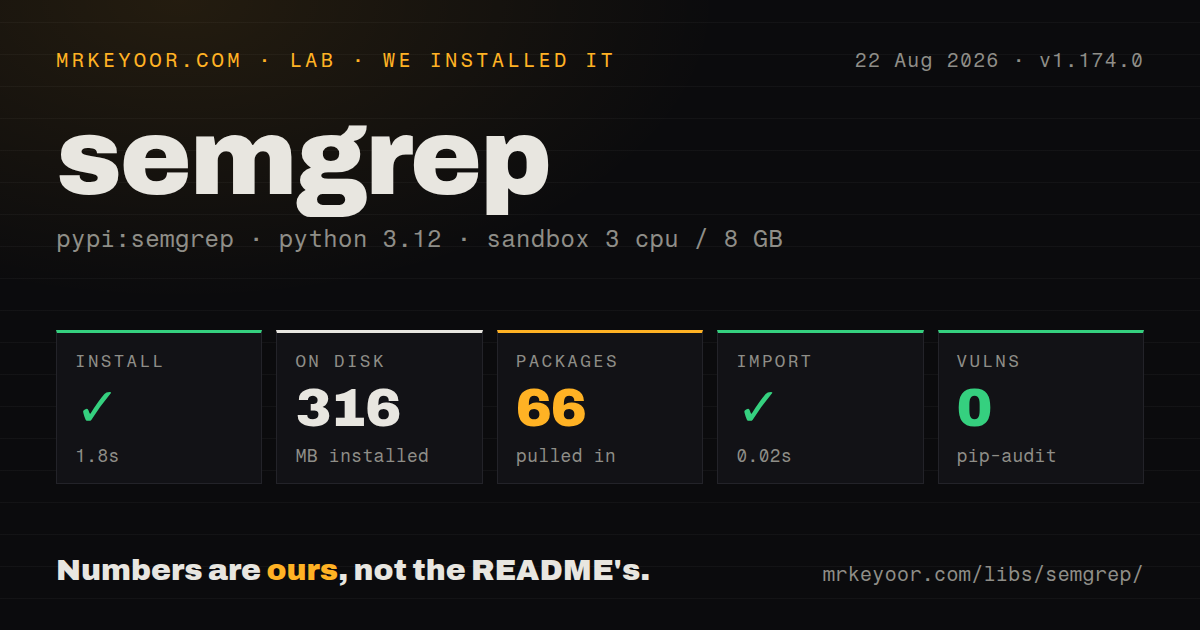
| Install | ✓ · 1.8s | 66 packages on disk · 316 MB |
| Import | ✓ | import semdep in 0.02s · compiled extensions · py.typed · requires Python >=3.10 |
| Known vulns | 0 | (pip-audit) |
Answers from our run
Does semgrep install cleanly?
Yes. In a fresh container with an empty cache, pip install semgrep finished in 2 seconds, leaving 66 packages and 316 MB on disk. pip-audit reported no known vulnerabilities.
What does semgrep need to run?
Python >=3.10, and a platform wheel with compiled extensions. In our run import semdep succeeded in 0.02s, and the package ships py.typed for type checkers.
semgrep or bandit: which should you use?
bandit: Choose it for a maintained set of Python security checks without a general structural rule engine. Semgrep 1.174.0 installed in 1.8 seconds but occupied 316 MB across 66 packages in our sandbox, with 0 audit findings.
When should you not use semgrep?
You expect the open-source engine to prove cross-file security properties. The README warns that Community Edition can miss findings beyond one function or file.
Use it if
- Your team can express a forbidden call shape, unsafe data use, or migration rule more precisely as syntax than as text.
- One checked-in rule suite must scan a repository containing several supported languages.
- A code audit needs structural search with metavariables, exclusions, and dataflow beyond what grep can represent.
- Rules and fixtures should run locally with source kept on the build machine.
- You expect the open-source engine to prove cross-file security properties. The README warns that Community Edition can miss findings beyond one function or file.
- A Python codebase only needs established lint and security checks. Ruff and Bandit avoid Semgrep's 316 MB environment and custom YAML rule maintenance.
- The CI tool image must remain small. Our clean installation created 66 packages and included compiled shared objects.
- Remote Registry shortcuts must work offline with frozen behavior. They fetch configuration, and Registry use can report pseudonymous metrics unless you turn metrics off.
- The requirement includes managed SCA reachability, validated secrets, cross-file analysis, and pull-request triage at no platform cost. The README assigns those capabilities to commercial products.
Setup reality
We installed semgrep 1.174.0 in a clean Python 3.12 Bookworm sandbox. It completed in 1.8 seconds, left 66 packages, and took 316 MB on disk. The distribution declares 27 direct dependencies and requires Python 3.10 or newer. It contains compiled .so files and a py.typed marker. import semdep worked in 0.02 seconds, and pip-audit found 0 known vulnerabilities. Our package check could not identify a license.
Put the CLI in pipx, an isolated uv tool environment, or a pinned CI image instead of the application's virtualenv. semgrep scan can run local rules without an account. Hosted policy through semgrep ci needs SEMGREP_APP_TOKEN. A Registry shorthand downloads rules and may send pseudonymous metrics. For a fixed offline run, commit the rule files and add --metrics off.
CI configuration needs target paths, a reviewed .semgrepignore, an explicit baseline policy, and tested exit behavior. A scan can print findings without failing unless --error or hosted policy changes the result. Run the exact command against a fixture that must fail. Send JSON or SARIF to its own artifact file so log messages cannot corrupt machine-readable output.
Treat a rule like production code. Add positive and negative fixtures, then run semgrep --test. patterns combines conditions, pattern-not removes matching ranges, metavariables bind syntax, and fix can edit source. Large monorepos need measured memory and time limits. Community Edition's local result only covers its engine boundary; version 1.174.0 does not turn a clean single-file scan into proof that cross-file flows are safe.
Patterns
Pin Semgrep outside the app install-isolated-cli
uv tool install 'semgrep==1.174.0'
semgrep --version
The measured package declares 27 direct dependencies, so an isolated tool environment keeps them out of production imports.
Search for a self-comparison run-structural-query
semgrep -e '$X == $X' --lang py src/Single-quote the expression because shells otherwise try to expand dollar-prefixed metavariables.
Write a Python rule ban-eval-call
rules:
  - id: forbid-python-eval
    languages: [python]
    message: Dynamic Python evaluation is forbidden
    severity: ERROR
    pattern: eval($EXPRESSION)
Pair this YAML with files containing expected matches and safe cases before CI enforcement.
Find a Flask debug launch combine-rule-patterns
rules:
  - id: flask-debug-enabled
    languages: [python]
    message: Run Flask without debug mode
    severity: ERROR
    patterns:
      - pattern-inside: |
          $APP = Flask(...)
          ...
      - pattern: $APP.run(..., debug=True, ...)
Every condition under patterns must match in compatible source ranges; ellipses permit intervening syntax.
Flag requests without a timeout exclude-timeout-calls
rules:
  - id: requests-without-timeout
    languages: [python]
    message: Add an HTTP timeout
    severity: WARNING
    patterns:
      - pattern: requests.get(...)
      - pattern-not: requests.get(..., timeout=$SECONDS, ...)
Test aliases, wrappers, and positional arguments because this rule only recognizes the written call shapes.
Constrain a captured variable filter-metavariable-name
rules:
  - id: review-secret-assignment
    languages: [python]
    message: Review this credential-like assignment
    severity: WARNING
    patterns:
      - pattern: $NAME = $VALUE
      - metavariable-regex:
          metavariable: $NAME
          regex: '(?i).*(password|secret|token).*'
The regex checks source text for the variable name; it does not prove the assigned value is a credential.
Attach a small rewrite provide-autofix
rules:
  - id: replace-debug-print
    languages: [python]
    message: Send diagnostics to the logger
    severity: INFO
    pattern: print($VALUE)
    fix: logger.info($VALUE)
Check the generated edit. Multiple arguments, formatting, and missing logger setup can make this replacement invalid.
Run without Registry metrics scan-checked-in-rules
semgrep scan \
  --config .semgrep/rules.yml \
  --metrics off \
  src/ tests/
A local config fixes the reviewed rules in the repository, and --metrics off disables Semgrep rule metrics.
Return a failing status for findings fail-ci-on-match
semgrep scan \
  --config .semgrep/rules.yml \
  --metrics off \
  --error \
  src/
Prove the CI status with one deliberately bad fixture before relying on the flag as a merge gate.
Exclude generated code ignore-generated-paths
# .semgrepignore
dist/
coverage/
vendor/
**/*.generated.js
Review the reported targets because a broad ignore pattern can silently remove first-party source from the scan.
Write findings to an artifact export-scan-json
semgrep scan \
  --config .semgrep/rules.yml \
  --json \
  --output semgrep-results.json \
  src/
Keep human logs out of semgrep-results.json so downstream parsers receive valid JSON.
Check expected rule matches test-rule-fixtures
semgrep --test .semgrep/Fixture comments declare matching and safe lines, turning rule behavior into a test before rollout.
Alternatives
| Package | Registry | Pick it when |
|---|---|---|
| bandit | PyPI | Choose it for a maintained set of Python security checks without a general structural rule engine. |
| ruff | PyPI | Choose it for fast Python linting, correctness checks, imports, formatting, and modernization rules. |
| pylint | PyPI | Choose it for Python-specific static checks and plugin-based project conventions. |
More security guides
cryptography · jose · pyjwt · dompurify · jsonwebtoken · oauthlib · the whole shelf →
How this guide is made: grounded in the library's documentation, release notes, changelog, and issue history, on a fixed rubric — not a hands-on install of every release. The 50 most-downloaded entries are additionally install-verified in clean containers. Corrections: contact the desk.