bcrypt review
bcrypt is PyCA's Python binding for hashing and checking passwords with the bcrypt algorithm. Its small bytes-only API centers on hashpw(), checkpw(), and gensalt(); kdf() exposes bcrypt_pbkdf for OpenSSH-compatible key derivation. Our Python 3.12 sandbox imported version 5.0.0 successfully and found compiled code plus typing metadata. This release adds Python 3.14, free-threaded 3.14, and Windows ARM support. It also stops accepting passwords over 72 bytes: hashpw() now raises ValueError where older releases discarded the excess bytes.
Install bcrypt to preserve bcrypt compatibility or use bcrypt_pbkdf, and plan explicitly for its byte API and 72-byte ceiling. For a new password database with no compatibility constraint, Argon2id is the better default named by this project's maintainers.
We installed it
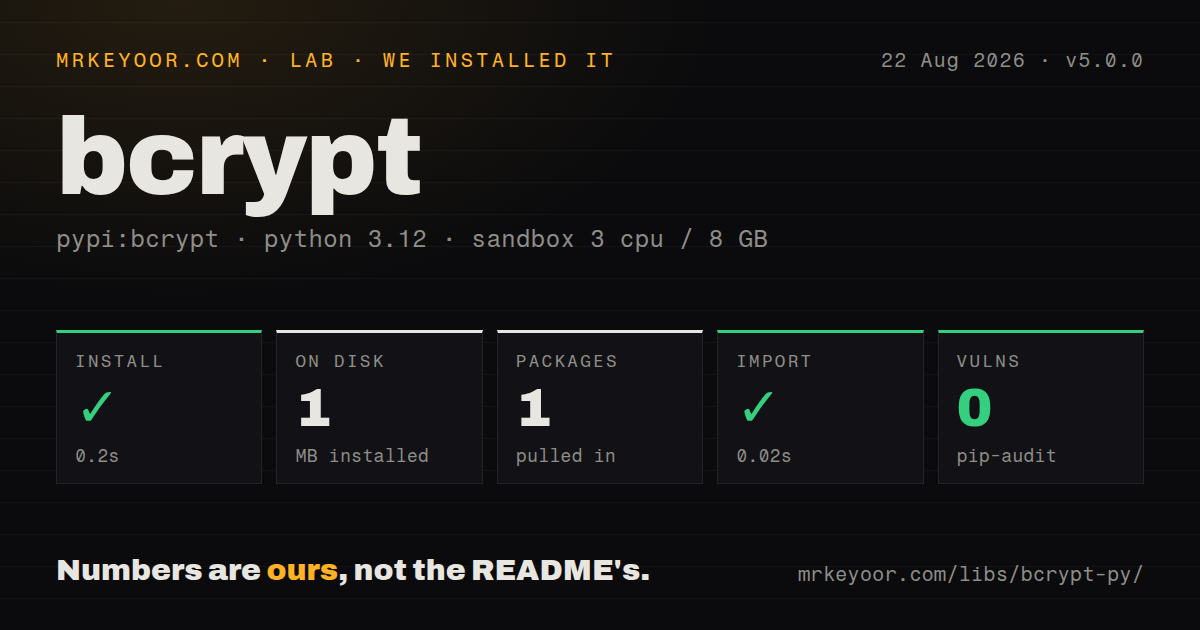
| Install | ✓ · 0.2s | 1 package on disk · 1 MB |
| Import | ✓ | import bcrypt in 0.02s · compiled extensions · py.typed · requires Python >=3.8 |
| Known vulns | 0 | (pip-audit) |
Answers from our run
Does bcrypt install cleanly?
Yes. In a fresh container with an empty cache, pip install bcrypt finished in 0.2s, leaving 1 package and 1 MB on disk. pip-audit reported no known vulnerabilities.
What does bcrypt need to run?
Python >=3.8, and a platform wheel with compiled extensions. In our run import bcrypt succeeded in 0.02s, and the package ships py.typed for type checkers.
bcrypt or argon2-cffi: which should you use?
argon2-cffi: Choose it for new password storage when you want the Argon2id scheme recommended by bcrypt's own README. Install bcrypt to preserve bcrypt compatibility or use bcrypt_pbkdf, and plan explicitly for its byte API and 72-byte ceiling.
When should you not use bcrypt?
You can choose the password scheme for a new application; the bcrypt README points readers to Argon2id or scrypt, both of which avoid bcrypt's fixed 72-byte password ceiling
Discussed on
- hnOkta Bcrypt incident lessons for designing better APIs377 points
- hnDon't use bcrypt177 points
- hnBcrypt at 25163 points
- hnA possible flaw in open-source bcrypt implementations124 points
- hnDjango-bcrypt92 points
Use it if
- Your user table already contains bcrypt hashes that must continue to verify across a Python migration
- A protocol, audit rule, or neighboring service requires bcrypt output with a compatible 2a or 2b prefix
- You need bcrypt_pbkdf for an OpenSSH private-key workflow and want the implementation exposed through kdf()
- You want a narrow password-hash primitive and will own policy, cost upgrades, and scheme migration in application code
- You can choose the password scheme for a new application; the bcrypt README points readers to Argon2id or scrypt, both of which avoid bcrypt's fixed 72-byte password ceiling
- You need one verifier for several stored hash formats plus automatic rehash decisions; bcrypt exposes one algorithm, while pwdlib and Passlib provide policy layers
- Your deployment target has no matching wheel and cannot compile native code; the source build requires both a C compiler and Rust 1.74 or newer for version 5.0.0
- Your authentication API accepts arbitrary Unicode strings without a byte-length rule; version 5.0.0 raises ValueError once the UTF-8 representation exceeds 72 bytes
- You expect the package to choose a suitable cost as hardware changes; gensalt() accepts the work factor, but benchmarking and raising old hashes remain your job
Setup reality
Our clean Python 3.12 install of bcrypt 5.0.0 completed in 0.2 seconds. One package occupied 1 MB, and pip-audit reported no known vulnerabilities. The distribution declares two direct dependencies, requires Python 3.8 or newer, includes py.typed, and loads a compiled extension. import bcrypt succeeded in 0.02 seconds. The published license is Apache-2.0.
There are no credentials or configuration files. Mainstream Linux, macOS, Windows, and supported ARM users normally receive a wheel. A less common platform can fall back to a source build, where the README calls for a C compiler and Rust 1.74 or newer. Version 5.0.0 added Windows ARM wheels and Python 3.14 support. The unreleased changelog already drops Python 3.8, so pinning the major alone will not preserve that interpreter forever.
Every password and stored hash crosses the API as bytes. Encode user input with one documented encoding and store the returned 60-byte hash without splitting out a salt. The encoded hash already carries its prefix, cost, and salt. Version 5.0.0 changed the long-password path: hashpw() raises ValueError above 72 bytes. The limit counts encoded bytes, so character length is not a safe proxy for non-ASCII input. Choose either an explicit byte limit or the README's SHA-256 plus base64 prehash convention, then apply it identically during verification.
Hashing is deliberately CPU-heavy. Measure gensalt() costs on production-class hardware, bound concurrent login work, and move calls off an async event loop. bcrypt does not track which stored rows need a higher cost. Parse the cost from a verified hash and replace it during a successful login, or use a password-policy wrapper that handles upgrades and multiple schemes.
Patterns
Create a bcrypt hash hash-password
import bcrypt

plain = "correct horse battery staple".encode("utf-8")
stored = bcrypt.hashpw(plain, bcrypt.gensalt())
Store the complete returned byte string. It already contains the prefix, work factor, and salt needed for verification.
Verify a login password verify-password
import bcrypt

def password_matches(candidate: str, stored: bytes) -> bool:
    return bcrypt.checkpw(candidate.encode("utf-8"), stored)
Use checkpw() rather than hashing with a new salt or comparing manually. A fresh salt intentionally produces a different result.
Store a hash in a text column store-text-hash
import bcrypt

def make_hash(password: str) -> str:
    value = bcrypt.hashpw(password.encode("utf-8"), bcrypt.gensalt())
    return value.decode("ascii")

def check_hash(password: str, value: str) -> bool:
    return bcrypt.checkpw(password.encode("utf-8"), value.encode("ascii"))
bcrypt output is ASCII-safe. Keep the password encoding fixed at the application boundary so signup and login produce the same bytes.
Benchmark candidate work factors set-work-factor
import bcrypt
import time

for cost in (11, 12, 13, 14):
    started = time.perf_counter()
    bcrypt.hashpw(b"timing sample", bcrypt.gensalt(rounds=cost))
    print(cost, time.perf_counter() - started)
One step doubles the work. Run the benchmark on production-class hardware and include your peak login concurrency when choosing a cost.
Reject input beyond bcrypt's limit enforce-byte-limit
def bcrypt_bytes(password: str) -> bytes:
    value = password.encode("utf-8")
    if len(value) > 72:
        raise ValueError("password exceeds bcrypt's 72-byte limit")
    return value
Version 5.0.0 raises ValueError above 72 bytes. Check bytes rather than characters because UTF-8 characters have different encoded lengths.
Prehash without introducing NUL bytes prehash-long-password
import base64
import hashlib

def bcrypt_input(password: str) -> bytes:
    digest = hashlib.sha256(password.encode("utf-8")).digest()
    return base64.b64encode(digest)
This follows the README's workaround for long passwords. Record the convention and use it for every old and new verification; changing it invalidates stored hashes.
Replace a low-cost hash after verification upgrade-cost-on-login
import bcrypt

TARGET_COST = 13

def verify_and_upgrade(plain: bytes, stored: bytes):
    if not bcrypt.checkpw(plain, stored):
        return False, stored
    current_cost = int(stored.split(b"$")[2])
    upgraded = bcrypt.hashpw(plain, bcrypt.gensalt(TARGET_COST)) if current_cost < TARGET_COST else stored
    return True, upgraded
Write the upgraded value only after successful verification. Login is the normal point where the application briefly has the plaintext again.
Spend hashing work for an unknown account hide-user-existence
import bcrypt

DUMMY_HASH = bcrypt.hashpw(b"unused account", bcrypt.gensalt())

def authenticate(candidate: bytes, stored: bytes | None) -> bool:
    matched = bcrypt.checkpw(candidate, stored or DUMMY_HASH)
    return stored is not None and matched
Create the dummy once when the process starts. Generating it inside the request adds avoidable work and makes timing less predictable.
Run password hashing outside the event loop hash-with-asyncio
import asyncio
import bcrypt

async def make_hash(plain: bytes) -> bytes:
    salt = bcrypt.gensalt()
    return await asyncio.to_thread(bcrypt.hashpw, plain, salt)
bcrypt work is intentionally expensive. A worker thread keeps unrelated async sockets and timers moving while the hash runs.
Treat malformed stored data as a failed check handle-invalid-hash
import bcrypt

def safe_check(candidate: bytes, stored: bytes) -> bool:
    try:
        return bcrypt.checkpw(candidate, stored)
    except ValueError:
        return False
Invalid bcrypt data raises ValueError. Log corruption through a separate path without returning parsing details to the caller.
Generate a 2a hash for an older peer write-legacy-prefix
import bcrypt

salt = bcrypt.gensalt(prefix=b"2a")
stored = bcrypt.hashpw(password_bytes, salt)
The default prefix is 2b. Request 2a only when a system that consumes newly written hashes cannot read 2b output.
Use bcrypt_pbkdf for key derivation derive-openssh-key
import bcrypt
import os

key = bcrypt.kdf(
    password=passphrase_bytes,
    salt=os.urandom(16),
    desired_key_bytes=32,
    rounds=100,
)
kdf() exposes bcrypt_pbkdf for formats such as OpenSSH private keys. Its rounds value is not the logarithmic cost accepted by gensalt().
Alternatives
| Package | Registry | Pick it when |
|---|---|---|
| argon2-cffi | PyPI | Choose it for new password storage when you want the Argon2id scheme recommended by bcrypt's own README |
| pwdlib | PyPI | Choose it when an application needs a current password-policy wrapper with verification and rehash checks |
| passlib | PyPI | Choose it when a legacy database contains several password-hash schemes that one verifier must recognize |
More security guides
cryptography · jose · pyjwt · dompurify · jsonwebtoken · requests-oauthlib · the whole shelf →
How this guide is made: grounded in the library's documentation, release notes, changelog, and issue history, on a fixed rubric — not a hands-on install of every release. The 50 most-downloaded entries are additionally install-verified in clean containers. Corrections: contact the desk.