@azure/identity review
Our clean install of @azure/identity 4.13.2 worked in both ESM and CommonJS, but it put 44 packages and 43 MB on disk. That cost buys the TokenCredential implementations used by Azure SDK clients: managed identity on Azure hosts, workload federation on Kubernetes or pipelines, service-principal credentials, developer CLI sessions, and interactive user sign-in. The 4.13.2 package raises its MSAL Node floor to avoid an older vulnerable uuid path and routes developer-tool commands through a structured process runner instead of shell-built command strings. It now requires Node 22 or later.
Use @azure/identity for Azure SDK authentication on Node 22, especially when managed identity removes secrets from deployment. Pick an explicit production credential or restrict DefaultAzureCredential, and use MSAL directly when the application owns the sign-in protocol.
We installed it
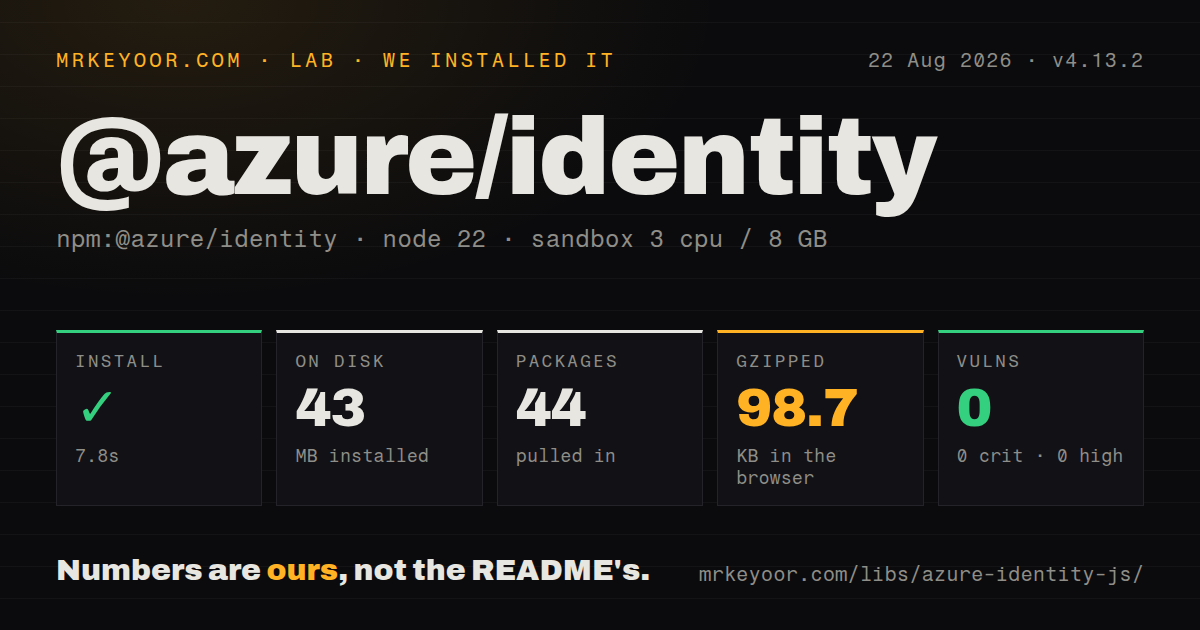
| Install | ✓ · 7.8s | 44 packages on disk · 43 MB |
| Import | ✓ | ESM import works · require() works · ESM package with exports map |
| Browser | 98.7 KB | gzipped (365.2 KB minified), bundled with esbuild |
| Types | ✓ | TypeScript types bundled |
| Known vulns | 0 | 0 critical · 0 high · 0 moderate · 0 low (npm audit) |
Answers from our run
Does @azure/identity install cleanly?
Yes. In a fresh container with an empty cache, npm install @azure/identity finished in 8 seconds, leaving 44 packages and 43 MB on disk. npm audit reported no known vulnerabilities.
How much does @azure/identity add to a browser bundle?
98.7 KB gzipped (365.2 KB minified) when the whole package is bundled for the browser with esbuild. Importing only part of it is usually smaller.
Does @azure/identity work with both ESM and CommonJS?
Yes. Both import '@azure/identity' and require('@azure/identity') worked in Node 22 in our run. The package is published as ESM with an exports map.
Does @azure/identity include TypeScript types?
Yes, type declarations ship inside the package, so no @types install is needed.
@azure/identity or @azure/msal-node: which should you use?
@azure/msal-node: Choose it for a Node application that needs direct control over MSAL accounts, token acquisition, and cache behavior rather than Azure SDK credential classes. Use @azure/identity for Azure SDK authentication on Node 22, especially when managed identity removes secrets from deployment.
When should you not use @azure/identity?
The application runs on Node 20 or an older LTS release. Version 4.13.2 declares Node >=22.0.0, so upgrading this package can force a runtime upgrade.
Use it if
- Your Node service constructs Azure SDK clients that accept a TokenCredential, such as clients for Key Vault, Blob Storage, Service Bus, or management APIs.
- The deployed workload should use an Azure managed identity or federated workload token instead of storing a client secret.
- Developers sign in through Azure CLI, Azure Developer CLI, PowerShell, or VS Code while production uses a workload credential from the same application code.
- You need a refreshing bearer-token callback for Azure OpenAI or a direct getToken call for an Azure REST endpoint.
- The application runs on Node 20 or an older LTS release. Version 4.13.2 declares Node >=22.0.0, so upgrading this package can force a runtime upgrade.
- You are building a browser login flow beyond the basic InteractiveBrowserCredential case. The README says that is the only credential supported in browsers and points advanced browser authentication to @azure/msal-browser.
- You need exact control over OAuth requests, account selection, or token-cache policy. The project documentation recommends using MSAL.js directly for that layer.
- Azure AD B2C is the identity provider. The package's documented known-issues section does not list B2C as a supported scenario, so MSAL with a B2C authority is the better fit.
- A 365.2 KB minified browser import is too much for one authentication helper. Our all-exports bundle compressed to 98.7 KB, before any Azure service client is added.
Setup reality
We installed @azure/identity 4.13.2 in a fresh unprivileged Node 22 Bookworm container with no cache. npm finished in 7.8 seconds, left 44 packages using 43 MB, and reported zero known vulnerabilities. The package has 12 direct dependencies, no peers, 6336 KB unpacked, bundled TypeScript declarations, and an ESM package layout with an exports map. Both require() and ESM import worked. An all-exports esbuild browser bundle measured 365.2 KB minified and 98.7 KB gzipped.
Authentication is where setup time goes. EnvironmentCredential needs tenant, client, and secret or certificate variables. WorkloadIdentityCredential needs the tenant, client, and federated token-file values supplied by the host. A user-assigned managed identity needs its client ID, object ID, or resource ID; leaving that choice implicit on a host with several identities can yield a valid token for the wrong principal and a later 403. Non-public Azure clouds also need the correct authority host.
DefaultAzureCredential tries deployed credentials and developer sessions under a continuation policy. Set AZURE_TOKEN_CREDENTIALS to prod, dev, or one supported credential name when that breadth is unwanted. CLI-backed credentials depend on the corresponding executable and signed-in account. VS Code authentication needs @azure/identity-vscode plus useIdentityPlugin. Persistent token storage and Windows broker sign-in are separate plugin packages; without cache persistence, interactive tokens survive only for the process lifetime.
Reuse one credential object so its in-memory token cache remains useful. Direct getToken calls need a scope for the target resource, commonly ending in /.default. Claims challenges are not handled by the Azure CLI, PowerShell, or Azure Developer CLI credentials. Failed chains surface multiple underlying errors, so log the nested error list while keeping token and credential values out of application logs.
Patterns
Pass one credential to an Azure client authenticate-sdk-client
import { DefaultAzureCredential } from '@azure/identity';
import { SecretClient } from '@azure/keyvault-secrets';

const credential = new DefaultAzureCredential();
const secrets = new SecretClient(
  'https://example-vault.vault.azure.net',
  credential,
);

const value = await secrets.getSecret('database-password');
Create the credential once and reuse it. Reconstructing it for each request discards its in-memory token cache.
Limit which credentials DefaultAzureCredential may try restrict-default-chain
# Deployed credential group
AZURE_TOKEN_CREDENTIALS=prod

# Developer-tool credential group
AZURE_TOKEN_CREDENTIALS=dev

# One credential only
AZURE_TOKEN_CREDENTIALS=ManagedIdentityCredential
An unsupported value causes construction to fail. Pinning one production path also keeps a developer login from being selected on a configured host.
Choose a short fallback chain build-explicit-chain
import {
  ChainedTokenCredential,
  ManagedIdentityCredential,
  AzureCliCredential,
} from '@azure/identity';

const credential = new ChainedTokenCredential(
  new ManagedIdentityCredential({ clientId: process.env.AZURE_CLIENT_ID }),
  new AzureCliCredential({ tenantId: process.env.AZURE_TENANT_ID }),
);
Credentials run in constructor order. Keep a developer credential out of a production chain unless that fallback is deliberate.
Select a user-assigned managed identity use-managed-identity
import { ManagedIdentityCredential } from '@azure/identity';

const credential = new ManagedIdentityCredential({
  clientId: process.env.AZURE_MANAGED_IDENTITY_CLIENT_ID,
});
With no option, the class targets the system-assigned identity. Specify a client ID, object ID, or resource ID when the host has a user-assigned identity.
Read a federated token mounted by the host use-workload-identity
import { WorkloadIdentityCredential } from '@azure/identity';

const credential = new WorkloadIdentityCredential({
  tenantId: process.env.AZURE_TENANT_ID,
  clientId: process.env.AZURE_CLIENT_ID,
  tokenFilePath: process.env.AZURE_FEDERATED_TOKEN_FILE,
});
AKS workload identity normally injects these values. Constructing this class directly makes a missing mount or variable fail on this path instead of falling through a longer chain.
Authenticate a service principal with a secret use-client-secret
import { ClientSecretCredential } from '@azure/identity';

const credential = new ClientSecretCredential(
  process.env.AZURE_TENANT_ID,
  process.env.AZURE_CLIENT_ID,
  process.env.AZURE_CLIENT_SECRET,
);
Keep the secret in a secret store and rotate it. On Azure hosting, managed identity avoids distributing this credential at all.
Authenticate a service principal with a certificate use-client-certificate
import { ClientCertificateCredential } from '@azure/identity';

const credential = new ClientCertificateCredential(
  process.env.AZURE_TENANT_ID,
  process.env.AZURE_CLIENT_ID,
  { certificatePath: '/run/secrets/service-principal.pem' },
);
The PEM file must be readable by the process and contain the expected private key material. Mount it with tighter permissions than the application source.
Create an Azure OpenAI token callback provide-bearer-token
import { DefaultAzureCredential, getBearerTokenProvider } from '@azure/identity';

const azureADTokenProvider = getBearerTokenProvider(
  new DefaultAzureCredential(),
  'https://cognitiveservices.azure.com/.default',
);

const token = await azureADTokenProvider();
The principal still needs an Azure role that permits the target operation. A successful sign-in does not grant service authorization by itself.
Attach a token to a direct REST request call-rest-api
const access = await credential.getToken(
  'https://management.azure.com/.default',
);

const response = await fetch(
  'https://management.azure.com/subscriptions?api-version=2022-12-01',
  { headers: { Authorization: `Bearer ${access.token}` } },
);
Request a scope for the API you call. A Key Vault token cannot be reused against Azure Resource Manager.
Fail during startup when required variables are absent validate-environment
import { DefaultAzureCredential } from '@azure/identity';

const credential = new DefaultAzureCredential({
  requiredEnvVars: ['AZURE_TENANT_ID', 'AZURE_CLIENT_ID'],
  processTimeoutInMs: 3_000,
});
requiredEnvVars checks for non-empty values when the credential is constructed. processTimeoutInMs applies to credentials that launch developer tools.
Register the VS Code credential plugin enable-vscode-login
import { DefaultAzureCredential, useIdentityPlugin } from '@azure/identity';
import { vsCodePlugin } from '@azure/identity-vscode';

useIdentityPlugin(vsCodePlugin);
const credential = new DefaultAzureCredential();
Install @azure/identity-vscode v2 or later and sign in through the Azure Resources extension before constructing the credential.
Use the Azure Government authority target-sovereign-cloud
import {
  AzureAuthorityHosts,
  ClientSecretCredential,
} from '@azure/identity';

const credential = new ClientSecretCredential(tenantId, clientId, secret, {
  authorityHost: AzureAuthorityHosts.AzureGovernment,
});
Developer-tool credentials follow the cloud selected inside that tool. Changing authorityHost on another credential does not reconfigure Azure CLI or PowerShell.
Alternatives
| Package | Registry | Pick it when |
|---|---|---|
| @azure/msal-node | npm | Choose it for a Node application that needs direct control over MSAL accounts, token acquisition, and cache behavior rather than Azure SDK credential classes. |
| @azure/msal-browser | npm | Choose it for a browser SPA with redirect or popup login, account selection, and browser-specific token-cache decisions. |
| @azure/identity-broker | npm | Add it when a Windows desktop flow must use the native account broker; it extends this package rather than replacing it. |
| @azure/identity-cache-persistence | npm | Add it to a CLI or desktop process when interactive tokens must remain available after the process exits. |
More security guides
cryptography · jose · pyjwt · dompurify · jsonwebtoken · requests-oauthlib · the whole shelf →
How this guide is made: grounded in the library's documentation, release notes, changelog, and issue history, on a fixed rubric — not a hands-on install of every release. The 50 most-downloaded entries are additionally install-verified in clean containers. Corrections: contact the desk.