
More than 200 modules trade focus for reconnaissance breadth
SpiderFoot starts with an IP address, domain, hostname, subnet, ASN, email, phone number, username, person's name, or cryptocurrency address. Modules query public records and external services, scrape pages, inspect metadata, enumerate related infrastructure, and publish new entities for other modules to consume. The result can be explored in a web interface or exported as CSV, JSON, or GEXF.
That breadth is the reason to use it. One run can connect certificate records, DNS, hosting, breach data, social profiles, threat feeds, cloud buckets, and page content without an analyst wiring every API by hand. It is also the reason results need supervision. A discovered name, shared IP, similar domain, or social account is a lead, not proof that two entities belong together.
What happened when we ran it
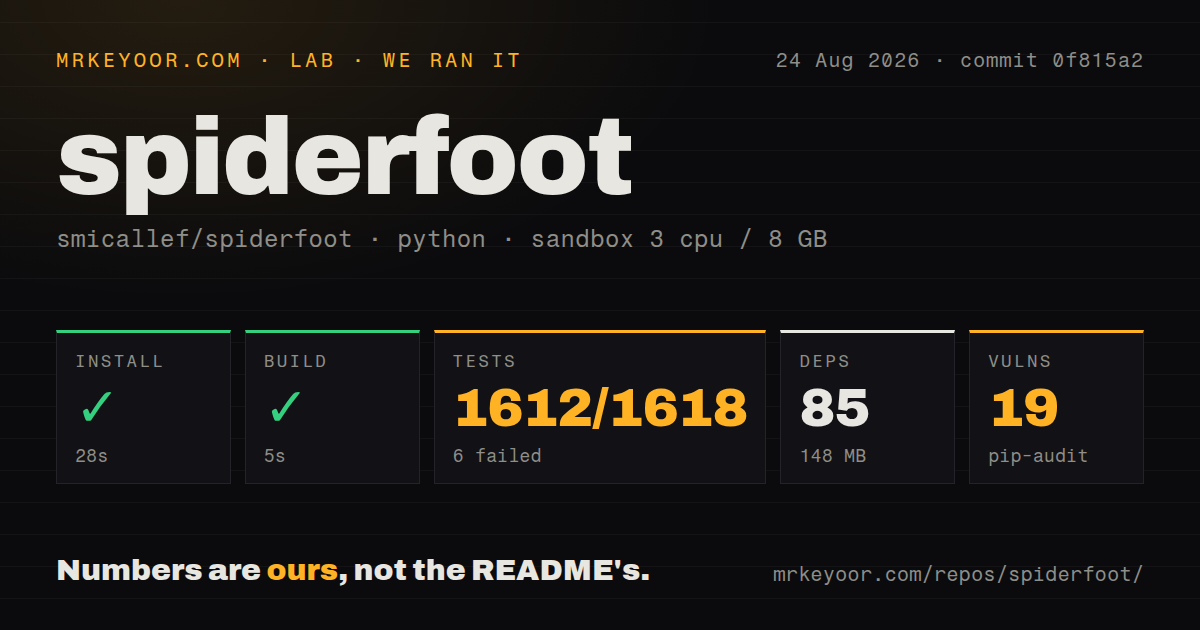
Our sandbox cloned commit 0f815a2 with 3 CPUs and 8 GB of RAM. The 14.3 MB checkout held 799 files and about 85,429 lines of source. Installation completed in 28 seconds, adding 85 Python packages and using 148 MB on disk. The build step then succeeded in 5 seconds.
The test command reached the outer 900-second timeout. Before that, pytest printed a summary with 1,612 passed tests, 6 failed, and 214 skipped. The six failures were integration cases for Adblock, DNS for Family, OpenNIC, and StevenBlack Hosts. Several expected an exception that was not raised; one StevenBlack case showed list index out of range. The log does not establish whether remote data, test assumptions, or code caused them.
Pip-audit reported 19 known vulnerabilities in the installed environment. That number comes from our checked-out dependency set, not from a claim that SpiderFoot itself contains 19 exploitable flaws. An operator must inspect package names, advisory reachability, available upgrades, and exposure. The repository includes a Dockerfile, compose file, tests directory, and 2 CI workflows, but an image does not waive that dependency review.
API keys decide how much of the module catalog is real
The README says many modules need no API key, and several keyed services offer a free tier. Its long integration table also labels tiered and commercial APIs. A fresh installation can perform useful DNS, certificate, extraction, scraping, and public-feed work, but the advertised catalog is not one uniform pool of free data. Results depend on which accounts, quotas, and terms you bring.
Treat module setup like a data procurement exercise. Record why each provider is allowed, what identifiers leave your network, how secrets are stored, and how quota errors appear in a scan. Paid services such as breach databases can change both coverage and legal obligations. A module returning no events might mean the target is clean, the provider changed, the account is limited, or the request failed.
SpiderFoot can also call local tools including Nmap, DNSTwist, WhatWeb, CMSeeK, and others. Those names in the catalog do not mean every binary arrives with pip install. Their packages, permissions, network effects, and licenses belong in the deployment checklist. The open-source Docker configuration can help make versions repeatable once that tool set is chosen.
Correlation rules help triage, but they do not prove ownership
Version 4.0 added a YAML-configurable correlation engine with 37 predefined rules in the repository. Correlation can reduce the manual work of spotting repeated indicators across hundreds of module events. GEXF export also lets an analyst move relationships into graph tools when the built-in visualizations are insufficient.
A rule is only as reliable as its inputs and assumptions. Shared infrastructure, recycled usernames, catch-all email patterns, and stale third-party records can create convincing false associations. Keep raw events beside correlated findings, note the source and retrieval time, and require a human to confirm any conclusion that affects a person or customer. SpiderFoot organizes evidence; it does not turn public data into certainty.
The open-source edition is a single-team tool, not HX
The MIT-licensed edition has the local web interface, CLI, SQLite storage, exports, modules, and correlation rules. The README draws a separate line around SpiderFoot HX. The managed product adds multi-target monitoring, change notifications, multi-user collaboration, authentication with 2FA, investigations, support, preconfigured third-party tools, and several outbound integrations.
That comparison prevents a common procurement mistake. Self-hosting the repository does not reproduce the hosted service merely because both run SpiderFoot modules. A team exposing the local web server must decide authentication, TLS, network access, backups, and concurrency itself. The README's sample binds to 127.0.0.1:5001, which is the safer starting point for a single analyst.
April 2026 code activity does not make v4.0 current
GitHub recorded 21,438 stars, 314 combined open issues and pull requests, and a last push on April 13, 2026. The latest GitHub release remains v4.0, published April 7, 2022. The four-year release gap is important for people who consume packaged versions, but it is not proof of abandonment because the default branch moved in 2026 and the queue still shows user and contributor activity.
The practical choice is between a dated stable archive and a newer master branch that the README says may contain features and modules that are not fully tested. Our commit built quickly, yet 6 integration tests failed and 19 dependency advisories appeared. Pin the exact revision, run the chosen modules against controlled targets, and produce your own image rather than floating with master.
SpiderFoot is useful when an authorized investigation needs broad collection more than a pristine one-purpose scanner. The interface and publisher model save real analyst time, and the MIT license keeps the local edition inspectable. Its output, dependencies, external services, and network actions all need ownership. For narrow subdomain enumeration, choose Amass; for a smaller email and host sweep, choose theHarvester.