Should you trust it with your archive?
Paperless-ngx is worth evaluating if you want a searchable archive on a server you control and can maintain backups. Its README explicitly recommends a local server with backups and warns that stored information is not encrypted. That storage boundary matters before any discussion of installation speed.
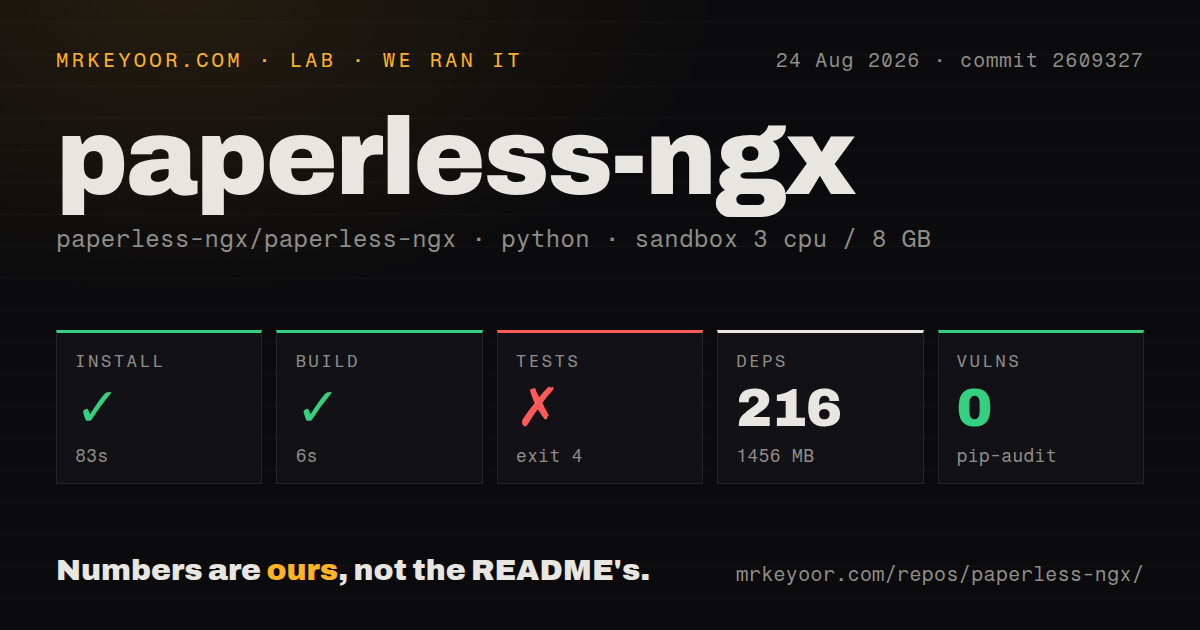
Our run on 2026-08-24 at commit 2609327 reached a configuration error during test setup. We did not validate a running archive, OCR accuracy, document ingestion, search results, permissions, backup restoration or an upgrade. Treat the recorded command outcomes as setup evidence, then test the document workflow you need before committing your records.
What our sandbox actually established
The attached record identifies a Python sandbox using ghcr.io/astral-sh/uv:python3.12-bookworm with 3 CPUs and 8 GB of memory. Installation succeeded in 83 seconds, with 216 packages and a recorded dependency footprint of 1,456 MB. The build step returned exit 0 after 6 seconds, but its stored log tail is empty. That limits what we can say about the work it performed.
The test setup stopped because PAPERLESS_SECRET_KEY was unset or still set to change-me. The command returned exit 4 after 9 seconds while pytest loaded configuration through Django. This is a configuration failure before recorded test results, rather than evidence that document-processing assertions failed. The stored test-count field is null.
The harness records each command's success flag, elapsed time, exit code, timeout status and log tail. Those fields let us distinguish an installation success from a test setup failure. The supplied MrKeyoor testing methodology explains this reporting approach and its limits; its current description does not establish which procedure version was used for our August run. This correction uses the existing record and includes no new execution.
The stored pip-audit result reports zero advisories. Scan coverage is unknown: the record supplies no scannedPackages value, and its separate packages field is zero. The audit result does not establish that all 216 installed packages were scanned or that the application is secure.
Deployment still needs its own check
The commit-matched README calls Docker Compose the easiest way to deploy Paperless-ngx and links an installation script. That recommendation comes from the project; our sandbox did not demonstrate a Compose deployment.
For an initial evaluation, use disposable documents and check that you can import them, find their contents and restore them from a backup. Resolve the secret-key configuration before rerunning tests. Keep these checks separate: a passing source test suite would still leave your storage, access and recovery configuration to validate.
The supplied documentation and setup pages could not be independently retrieved. This review therefore does not rely on their detailed claims about supported formats, OCR languages, optional services, database recommendations or AI features. The supplied README establishes the archive's purpose and deployment recommendation, but our run does not measure its document-processing quality.
Which alternatives deserve a look?
Docspell can unify files from scanners, emails and other sources. Its README also describes OCR, full-text search and suggested metadata. Evaluate it as a replacement archive if assisted classification and email ingestion are central to your requirements. These are documented capabilities, not results from our sandbox, and they do not establish that Docspell performs better than Paperless-ngx.
Papermerge OSS supports OCR, full-text search, tags and hierarchical folders. Evaluate it as a replacement if organizing scanned documents through folders and a desktop-like browser is your preferred workflow. Its README distinguishes the self-hosted OSS edition from Papermerge Cloud, which has a separate codebase; do not assume their features match.
The supplied Paperless-GPT page addresses an add-on that connects to Paperless-ngx for metadata suggestions and OCR-related work. It answers a different question from choosing the underlying archive and belongs in the complement category.
How to read the ratings
Assessed ratings use a five-point rubric: 1 means the supplied evidence shows a substantial obstacle; 2 means substantial manual work with limited guidance; 3 means a documented route with unresolved setup work; 4 means the relevant path is demonstrated with minor limits; 5 means strong, direct evidence across that dimension. A null score means the supplied evidence is insufficient to assess it.
Setup ease receives 3 because the README documents a Compose route while our source-checkout test setup remained blocked by configuration. The inaccessible documentation prevents a full documentation assessment. Support channels and successor status alone do not establish community responsiveness or operational maturity, so those dimensions remain unassessed.