
A 281-file site puts two proxy engines behind one browser page
Our checkout had 281 files and about 5,832 lines of source, enough to include a site shell without becoming an enormous application. InvisiProxy uses Scramjet and Ultraviolet as its main browser proxy engines, with Wisp and Bare-Mux handling transport choices. Users enter an address in the site's omnibox and pick a proxy mode. Settings cover ad blocking, tab disguise, source randomization, DOM masquerading, Tor, and other upstream proxies.
The useful distinction is clientless access. A user visits a website instead of installing a system VPN, which can help on a locked-down device when the operator has permission to provide that route. The trade is that a browser proxy has its own compatibility limits. The README says CAPTCHA support is spotty and some sites may return 502 errors. It also calls the project a proof of concept, even while listing high-demand targets such as YouTube, Discord, ChatGPT, and Spotify.
What happened when we ran it
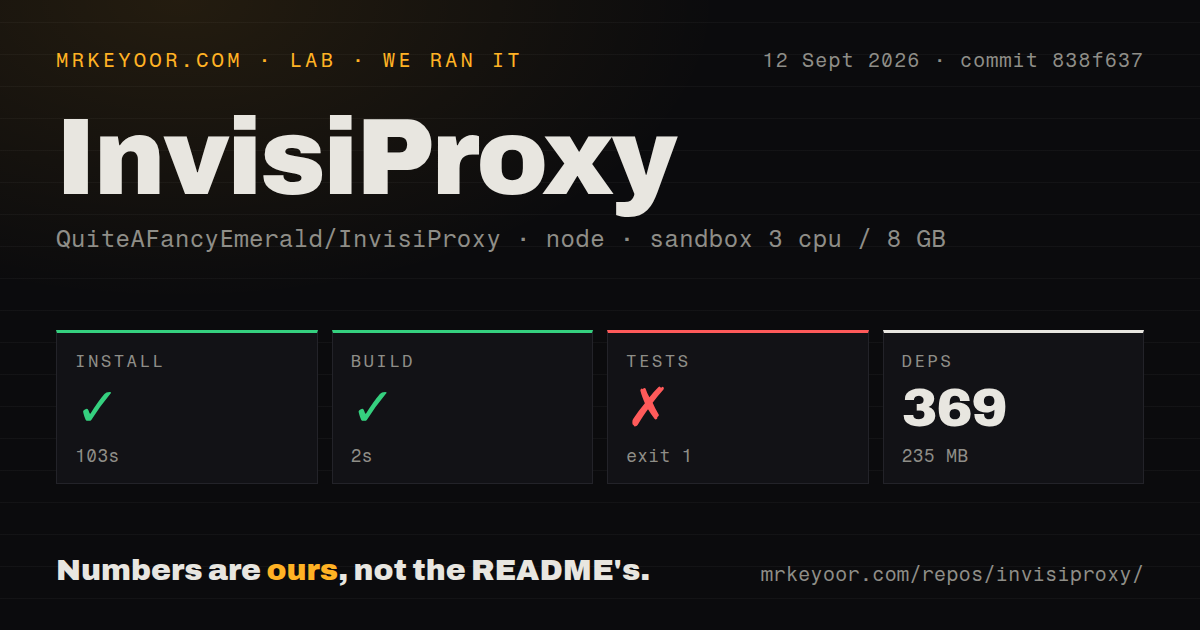
Our sandbox installed 369 pnpm packages in 103 seconds, leaving 235 MB on disk. The build then succeeded in 2 seconds. We measured commit 838f637 in an unprivileged Node 22 Debian container with 3 CPUs, 8 GB of RAM, and no secrets. The repository contained 2 CI workflow files, a Dockerfile, a compose file, and workspace configuration. It had no tests directory, although a test command was present.
That command failed after 2 seconds with exit code 1. Each line in the supplied tail reported ECONNREFUSED for an asset URL under http://localhost:8080, including worker-control and networking scripts. The final message said one or more endpoints failed to respond with status 200. The log does not say why the service was unavailable, so our finding stops there. The test did not pass, and it appears to check a running deployment rather than isolated units.
Production requires a separate branch, Nginx, and port 8080
The README warns self-hosters away from master because that branch contains work in progress. Its production branches enable filter-evasion behavior and are the stated target for live hosting. The usual process installs dependencies, fetches an ad-block list, edits configuration, and starts the Node service. Production mode can bring in PM2 workers and caching. The default application address is http://localhost:8080, which matches the port our failed endpoint test tried to reach.
Nginx is a firm part of the documented architecture. A prominent warning says not to use Caddy because mrrowisp uses loopbacks, although a later Ubuntu paragraph mentions Caddy as an option. That inconsistency deserves resolution before rollout. The repository does provide Docker and compose paths, plus buttons for several hosts, but one-click deployment does not decide the branch, domain, TLS, cache policy, process supervision, or whether public access is appropriate.
Tor mode still needs a service on port 9050 or 9150
InvisiProxy can route selected traffic through Tor or another SOCKS5, HTTP, or HTTPS proxy. It does not bundle the Tor network service into the basic Node process. The instructions expect Tor on port 9050 for command-line setups or 9150 for the GUI, then map the chosen URL in the client registration code. That makes Onion browsing possible through the site, while adding another daemon, port, update path, and failure point for the operator.
Configuration reaches beyond transport. config.json controls minification, identifier randomization, production behavior, file disguises, search-oriented source changes, and verbose output. Client scripts select the default proxy, upstream URL, Wisp path, search handling, and site blacklist. These controls are useful for a specialist. They also make casual deployment risky because a fork can run while still carrying defaults the owner has not examined. The 2-second build did not validate policy, access control, or privacy claims.
Node guidance and restart behavior still have open edges
Issue 587 records a fresh Codespace failing under Node 20.20.2 because the installed pnpm version required Node 22.13 or newer. That report conflicts with the README's request to use Node 20.x. Our Node 22 install succeeded, but one successful environment does not settle what every production branch supports. Pin Node and pnpm together rather than following only the prose version, then run the endpoint check against the exact branch and image you plan to host.
Open issue 481 describes pages turning into GZIP gibberish around a forced restart, and pull request 589 proposes swapping the built output atomically. The repository was pushed on September 11, 2026, and release v7.0.2.1 arrived on August 30. GitHub listed 8 combined open issues and pull requests. Those dates show active work, while the open restart report and our failed localhost check still argue for a staged deployment with a real health probe.
Authorized clientless access is the narrow good fit
InvisiProxy carries an AGPL-3.0 license, so anyone modifying it for network use should understand the corresponding source obligations. More immediate is the operating context: the README explicitly discusses bypassing government, school, browser-extension, and network filters. A competent administrator should confirm authority, applicable law, acceptable-use policy, logging, and abuse handling before putting an instance on a public domain. The software's ability to obscure traffic does not supply that permission.
For a permitted use case, the project saves considerable integration work by packaging 2 proxy engines, a user interface, transport switching, and deployment files. It asks for more care than the quick build suggests. Choose it when a browser-only route is essential and someone can own Nginx, updates, upstream services, and live endpoint checks. If users can install software, a client-based access tool such as Outline moves the problem outside this experimental website and may be easier to govern.