Should you use Homebox?
Homebox is worth a small household trial if your main task is recording possessions and their supporting documents. Homebox organizes household items with locations, tags and custom fields. Its README also documents search, images, warranty documents, purchase details and maintenance schedules. Those capabilities fit a household catalog, but our sandbox did not verify their behavior through the interface.
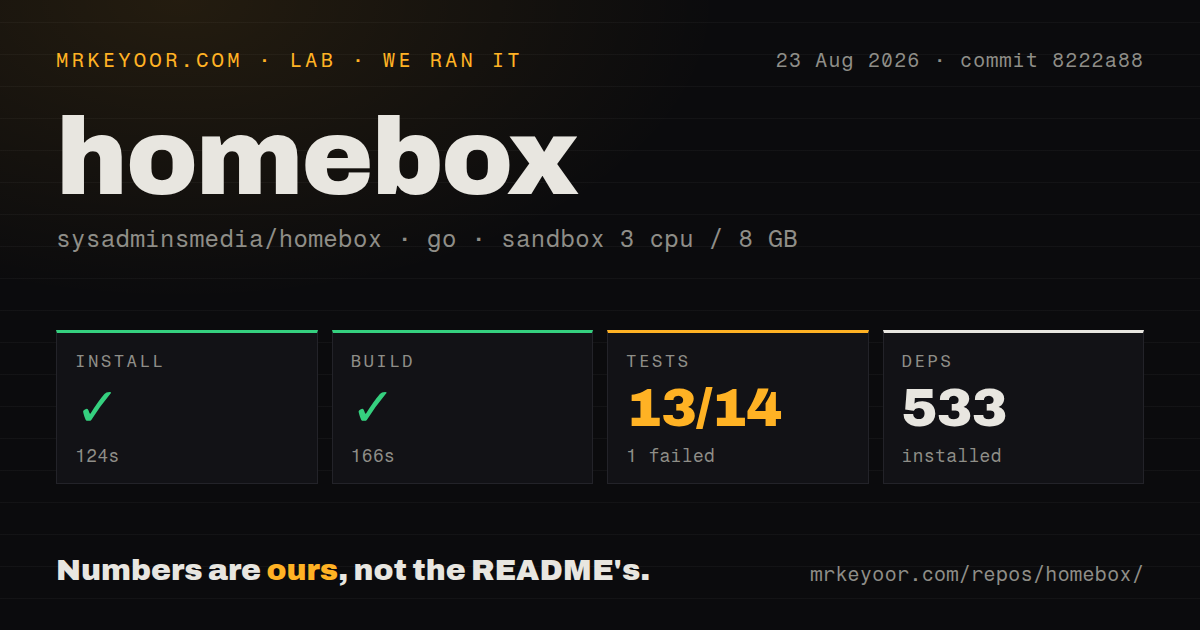
Our run on August 23, 2026, at commit 8222a88 recorded a successful build and a failed test command; it did not test the running web application. That makes a staged trial the useful next step before entering a full inventory.
What our sandbox actually recorded
The matching stored record places our run in backend, using the golang:1.24-bookworm sandbox image with 3 CPUs and 8 GB of RAM. The installation tail says go: downloading go1.26.0 (linux/amd64), so the image tag alone should not be read as the toolchain version used throughout the run.
Our harness stores each step's success flag, elapsed time, exit code, timeout flag and output tail separately from its parsed counts. Installation recorded success in 124 seconds. The build step recorded success in 166 seconds, with vet-exit:0 in its tail. The test command returned exit code 1 after 100 seconds. None of those command results proves that Homebox started or served a usable interface.
The attached stored parser summaries report 13 passing packages and 1 failing package out of 14. These are package-level parser summaries, not an exhaustive count of unique test cases. The raw record also has a separate no-test-files category; those packages are not failed or skipped tests. No new execution or complete-log reconciliation accompanies this correction.
For broader provenance, see how MrKeyoor tests software. That supplied methodology page describes the publisher's process when retrieved in October 2026. It does not establish that this August run used every detail of that later description.
The raw failure names a redirect-guard assertion
Our sandbox output names TestNotifierRedirectSSRF_Guarded as a failed test. In notifier_ssrf_redirect_test.go:68, the assertion says An error is expected but got nil. Its accompanying message is guarded: redirect to loopback must be refused and the send must fail. The failed package is github.com/sysadminsmedia/homebox/backend/internal/sys/validate.
This is more specific than an unexplained package failure: the test expected a guarded send involving a loopback redirect to return an error. The supplied output does not establish the cause, exploitability or behavior of a deployed instance. It warrants investigation before relying on that protection. The nearby invalid-CIDR warnings are separate log messages, not additional demonstrated failures.
There is no dependency-audit result in the attached record, and scan coverage is unknown. This run is not a security assessment.
Installation still leaves storage and recovery to you
The installation guide recommends Docker for production and points from Docker Run to a Compose example for production deployment. The examples mount persistent storage at /data, publish port 3100 to application port 7745 and configure an API-key pepper. The README generates that pepper rather than treating the documentation's placeholder as a production value.
Rootless and hardened images require appropriate data-directory ownership for bind mounts. The hardened image lacks the MQTT client, so choose the regular or rootless image if you need MQTT. Binary downloads are another documented option, but the maintainers say they cannot test every platform and architecture; Linux is their primary validation platform.
Homebox uses SQLite and an embedded web interface according to its README. Before trusting a household inventory to any deployment, add a few documents and prove that you can restore its persistent data. That is a recommended acceptance check, not something our run completed.
CSV is a partial transfer format
Homebox CSV imports and exports do not support attachments. The CSV documentation also says exports retain only an item's direct parent location, and the format cannot specify item-to-item relationships. A CSV export therefore cannot stand in for a complete backup.
The documentation describes HB.import_ref as the identifier used to deduplicate imports and update existing items. Before managing inventory through spreadsheet edits, rehearse that behavior in a disposable instance: import a small file with references, change a record and confirm that importing it updates the intended item. Our run did not test this workflow. The supplied primary extracts do not establish the current status of the previously cited export or camera issues, so this review does not present those reports as verified current defects.
Choose alternatives by the job
Grocy is a self-hosted groceries and household management application. Compare it when groceries are the main reason you want household software. It can also complement a separate possession catalog; its documented role does not establish that it replaces every Homebox workflow.
Snipe-IT manages IT assets, including laptop assignments and software licenses. Compare it when the question is who has a device or how to record its purchase for depreciation. Its README supports that different purpose; it does not establish that Homebox lacks every overlapping feature.
Neither alternative was executed in our Homebox run.
How to read the ratings
These editorial ratings use a five-point rubric: 1 means substantial documented barriers, 2 means major gaps for the stated task, 3 means a usable proposition with material limits, 4 means clear support with manageable operator work, and 5 requires unusually complete evidence with few material limits. They are judgments about the evidence described here, not benchmark results.
Setup ease is 4 because the documented container route is compact but still requires storage permissions and recovery work. Documentation is 4 because the supplied guides explain installation choices and CSV limitations, although our run did not validate every instruction. Community is 4 for the documented participation routes, including code contributions, translation and financial support; it does not measure adoption, response times or support quality. Maturity is 3 because the documented household feature set is useful, while CSV omissions and the unresolved sandbox assertion limit confidence. None of these ratings certifies production readiness.