Pele, the open-source Mermaid diagram renderer developed for Obsidian, reached version 1.6.0 on October 17, 2026, according to its npm publication record. It turns diagram text into SVG whose colors can follow an application's CSS without rendering the diagram again, as the project's introduction explains.
The publication record dates the package release, not when each feature first appeared. The capabilities below describe Pele's current documentation; we have not verified which were introduced in 1.6.0.
For developers considering a switch, Pele's compatibility notes spell out the work: it uses its own layout, and existing Mermaid theme colors don't carry over.
Colors can change without rebuilding the diagram
Pele uses CSS variables for colors and fonts. Set variables such as --pele-bg and --pele-fg on the diagram or a containing element, and the SVG inherits them. The theming guide says light and dark colors can switch without a new render. For a site with an existing theme switch, this means diagram colors can use the same stylesheet decisions as the surrounding page.
Typography has a different cost. Pele measures labels to size nodes, so changing fonts requires new measurements. The same guide tells developers to call refresh() after a font change; the browser helper also redraws when pending web fonts load. Colors fixed inside a diagram's own style declarations won't follow the theme either. A theme migration therefore needs a check of both the stylesheet and the diagram source.
The API separates generating an SVG string with render() from displaying an adaptive diagram with mount(). Both calls are synchronous. The latter watches its container and renders again when the width changes. With render(), your application handles resizing. Supported diagrams may switch from horizontal to vertical below 640 pixels, so a phone-sized preview can have a different arrangement rather than simply smaller labels.
A CSS-only theme change in our browser check
On October 18, 2026, we loaded the pinned Pele 1.6.0 browser bundle in Chromium 148 and rendered this three-node flowchart once:
flowchart LR
  A[Draft] --> B[Review]
  B --> C[Publish]
We then changed the containing element's CSS colors, including --pele-bg and --pele-fg, from a light palette to a dark one. In our browser check, the SVG markup stayed unchanged when we switched only CSS colors. The first node's computed fill changed from rgb(242, 240, 229) to rgb(28, 27, 26); we did not call render() a second time.
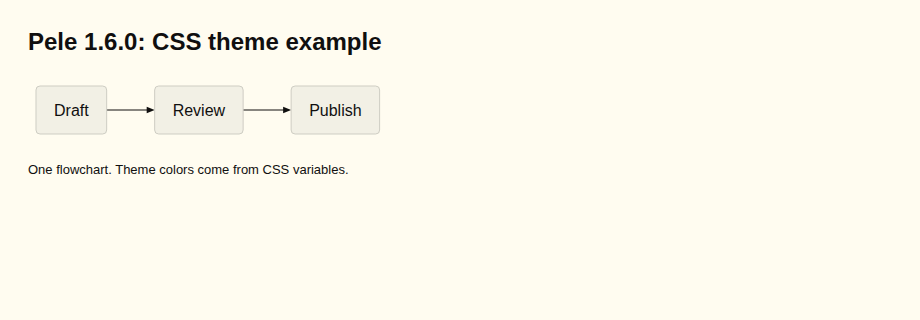
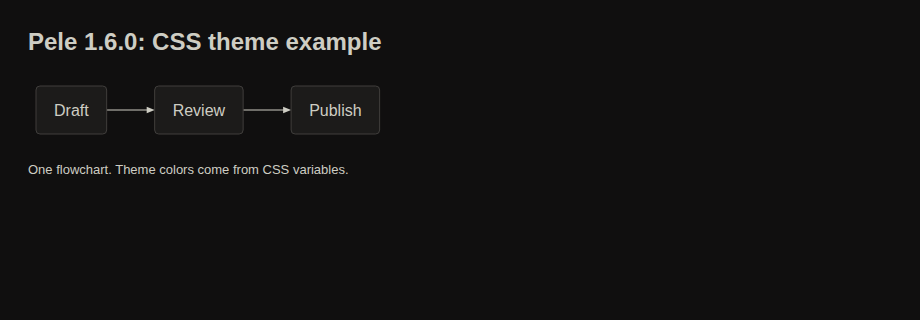
Both screenshots are from that check. Here is the complete palette and render/insertion example. Save it as an HTML file, open it in a browser, then run the final commented line in the browser console to switch the theme. The CDN bundle is pinned to 1.6.0 and its SHA-256 matched the npm bundle used in our check. Node fill comes from --pele-surface, not --pele-bg alone.
<!doctype html>
<meta charset="utf-8">
<style>
body{margin:0;font-family:Arial,sans-serif}.frame{box-sizing:border-box;width:920px;min-height:320px;padding:28px;background:#fffcf0;--pele-bg:#fffcf0;--pele-fg:#100f0f;--pele-line:#100f0f;--pele-surface:#f2f0e5;--pele-surface-alt:#e6e4d9;--pele-border:#cecdc3;--pele-muted:#6f6e69;--pele-accent:#205ea6;color:#100f0f}.frame.dark{background:#100f0f;--pele-bg:#100f0f;--pele-fg:#cecdc3;--pele-line:#cecdc3;--pele-surface:#1c1b1a;--pele-surface-alt:#282726;--pele-border:#403e3c;--pele-muted:#878580;--pele-accent:#4385be;color:#cecdc3}h1{font-size:24px;margin:0 0 22px}#diagram svg{display:block;max-width:100%;height:auto}footer{font-size:13px;margin-top:20px}
</style>
<div class="frame"><h1>Pele 1.6.0: CSS theme example</h1><div id="diagram"></div><footer>One flowchart. Theme colors come from CSS variables.</footer></div>
<script src="https://cdn.jsdelivr.net/npm/pele@1.6.0/dist/pele.global.js"></script>
<script>
const source = "flowchart LR\n  A[Draft] --> B[Review]\n  B --> C[Publish]";
const result = pele.render(source, { idPrefix: "mrkeyoor-pele-demo" });
document.querySelector("#diagram").innerHTML = result.svg;
// Toggle this class in your browser console; do not render again:
// document.querySelector(".frame").classList.toggle("dark");
</script>
This was one flowchart in one browser, not a performance, full compatibility or security benchmark.
Mermaid syntax doesn't promise the same picture
Pele documents support for every diagram type built into Mermaid 12.1.0. That statement has boundaries: external plugins such as ZenUML aren't supported. Node positions, spacing and edge paths also differ because Pele has its own layout engine. Mermaid themes and themeVariables colors do not apply.
Labels use SVG text, with line breaks and bold or italic formatting, rather than arbitrary HTML. Link-opening click statements work, while JavaScript callbacks are ignored, according to the compatibility notes. If your documentation relies on callback-driven interactions or HTML labels, those features need attention before a renderer swap. A successful parse alone won't establish that the page behaves the same way.
The host app still controls untrusted input
Pele's security documentation describes escaping text, filtering links and styles, and imposing size limits. It also identifies inputs the application must control. Icon markup supplied by the host is inserted without filtering, and render options should stay under the app's control. Images can make network requests when displayed; applications can disable links and images through options.
These are integration requirements, not findings from a security audit by MrKeyoor. The same documentation tells developers to display error messages as text because they can contain diagram source. For an editor accepting diagrams from other people, the error display deserves review alongside the successful SVG output.
Watch for compatibility reports from existing diagram collections. The project asks users to reproduce rejected or misread Mermaid 12.1.0 syntax in its playground. Those examples will help adopters judge how much migration work their diagrams need.